Ọrọ Iṣaaju
This manual provides essential instructions for the safe and efficient use of your Xanlite SONOLUX 608194 Portable LED Lantern with Bluetooth Speaker. Please read this manual thoroughly before operating the device and retain it for future reference.
The SONOLUX lantern combines a versatile LED light source with a high-performance Bluetooth speaker, designed for both indoor and outdoor use. It features a durable, ergonomic design, RGB color options, and an IP44 water resistance rating.
Ohun ti o wa ninu Apoti
- Xanlite SONOLUX Portable LED Lantern
- Isakoṣo latọna jijin
- Okun Ngba agbara USB
- Itọsọna Ibẹrẹ kiakia (ti o ba wulo)

Image: The Xanlite SONOLUX lantern packaging, showing the product and its branding.
Ṣeto
1. Gbigba agbara akọkọ
Before first use, fully charge the lantern's internal battery. The lantern can be charged via the provided USB cable or using Xanlite's iTX induction charging technology.
- Ngba agbara USB: Connect the USB charging cable to the lantern's charging port and to a compatible USB power adapter (not included).
- iTX Induction Charging: If you have a Xanlite iTX induction charging base, place the lantern on the base. The iTX technology allows contact-free charging up to 5cm, enabling discreet installation under surfaces like deck boards.
A full charge provides approximately 10 hours of light autonomy at 50% brightness or 6 hours of Bluetooth speaker use.
2. Latọna Iṣakoso Batiri
Ensure the remote control has a working battery. If not, insert or replace the battery according to the markings inside the remote's battery compartment.
Awọn ilana Iṣiṣẹ
1. Agbara Tan / Paa
Locate the power button on the lantern. Press and hold for a few seconds to turn the device on or off. Alternatively, use the power button on the remote control.
2. Light Functions
The lantern offers various lighting modes, controllable via the remote control:
- LED funfun: Activate the 4000 Kelvin neutral white light. Adjust brightness (100% or 50%) using the remote.
- Awọn awọ RGB: Select from a range of multicolor (RGB) LED options to create ambient lighting.
- LED Music Rhythm: Engage this mode for dynamic lighting that synchronizes with the music played through the Bluetooth speaker.
- Ipo Flash: A flashing light mode may be available for specific situations.

Image: The Xanlite SONOLUX lantern providing ambient light on an outdoor patio table.
3. Bluetooth Speaker Pairing
- Ensure the lantern is powered on.
- Mu Bluetooth ṣiṣẹ lori foonu alagbeka rẹ tabi ẹrọ ohun miiran.
- Wa fun available Bluetooth devices. The lantern should appear as "SONOLUX" or a similar identifier.
- Select the lantern to pair. A confirmation sound may indicate successful pairing.
- Once paired, you can play audio from your device through the lantern's speaker.
The speaker offers a high-performance sound experience, allowing you to enjoy your favorite music.

Image: The Xanlite SONOLUX lantern positioned outdoors near a swimming pool, demonstrating its portability and suitability for various environments.
Itoju
1. Ninu
Láti nu fìtílà náà, fi aṣọ rírọ nu ún, damp cloth. Do not use abrasive cleaners or solvents, as these may damage the plastic and rubber finish. Ensure the charging port cover is securely closed before cleaning if using a damp asọ.
2. Omi Resistance (IP44)
The SONOLUX lantern has an IP44 rating, meaning it is protected against solid objects larger than 1mm (like dust) and splashing water from any direction. This makes it suitable for outdoor use, but it should not be submerged in water or exposed to strong jets of water.

Image: Visual representation of the lantern's IP44 protection against water splashes and resistance to cold temperatures.
3. Itọju batiri
To prolong battery life, avoid fully discharging the battery frequently. Recharge the lantern regularly, especially if it will be stored for an extended period.
4. Atunlo
This product is recyclable. Please dispose of it at designated recycling collection points (e.g., Recyclum in France) to ensure proper environmental management of electronic waste.
Laasigbotitusita
| Isoro | Owun to le Fa | Ojutu |
|---|---|---|
| Atupa ko ni tan. | Batiri ti wa ni idasilẹ. | Charge the lantern using the USB cable or iTX induction charger. |
| Imọlẹ ko ṣiṣẹ. | Incorrect mode selected; LED failure. | Check light mode with remote. If issue persists, contact support. Note: LEDs are not user-replaceable. |
| Bluetooth ko sopọ. | Lantern not in pairing mode; device too far; interference. | Ensure lantern is on and Bluetooth is active. Move device closer. Restart both devices. |
| Didara ohun ti ko dara. | Low battery; device too far; audio source issue. | Charge the lantern. Move device closer. Check audio source volume and quality. |
| Isakoṣo latọna jijin ko ṣiṣẹ. | Dead battery; obstruction. | Replace remote control battery. Ensure no obstructions between remote and lantern. |
Awọn pato ọja
| Nọmba awoṣe | 608194 |
| Orisun Imọlẹ | LED (White and RGB Multicolor) |
| White Light Color Temperature | Kelvin 4000 (Fúlú Àìlágbára) |
| Flux Imọlẹ | 100 Lumens (Pupọ julọ) |
| Agbọrọsọ | Integrated Bluetooth Speaker (90 dB) |
| Asopọmọra | Bluetooth |
| Orisun agbara | Batiri litiumu-ion gbigba agbara |
| Ọna gbigba agbara | USB, iTX Induction Technology |
| Battery Life (Light 100%) | wakati meji 3 |
| Battery Life (Light 50%) | wakati meji 6 |
| Battery Life (Bluetooth Speaker) | wakati meji 6 |
| Omi Resistance Rating | IP44 (Protected against splashing water and solid objects >1mm) |
| Ohun elo | Ṣiṣu, Roba |
| Awọn iwọn (isunmọ.) | 22.6 cm (iwọn) x 26.0 cm (iga) |
| Ìwọ̀n (isunmọ́.) | 1.47 kilo |

Image: Dimensional diagram of the SONOLUX lantern.
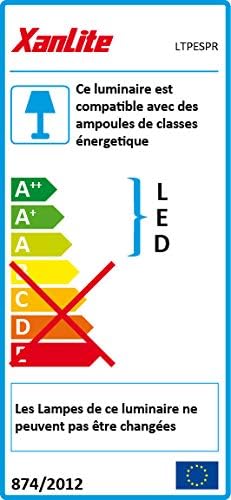
Image: EU Energy Label for the Xanlite luminaire, highlighting its LED technology and non-replaceable lamps.
Alaye atilẹyin ọja
The Xanlite SONOLUX 608194 Portable LED Lantern is covered by a 2-odun olupese ká atilẹyin ọja lati ọjọ ti o ra. Atilẹyin ọja yi ni wiwa awọn abawọn ninu awọn ohun elo ati iṣẹ ṣiṣe labẹ lilo deede. Jọwọ ṣe idaduro ẹri rira rẹ fun awọn iṣeduro atilẹyin ọja.
The warranty does not cover damage resulting from misuse, accidents, unauthorized modifications, or failure to follow the instructions in this manual.
Onibara Support
If you encounter any issues not covered in the troubleshooting section or require further assistance, please contact Xanlite customer support. Refer to the product packaging or the official Xanlite webojula fun awọn julọ soke-si-ọjọ alaye olubasọrọ.
For more information about Xanlite products, visit: Xanlite Official Store


