Ọrọ Iṣaaju
O ṣeun fun riraasing the Trevi RR 501 BT Portable Bluetooth, USB, SD, MP3 Stereo Boombox. This manual provides essential information for the safe and efficient use of your new device. Please read these instructions carefully before operating the unit and retain them for future reference.
Alaye Aabo
- Ma ṣe fi ohun elo yii han si ojo tabi ọrinrin.
- Ma ṣe dina eyikeyi awọn ṣiṣi atẹgun.
- Rii daju pe okun agbara ko pin tabi rin lori.
- Lo awọn asomọ/awọn ẹya ara ẹrọ ti olupese pato.
- Yọ ẹ̀rọ náà kúrò nígbà tí mànàmáná bá ń jà tàbí nígbà tí a kò bá lò ó fún ìgbà pípẹ́.
- Tọkasi gbogbo iṣẹ si awọn oṣiṣẹ iṣẹ ti o peye.
- Maṣe ṣii ẹrọ casing; kò sí àwọn ẹ̀yà ara tí a lè lò nínú rẹ̀.
Package Awọn akoonu
Jọwọ ṣayẹwo pe awọn nkan wọnyi wa ninu package rẹ:
- Trevi RR 501 BT Boombox Unit
- AC Power Okun
- Afowoyi Olumulo (iwe-ipamọ yii)
Ọja Pariview
Familiarize yourself with the main components of your Trevi RR 501 BT Boombox.
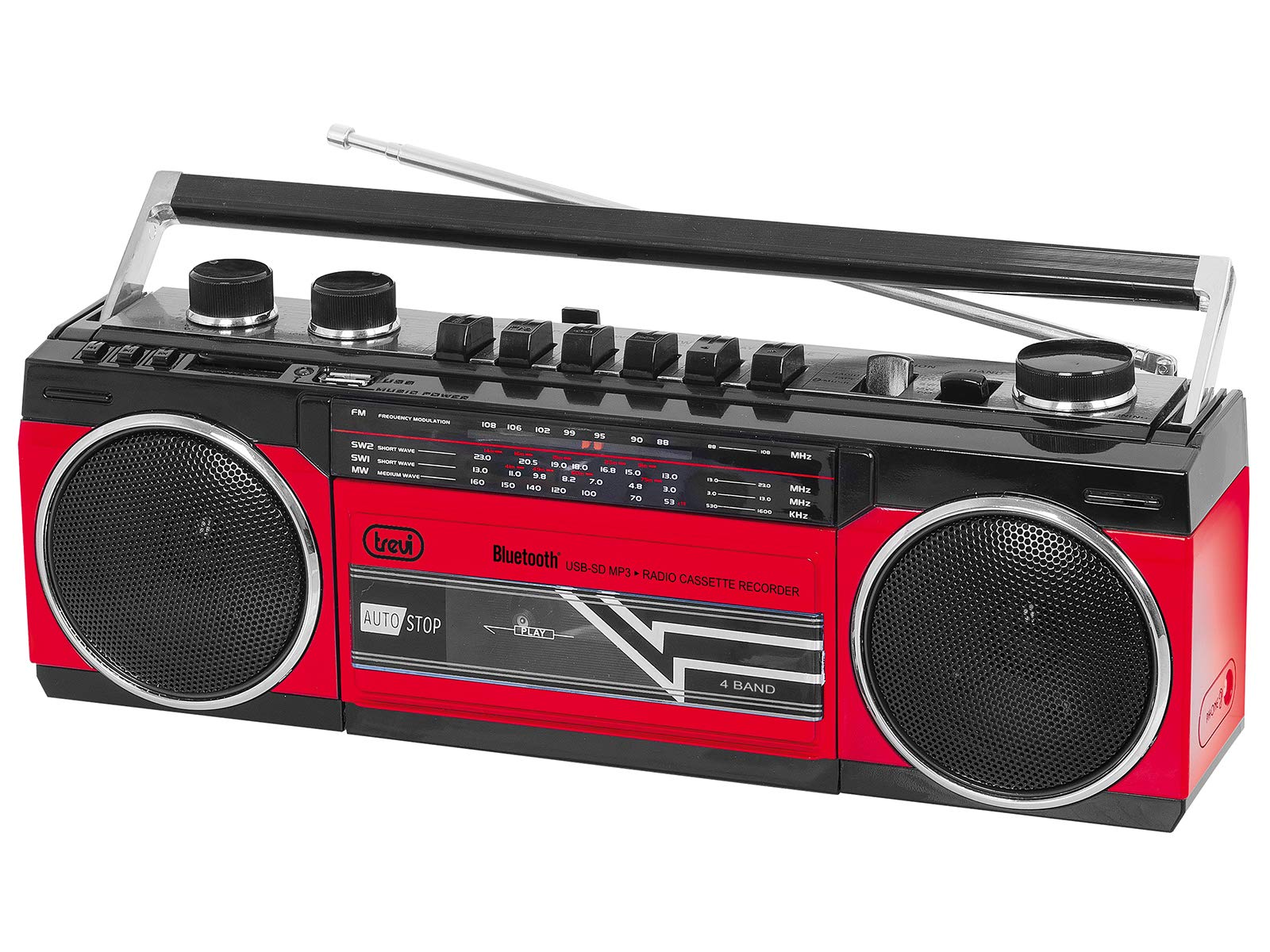
Nọmba 1: Iwaju view of the Trevi RR 501 BT Boombox, showing the dual speakers, control panel, and cassette deck.

Nọmba 2: Igun view of the Trevi RR 501 BT Boombox, highlighting the side profile ati mu.
Awọn eroja pataki:
- Awọn agbọrọsọ: Two integrated stereo speakers.
- Ibi iwaju alabujuto: Buttons for playback, mode selection, and tuning.
- Bọtini Iwọn didun: Ṣe atunṣe ipele iṣelọpọ ohun.
- Knob Tuntun: For radio frequency selection.
- Aṣayan Ipo: Switches between Radio, Bluetooth, USB, SD, and Cassette modes.
- Dekini Kasẹti: For playing and recording audio cassettes.
- Ibudo USB: Fun šišẹsẹhin okun filasi USB.
- Iho kaadi SD: Fun ṣiṣiṣẹsẹhin kaadi SD.
- Eriali: Eriali telescopic fun gbigba redio FM.
- Iṣagbewọle agbara: Fún síso okùn agbára AC pọ̀.
- Abala Batiri: (Located on the bottom/rear) For optional battery operation.
Ṣeto
Asopọ agbara:
- Agbara AC: Insert the AC power cable into the AC input jack on the back of the unit, then plug the other end into a standard wall outlet.
- Agbara Batiri (Aṣayan): Open the battery compartment cover (usually on the bottom or rear). Insert the required number of D-size batteries (not included), ensuring correct polarity (+/-). Close the compartment cover securely.
Note: When using AC power, batteries are automatically disconnected. Remove batteries if the unit will not be used for an extended period.
Awọn ilana Iṣiṣẹ
Titan / Pipa:
To turn the unit on, rotate the Iwọn didun Iwọn clockwise until you hear a click. To turn off, rotate the Iwọn didun Iwọn counter-clockwise until it clicks off.
Radio Operation (FM):
- Tan ẹrọ naa.
- Ṣeto awọn Aṣayan Ipo to "RADIO".
- Fa eriali telescopic fun gbigba ti o dara julọ.
- Yiyi awọn Tunṣe Knob to select your desired FM station.
- Ṣatunṣe awọn Iwọn didun Iwọn sí ipele ìgbọ́ran tí o fẹ́.
Asopọ Bluetooth:
- Tan ẹrọ naa.
- Ṣeto awọn Aṣayan Ipo to "BT" (Bluetooth). The unit will enter pairing mode, indicated by a flashing LED.
- Lori ẹrọ Bluetooth ti o ṣiṣẹ (fun apẹẹrẹ, foonuiyara, tabulẹti), mu Bluetooth ṣiṣẹ ki o wa awọn ẹrọ to wa.
- Select "Trevi RR 501 BT" from the list of devices.
- Once paired, the LED indicator will stop flashing and remain solid. You can now play audio from your device through the boombox.
Sisisẹsẹhin USB/SD:
- Tan ẹrọ naa.
- Fi okun filasi USB sinu Ibudo USB tabi kaadi SD kan sinu SD kaadi Iho. Ensure the media contains MP3 audio files.
- Ṣeto awọn Aṣayan Ipo to "USB/SD". The unit will automatically begin playing the first compatible audio file.
- Use the playback control buttons (e.g., Play/Pause, Next, Previous) on the unit to manage your audio.
Sisisẹsẹhin kasẹti:
- Tan ẹrọ naa.
- Tẹ awọn Duro/EJECT button on the cassette deck to open the cassette compartment.
- Insert an audio cassette with the open edge facing upwards and the tape side facing you. Close the compartment door.
- Ṣeto awọn Aṣayan Ipo to "TAPE".
- Tẹ awọn ERE bọtini lati bẹrẹ ṣiṣiṣẹsẹhin.
- Lo awọn TUNTUN ati Siwaju Siwaju awọn bọtini lati lilö kiri ni teepu.
- Tẹ Duro/EJECT to stop playback and open the compartment.
Cassette Recording:
- Insert a blank cassette into the cassette deck.
- Select the desired audio source (Radio, Bluetooth, USB, SD) using the Aṣayan Ipo.
- Start playback of the source audio.
- Tẹ awọn Igbasilẹ button (usually red) on the cassette deck. The ERE Bọ́tìnì náà yóò tún ṣiṣẹ́. Ìgbàsílẹ̀ yóò bẹ̀rẹ̀.
- Lati da gbigbasilẹ duro, tẹ bọtini naa Duro/EJECT bọtini.
Itoju
- Ninu: Lo asọ asọ ti o gbẹ lati nu ode ti ẹyọ naa. Ma ṣe lo abrasive ose tabi epo.
- Itọju Deki Kasẹti: Máa fọ àwọn orí teepu náà lẹ́ẹ̀kọ̀ọ̀kan kí o sì fi owú swẹ́ díẹ̀díẹ̀ampened pẹlu isopropyl oti.
- Ibi ipamọ: When not in use for extended periods, store the unit in a cool, dry place, away from direct sunlight and extreme temperatures. Remove batteries if applicable.
Laasigbotitusita
| Isoro | Owun to le Fa | Ojutu |
|---|---|---|
| Ko si agbara | Kò sí okùn agbára tí a so pọ̀; Àwọn bátìrì ti bàjẹ́ tàbí a fi wọ́n sí ibi tí kò tọ́. | Check AC power connection; Replace batteries or ensure correct polarity. |
| Gbigba redio ti ko dara | Eriali ko tesiwaju; Ifihan agbara. | Fa eriali telescopic naa siwaju patapata; Tun ẹrọ naa si ipo fun ifihan agbara to dara julọ. |
| Bluetooth ko so pọ | Unit not in BT mode; Device too far; Already paired with another device. | Ensure mode is set to BT; Move device closer; Disconnect from other devices. |
| USB/SD ko dun | Incorrect mode; Incompatible file ìrísí; Àwọn ohun èlò ìṣiṣẹ́ tí ó bàjẹ́. | Set mode to USB/SD; Ensure files are MP3; Try different USB/SD media. |
| Awọn oran ṣiṣiṣẹsẹhin kasẹti | Cassette inserted incorrectly; Tape heads dirty. | Re-insert cassette correctly; Clean tape heads and pinch rollers. |
Awọn pato
| Brand | Trevi |
| Nọmba awoṣe | 0RR50102 |
| Asopọmọra Technology | Bluetooth, USB |
| Agbọrọsọ Iru | Sitẹrio |
| Awọn iwọn (L x W x H) | 50 x 50 x 28 centimeters |
| Orisun agbara | AC |
| Iwọn Nkan | 1.25 kilo |
| Agbara Ijade | 6 Wattis |
| Àwọ̀ | Pupa |
| Ara | Retiro |
Atilẹyin ọja ati Support
For warranty information and technical support, please refer to the warranty card included with your product or visit the official Trevi website. Information regarding spare parts availability and software updates is not provided in the product specifications.
Jọwọ ṣe idaduro ẹri rira rẹ fun eyikeyi awọn ibeere atilẹyin ọja.