1. Ifihan
Thank you for choosing the Ridgeway QS-3715BR Professional Portable PA Wireless Bluetooth Speaker. This powerful 15-inch high-efficiency portable speaker system is designed for versatile audio playback and amplification. It features a multifunction music player with intuitive controls, USB and SD card inputs, integrated Bluetooth connectivity, and an auxiliary LED light display. Built with a durable ABS cabinet and equipped with an extendable handle and rear wheels, it offers both robust performance and easy portability.
This manual provides detailed instructions for setup, operation, maintenance, and troubleshooting to ensure you get the most out of your speaker.

olusin 1: Iwaju view of the Ridgeway QS-3715BR speaker, showing the main speaker grille with LED lights, a wired microphone, and a remote control.
2. Eto
2.1 Asopọ agbara
Connect the speaker to a standard AC power outlet using the provided power cable. Ensure the power switch on the rear panel is in the OFF position before connecting. Once connected, you can switch the unit ON.
2.2 Nsopọ Awọn orisun ohun
- USB/SD Kaadi: Insert a USB flash drive or SD card into the respective slot on the rear control panel. The speaker will automatically switch to USB/SD mode and begin playing compatible audio files.
- Iṣawọle Iranlọwọ: Use a 3.5mm audio cable (not included) to connect external audio devices (e.g., smartphones, MP3 players) to the AUX input jacks on the rear panel.
- Gbohungbohun: Plug the wired microphone into the MIC input jack on the rear panel. Adjust the microphone volume and echo using the dedicated knobs.

olusin 2: Ẹyìn view of the speaker, highlighting the control panel with various inputs (USB, SD, Aux, Mic), volume controls, and power connections.
3. Awọn ilana Iṣiṣẹ
3.1 Agbara Tan / Pa
Locate the main power switch on the rear control panel. Flip it to the 'ON' position to power on the speaker. Flip it to 'OFF' to power off.
3.2 Sisopọ Bluetooth
- Turn on the speaker. It will automatically enter Bluetooth pairing mode, indicated by a flashing 'BT' on the digital display.
- Mu Bluetooth ṣiṣẹ lori ẹrọ alagbeka rẹ (foonuiyara, tabulẹti, ati bẹbẹ lọ).
- Wa fun available Bluetooth devices and select 'QS-3715BR' from the list.
- Once paired, the speaker will emit a confirmation sound, and the 'BT' indicator will stop flashing. You can now play audio from your device through the speaker.
3.3 Sisisẹsẹhin USB/SD
After inserting a USB drive or SD card, the speaker will automatically detect and play audio files. Use the 'MODE' button on the control panel or remote to switch between USB and SD card modes if both are inserted. Use the playback controls (Play/Pause, Next, Previous) to navigate your music.
3.4 Redio FM
Press the 'MODE' button to switch to FM Radio mode. Press and hold the 'Play/Pause' button to auto-scan and save available FM stations. Use the 'Next' and 'Previous' buttons to navigate through the saved stations.
3.5 Input Iranlọwọ
Connect your external audio device to the AUX input. Press the 'MODE' button until 'AUX' is displayed. Audio from your connected device will now play through the speaker.
3.6 LED Light Display
The speaker features an integrated LED light display that moves with the music. Use the 'LIGHTS' switch on the rear panel to turn the LED lights on or off.
3.7 Gbigbe
The speaker is equipped with an extendable top handle and rear wheels for easy transport. Simply extend the handle and tilt the speaker to roll it to your desired location.
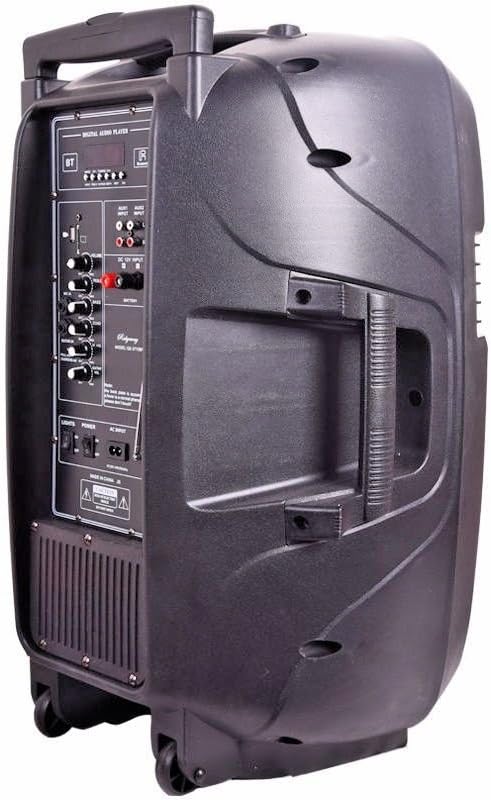
olusin 3: Apa view of the speaker, illustrating the extendable handle and the rear wheels for convenient mobility.
4. Itọju
4.1 Ninu
To clean the speaker, disconnect it from the power source. Use a soft, dry cloth to wipe down the exterior. Do not use abrasive cleaners, waxes, or solvents as they may damage the finish. Keep liquids away from the control panel and speaker grille.
4.2 Ibi ipamọ
When not in use for extended periods, store the speaker in a cool, dry place, away from direct sunlight and extreme temperatures. Ensure all cables are neatly coiled to prevent damage.
5. Laasigbotitusita
- Ko si Agbara: Ensure the power cable is securely connected to both the speaker and a working electrical outlet. Check the power switch on the rear panel is in the 'ON' position.
- Ko si Ohun: Check the master volume knob on the speaker and ensure it is turned up. Verify that the audio source (Bluetooth device, USB/SD, AUX) is playing and its volume is also turned up. Ensure the correct input mode is selected.
- Bluetooth Ko Sopọ: Make sure the speaker is in Bluetooth mode. Ensure your device's Bluetooth is enabled and within range (typically 30 feet). Try unpairing and re-pairing the device.
- USB/SD Card Not Reading: Ensure the USB drive or SD card is inserted correctly. Check that the audio files are in a compatible format (e.g., MP3). Try a different USB drive or SD card.
- Idaduro Redio FM: Extend the FM antenna fully. Try repositioning the speaker to improve reception. Perform an auto-scan again to find stronger signals.
6. Awọn pato
| Ẹya ara ẹrọ | Sipesifikesonu |
|---|---|
| Brand | Ridgeway |
| Awoṣe | QS-3715BR |
| Orisun agbara | Okun itanna |
| Asopọmọra Technology | Bluetooth, USB, AUX |
| Asopọmọra Iru | USB, Iranlọwọ |
| Input Audio | USB, SD Kaadi, Bluetooth |
| Ohun elo | Acrylonitrile Butadiene Styrene (ABS) or Polypropylene (PP) |
| Iwọn Ọja | 30 Poun (iwọn 13.61 kg) |
| Awọn iwọn Ọja (L x W x H) | 44.45 x 36.83 x 69.85 cm (17.5 x 14.5 x 27.5 inches) |
| Lilo Ọja ti a ṣeduro | Concerts, conferences, places of worship, outdoor events, schools, or other environments requiring sound amplification for a large audience. |
| Awọn ẹrọ ibaramu | Kọǹpútà alágbèéká, Foonuiyara |
| Iṣagbesori Iru | Floor Oke |
| Awọn batiri To wa | Rara |
7. Atilẹyin ọja ati Support
For warranty information and technical support, please refer to the documentation included with your purchase or contact the retailer where the product was acquired. Keep your purchase receipt as proof of purchase.


