1. Ifihan
This manual provides comprehensive instructions for the setup, operation, and maintenance of your Galaxy Audio PA6BT Powered Hot Spot Monitor Speaker with Bluetooth. Please read this manual thoroughly before using the device to ensure proper functionality and to prevent damage.
The Galaxy Audio PA6BT is a 6-inch, 170-watt, 2-way powered monitor speaker designed for various audio applications, featuring integrated Bluetooth connectivity for wireless audio streaming.

olusin 1: Angled iwaju view of the Galaxy Audio PA6BT monitor, highlighting its compact design and the integrated control panel.
2. Awọn Ilana Aabo pataki
- Ka awọn ilana wọnyi.
- Pa awọn ilana wọnyi.
- Tẹtisi gbogbo awọn ikilọ.
- Tẹle gbogbo awọn ilana.
- Maṣe lo ohun elo yii nitosi omi.
- Mọ pẹlu asọ gbigbẹ nikan.
- Ma ṣe dina eyikeyi awọn ṣiṣi atẹgun. Fi sori ẹrọ ni ibamu pẹlu awọn ilana ti olupese.
- Maṣe fi sori ẹrọ nitosi awọn orisun ooru gẹgẹbi awọn imooru, awọn iforukọsilẹ ooru, awọn adiro, tabi awọn ohun elo miiran (pẹlu ampliifiers) ti o gbe ooru jade.
- Ma ṣe ṣẹgun idi aabo ti polarized tabi pilogi iru ilẹ. Plọọgi polarized ni awọn abẹfẹlẹ meji pẹlu ọkan gbooro ju ekeji lọ. Plọọgi iru-ilẹ ni awọn abẹfẹlẹ meji ati prong grounding kẹta. Abẹfẹlẹ ti o gbooro tabi prong kẹta ni a pese fun aabo rẹ. Ti pulọọgi ti a pese ko ba wo inu iṣan-ọna rẹ, kan si alamọdaju kan fun rirọpo ti iṣan igba atijọ.
- Dabobo okun agbara lati ma rin lori tabi pin, ni pataki ni awọn pilogi, awọn ohun elo irọrun, ati aaye nibiti wọn ti jade kuro ninu ohun elo naa.
- Lo awọn asomọ/awọn ẹya ara ẹrọ ti olupese pato.
- Lo nikan pẹlu rira, iduro, mẹta, akọmọ, tabi tabili ti a ti sọ tẹlẹ nipasẹ olupese, tabi ta pẹlu ohun elo. Nigbati a ba lo ọkọ ayọkẹlẹ kan, lo iṣọra nigbati o ba n gbe akojọpọ rira / ohun elo lati yago fun ipalara lati itọsi.
- Yọọ ohun elo yi nigba iji manamana tabi nigba lilo fun igba pipẹ.
- Tọkasi gbogbo iṣẹ si awọn oṣiṣẹ iṣẹ ti o peye. Iṣẹ nilo nigbati ohun elo ba ti bajẹ ni ọna eyikeyi, gẹgẹbi okun ipese agbara tabi plug ti bajẹ, omi ti ta silẹ tabi awọn nkan ti ṣubu sinu ẹrọ, ohun elo naa ti farahan si ojo tabi ọrinrin, ko ṣiṣẹ deede. , tabi ti lọ silẹ.
- IKILO: To reduce the risk of fire or electric shock, do not expose this apparatus to rain or moisture. Do not open the unit; there are no user-serviceable parts inside.
3. Key Awọn ẹya ara ẹrọ
- Ijade agbara: 170 Watts for robust sound delivery.
- Idahun Igbohunsafẹfẹ: 80Hz - 18kHz for a wide audio spectrum.
- Eto Agbọrọsọ Ọna Meji: Features a 6.5" Neodymium High Power Woofer and a 1.5" High Efficiency Tweeter.
- Awọn ikanni meji: Two independent input channels with individual volume controls.
- Awọn igbewọle Wapọ: Channel 1 offers XLR and 1/4" inputs. Channel 2 offers XLR, 1/4", and an additional 1/8" line input.
- Asopọmọra Bluetooth: Integrated Bluetooth technology with its own volume control for wireless audio streaming.
- XLR Pass-Through: Allows independent control of microphones without affecting the signal sent to a main PA system.
- -20dB Pad Switch: On each XLR input to accommodate high-level signals without distortion.
- 3-Band EQ: Adjustable Low, Mid, and High frequency controls for sound shaping.
- Compressor/Limiter: Built-in 18dB circuit with Compressor and Clip LEDs to smooth transient peaks and protect speakers.
- Awọn aṣayan iṣagbesori: Designed for mounting on most mic stands, includes an MSA-1 stand adaptor.
4. Package Awọn akoonu
Jọwọ ṣayẹwo awọn akoonu package lori ṣiṣi silẹ lati rii daju pe gbogbo awọn nkan wa:
- Galaxy Audio PA6BT Powered Hot Spot Monitor Speaker
- MSA-1 Stand Adaptor
- IEC Power USB
- Afowoyi Olumulo (iwe-ipamọ yii)
5. Awọn iṣakoso ati Awọn isopọ
5.1 Iwaju Panel idari

olusin 2: Iwaju view of the Galaxy Audio PA6BT monitor, showing the speaker grille, tweeter, and control panel with knobs and LEDs.
- PWR LED: Ṣe itanna nigbati ẹrọ naa ba wa ni titan.
- LOW, MID, HI Knobs: 3-band equalizer controls to adjust bass, midrange, and treble frequencies.
- LED CLIP: Indicates when the input signal is too high, potentially causing distortion. Reduce input volume if this LED illuminates frequently.
- COMP LED: Indicates when the built-in compressor/limiter circuit is active, smoothing out transient peaks.
- CHAN 1 Knob: Volume control for Channel 1 input.
- CHAN 2 Knob: Volume control for Channel 2 input.
- BT VOL Knob: Volume control for the Bluetooth audio input.
5.2 Ru Panel Awọn isopọ
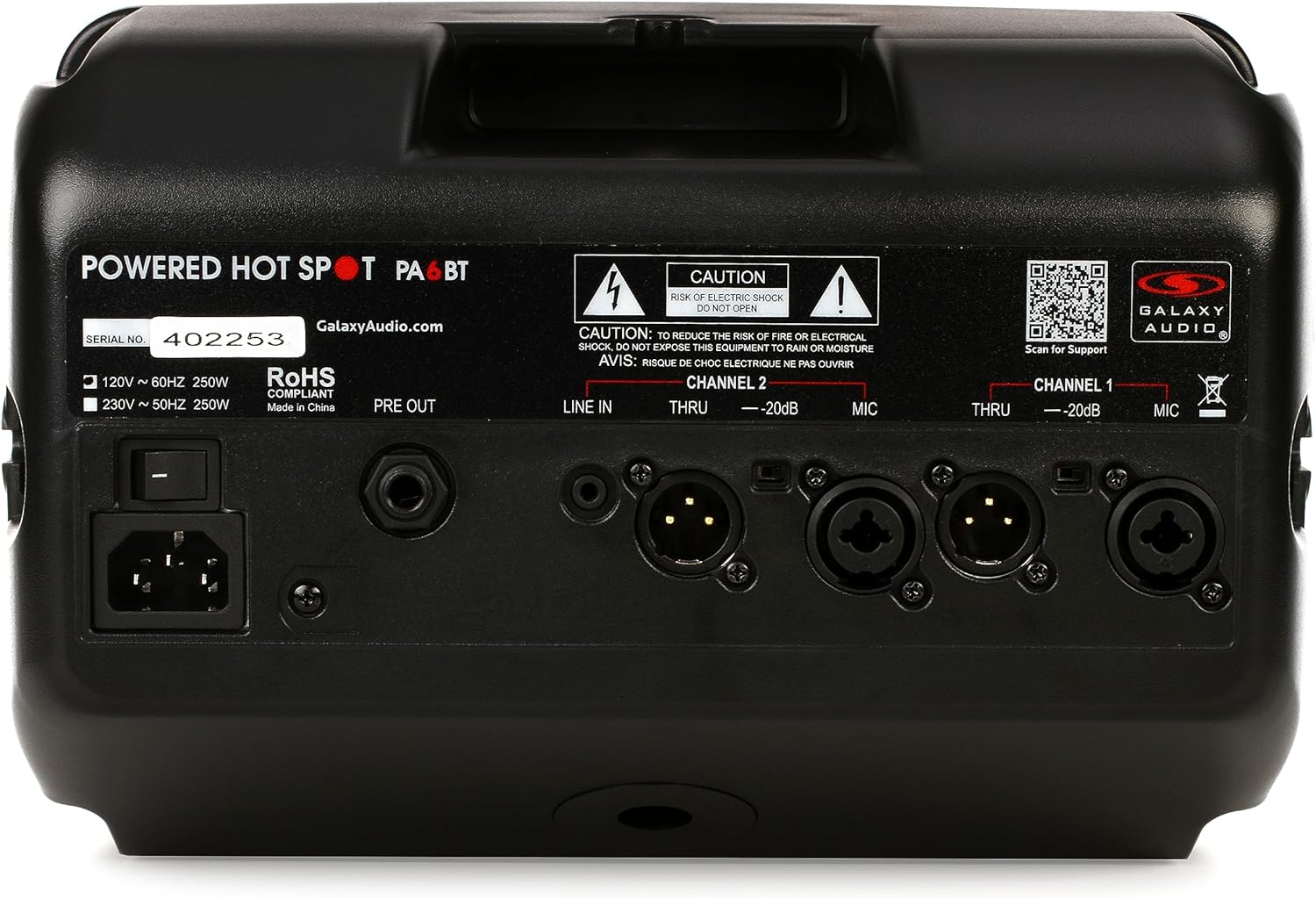
olusin 3: Ẹyìn view of the Galaxy Audio PA6BT monitor, displaying the power input, serial number, and various audio input/output connections for Channel 1 and Channel 2.
- Agbara Yi pada: Yipada ẹyọ naa tan tabi pa.
- IEC Power Inlet: Connects the included IEC power cable to an AC power source.
- ṢEJADE: Line-level output for sending the mixed signal to another powered speaker or a main PA system.
- Channel 2 Inputs:
- LINE IN (1/8"): Stereo or mono input for connecting devices like MP3 players, smartphones, or laptops.
- THRU (XLR): XLR pass-through for Channel 2, allowing the input signal to be sent to another device without processing.
- -20dB Pad (Switch): Reduces the input sensitivity by 20dB for high-level signals.
- MIC (XLR/1/4" Combo): Combo jack for connecting microphones (XLR) or line-level instruments (1/4").
- Channel 1 Inputs:
- THRU (XLR): XLR pass-through for Channel 1.
- -20dB Pad (Switch): Reduces the input sensitivity by 20dB for high-level signals.
- MIC (XLR/1/4" Combo): Combo jack for connecting microphones (XLR) or line-level instruments (1/4").
6. Eto Itọsọna
- Yọ Ẹka naa kuro: Carefully remove the PA6BT from its packaging and inspect for any signs of damage.
- Ibi:
- For personal monitoring, mount the PA6BT onto a standard microphone stand using the included MSA-1 stand adaptor. Ensure the stand is stable.
- Alternatively, place the unit on a stable, flat surface such as a table or stage floor.
- Initial Control Settings: Before connecting power, ensure all volume knobs (CHAN 1, CHAN 2, BT VOL) are turned completely counter-clockwise (minimum). Set the LOW, MID, and HI EQ knobs to their center (flat) positions.
- Asopọ agbara: Connect the supplied IEC power cable to the IEC inlet on the rear panel of the PA6BT, then plug the other end into a suitable AC power outlet.
- Agbara Tan: Flip the Power Switch on the rear panel to the "ON" position. The PWR LED on the front panel should illuminate.
7. Awọn ilana Iṣiṣẹ
7.1 Nsopọ Awọn orisun ohun
- Microphones/Instruments (XLR/1/4" Combo Jacks):
- Connect your microphone or instrument to either the Channel 1 or Channel 2 MIC input.
- If using a high-output source, engage the -20dB Pad switch for that channel to prevent input clipping.
- Slowly increase the corresponding CHAN 1 or CHAN 2 volume knob until the desired level is reached. Monitor the CLIP LED; if it flashes frequently, reduce the input volume or engage the -20dB pad.
- Line-Level Devices (1/8" LINE IN - Channel 2 only):
- Connect your smartphone, tablet, or other line-level audio device to the 1/8" LINE IN jack on Channel 2.
- Adjust the BT VOL knob to control the volume of this input.
7.2 Bluetooth Pairing and Operation
- Ensure the PA6BT is powered on.
- Activate Bluetooth on your audio device (e.g., smartphone, tablet).
- Wa fun available Bluetooth devices. The PA6BT should appear as "Galaxy Audio PA6BT".
- Select "Galaxy Audio PA6BT" to pair. A confirmation tone may sound from the speaker.
- Once paired, play audio from your device. Adjust the BT VOL knob on the PA6BT to control the playback volume.
7.3 Using the Equalizer (EQ)
The LOW, MID, and HI knobs allow you to tailor the sound to your preference or acoustic environment:
- Kekere: Adjusts the bass frequencies. Turn clockwise to boost bass, counter-clockwise to cut.
- Àárín: Adjusts the midrange frequencies. Turn clockwise to boost mids, counter-clockwise to cut. This is often used to enhance vocal clarity.
- HI: Adjusts the treble frequencies. Turn clockwise to boost highs, counter-clockwise to cut.
7.4 Compressor/Limiter
The PA6BT features a built-in 18dB compressor/limiter. This circuit automatically reduces the dynamic range of the audio signal, preventing sudden loud peaks from distorting the sound and protecting the speakers from damage. The COMP LED illuminates when the compressor/limiter is active.
7.5 XLR Pass-Through (THRU)
The XLR THRU outputs on both channels allow you to send the unprocessed input signal from that channel to another device, such as a main mixing console or another powered speaker. This is useful for creating a separate monitor mix without affecting the main house sound.
8. Itọju
- Ninu: Use a soft, dry cloth to clean the exterior of the unit. Do not use liquid cleaners or solvents, as they may damage the finish or internal components.
- Ibi ipamọ: When not in use for extended periods, store the PA6BT in a cool, dry place, away from direct sunlight and extreme temperatures.
- Afẹfẹ: Rii daju pe awọn šiši fentilesonu ko ni idinamọ lati ṣe idiwọ igbona.
- Ṣiṣẹ: Refer all servicing to qualified service personnel. Do not attempt to open the unit or perform repairs yourself.
9. Laasigbotitusita
| Isoro | Owun to le Fa | Ojutu |
|---|---|---|
| Kò sí agbára (PWR LED ti pa) | Kò sí okùn agbára tí a so pọ̀; A ti pa iná; ibi tí a ti ń ta iná mànàmáná kò ní àbùkù. | Ensure power cable is securely connected. Turn power switch ON. Test power outlet with another device. |
| Ko si ohun jade | Volume knobs too low; Input source not connected or muted; Incorrect input selected; Faulty cable. | Increase CHAN 1, CHAN 2, or BT VOL. Check input source connection and volume. Ensure correct input is used. Test with a different cable. |
| Distorted sound / CLIP LED flashing | Input signal too high; EQ settings extreme. | Reduce the volume of the input source. Engage the -20dB Pad switch for the affected channel. Adjust EQ knobs to a more neutral position. |
| Bluetooth ko so pọ | PA6BT not in pairing mode; Device too far; Interference; Previously paired with another device. | Ensure PA6BT is powered on. Move device closer. Turn off other Bluetooth devices. Forget PA6BT from your device's Bluetooth list and try pairing again. |
| Esi (ohun igbe) | Microphone too close to speaker; Microphone gain too high; Speaker pointed directly at microphone. | Reposition the microphone and speaker. Reduce microphone gain. Adjust EQ settings (especially MID/HI). |
10. Awọn pato

Figure 4: Diagram showing the dimensions of the Galaxy Audio PA6BT monitor: 12 inches deep, 7 inches wide, and 12 inches high.
| Ẹya ara ẹrọ | Ẹ̀kúnrẹ́rẹ́ |
|---|---|
| Awoṣe | PA6BT |
| Ijade agbara | 170 Wattis |
| Idahun Igbohunsafẹfẹ | 80Hz - 18kHz |
| Agbọrọsọ Iru | 2-Way: 6.5" Neodymium Woofer, 1.5" Tweeter |
| Awọn igbewọle | Channel 1: XLR/1/4" Combo; Channel 2: XLR/1/4" Combo, 1/8" Line In |
| Awọn abajade | PRE OUT (Line Level), XLR THRU (Channel 1 & 2) |
| Alailowaya Asopọmọra | Bluetooth |
| Idogba | 3-Band (Low, Mid, High) |
| Dynamic Processing | Built-in 18dB Compressor/Limiter |
| Awọn iwọn (H x W x D) | 12" x 7" x 12" (isunmọ) |
| Iwọn Nkan | 8.21 iwon |
| Awọn irinše to wa | MSA-1 stand adaptor, IEC power cable |
| Orisun agbara | Okun Itanna |
| Àwọ̀ | Dudu |
11. Atilẹyin ọja ati Support
11.1 Atilẹyin ọja to lopin
The Galaxy Audio PA6BT is covered by a limited warranty. For specific terms, conditions, and duration of the warranty, please refer to the warranty card included with your product or visit the official Galaxy Audio webojula. Jeki ẹri rira rẹ fun awọn iṣeduro atilẹyin ọja.
11.2 Onibara Support
For technical assistance, troubleshooting beyond this manual, or service inquiries, please contact Galaxy Audio customer support. You can find contact information and additional resources on the official Galaxy Audio webojula:


