Ọja Pariview
The Waveshare 2.9inch E-Ink Raw Display is a low-power, high-resolution display module designed for various embedded applications. It features a 296x128 pixel resolution and communicates via an SPI interface. This display is particularly suitable for applications requiring ultra-low power consumption and clear readability without a backlight.

Figure 1: Waveshare 2.9inch E-Ink Raw Display Module.
Aworan yii ṣe afihan iwaju view of the 2.9-inch e-Paper module, highlighting its 296x128 pixel resolution and support for black and white color with 4 gray scales. The flexible printed circuit (FPC) cable is visible on the left side.
Key Awọn ẹya ara ẹrọ
- Iru ifihan: E-Ink raw display, 2.9inch.
- Ipinnu: 296x128 pixels.
- Ni wiwo: SPI (Tẹlentẹle Agbeegbe Interface).
- Tuntun: Supports partial refresh.
- Lilo Agbara: Ultra-low power, primarily required only for refreshing.
- Imọlẹ ẹhin: No backlight, retains content display even when powered down.
- Viewigun Angle: Gbooro viewing angle, clear display without electricity.
- Ibamu: Compatible with Raspberry Pi, Jetson Nano, Arduino, and STM32 series boards.
Eto ati Asopọmọra
This 2.9inch E-Ink display is a raw panel and requires a driver board for operation. It communicates via SPI, making it compatible with various microcontrollers and single-board computers.
Nsopọ Ifihan naa
The display connects to a compatible driver board or development board (e.g., Raspberry Pi, Arduino) via its flexible printed circuit (FPC) cable. Ensure correct pin alignment and secure connection to prevent damage.
- Identify the SPI pins on your development board (MOSI, MISO, SCK, CS, DC, RST, BUSY).
- Connect the FPC cable from the e-Paper display to the corresponding connector on your driver board.
- Ensure the power supply (typically 3.3V) is correctly connected.

Figure 2: Key specifications and features of the 2.9inch e-Paper display.
This diagram illustrates the physical and functional characteristics of the e-Paper display, including its dimensions, resolution, viewing angle, and communication protocol (SPI).
Driver Board Solutions
As this is a raw display, a separate driver board is necessary. Waveshare offers various compatible driver solutions:
- 2.9inch e-Paper with driver board (module)
- Universal e-Paper Raw Panel Driver HAT (for Raspberry Pi)
- Universal e-Paper Raw Panel Driver Board, ESP32 WiFi / Bluetooth Wireless
- Universal e-Paper Raw Panel Driver Board, ESP8266 WiFi Wireless
- Universal e-Paper Raw Panel Driver Shield for Arduino / NUCLEO
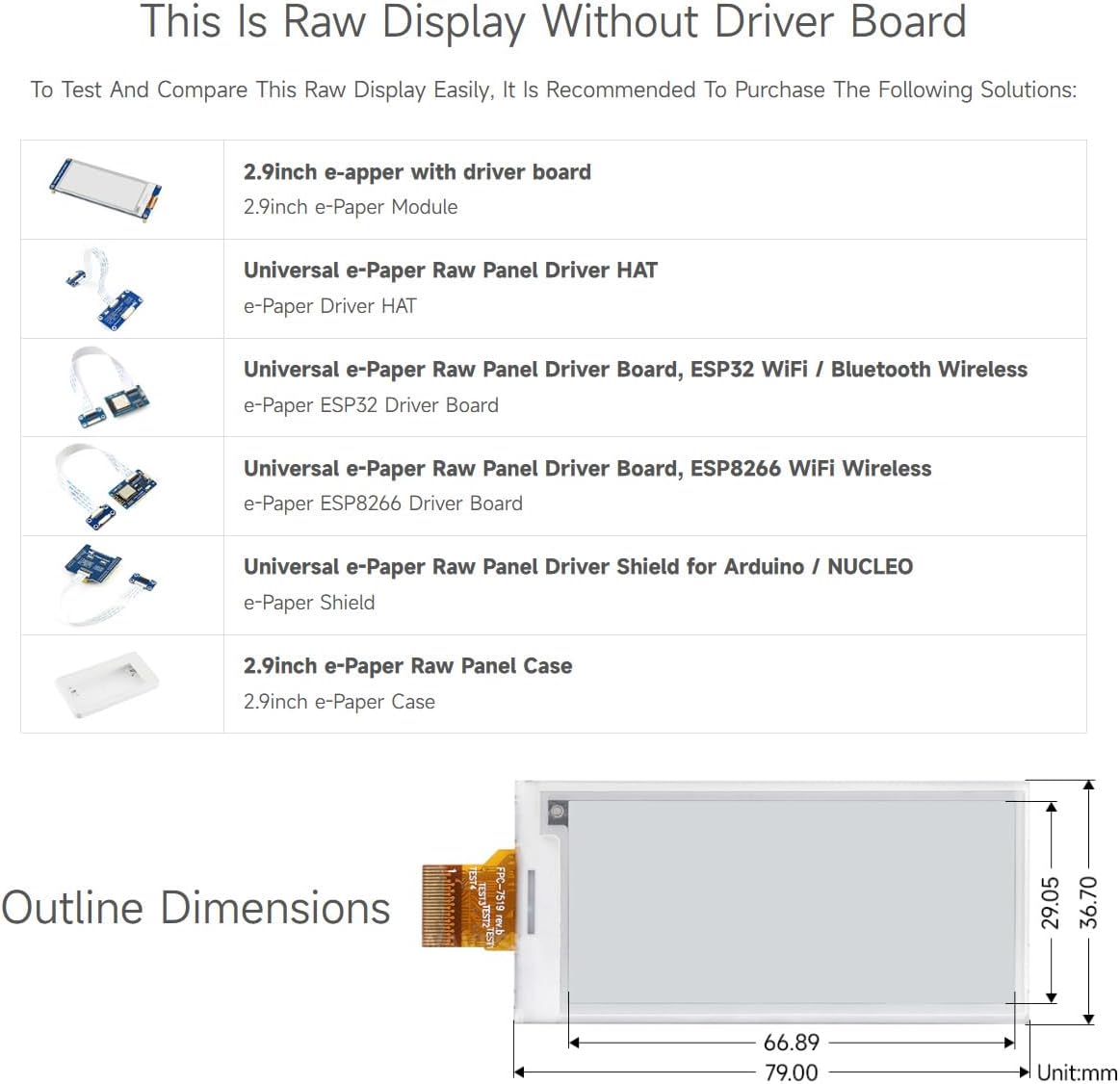
Figure 3: Recommended driver board solutions for the raw display.
This image provides a visual guide to the different driver board options available for integrating the 2.9inch e-Paper raw display into various projects.
Ṣiṣẹ Ifihan naa
The e-Paper display operates by changing the position of charged particles within microcapsules, reflecting ambient light to form images. This technology allows for clear display without power consumption once an image is rendered.
Ifihan Sọtun
The display supports both full and partial refresh modes. Full refresh clears the entire screen and redraws the content, while partial refresh updates only specific areas, which is faster and consumes less power for minor changes.
- Full Refresh Time: O fẹrẹ to ọgbọn iṣẹju.
- Partial Refresh Time: O fẹrẹ to ọgbọn iṣẹju.
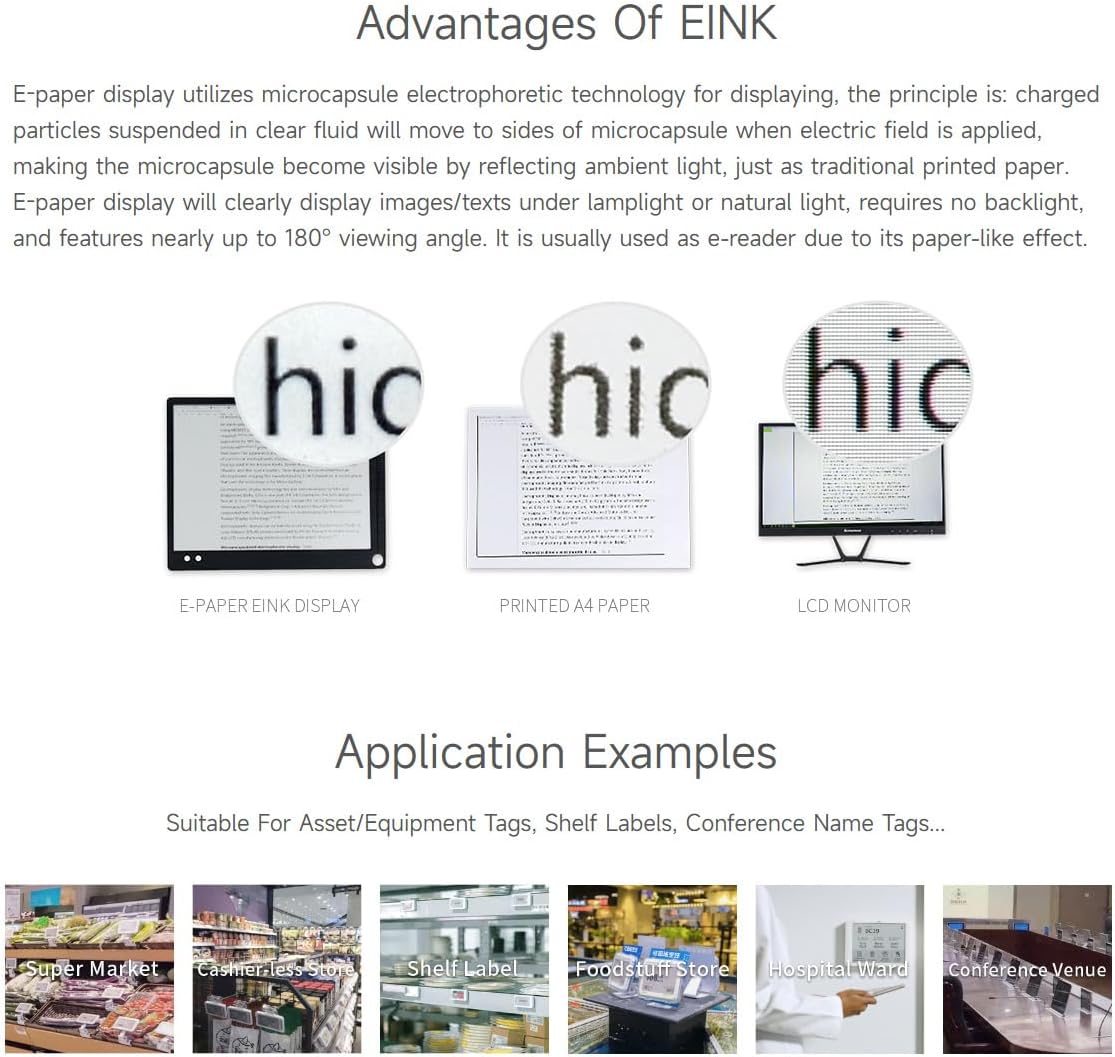
olusin 4: Advantages of E-Ink technology and application examples.
This image highlights the superior readability of E-Ink displays compared to traditional LCD monitors, resembling printed paper. It also showcases common applications such as retail shelf labels and industrial instruments.
Programming and Libraries
Waveshare provides online development resources and example code for various platforms, including Raspberry Pi, Jetson Nano, Arduino, and STM32. These resources typically include libraries and sample programs to help you get started with displaying text and graphics.
It is recommended to consult the official Waveshare Wiki for detailed programming guides and up-to-date examples. A link to the user guide is provided in the Support section.
Itọju ati Itọju
The 2.9inch E-Ink Raw Display is a delicate electronic component. Proper handling and care will ensure its longevity and optimal performance.
Gbogbogbo Itọju
- Alailagbara: Handle the display with care, especially the glass panel and the flexible FPC cable, as they are susceptible to damage from bending or impact.
- Ninu: Use a soft, dry, lint-free cloth to gently wipe the display surface if necessary. Avoid using liquid cleaners or abrasive materials.
- Ina Aimi: Take precautions against electrostatic discharge (ESD) when handling the display, as static can damage electronic components.
- Ibi ipamọ: Store the display in a cool, dry environment, away from direct sunlight and extreme temperatures.

Figure 5: Product packaging with handling and recycling information.
The product box includes important warnings regarding static electricity and proper disposal/recycling of the electronic device.
Laasigbotitusita
If you encounter issues with your Waveshare 2.9inch E-Ink Raw Display, consider the following common troubleshooting steps:
- Ko si Ifihan/Iboju òfo:
- Verify all connections, especially the FPC cable to the driver board, are secure and correctly oriented.
- Ensure the power supply (3.3V) is stable and correctly connected.
- Check your code for initialization errors or incorrect SPI communication settings.
- Incomplete or Garbled Display:
- Confirm that the display resolution (296x128) in your code matches the physical display.
- Ensure the correct display driver library is being used for this specific 2.9inch model.
- Try a full refresh cycle to clear any residual images.
- Slow Refresh Rate:
- E-Ink displays inherently have slower refresh rates than LCDs. Refer to the specifications for expected refresh times.
- Utilize partial refresh for minor updates to improve perceived speed.
- Ghosting/Image Retention:
- This is a characteristic of e-Ink technology. A full refresh cycle can often mitigate ghosting.
- Ensure your driver code implements proper refresh sequences.
For more detailed troubleshooting and specific error codes, refer to the online user manual and Waveshare's official documentation and forums.
Awọn pato
Detailed technical specifications for the Waveshare 2.9inch E-Ink Raw Display:

Figure 6: Detailed specifications of the 2.9inch e-Paper display.
This image provides a comprehensive table of the display's electrical and physical characteristics, including refresh rates and power consumption.
| Iwa | Iye |
|---|---|
| Iwọn ifihan iboju duro | 2.9 inches |
| Brand | Waveshare |
| Nọmba awoṣe ohun kan | 2.9inch e-Paper |
| Ibamu System isẹ | Lainos |
| Iwọn Nkan | 0.352 iwon |
| Awọn iwọn Ọja (LxWxH) | 7.09 x 3.94 x 3.54 inches |
| Asopọmọra Technology | SPI |
| Awọn ẹrọ ibaramu | Raspberry Pi 4B/3B+/3B/2B/B+/A+/Zero/Zero W/WH/Zero 2W Series Boards, Jetson Nano |
Atilẹyin ọja ati Support
Waveshare products are designed for reliability and performance. For specific warranty information, please refer to the terms and conditions provided at the time of purchase or contact Waveshare directly.
Awọn orisun Ayelujara
Waveshare provides extensive online resources to assist users with their products:
- Itọsọna olumulo (PDF): For detailed technical documentation and programming examples, please refer to the official user guide: Waveshare 2.9inch E-Ink User Guide
- Waveshare Store: Explore other Waveshare products and resources on their official Amazon store: Waveshare Amazon Store
- Oluranlowo lati tun nkan se: For technical inquiries or assistance, please visit the Waveshare official website or contact their support channels as listed in the product documentation.


