1. Eto
1.1 Fifi sori batiri
The Insignia NS-RC03A-13 remote control requires two AAA batteries for operation. Follow these steps to install them:
- Wa ideri iyẹwu batiri ni ẹhin isakoṣo latọna jijin.
- Gbe ideri si isalẹ tabi tẹ latch lati ṣii.
- Insert two AAA batteries, ensuring that the positive (+) and negative (-) terminals align correctly with the markings inside the compartment.
- Gbe ideri iyẹwu batiri pada si aaye titi yoo fi tẹ ni aabo.
Aworan: Ẹyin view of the Insignia NS-RC03A-13 remote control, showing the battery compartment open with two AAA batteries inserted. The remote is black with gray buttons.
2. Awọn ilana Iṣiṣẹ
This section details the primary functions and usage of your Insignia NS-RC03A-13 remote control.
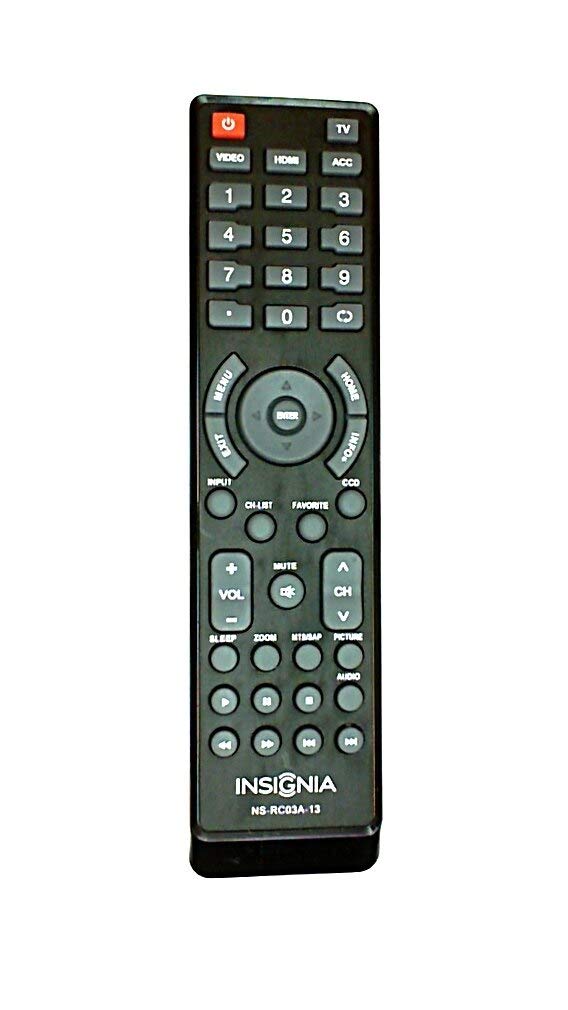
Aworan: Iwaju view of the Insignia NS-RC03A-13 remote control, displaying all buttons and their labels. The remote is black with gray buttons and white text.
2.1 Agbara Tan / Pa
Tẹ awọn AGBARA button (usually located at the top left) to turn your television on or off.
2.2 Aṣayan titẹ sii
To switch between different video sources (e.g., HDMI 1, HDMI 2, Video), press the ÀWỌN Ọ̀RỌ̀ button. Continue pressing to cycle through available inputs until your desired source is selected.
2.3 Channel and Volume Control
- Iwọn didun: Lo awọn VOL+ ati VOL - buttons to increase or decrease the audio volume.
- Pa ẹnu mọ́: Tẹ awọn IKU button to instantly silence the television audio. Press it again to restore sound.
- Awọn ikanni: Lo awọn CH + ati CH - buttons to navigate through television channels.
- Paadi Nọmba: Directly enter channel numbers using the numeric keypad (0-9).
2.4 Lilọ kiri Akojọ aṣyn
Use the directional arrow buttons (Up, Down, Left, Right) around the WOLE button to navigate through on-screen menus. Press WOLE to confirm a selection. The Akojọ button typically opens the main menu, and JADE tilekun.
3. Itọju
Proper care ensures the longevity and optimal performance of your remote control.
- Ninu: Wipe the remote control with a soft, dry cloth. Avoid using liquid cleaners, abrasive materials, or chemical solvents, as these can damage the surface or internal components.
- Rirọpo Batiri: Replace batteries when the remote's responsiveness decreases. Always replace both batteries at the same time with new ones of the same type (AAA).
- Ibi ipamọ: Tọ́jú àgbékalẹ̀ ìpamọ́ náà sí ibi gbígbẹ, kúrò níbi tí oòrùn kò ti lè tàn tààrà, ooru tó le koko, àti ọ̀rinrin tó ga.
- Yago fun awọn isọ silẹ: Dáàbò bo latọna jijin kuro ninu ipa ti ara, nitori awọn silė le ba awọn iyipo inu jẹ.
4. Laasigbotitusita
Ti o ba pade awọn iṣoro pẹlu isakoṣo latọna jijin rẹ, gbiyanju awọn ojutu wọnyi:
- Latọna jijin ko dahun:
- Ṣayẹwo boya awọn batiri ti wa ni fi sii bi o ti tọ pẹlu polarity to dara.
- Rọpo awọn batiri atijọ pẹlu awọn batiri AAA tuntun.
- Ensure there are no obstructions between the remote control and the TV's infrared (IR) receiver.
- Tọ́ka sí remote taara sí olugba IR ti TV.
- Awọn bọtini kan pato ko ṣiṣẹ:
- Clean around the unresponsive buttons with a soft, slightly damp cloth to remove any debris or stickiness.
- If cleaning does not resolve the issue, the button mechanism may be faulty, and the remote might require replacement.
- TV not responding to input changes:
- Ensure the remote is correctly paired or compatible with your Insignia TV model.
- Gbiyanju titẹ awọn ÀWỌN Ọ̀RỌ̀ button multiple times to cycle through all available sources.
5. Awọn pato
| Nọmba awoṣe | NS-RC03A-13 |
| Brand | BADGE |
| Awọn ẹrọ ibaramu | Tẹlifisiọnu |
| Nọmba ti o pọju Awọn ẹrọ Atilẹyin | 1 |
| Awọn batiri ti a beere | 2 AAA batiri |
| Àwọ̀ | Dudu |
| Pataki Ẹya | Ergonomic |
| Iwọn Nkan | 2.39 iwon |
| Package Mefa | 7 x 2 x 1 inches |
6. Atilẹyin ọja ati Support
For detailed warranty information, product registration, or technical support, please visit the official Insignia webojula tabi kan si wọn onibara iṣẹ Eka. Tọju iwe-ẹri rira rẹ bi ẹri rira fun eyikeyi awọn ibeere atilẹyin ọja.
Atilẹyin Ayelujara: www.insigniaproducts.com
Akiyesi: Awọn ofin atilẹyin ọja le yatọ nipasẹ agbegbe ati alagbata.


