Ọrọ Iṣaaju
O ṣeun fun riraasing the OontZ Angle 3 Ultra Portable Bluetooth Speaker by Cambridge Soundworks. This manual provides essential information for setting up, operating, maintaining, and troubleshooting your speaker. Designed for superior sound quality and durability, the OontZ Angle 3 Ultra features a 14-watt output, rich bass, IPX7 waterproofing, and an impressive 30-meter Bluetooth range. Enjoy up to 20 hours of playtime on a single charge.

Image: The OontZ Angle 3 Ultra Portable Bluetooth Speaker, showcasing its sleek black, triangular design with control buttons on one end.
Ṣeto
1. Awọn ohun ti o wa pẹlu
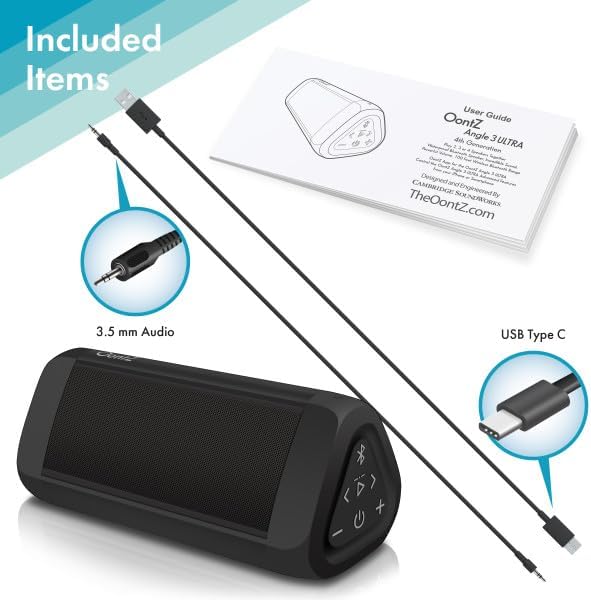
Image: The OontZ Angle 3 Ultra speaker along with its accessories: a Quick Start Guide, a 3.5mm audio cable, and a USB Type-C charging cable.
Before first use, ensure all components are present:
- OontZ Angle 3 Ultra Bluetooth Speaker
- Quick Start Guide (Full manual available online)
- 3.5mm Audio USB
- USB Iru-C Ngba agbara USB
2. Gbigba agbara Agbọrọsọ
The speaker comes with a built-in rechargeable Lithium-ion battery. For optimal performance, fully charge the speaker before first use.
- Locate the charging port on the side of the speaker, protected by a rubber flap.
- Connect the supplied USB Type-C charging cable to the speaker's charging port.
- Connect the other end of the USB cable to a USB wall charger (not included) or a computer USB port.
- The charging indicator light will illuminate. A full charge takes approximately 20 hours for the first charge, and subsequent charges will be faster.

Aworan: A sunmọ-soke view of the speaker's side, showing the 3.5mm AUX input and the USB-C charging port, typically protected by a waterproof flap.
3. Sisopọ Bluetooth
Pair your OontZ Angle 3 Ultra with your Bluetooth-enabled device (smartphone, tablet, laptop).
- Tan agbohunsoke nipa titẹ ati didimu bọtini agbara (⏻) until the indicator light flashes blue.
- Lori ẹrọ rẹ, lọ si awọn eto Bluetooth ki o rii daju pe Bluetooth ti ṣiṣẹ.
- Look for "OontZ Angle 3 Ultra" in the list of available devices and select it.
- Once paired, the speaker will emit a confirmation tone, and the indicator light will turn solid blue.
4. Nsopọ nipasẹ AUX Input
O le so awọn ẹrọ ti kii ṣe Bluetooth pọ nipa lilo okun ohun afetigbọ 3.5mm.
- So opin kan ti okun ohun 3.5mm pọ mọ ibudo AUX IN lori agbọrọsọ naa.
- So ìpẹ̀kun kejì mọ́ ibi tí a ti ń gbé ohùn sókè tàbí ibi tí a ti ń gbọ́ ohùn ẹ̀rọ rẹ.
- Agbọrọsọ yoo yipada laifọwọyi si ipo AUX.
5. Pairing Two Speakers for Stereo Sound (OontZ Dual Wireless Stereo)
Enhance your audio experience by wirelessly connecting two OontZ Angle 3 Ultra speakers for impressive stereo separation.

Image: Two OontZ Angle 3 Ultra speakers positioned to provide stereo sound, with two individuals enjoying music in an outdoor setting.
- Ensure both OontZ Angle 3 Ultra speakers are charged and powered on.
- Disconnect both speakers from any previously paired Bluetooth devices.
- On one speaker (this will be the Left Channel), press and hold the Bluetooth button (Ⓑ) for 3 seconds until you hear a tone.
- On the second speaker (this will be the Right Channel), press and hold the Bluetooth button (Ⓑ) for 3 seconds until you hear a tone.
- The speakers will automatically connect to each other. Once connected, you will hear a confirmation tone, and the indicator lights on both speakers will turn solid blue.
- Now, connect your audio device to the Left Channel speaker via Bluetooth as described in "Bluetooth Pairing" above.
- For video audio, connect your device or TV to the Left Channel speaker using the 3.5mm audio cable.
Awọn ilana Iṣiṣẹ
1. Awọn iṣakoso Loriview
| Bọtini/Atọka | Išẹ |
|---|---|
| ⏻ (Agbara) | Tẹ mọlẹ lati Tan/Pa a. |
| + (Iwọn didun soke) | Tẹ lati mu iwọn didun pọ si. |
| - (Iwọn didun isalẹ) | Tẹ lati dinku iwọn didun. |
| ▷ (Ṣiṣere/Daduro) | Tẹ lati Mu / Daduro orin duro. |
| < (Previous Track) | Tẹ lati lọ si orin išaaju. |
| > (Next Track) | Tẹ lati lọ si orin atẹle. |
| Ⓑ (Bluetooth) | Press to disconnect current Bluetooth device and enter pairing mode. Press and hold for 3 seconds to initiate OontZ Dual Wireless Stereo pairing. |
| Imọlẹ Atọka | Flashes blue for pairing, solid blue for connected, red for charging. |
2. Ọwọ-Ọfẹ Npe
The OontZ Angle 3 Ultra has a built-in microphone for hands-free calls.
- Tí ìpè bá wọlé, orin náà yóò dákẹ́. Tẹ ▷ bọtini lati dahun ipe.
- Lati mu ipe dopin, tẹ awọn ▷ bọtini lẹẹkansi.
- Lati kọ ipe, tẹ mọlẹ ▷ bọtini fun 2 aaya.
- To activate Siri or Google Assistant, press and hold the ▷ button for 2 seconds when not on a call.
3. Waterproof Features (IPX7)
The OontZ Angle 3 Ultra is IPX7 certified, meaning it is fully waterproof and can be immersed in water up to 1 meter (3.3 feet) for up to 30 minutes.
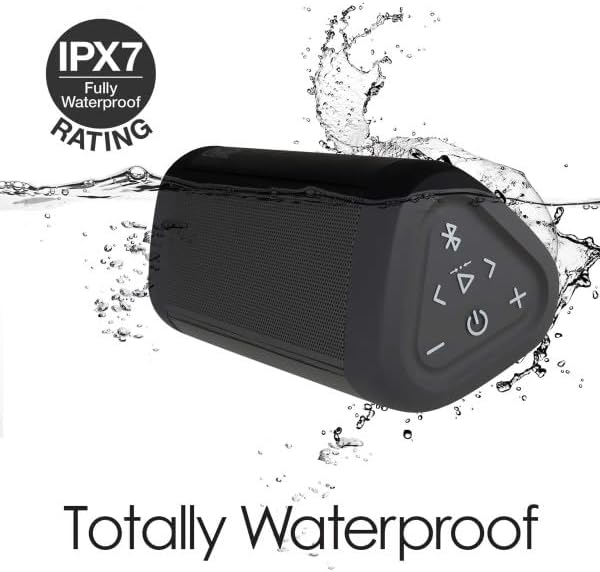
Image: The OontZ Angle 3 Ultra speaker shown partially submerged in water, illustrating its IPX7 waterproof capability.
- Rí i dájú pé a ti ti àtẹ́lẹwọ́ roba tó bo àwọn èbúté gbigba agbára àti AUX pa dáadáa kí o tó fi omi sí agbọ́hùnsọ̀ náà.
- Ideal for use by the pool, at the beach, or in the shower.
- Do not expose to salt water or chemicals. Rinse with fresh water after exposure to chlorinated water.
Itoju
1. Ninu
Lati nu agbọrọsọ rẹ nu, lo asọ, damp asọ. Ma ṣe lo abrasive ose tabi epo.
2. Ibi ipamọ
Tọju agbohunsoke ni itura, aye gbigbẹ kuro lati orun taara ati awọn iwọn otutu to gaju.
3. Itọju batiri
Lati pẹ igbesi aye batiri:
- Yago fun gbigba agbara si batiri ni kikun nigbagbogbo.
- Gba agbara si agbọrọsọ nigbagbogbo, paapaa ti ko ba si ni lilo, lati ṣetọju ilera batiri.
- Má ṣe fi agbọ́hùnsọ̀ sí iwọ̀n otútù tó ju 60°C (140°F) lọ.
Laasigbotitusita
| Isoro | Ojutu |
|---|---|
| Agbọrọsọ kii yoo tan. | Rii daju pe batiri ti gba agbara. So agbohunsoke pọ si orisun agbara nipa lilo okun USB-C. |
| Ko si ohun tabi iwọn kekere. | Check the volume level on both the speaker and your connected device. Ensure the speaker is properly paired via Bluetooth or connected via AUX. |
| Ko le so pọ nipasẹ Bluetooth. | Ensure the speaker is in pairing mode (flashing blue light). Turn off and on Bluetooth on your device. Move the speaker closer to your device. Disconnect from other Bluetooth devices. |
| Iparun ohun ni iwọn didun ga. | Reduce the volume on the speaker or your connected device. Ensure the audio source is not distorted. |
| OontZ Dual Wireless Stereo not connecting. | Ensure both speakers are disconnected from other Bluetooth devices. Follow the pairing steps carefully, ensuring both speakers are in pairing mode for stereo connection. |
Awọn pato
Key technical specifications for the OontZ Angle 3 Ultra Portable Bluetooth Speaker:
- Nọmba awoṣe: SWOA3UBLK
- Awọn iwọn (L x W x H): 16.26 x 7.11 x 7.11 cm (6.4 x 2.8 x 2.8 inches)
- Ìwúwo: 480 giramu (1.06 lbs)
- Agbara Agbejade Agbọrọsọ: 14 Wattis
- Ẹya Bluetooth: 4.2
- Iwọn Alailowaya: Títí dé mítà 30 (ẹsẹ̀ 100) láìsí ìdíwọ́
- Igbesi aye batiri: Up to 20 hours (at 2/3 volume)
- Idiwon ti ko ni omi: IPX7 (Submerable to 1 mita fun ọgbọn išẹju 30)
- Asopọmọra: Bluetooth, 3.5mm AUX Input, USB-C Charging
- Awọn eroja To wa: Speaker, 3.5mm Audio Cable, USB-C Charging Cable, Quick Start Guide

Image: Diagram showing the dimensions of the OontZ Angle 3 Ultra speaker: 6.5 inches in length, 3 inches in width, and 2.75 inches in height.
Atilẹyin ọja ati Support
For detailed warranty information and customer support, please visit the official OontZ website. The full localized manual is also available there.
Osise Webojula: www.theoontz.com
Cambridge Soundworks is committed to providing high-quality audio products and customer satisfaction.


