1. Ifihan
The SJCAM SJ7 Star is a high-performance action camera designed to capture your adventures in stunning 4K resolution. Featuring an Ambarella A12S75 processor and a Sony IMX117 12MP sensor, it delivers clear images and smooth video. The camera includes a 2.0-inch touchscreen for easy navigation and a durable aluminum alloy housing. This manual provides essential information for operating and maintaining your device.

Image 1.1: SJCAM SJ7 Star Action Camera, available in silver and black finishes. This image displays the front view of two cameras, highlighting their compact design and lens.
2. Package Awọn akoonu
Verify that all items are present in your SJCAM SJ7 Star package:
- 1 x Original SJCAM SJ7 Star Action Camera
- 1 x Waterproof Housing
- 1 x Quick Release Buckle
- 1 x Handlebar Seat Post Mount
- 1 x Curved Adhesive Mount
- 1 x Flat Adhesive Mount
- 1 x 3-Way Pivot Arm Mount
- 2 x 3M Adhesive Tape
- 1 x Frame Mount
- 1 x Quick Release Clip for The Frame
- 1 x Vertical Quick Release J-Hook Buckle
- 1 x Universal 1/4" Camera Tripod Mount
- 1 x Tripod Mount Adapter
- 1 x Asọ mimọ
- 1 x Okun USB
- Batiri Li-ion 1 x 1000mAh
- Ìwé Àfọwọ́kọ 1 x Ọ̀pọ̀ èdè
- 2 x SJCAM Stickers
Note: SJ Smart Remote and external microphone are not included in the standard package.
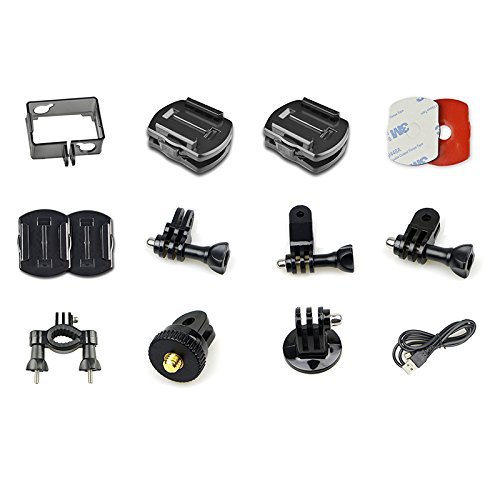
Image 2.1: Various mounting accessories and cables included with the SJCAM SJ7 Star. This image displays a collection of mounts, adhesive pads, and a USB cable, illustrating the comprehensive accessory kit.
3. Eto
3.1. Fifi sori batiri
- Ṣii ideri iyẹwu batiri ni isalẹ kamẹra.
- Insert the 1000mAh Li-ion battery, ensuring the contacts align correctly.
- Pa ideri batiri naa ni aabo.
3.2. MicroSD Kaadi Fi sii
The SJ7 Star supports SDHC and SmartMedia flash memory types. A Class 10 or higher MicroSD card (up to 128GB, not included) is recommended for optimal performance, especially when recording 4K video.
- Wa iho kaadi MicroSD ni ẹgbẹ kamẹra naa.
- Fi kaadi MicroSD sii pẹlu awọn olubasọrọ goolu ti o kọju si ẹhin kamẹra titi ti o fi tẹ sinu ipo rẹ.
- Lati yọọ kuro, tẹ kaadi naa rọra titi yoo fi jade.
3.3. Mabomire Housing
The included waterproof housing allows the camera to be used underwater. Ensure the housing is properly sealed before submerging the camera. Test the housing without the camera first to confirm its integrity.
3.4. Iṣagbesori Kamẹra
Utilize the various mounts provided to attach your SJ7 Star to helmets, handlebars, or other surfaces. Refer to the specific mount instructions for secure attachment.

Image 3.1: Multiple views of the SJCAM SJ7 Star, showing its various ports and buttons. This composite image displays the camera from different angles, highlighting the power button, settings button, lens, and side ports for USB and MicroSD card.
4. Awọn ilana Iṣiṣẹ
4.1. Agbara Tan / Paa
- Agbara Tan: Press and hold the Power/Mode button (usually on the front or top) for a few seconds until the screen illuminates.
- Agbara Pa: Tẹ bọtini Power/Mode ki o si di i mu lẹẹkansi titi iboju yoo fi pa.
4.2. Lilo awọn Touchscreen
The 2.0-inch TFT LCD touchscreen allows for intuitive navigation through menus and settings.

Image 4.1: The 2.0-inch touchscreen interface of the SJCAM SJ7 Star, showing menu options. This image illustrates a hand interacting with the camera's display, showcasing the intuitive icons for photo, video, and various capture modes.
- Lilọ kiri: Swipe left, right, up, or down to browse through modes and settings.
- Yan: Tap on an icon or option to select it.
- Jade: Tap the 'X' icon or swipe from the edge to return to the previous screen or main interface.
4.3. Gbigbasilẹ fidio
The SJ7 Star supports various video resolutions and frame rates, including native 4K at 30fps.
- Bẹrẹ Gbigbasilẹ: In video mode, tap the record icon on the touchscreen or press the Shutter button.
- Duro Gbigbasilẹ: Tap the record icon or press the Shutter button again.
- Ìdúróṣinṣin Àwòrán Ẹ̀rọ Amúṣẹ́dá (EIS): EIS is supported at 1080P 60/30 fps to reduce camera shake. Enable this feature in the settings menu for smoother footage.
- Awọn ọna kika fidio: Videos are recorded in H.264 BP/MP/HP Level 5.1 and MJPEG codecs.
4.4. Fọto Yaworan
Capture still images up to 12MP, with interpolation available for 16MP photos.
- Ya Fọto: In photo mode, tap the capture icon on the touchscreen or press the Shutter button.
- Awọn ọna kika aworan: Photos are saved as JPEG files.
4.5. WiFi Asopọmọra
Connect your SJ7 Star to a smartphone or tablet via WiFi for remote control and file gbigbe.
- Enable WiFi on the camera via the settings menu.
- Download the official SJCAM app on your mobile device.
- Connect to the camera's WiFi network from your device's WiFi settings.
- Open the SJCAM app to control the camera and access media.
4.6. External Microphone
The SJCAM SJ7 Star supports external microphones. Only official SJCAM external microphones are compatible. Using microphones from other brands may result in non-functionality.
4.7. Awọn iṣẹ miiran
The camera offers various advanced functions accessible through the settings menu:
- Time Lapse Function: Capture a series of photos at set intervals to create a time-lapse video.
- Aago ara ẹni: Set a delay before a photo is taken.
- Ibon Tesiwaju: Take multiple photos in quick succession.
- Auto Shooting: Automatically capture photos.
- Iwari išipopada: Start recording when motion is detected.
- Igbasilẹ Yipo: Overwrite the oldest footage nigbati kaadi iranti ti kun.
- Dinku: Adjust the image sharpness.
- Iwontunwonsi Funfun: Adjust color temperature for accurate colors in different lighting conditions.
5. Itọju
5.1. Ninu
- Use the provided cleaning cloth or a soft, lint-free cloth to clean the camera body and lens.
- Yago fun lilo awọn kẹmika lile tabi awọn ohun elo abrasive.
- Ensure the lens is free of dust and smudges for clear images.
5.2. Itọju batiri
- Gba agbara si batiri ni kikun ṣaaju lilo akọkọ.
- Store the camera and battery in a cool, dry place when not in use.
- Yago fun ṣiṣafihan batiri si awọn iwọn otutu to gaju.
5.3. Awọn imudojuiwọn famuwia
Periodically check the official SJCAM website for firmware updates. Keeping your camera's firmware updated can improve performance, add new features, and resolve bugs.
- Ṣe igbasilẹ famuwia tuntun file from the SJCAM official webojula.
- Follow the specific instructions provided with the firmware update to avoid damaging the device.
6. Laasigbotitusita
If you encounter issues with your SJCAM SJ7 Star, refer to the following common problems and solutions:
- Gbigbona Kamẹra Ju: Prolonged 4K recording or use in hot environments can cause the camera to overheat. Reduce recording resolution or allow the camera to cool down.
- Gbohungbohun Ita Ko Ṣiṣẹ: Ensure you are using an official SJCAM external microphone. Third-party microphones are not supported. Check the microphone connection.
- Camera Freezes or Becomes Unresponsive: Remove and reinsert the battery to perform a hard reset. Ensure your firmware is up to date.
- Awọn iṣoro pẹlu asopọ Wi-Fi: Restart both the camera and your mobile device. Ensure the SJCAM app is updated. Try reconnecting to the camera's WiFi network.
- Red Lines on Screen: This may indicate a firmware issue or hardware malfunction. Try updating or re-flashing the firmware. If the problem persists, contact customer support.
- Batiri Sisan Ni kiakia: Ensure all unnecessary features (like WiFi) are turned off when not in use. Reduce screen brightness. Consider replacing an aging battery.
- Missing HDMI Port: Some product images may show an HDMI port. Verify your specific model's specifications. If a feature is critical and missing, contact your retailer.
If these solutions do not resolve your issue, please contact SJCAM customer support.
7. Awọn pato
| Ẹya ara ẹrọ | Sipesifikesonu |
|---|---|
| Brand | SJCAM |
| Awoṣe | SJ7 |
| Chipset | Ambarella A12S75 |
| Sensọ Aworan | Sony IMX117 12MP CMOS |
| Ifihan LCD | 2.0 inch TFT LCD Fọwọkan iboju |
| Ipinnu fidio | 4K (3840x2160) 30fps, 2.7K, 2.5K, 1440P, 1080P, 960P, 720P |
| Ipinnu Fọto | 12MP (4000x3000), 8.3M, 5M, 3M (Interpolated up to 16M) |
| Fidio kika | H.264 |
| Aworan kika | JPEG |
| Ohun kika | PCM |
| Iduroṣinṣin Aworan | Digital (EIS supported at 1080P 60/30 fps) |
| Lẹnsi Iru | Wide Angle (Adjustable FOV up to 166°) |
| Ibi ipamọ | MicroSD (SDHC, SmartMedia) |
| Asopọmọra | USB, Wi-Fi |
| Batiri | 1000mAh Lithium Ion Rechargeable Battery |
| Pataki Awọn ẹya ara ẹrọ | Gyro Stabilization, Time Lapse, Self Timer, Continuous Shooting, Motion Detection, Loop Record |
| Iwọn Nkan | 650 g |

Image 7.1: Diagram illustrating the Ambarella A12S75 processor and Sony IMX117 CMOS sensor within the SJCAM SJ7 Star. This image highlights the core components responsible for the camera's image processing and performance.
8. Atilẹyin ọja ati Support
8.1. atilẹyin ọja Information
The SJCAM SJ7 Star typically comes with a 1-odun olupese ká atilẹyin ọja. Please retain your proof of purchase for warranty claims. The warranty covers manufacturing defects but generally excludes damage caused by misuse, accidents, or unauthorized modifications.
8.2. Onibara Support
For technical assistance, warranty claims, or further inquiries, please contact SJCAM customer support through their official website or the retailer where you purchased the product. Provide your product model and serial number for faster service.
9. Awọn fidio ọja osise
Ko si awọn fidio ọja osise lati ọdọ olutaja ti a rii ninu data ti a pese.


