Alaye Aabo pataki
Jọ̀wọ́ ka gbogbo ìlànà ààbò kí o sì lóye wọn kí o tó lo ọjà yìí. Pa àwọn ìlànà wọ̀nyí mọ́ fún ìtọ́kasí ọjọ́ iwájú.
- Má ṣe fi agbọ́rọ̀sọ náà sí òjò tàbí ọrinrin láti dènà iná tàbí ìkọlù iná mànàmáná.
- Ma ṣe dina eyikeyi awọn ṣiṣi atẹgun. Fi sori ẹrọ ni ibamu pẹlu awọn ilana ti olupese.
- Dabobo okun agbara lati ma rin lori tabi pin, ni pataki ni awọn pilogi, awọn ohun elo irọrun, ati aaye nibiti wọn ti jade kuro ninu ohun elo naa.
- Lo awọn asomọ/awọn ẹya ara ẹrọ ti olupese pato.
- Yọọ ohun elo yi nigba iji manamana tabi nigba lilo fun igba pipẹ.
- Tọkasi gbogbo iṣẹ si awọn oṣiṣẹ iṣẹ ti o peye. Iṣẹ iṣẹ nilo nigbati ohun elo ba ti bajẹ ni ọna eyikeyi.
- Do not open the speaker enclosure. There are no user-serviceable parts inside.
Package Awọn akoonu
Daju pe gbogbo awọn nkan ti a ṣe akojọ rẹ si isalẹ wa ninu package rẹ:
- Kaiser MSA-9908BT Amplified Agbọrọsọ
- 1 x Gbohungbo ti a firanṣẹ
- 1 x Isakoṣo latọna jijin
- 1 x Agbara Adapter / Ngba agbara Cable

Image showing the Kaiser MSA-9908BT speaker along with its included wired microphone, remote control, and power cable.
Ọja Pariview
Familiarize yourself with the main components and controls of your Kaiser MSA-9908BT speaker.
Iwaju View

The front of the speaker features a protective metal grille with the Kaiser logo at the bottom.
Rear Panel Controls and Ports

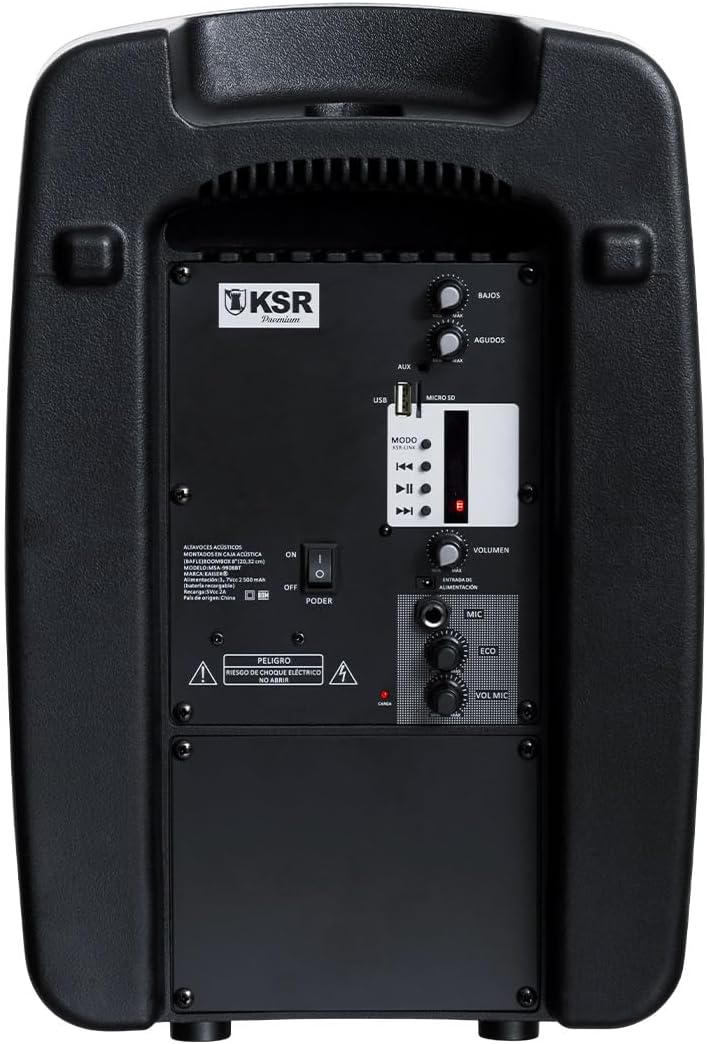
Alaye view of the rear control panel, including audio inputs, volume controls, and media playback options.
- BASS / AGUDOS (Treble) Knobs: Ṣatunṣe baasi ati awọn ipele tirẹbu.
- Ibudo USB: Fun šišẹsẹhin okun filasi USB.
- MICRO SD Slot: Fun Micro SD kaadi Sisisẹsẹhin.
- Iṣawọle AUX: 3.5mm igbewọle iranlọwọ fun awọn ẹrọ ohun ita.
- Bọtini MODE: Switches between input modes (Bluetooth, USB, Micro SD, FM).
- Awọn idari Sisisẹsẹhin: Mu ṣiṣẹ/Duro, Orin ti tẹlẹ, Orin atẹle.
- VOLUMEN Knob: Titunto si iwọn didun iṣakoso fun agbọrọsọ.
- MIC Input (6.3mm): Fún sísopọ̀ gbohungbohun onírin.
- ECO Knob: Ṣe atunṣe ipa iwoyi fun gbohungbohun.
- VOL MIC Knob: Adjusts the microphone volume independently.
- AGBARA AGBARA: Turns the speaker On or Off.
- Ibudo gbigba agbara: For connecting the power adapter to charge the internal battery.
Ṣeto
Gbigba agbara ni ibẹrẹ
Before first use, it is recommended to fully charge the speaker's internal battery. This typically takes approximately 4 hours.
- Connect the provided power adapter to the charging port on the rear panel of the speaker.
- So ohun ti nmu badọgba naa sinu ibudo ina deede kan.
- The charging indicator light (usually red) will illuminate during charging and may change color or turn off when fully charged.
- Gbigba agbara kikun yoo gba to wakati meje ti akoko ṣiṣiṣẹ.

The rear panel showing the charging port and an important reminder to charge the unit for 4 hours before initial use.
Titan / Pipa agbara
- To turn on the speaker, slide the AGBARA switch on the rear panel to the 'ON' position.
- To turn off the speaker, slide the AGBARA yipada si ipo 'PA'.
Awọn ilana Iṣiṣẹ
Bluetooth Asopọmọra
- Turn on the Kaiser MSA-9908BT speaker. It will automatically enter Bluetooth pairing mode, indicated by a flashing light or an audible prompt.
- Lori foonu alagbeka rẹ, tabulẹti, tabi ẹrọ Bluetooth miiran ti o ṣiṣẹ, mu Bluetooth ṣiṣẹ ki o wa awọn ẹrọ to wa.
- Select "MSA-9908BT" from the list of found devices.
- Once successfully paired, the speaker will provide an audible confirmation, and the Bluetooth indicator light will become solid.
- O le mu ohun ṣiṣẹ bayi lati ẹrọ rẹ nipasẹ agbọrọsọ.
USB / Micro SD Playback
- Fi okun filasi USB sinu Ibudo USB or a Micro SD card into the MICRO SD Slot on the rear panel. Ensure the media contains compatible audio files (fun apẹẹrẹ, MP3).
- The speaker should automatically switch to USB or Micro SD mode and begin playing audio. If not, press the MODE bọtini lati yan titẹ sii to tọ.
- Use the Play/Pause, Previous Track, and Next Track buttons on the speaker or remote control to manage playback.
FM Radio isẹ
- Tẹ awọn MODE button repeatedly until you select FM radio mode.
- The speaker will automatically scan and save available FM stations.
- Lo awọn bọtini Orin Ti O Ti Tẹlẹ ati Orin Next lati lọ kiri laarin awọn ibudo ti a fipamọ.
Lilo Gbohungbohun Firanṣẹ
- So awọn ti firanṣẹ gbohungbohun si awọn MIC Input (6.3mm) lori ru nronu.
- Ṣatunṣe iwọn gbohungbohun nipa lilo awọn VOL MIC koko.
- Lo awọn ECO knob to add or reduce the echo effect for the microphone.

Detail of the 6.3mm microphone input jack and its dedicated volume and echo controls.
Awọn iṣẹ iṣakoso latọna jijin
Iṣakoso latọna jijin ti o wa ninu rẹ pese iwọle irọrun si awọn iṣẹ oriṣiriṣi:

The remote control allows for convenient operation of playback, volume, and mode selection.
- SERE/SINMI: Bẹrẹ tabi da ṣiṣiṣẹsẹhin duro.
- PREV/TẸJẸ: Skip to the previous or next track/station.
- VOL-/VOL+: Decrease or increase the master volume.
- CH-/CH+: Change FM radio channels.
- EQ: Yiyipo nipasẹ tito tẹlẹ oluṣeto.
- Ipo: Switch between input sources (Bluetooth, USB, Micro SD, FM, AUX).
- Awọn bọtini nọmba (0-9): Fún yíyan orin taara tabi titẹ sii igbohunsafẹfẹ FM.
Itoju
- Ninu: Lo asọ rirọ, ti o gbẹ lati nu ode ti agbọrọsọ. Ma ṣe lo awọn afọmọ abrasive, waxes, tabi awọn nkanmimu.
- Itọju Batiri: To prolong battery life, avoid fully discharging the battery frequently. If storing the speaker for an extended period, charge it to about 50% every few months.
- Ibi ipamọ: Tọju agbohunsoke ni itura, aye gbigbẹ kuro lati orun taara ati awọn iwọn otutu to gaju.
Laasigbotitusita
| Isoro | Owun to le Fa | Ojutu |
|---|---|---|
| Agbọrọsọ ko ni tan. | Batiri ti dinku; Yipada agbara wa ni pipa. | Charge the speaker for at least 4 hours. Ensure the POWER switch is in the 'ON' position. |
| Ko si ohun lati agbọrọsọ. | Iwọn didun ti lọ silẹ pupọ; Ipo titẹ sii ti ko tọ; Ẹrọ ko ni asopọ. | Mu awọn Iwọn didun knob. Press MODE to select the correct input. Ensure your device is properly connected (Bluetooth paired, USB/SD inserted). |
| Asopọ Bluetooth kuna. | Agbọrọsọ kii ṣe ni ipo sisopọ; Ẹrọ ti o jinna pupọ; kikọlu. | Ensure speaker is in Bluetooth mode. Move device closer to speaker. Turn off other Bluetooth devices. Try restarting both speaker and device. |
| Gbohungbohun ko ṣiṣẹ. | Microphone not connected; VOL MIC knob is low. | Ensure microphone is fully plugged into the 6.3mm MIC input. Increase the VOL MIC koko. |
| Gbigba redio FM ti ko dara. | Àmì tí kò lágbára; Ìdènà àyíká. | Reposition the speaker to improve reception. Extend any external antenna if available. |
Awọn pato
| Ẹya ara ẹrọ | Ẹ̀kúnrẹ́rẹ́ |
|---|---|
| Awoṣe | MSA-9908BT |
| Brand | Kaiser |
| Igbara agbara (RMS) | 30W RMS |
| Iwọn Agbọrọsọ | 8 inches |
| Asopọmọra | Bluetooth, USB, Micro SD, AUX (3.5mm), Wired Microphone (6.3mm) |
| Igbesi aye batiri | Titi di wakati 6 |
| Akoko gbigba agbara | Isunmọ. wakati meji 4 |
| Iwọn (D x W x H) | 33 x 27 x 48 cm (isunmọ. 13 x 10.6 x 18.9 inches) |
| Iwọn | Kg 5.4 (isunmọ 11.9 lbs) |
| Ohun elo | Ṣiṣu |
| Awọn irinše to wa | Speaker, Wired Microphone, Remote Control, Power Adapter |
The speaker's dimensions are approximately 38.5 cm (height), 25.5 cm (width), and 20.5 cm (depth).
Atilẹyin ọja ati Support
This product is covered by a limited warranty provided by Kaiser. For specific warranty terms and conditions, please refer to the documentation included with your purchase or visit the official Kaiser webojula.
For technical support, troubleshooting assistance, or warranty claims, please contact Kaiser customer service through their official channels. Keep your purchase receipt as proof of purchase.
- Atilẹyin Ayelujara: Visit the Kaiser official webaaye fun FAQs ati awọn orisun atilẹyin.
- Iṣẹ onibara: Refer to your product packaging or the Kaiser webojula fun alaye olubasọrọ.


