Ọrọ Iṣaaju
This user manual provides detailed instructions for the safe and efficient operation of your Kaiser Donker Professional Rechargeable Amplified Wireless Speaker Kit. This 15-inch speaker system features KSR-Link technology for connecting multiple units, Bluetooth connectivity, FM radio, and various input options for a versatile audio experience. Please read this manual thoroughly before using the product and retain it for future reference.
Package Awọn akoonu
Jọwọ ṣayẹwo apoti fun awọn nkan wọnyi:
- 1 x Rechargeable Speaker Unit
- 1 x Isakoṣo latọna jijin
- 1 x Power Cable (for charging)
- 1 x Gbohungbo ti a firanṣẹ
Ọja Pariview
Iwaju View

The front of the speaker features a protective grille covering the 15-inch woofer, which illuminates with a blue light when active, and the tweeter. The Donker brand logo is prominently displayed across the center.
Ru Iṣakoso igbimo

The rear panel houses all the main controls and input/output ports. These include independent knobs for master volume, bass, treble, microphone volume, and echo. It also features a display, playback controls, 3.5mm audio input, 6.3mm microphone input, USB port, micro SD card slot, external battery terminals, and power input.
Gbohungbo onina

A wired microphone is included for karaoke or public address functions. It connects to the 6.3mm microphone input on the rear panel.
Isakoṣo latọna jijin

The provided remote control allows for convenient operation of the speaker's functions, including power, mode selection, volume, track control, EQ, and FM scan.
Optional Speaker Stand
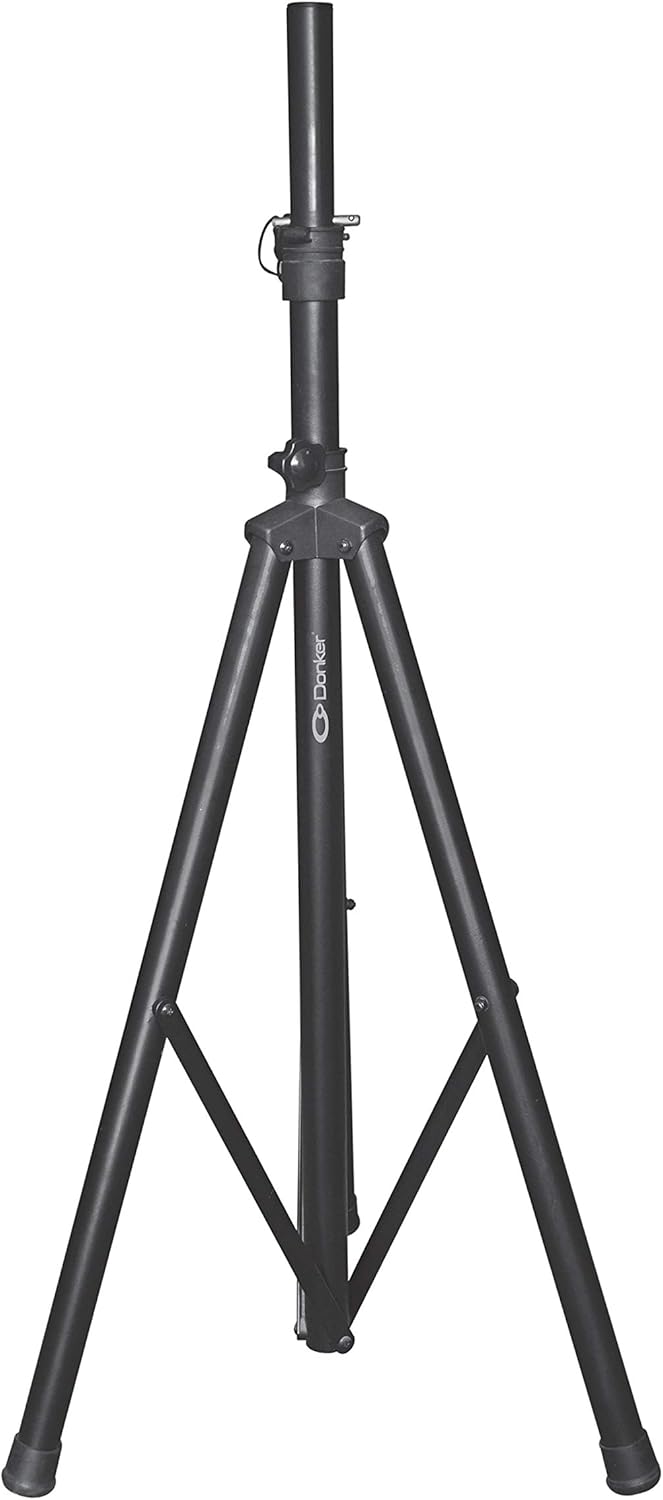
While not included in the standard package, the speaker is compatible with a standard tripod speaker stand (sold separately) for elevated sound projection.
Ṣeto
Gbigba agbara ni ibẹrẹ
- Before first use, fully charge the speaker for approximately 6 hours using the provided power cable.
- Connect the power cable to the speaker's power input and plug the other end into a standard electrical outlet.
- Ina Atọka gbigba agbara yoo fi ipo gbigba agbara han.
Ipo
- Gbe agbọrọsọ sori ibi iduro, dada alapin.
- For optimal sound dispersion, position the speaker in an open area, away from obstructions.
- If using a speaker stand, ensure it is securely locked and capable of supporting the speaker's weight (21 kg).
Awọn ilana Iṣiṣẹ
Titan / Paa
Locate the power switch on the rear control panel. Flip it to the "ON" position to power on the speaker. Flip it to "OFF" to power off.
Asopọ Bluetooth
- Tan agbọrọsọ naa. Ifihan naa yoo fi ipo lọwọlọwọ han.
- Press the "Mode" button on the control panel or remote until "Bluetooth" mode is selected. The speaker will enter pairing mode, indicated by a flashing Bluetooth icon on the display.
- Lori ẹrọ alagbeka rẹ, mu Bluetooth ṣiṣẹ ki o wa awọn ẹrọ to wa.
- Select "Kaiser Donker" (or similar name) from the list. Once paired, the speaker will emit a confirmation sound, and the Bluetooth icon will stop flashing.
- You can now play audio from your device through the speaker. The Bluetooth range is up to 10 meters.
FM Radio isẹ
- Press the "Mode" button until "FM Radio" mode is selected.
- Press the "SCAN" button on the remote or control panel to automatically scan and save available FM stations.
- Use the "Previous/Next Track" buttons to navigate between saved stations.
USB / Micro SD Sisisẹsẹhin
- Insert a USB flash drive or a micro SD card into the corresponding slot on the rear panel.
- The speaker will automatically switch to USB or Micro SD mode and begin playing audio files. Tí kò bá rí bẹ́ẹ̀, tẹ bọ́tìnì "Ipò" láti yan ìtẹ̀síwájú tó tọ́.
- Use the playback controls (Play/Pause, Previous/Next Track) on the speaker or remote to manage your music.
Gbohungbohun Lilo
- Connect the wired microphone to the 6.3mm microphone input on the rear panel.
- Ṣàtúnṣe bọ́tìnì "MIC VOL" láti ṣàkóso ìró ohùn gbohùngbohùn náà.
- Use the "ECHO" knob to add an echo effect to the microphone's output.
- The speaker features a "Microphone Audio Priority" function, which automatically lowers background music when the microphone is in use.
Gbigbasilẹ ohun
The speaker supports audio recording. Ensure a USB drive or micro SD card is inserted. Press the "Record" button (if available on your model/remote) to start recording. Press again to stop.
Ita Batiri Asopọ
For extended use, the speaker includes terminals for connecting an external 12V battery. Ensure correct polarity when connecting to avoid damage.
KSR-Link Technology
The KSR-Link 9.2 technology allows you to wirelessly connect two Kaiser Donker speakers with the same technology for a stereo sound experience. Refer to the KSR-Link specific instructions for detailed pairing steps (usually involves holding a dedicated button on both units).
Itoju
- Ninu: Lo asọ ti o rọ, ti o gbẹ lati nu ita ti agbọrọsọ. Ma ṣe lo abrasive ose tabi epo.
- Ibi ipamọ: Nigbati o ko ba wa ni lilo fun awọn akoko ti o gbooro sii, tọju agbohunsoke si tutu, ibi gbigbẹ, kuro lati orun taara ati awọn iwọn otutu to gaju.
- Itọju Batiri: To prolong battery life, fully charge the speaker before storing it for long periods. Avoid completely draining the battery frequently.
- Afẹfẹ: Ensure the speaker's ventilation openings are not blocked to prevent overheating.
Laasigbotitusita
| Isoro | Owun to le Fa | Ojutu |
|---|---|---|
| Ko si agbara | Battery drained; Power cable not connected; Power switch off. | Charge the battery; Ensure power cable is securely connected; Turn power switch to ON. |
| Ko si ohun | Volume too low; Incorrect input mode; Device not connected/paired. | Increase volume; Select correct input mode (Bluetooth, USB, AUX); Re-pair Bluetooth device or check cable connection. |
| Bluetooth ko sopọ | Agbọrọsọ kii ṣe ni ipo sisopọ; Ẹrọ ti o jinna pupọ; kikọlu. | Ensure speaker is in Bluetooth pairing mode; Move device closer (within 10m); Turn off other Bluetooth devices. |
| Gbohungbohun ko ṣiṣẹ | Microphone not connected; MIC VOL knob too low; Faulty microphone. | Ensure microphone is fully plugged in; Increase MIC VOL; Test with another microphone if possible. |
| Ìyípadà ohùn ní ìpele gíga | Volume too high; Input source distortion. | Reduce master volume; Check volume on connected device; Adjust bass/treble knobs. |
Awọn pato
| Ẹya ara ẹrọ | Ẹ̀kúnrẹ́rẹ́ |
|---|---|
| Awoṣe | MSA-5715 |
| Agbara ohun | 25,000 W PMPO / 40 W RMS |
| Iwọn Agbọrọsọ | 15 inches (38.1 cm) |
| Asopọmọra | Bluetooth, USB, Micro SD, 3.5mm AUX, 6.3mm Microphone |
| Bluetooth Ibiti | Ti o to awọn mita 10 |
| Pataki Awọn ẹya ara ẹrọ | KSR-Link 9.2 Technology, FM Radio, Audio Recording, Microphone Audio Priority, External Battery Terminals |
| Ipalara | 3.6 ohms |
| Igbesi aye Batiri (Apapọ) | Awọn wakati 4 |
| Awọn iwọn Ọja (L x W x H) | 41.5 x 64.7 x 34.7 cm |
| Iwọn Ọja | 21 kg |
Atilẹyin ọja ati Support
For warranty information and technical support, please refer to the warranty card included with your product or visit the official Kaiser webojula. Tọju iwe-ẹri rira rẹ bi ẹri rira fun eyikeyi awọn ibeere atilẹyin ọja.
For further assistance, you may contact Kaiser customer service through their official channels.


