1. Ifihan
The Marmitek Surround Anywhere 221 is designed to convert your existing wired rear speakers into wireless speakers, eliminating the need for long speaker cables across your room. This kit provides high-quality, uncompressed digital audio transmission without delay, ensuring an optimal surround sound experience.

Image 1.1: Marmitek Surround Anywhere 221 Transmitter and Receiver units. The top unit is the transmitter, and the bottom unit is the receiver, both in a sleek black finish.

Image 1.2: A living room setup demonstrating the benefit of wireless speakers, with no visible cables on the floor.
2. Alaye Aabo
Jọwọ ka ati loye gbogbo awọn ilana aabo ṣaaju lilo ọja yii. Jeki iwe afọwọkọ yii fun itọkasi ọjọ iwaju.
- Interference may occur with other wireless devices operating at the same 2.4 GHz frequency. Maintain adequate distance from other wireless devices to minimize interference.
- Ma ṣe fi ẹrọ naa han si awọn iwọn otutu to gaju, ọriniinitutu, tabi imọlẹ orun taara.
- Ma ṣe ṣi ẹrọ naa casing. Iṣẹ iṣẹ yẹ ki o ṣee ṣe nipasẹ oṣiṣẹ ti o peye nikan.
- Lo awọn ohun ti nmu badọgba agbara ti a pese nikan.
3. Package Awọn akoonu
Jẹrisi pe gbogbo awọn ohun kan wa ninu package:
- 1x Atagba kuro
- 1x Olugba kuro
- 1x Power adapter for Transmitter (185 cm cable)
- 1x Power adapter for Receiver (145 cm cable)
- 1x Speaker cable (60 cm)

Image 3.1: Visual representation of the items included in the Marmitek Surround Anywhere 221 package.

Image 3.2: The retail packaging for the Marmitek Surround Anywhere 221 kit.
4. Ọja Ipariview
The Marmitek Surround Anywhere 221 consists of a transmitter and a receiver unit. The transmitter connects to your AV receiver's speaker outputs, and the receiver connects to your rear speakers.
Awọn ẹya pataki:
- Uncompressed Digital Transmission: Ensures superior sound quality, comparable to CD audio, without interference or delay.
- Ti ṣepọ Ampolutọpa: The receiver features a built-in amplifier providing sufficient power for your speakers (2 x 25 W RMS / 2 x 50 W musical power).
- Iṣakoso iwọn didun: A dedicated volume control on the receiver allows for balanced sound between front and rear speakers.
- Direct Speaker Output Connection: Volume adjusts automatically with your main audio system when connected directly to speaker outputs.
- Isopọpọ to ni aabo: Transmitter and receiver are securely paired, allowing up to 6 sets to be used in the same room without interference.

Àwòrán 4.1: Àwòrán inú view of the receiver unit, highlighting its electronic components and integrated amplifier.

Image 4.2: A schematic diagram illustrating the wireless audio signal path from a surround sound system to the rear speakers via the transmitter and receiver.
5. Awọn ilana iṣeto
Follow these steps to set up your Marmitek Surround Anywhere 221 kit:
- So Atagba:
- Locate the speaker outputs on your AV receiver or amplifier that are designated for your rear speakers (e.g., "Surround Left" and "Surround Right").
- Connect the speaker cables from these outputs to the "SPEAKER INPUT R" and "SPEAKER INPUT L" terminals on the Atagba unit. Ensure correct polarity (+ to + and - to -).
- Connect the transmitter's power adapter to the "DC 5V" input and then plug it into a power outlet.
- So Olugba naa pọ:
- Ipo awọn Olugba unit near your rear speakers.
- Connect your rear speakers to the "SPEAKER OUTPUT R" and "SPEAKER OUTPUT L" terminals on the Olugba unit using speaker cables. Ensure correct polarity.
- Connect the receiver's power adapter to the "DC 5V" input and then plug it into a power outlet.
- Tan-an ati Sopọ:
- Turn on both the Transmitter and Receiver units using their respective ON/OFF switches.
- The units should automatically pair. A status indicator light (usually blue) will confirm a successful connection.
- Àtúnṣe Ìwọ̀n Àkọ́kọ́:
- Start with the volume knob on the receiver unit set to a low level.
- Play audio through your AV receiver and gradually increase the receiver's volume until the rear speakers are balanced with your front speakers.
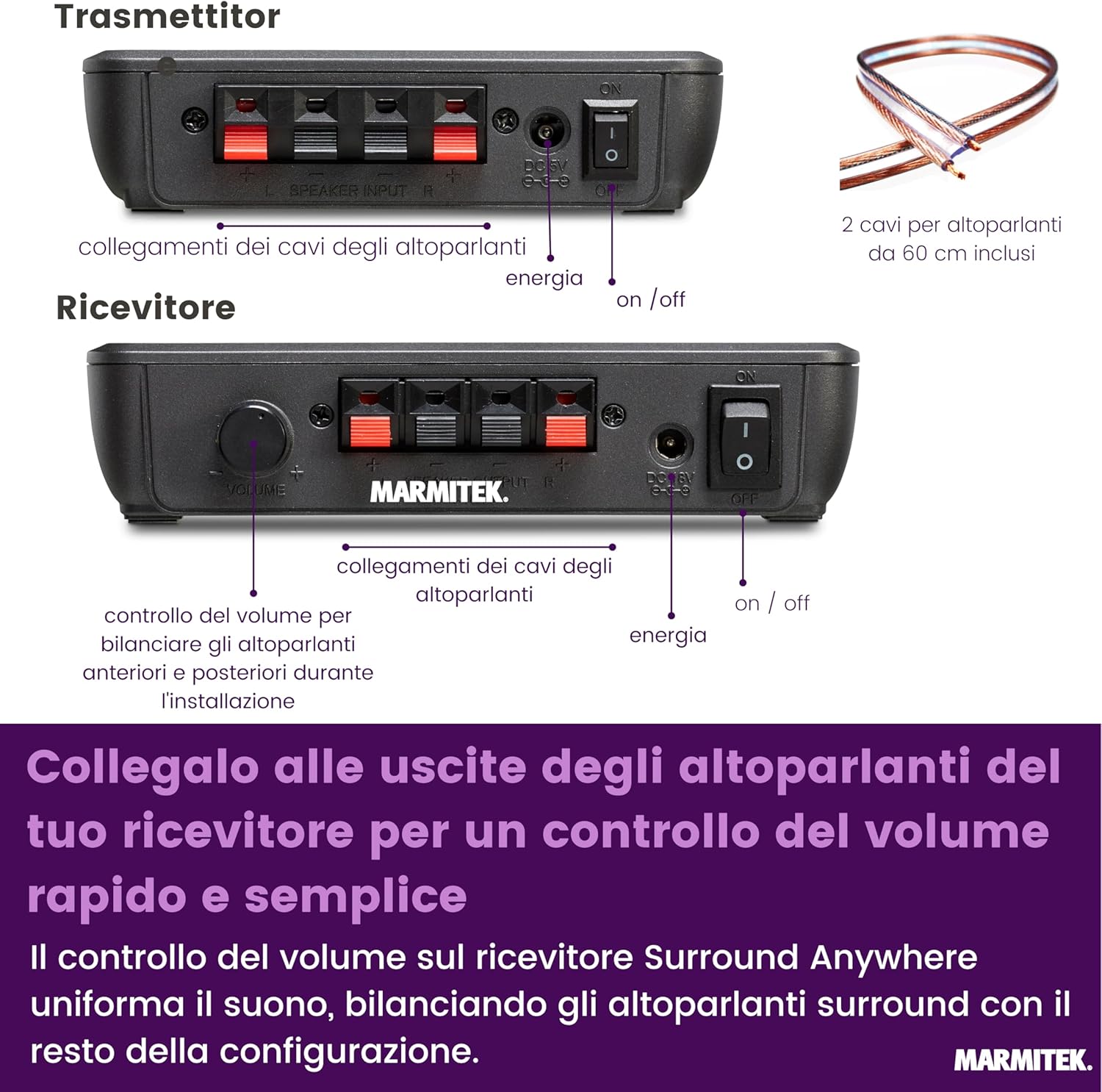
Image 5.1: Connection diagram for the transmitter and receiver units, showing speaker cable and power connections.

Aworan 5.2: A sunmọ-soke view of the speaker input/output terminals and the volume control knob on the receiver unit.
6. Awọn ilana Iṣiṣẹ
Once set up, the Marmitek Surround Anywhere 221 operates largely automatically. Here are some operational considerations:
- Titan/Apapa: The units can be turned on or off using their respective switches. For optimal convenience, you can connect them to switched power outlets that turn on with your AV receiver.
- Volume Synchronization: When connected to the speaker outputs of your AV receiver, the volume of the wireless rear speakers will automatically adjust with the main volume control of your AV system.
- Fine-tuning Volume: Use the volume knob on the receiver unit to fine-tune the balance of the rear speakers relative to the front speakers. This allows you to achieve your preferred surround sound immersion.
- Multiple Sets: If using multiple Surround Anywhere 221 kits in the same area, the secure pairing ensures that each transmitter communicates only with its paired receiver, preventing interference.

Image 6.1: The volume control knob on the receiver, used for balancing rear speaker levels.

Image 6.2: The master volume control on a typical AV receiver, which will synchronize with the wireless rear speakers.
7. Itọju
The Marmitek Surround Anywhere 221 requires minimal maintenance:
- Ninu: Use a soft, dry cloth to clean the units. Do not use liquid cleaners or abrasive materials.
- Afẹfẹ: Ensure the units have adequate ventilation to prevent overheating. Do not cover them or place them in enclosed spaces.
- Iṣakoso USB: Lokọọkan ṣayẹwo gbogbo awọn asopọ okun lati rii daju pe wọn wa ni aabo ati laisi ibajẹ.
8. Laasigbotitusita
If you encounter issues with your Surround Anywhere 221, try the following:
| Isoro | Owun to le Fa | Ojutu |
|---|---|---|
| Kò sí ohùn láti inú àwọn agbohunsoke ẹ̀yìn |
|
|
| Sound interference or dropouts |
|
|
| Rear speaker volume too loud/quiet |
|
|
9. Awọn pato
| Ẹya ara ẹrọ | Ẹ̀kúnrẹ́rẹ́ |
|---|---|
| Brand | Marmitek |
| Nọmba awoṣe | 08200 |
| Asopọmọra Technology | Alailowaya (2.4 GHz) |
| Orisun agbara | Okun Itanna |
| Ohun elo | Ṣiṣu |
| Awọn Iwọn Agbekalẹ (L x W x H) | 120 x 82 x 30 mm (isunmọ.) |
| Ìwọ̀n Olùgbà (L x W x H) | 155 x 110 x 35 mm (isunmọ.) |
| Iwọn Ọja | 200 grams (total, approx.) |
| Amplifier Output (Receiver) | 2 x 25 W RMS (2 x 50 W musical power) |
| Pataki Ẹya | Uncompressed digital transmission for high-quality sound |

Image 9.1: Dimensions of the Marmitek Surround Anywhere 221 transmitter and receiver units.
10. Atilẹyin ọja ati Support
Marmitek products are designed and manufactured to the highest standards. This product is covered by a standard manufacturer's warranty. For specific warranty terms and conditions, please refer to the documentation provided with your purchase or visit the official Marmitek webojula.
For technical support, troubleshooting assistance, or warranty claims, please contact Marmitek customer service or your retailer. Contact information can typically be found on the Marmitek webaaye tabi ninu apoti ọja rẹ.

Image 10.1: "Dutch Quality EU European Standards" badge, indicating product quality and compliance.


