Ọrọ Iṣaaju
The Logitech G603 Lightspeed Wireless Gaming Mouse is engineered to deliver exceptional performance and reliability for gamers. Featuring the revolutionary HERO optical sensor and Lightspeed wireless technology, it provides precise tracking and ultra-fast response times. The G603 also boasts an impressive battery life, offering flexibility with its dual connectivity options (Lightspeed and Bluetooth) and customizable settings through Logitech G HUB software.
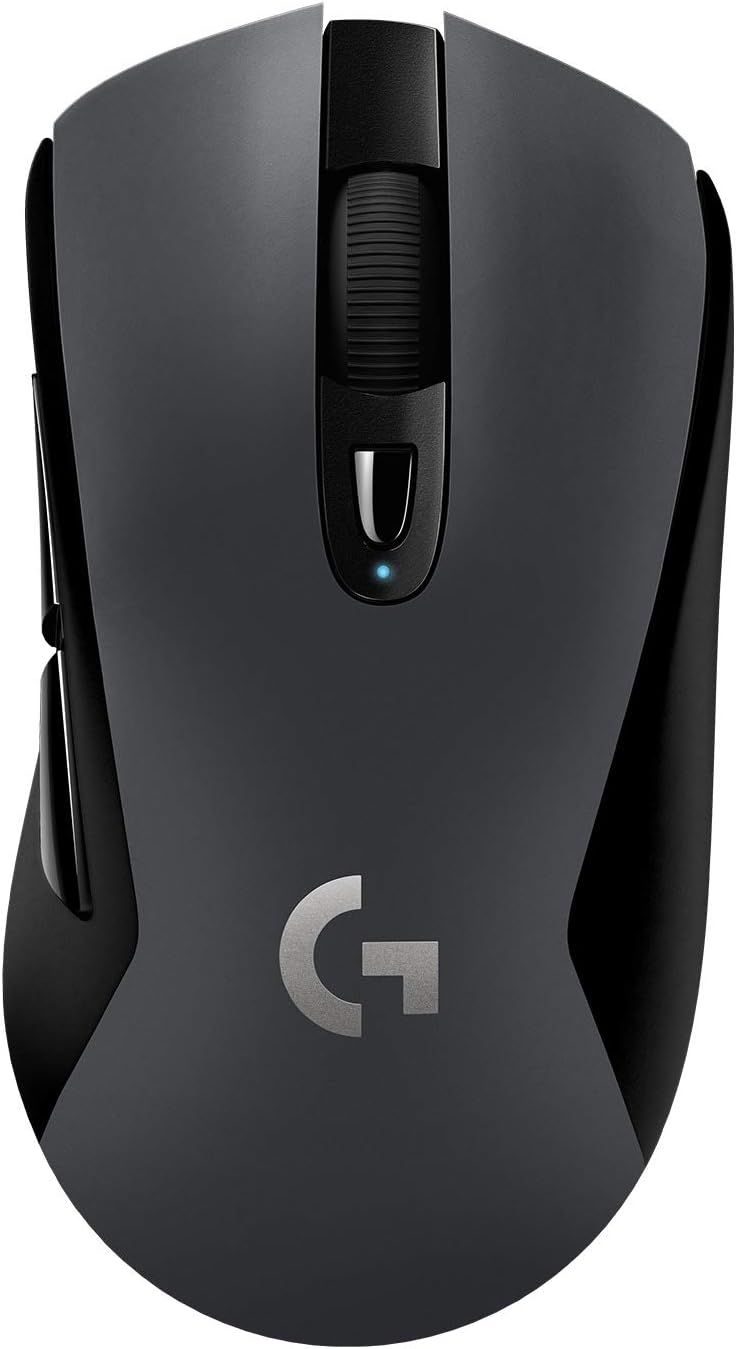
The Logitech G603 Lightspeed Wireless Gaming Mouse, showcasing its ergonomic design and central scroll wheel.
Ṣeto
Package Awọn akoonu
Ṣaaju ki o to bẹrẹ, rii daju pe gbogbo awọn paati wa ninu package:
- Logitech G603 Alailowaya Awọn ere Awọn Asin
- Lightspeed USB Nano Receiver
- USB Receiver Extender Cable
- Awọn batiri AA 2 (ti fi sii tẹlẹ tabi pẹlu lọtọ)

Illustration of the Logitech G603 mouse and its included accessories: two AA batteries, a Lightspeed USB nano receiver, and a receiver extender cable.
Fifi sori batiri
The G603 mouse operates on two AA batteries. You can use one or two batteries to adjust the mouse's weight and balance to your preference. The mouse functions normally with a single battery.
- Rọra gbe ideri oke ti Asin lati ẹhin lati fi aaye batiri han.
- Insert one or two AA batteries, ensuring correct polarity (+/-).
- Rọpo ideri oke, aligning daradara titi ti o fi tẹ sinu aaye.

The removable top cover of the G603 mouse, showing the internal compartment for battery and USB receiver storage.
Asopọmọra
The G603 offers dual connectivity options: Lightspeed wireless and Bluetooth.
- Lightspeed Wireless: For optimal gaming performance, connect via the Lightspeed USB Nano Receiver. Plug the receiver into an available USB port on your computer. For best signal, use the included extender cable to position the receiver closer to the mouse.
- Bluetooth: For general use or connecting to multiple devices, switch the mouse to Bluetooth mode using the switch on the bottom of the mouse. Pair it with your Bluetooth-enabled device through your device's Bluetooth settings.

The bottom of the G603 mouse, highlighting the Lightspeed and Bluetooth connectivity indicators and the mode switch.
Ṣiṣẹ Asin
Power Modes (HI/LO)
The G603 features a power mode switch on its underside, allowing you to toggle between HI (High) and LO (Low) modes, or turn the mouse OFF.
- Ipo HI: Provides peak performance with a 1ms report rate, ideal for gaming. Offers up to 500 hours of continuous gaming on two AA batteries.
- Ipo LO: Extends battery life with an 8ms report rate, suitable for general desktop use. Can last up to 18 months on two AA batteries.

Close-up of the G603's power mode switch, indicating HI (1ms), LO (8ms), and OFF settings.
Programmable Buttons and DPI Shifting
The G603 comes with 6 programmable buttons, including on-the-fly DPI shifting. You can customize these buttons and up to 5 sensitivity settings using the Logitech G HUB software.
- Bọtini DPI: Located below the scroll wheel, this button allows you to cycle through your pre-configured DPI settings.
- Logitech G HUB: Download and install Logitech G HUB from the official Logitech website to unlock full customization. You can assign custom commands, configure macros, and store configuration profiles directly on the mouse's onboard memory.

A alaye view of the G603's scroll wheel and the DPI cycle button located just below it.
Atọka Ipo Batiri
The LED status indicator on the mouse and the Logitech G HUB software will notify you when the battery level reaches 15%, allowing you to replace batteries before they run out during critical moments.

Visual representation of the G603's extended battery life, indicating up to 500 hours of use with two AA batteries.
Itoju
Ninu
To maintain optimal performance and appearance, regularly clean your G603 mouse:
- Lo aṣọ rirọ, tí kò ní àwọ̀ láti nu ìta eku náà.
- Fun idoti alagidi, die-die dampen awọn asọ pẹlu omi tabi kan ìwọnba ninu ojutu. Yẹra fun awọn kẹmika lile.
- Use a can of compressed air to clear dust and debris from around the scroll wheel and buttons.
- Ensure the optical sensor on the bottom is clean and free of obstructions.
Itọju Batiri
To maximize battery life and prevent issues:
- Remove batteries if the mouse will not be used for an extended period.
- Lo ipilẹ to gaju tabi awọn batiri AA gbigba agbara.
- Tọju awọn batiri ni itura, ibi gbigbẹ.
Laasigbotitusita
If you encounter issues with your Logitech G603 mouse, try the following solutions:
- Asin ko dahun:
- Check the power mode switch on the bottom of the mouse and ensure it is set to HI or LO, not OFF.
- Verify that the batteries are correctly installed and have sufficient charge. Replace if necessary.
- If using Lightspeed, ensure the USB Nano Receiver is securely plugged into a working USB port. Try a different USB port.
- If using Bluetooth, ensure Bluetooth is enabled on your device and the mouse is properly paired.
- Asopọmọra tabi aisun:
- Reduce the distance between the mouse and the receiver/device.
- Use the USB extender cable to bring the Lightspeed receiver closer to the mouse.
- Move the mouse away from other wireless devices that might cause interference (e.g., Wi-Fi routers, cordless phones).
- DPI or button customization not working:
- Ensure Logitech G HUB software is installed and up to date.
- Check if the mouse is recognized in G HUB and that your profiles ti nṣiṣe lọwọ.
- Mouse cursor erratic or not tracking:
- Nu sensọ opitika lori isalẹ ti Asin.
- Rí i dájú pé o ń lo àsíìsì náà lórí ojú ibi tó yẹ (fún àpẹẹrẹ, àsíìsì). Yẹra fún àwọn ojú ibi tó ń tàn yanranyanran tàbí tó ń hàn gbangba.
Awọn pato
| Ẹya ara ẹrọ | Ẹ̀kúnrẹ́rẹ́ |
|---|---|
| Brand | Logitech |
| Orukọ awoṣe | Logitech G603 |
| Nọmba Awoṣe Nkan | 910-005103 |
| Asopọmọra Technology | Bluetooth, USB (Lightspeed Wireless) |
| Imọ-ẹrọ Iwari išipopada | Optical (HERO Sensor) |
| Iwọn DPI | 200 si 12,000 DPI |
| Report Rate (Lightspeed) | 1 ms (HI Mode) |
| Report Rate (LO Mode) | 8 ms |
| Nọmba ti Awọn bọtini | 6 (Ṣiṣe eto) |
| Orisun agbara | Agbara Batiri (batiri AA 2) |
| Battery Life (HI Mode) | Titi di wakati 500 |
| Battery Life (LO Mode) | Titi di oṣu mẹfa |
| Awọn iwọn (L x W x H) | 12.4 x 6.8 x 4.3 cm |
| Iwọn Nkan | 88 g (mouse only, without batteries) |
| Àwọ̀ | Dudu |
| Hardware Platform | PC |
| Eto isesise | Windows 7 ati nigbamii |

Diagram illustrating the approximate dimensions of the Logitech G603 mouse.
Atilẹyin ọja ati Support
Awọn ọja Logitech ti ṣelọpọ si awọn iṣedede didara ti o ga julọ. Fun alaye atilẹyin ọja, jọwọ tọka si kaadi atilẹyin ọja ti o wa pẹlu ọja rẹ tabi ṣabẹwo si atilẹyin Logitech osise webojula.
For further assistance, troubleshooting guides, and driver downloads (including Logitech G HUB), please visit the official Logitech Support page:


