1. Ifihan
O ṣeun fun riraasing the Ridgeway QS-J1205 Portable Trolley Speaker. This device is designed to provide high-quality audio with versatile connectivity options, including Bluetooth, USB, TF card, FM radio, and microphone/guitar inputs. Its portable design with a trolley handle and wheels makes it suitable for various indoor and outdoor activities. Please read this manual thoroughly before operating the speaker to ensure proper use and to maximize its performance and lifespan.
2. Awọn ilana aabo
- Orisun Agbara: Lo oluyipada agbara pàtó kan fun gbigba agbara. Rii daju pe voltage matches the speaker's requirements.
- Omi ati Ọrinrin: Do not expose the speaker to water, rain, or high humidity. This can cause electric shock or damage.
- Afẹfẹ: Má ṣe dí àwọn ihò afẹ́fẹ́. Rí i dájú pé afẹ́fẹ́ tó wà ní àyíká agbọ́hùnsọ̀ náà tó láti dènà kí ó má baà gbóná jù.
- Awọn orisun Ooru: Keep the speaker away from heat sources such as radiators, heat registers, stoves, or other heat-producing appliances.
- Ninu: Yọ agbara kuro ki o to nu. Lo aṣọ gbigbẹ ti o rọ. Maṣe lo awọn afọmọ omi tabi awọn afọmọ aerosol.
- Ṣiṣẹ: Maṣe gbiyanju lati ṣe iṣẹ ọja yii funrararẹ. Tọkasi gbogbo iṣẹ si awọn oṣiṣẹ iṣẹ ti o peye. Ṣiṣii ẹrọ naa le fi ọ han si voltages tabi awọn ewu miiran.
- Batiri: The speaker contains a rechargeable battery. Do not dispose of the battery in fire. Follow local regulations for battery disposal.
- Ibi: Gbé agbọ́hùnsọ̀ náà sí orí ilẹ̀ tí ó dúró ṣinṣin, tí ó tẹ́jú kí ó má baà jábọ́.
- Iwọn didun: Yago fun gbigbọ gigun ni awọn ipele iwọn didun giga lati ṣe idiwọ ibajẹ igbọran.
3. Package Awọn akoonu
Jọ̀wọ́ ṣàyẹ̀wò ohun tó wà nínú àpótí náà nígbà tí o bá ń ṣí àpótí náà láti rí i dájú pé gbogbo àwọn ohun náà wà níbẹ̀ tí wọn kò sì bàjẹ́:
- Ridgeway QS-J1205 Portable Trolley Speaker
- Gbohungbo onina
- Isakoṣo latọna jijin
- Audio Cable (RCA to 3.5mm)
- Power Adapter / Ngba agbara Cable
- Ilana itọnisọna

Aworan 3.1: Contents of the Ridgeway QS-J1205 speaker package, including the speaker, wired microphone, remote control, audio cables, and instruction manual.
4. Awọn ẹya Ọja
- Ijade Olohun ti o lagbara: 40W portable speaker with a 12-inch woofer for clear and robust sound.
- Awọn ọna Sisisẹsẹhin lọpọlọpọ: Bluetooth, USB, TF Card, FM Radio, AUX Input.
- Microphone & Guitar Inputs: Dedicated 1/4" inputs with individual volume controls for karaoke or live performances.
- Awọn iṣakoso oludogba: Adjustable Bass and Treble for customized sound.
- Ifihan Imọlẹ LED: Integrated LED lights that synchronize with music.
- Batiri gbigba agbara: Long-lasting battery provides up to 4 hours of music playback.
- Gbigbe: Extendable handle and rolling wheels for easy transport.
- Ikole ti o tọ: Made with robust ABS nylon fiber for heavy-duty use.
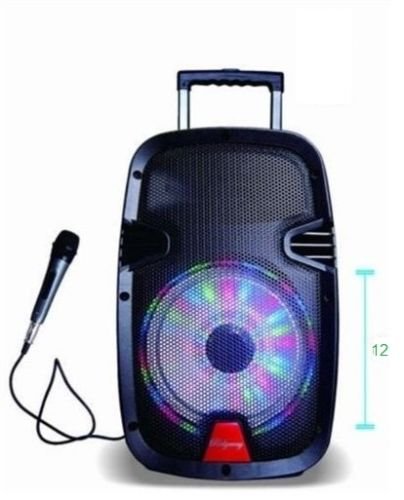
Aworan 4.1: Iwaju view of the Ridgeway QS-J1205 Portable Trolley Speaker, showcasing its design and portability features.
5. Awọn iṣakoso ati Awọn isopọ
Familiarize yourself with the control panel located on the rear of the speaker:
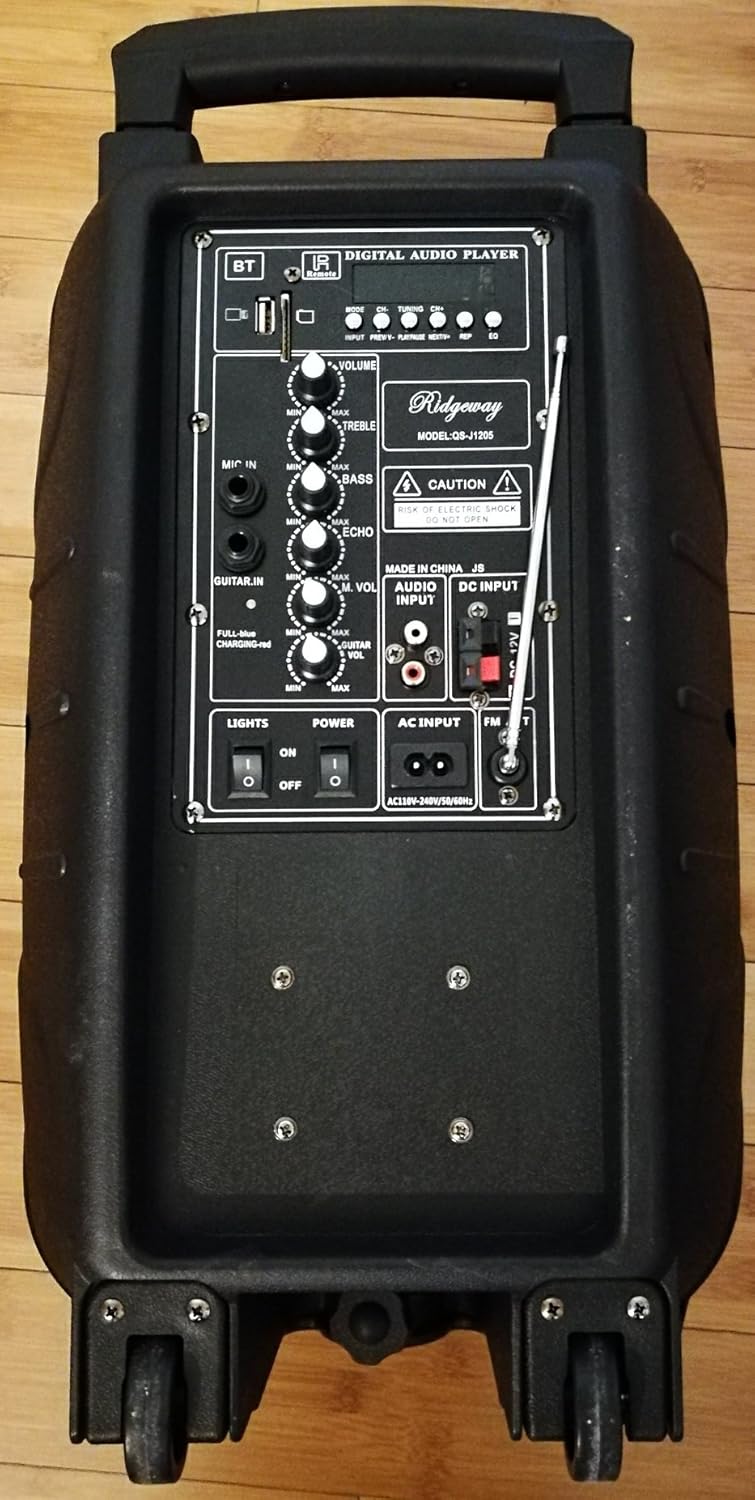
Aworan 5.1: Rear control panel of the Ridgeway QS-J1205 speaker, showing various inputs, outputs, and control knobs.
- Àwọn Ìṣàkóso Ohun Ohùn Oní-nọ́ńbà:
- Ipo: Àwọn ìyípadà láàrín Bluetooth, FM Radio, USB, TF Card, àti AUX modes.
- PREV/CH-: Short press for previous track/station; long press for fast rewind (USB/TF).
- SERE/SINMI: Play/pause music; long press for TWS pairing (Bluetooth).
- Next/CH+: Short press for next track/station; long press for fast forward (USB/TF).
- Gba: Record function (requires USB/TF and microphone).
- Tun: Repeats current track or all tracks (USB/TF).
- Ibudo USB: Fun awọn awakọ filasi USB.
- Iho Kaadi TF: For TF (MicroSD) cards.
- Awọn iṣakoso iwọn didun:
- IDAGBASOKE: Master volume control for all audio output.
- TẸRẸ: Adjusts high-frequency sound.
- Mimọ: Adjusts low-frequency sound.
- MIC VOL: Ṣe atunṣe iwọn didun gbohungbohun ti a ti sopọ.
- ECHO: Ṣe atunṣe ipa iwoyi fun gbohungbohun.
- GUITAR VOL: Ṣe atunṣe iwọn didun ti gita ti a ti sopọ.
- Awọn igbewọle/Awọn igbejade:
- MIC NI: 1/4" input for wired microphone.
- GUITAR NI: 1/4" input for guitar.
- AUDIO INPUT (AUX): RCA stereo input for external audio devices.
- ÀKÚN DC: 12V DC input for external power or charging.
- AC igbewọle: AC110V-240V/50-60Hz input for main power and charging.
- Awọn iyipada:
- LIGHTS ON/OFF: Controls the LED light display.
- AGBARA ON/PA: Main power switch for the speaker.
- Eriali FM: Extendable antenna for improved FM radio reception.
6. Eto
6.1 Gbigba agbara akọkọ
Before first use, fully charge the speaker's internal battery. Connect the provided power adapter to the AC INPUT on the rear panel and plug it into a wall outlet. The charging indicator light (if present, usually red during charging and green when full) will illuminate. Charging typically takes 4-6 hours. The speaker can be used while charging.
6.2 Titan / Pa a
Wa awọn AGBARA PA/PA switch on the rear panel. Flip it to the "ON" position to power on the speaker. Flip it to "OFF" to power off the speaker.
6.3 Positioning the Speaker
Place the speaker on a stable, flat surface. For optimal sound projection, position it in an open area. Use the trolley handle and wheels for easy transportation.
7. Awọn ilana Iṣiṣẹ
7.1 Ipo Bluetooth
- Power on the speaker. The speaker will automatically enter Bluetooth mode or you can press the MODE button until "Bluetooth" is announced or displayed.
- Mu Bluetooth ṣiṣẹ lori ẹrọ alagbeka rẹ (foonuiyara, tabulẹti, ati bẹbẹ lọ).
- Wa fun available Bluetooth devices. You should find "QS-J1205" or "Ridgeway Speaker" in the list.
- Yan agbọrọsọ tí o fẹ́ so pọ̀. Nígbà tí o bá so pọ̀, o máa gbọ́ ohùn ìjẹ́rìísí kan.
- You can now play music from your device through the speaker. Use the Iwọn didun knob on the speaker and your device's volume controls to adjust the sound level.
- Lo awọn PREV/CH-, ERE/SINMI, ati Next/CH+ buttons on the speaker or remote control to manage playback.
7.2 USB / TF Kaadi Ipo
- Fi okun filasi USB sinu Ibudo USB or a TF (MicroSD) card into the Iho TF Kaadi. Ensure the card is inserted correctly.
- The speaker will automatically switch to USB or TF card mode and begin playing music. If not, press the MODE button until the correct mode is selected.
- Lo awọn PREV/CH-, ERE/SINMI, ati Next/CH+ awọn bọtini lati ṣakoso ṣiṣiṣẹsẹhin.
- Tẹ awọn Tun bọ́tìnì láti yípo nípasẹ̀ àwọn ipò ìtúnṣe (fún àpẹẹrẹ, tún ọ̀kan ṣe, tún gbogbo rẹ̀ ṣe).
7.3 FM Redio Ipo
- Extend the FM antenna on the rear panel for better reception.
- Tẹ awọn MODE button until "FM Radio" is announced or displayed.
- Láti ṣe àyẹ̀wò láìfọwọ́kàn àti láti fi àwọn ibùdó tó wà pamọ́, tẹ ibi tí o ti lè ṣe àyẹ̀wò náà fún ìgbà pípẹ́ ERE/SINMI bọtini. Agbọrọsọ yoo ṣayẹwo ati tọju awọn ibudo laifọwọyi.
- Lo awọn PREV/CH- ati Next/CH+ awọn bọtini lati lọ kiri nipasẹ awọn ibudo ti a fipamọ.
7.4 Ipo Input AUX
- So ẹ̀rọ ohùn ìta pọ̀ mọ́ ẹ̀rọ orin (fún àpẹẹrẹ, ẹ̀rọ orin MP3, kọ̀ǹpútà alágbèéká) mọ́ ODIO (AUX) using the provided RCA to 3.5mm audio cable.
- Tẹ awọn MODE button until "AUX" or "Audio Input" is announced or displayed.
- Play audio from your connected device. Adjust the volume using both the speaker's Iwọn didun knob and the external device's volume controls.
7.5 Gbohungbo ati gita awọn igbewọle
- So gbohungbohun onirin pọ mọ MIC INU jack or a guitar to the GUITAR IN jaki.
- Ṣatunṣe iwọn gbohungbohun nipa lilo awọn MIC vol koko.
- Adjust the guitar volume using the GUITAR VOL koko.
- Lo awọn ECHO knob to add an echo effect to the microphone.
- Rii daju oluwa Iwọn didun is set to an appropriate level.
7.6 LED imọlẹ
Yipada awọn INA / PA switch to "ON" to activate the integrated LED light display. The lights will move and change color with the music. Flip to "OFF" to disable them.
8. Ngba agbara si Batiri naa
The speaker is equipped with a built-in rechargeable battery. When the battery is low, the speaker may indicate this with an audible prompt or a flashing indicator light. To charge:
- So ohun ti nmu badọgba agbara pọ si AC INPUT lori ru nronu.
- Plug the adapter into a standard AC power outlet (110V-240V, 50/60Hz).
- Àmì ìgbóná náà yóò tànmọ́lẹ̀. Jẹ́ kí ó gba wákàtí méjì sí mẹ́ta kí ó tó lè gba agbára rẹ̀ dáadáa.
- Once fully charged, the indicator light may change color or turn off. Disconnect the charger when not needed to prolong battery life.
Akiyesi: The speaker can operate while charging, but it is recommended to fully charge it before initial use for optimal battery performance.
9. Itọju
- Ninu: Lo aṣọ rírọrùn tí ó gbẹ láti nu ìta agbọ́rọ̀ náà. Má ṣe lo àwọn ohun ìfọṣọ, ìpara, tàbí àwọn ohun èlò ìfọṣọ.
- Ibi ipamọ: When not in use for extended periods, store the speaker in a cool, dry place. It is recommended to charge the battery every 3-6 months to maintain its health.
- Itọju Batiri: Avoid completely draining the battery frequently. Charge it before it runs out completely to extend its lifespan.
- Yago fun Awọn iwọn otutu to gaju: Do not expose the speaker to extreme heat or cold, as this can damage internal components and the battery.
10. Laasigbotitusita
| Isoro | Owun to le Fa | Ojutu |
|---|---|---|
| Agbọrọsọ ko ni agbara lori. | Batiri ti wa ni imugbẹ. Yipada agbara wa ni pipa. Adaparọ agbara ko sopọ mọ daradara. |
Gba agbara si batiri. Ensure the POWER switch is in the "ON" position. Ṣayẹwo awọn asopọ okun agbara. |
| Ko si ohun. | Iwọn didun ti lọ silẹ pupọ. Ipo titẹ sii ti ko tọ ti yan. Device not properly connected/paired. |
Increase the master VOLUME and source device volume. Press MODE to select the correct input. Reconnect/re-pair the device. Check cable connections for AUX/Mic/Guitar. |
| Asopọ Bluetooth kuna. | Speaker not in Bluetooth mode. Ẹ̀rọ náà jìnnà jù sí agbọ́hùnsọ̀. Speaker already paired with another device. |
Press MODE to select Bluetooth. Gbé ẹ̀rọ rẹ sún mọ́ agbọ́hùnsọrọ̀ náà (láàrín mítà mẹ́wàá). Disconnect from other devices and try again. |
| Káàdì USB/TF kò ṣiṣẹ́. | Ti ko tọ file ọna kika. Kaadi/wakọ ko fi sii bi o ti tọ. Card/drive is corrupted or empty. |
Ṣe idaniloju ohun afetigbọ files wa ni awọn ọna kika ti a ṣe atilẹyin (fun apẹẹrẹ, MP3). Reinsert the USB drive or TF card. Try a different USB drive or TF card. |
| Gbigba redio FM ti ko dara. | A kò fẹ̀ antenna náà. Ailagbara ifihan agbara ni agbegbe. |
Fa eriali FM ni kikun. Gbìyànjú láti tún gbé agbọ́hùn tàbí eriali náà sí ipò mìíràn. |
11. Awọn pato
- Awoṣe: QS-J1205
- Agbara Ijade: 40W
- Iwọn Woofer: 12 inches (30.5 cm)
- Asopọmọra: Bluetooth, USB, TF Card, FM Radio, AUX (RCA), Microphone (1/4"), Guitar (1/4")
- Iṣagbewọle agbara: AC 110V-240V, 50/60Hz; DC 12V
- Igbesi aye batiri: Up to 4 hours (music playback only)
- Awọn iwọn (L x W x H): Isunmọ 30.5 x 25.4 x 50.8 cm (12 x 10 x 20 inches)
- Ìwúwo: Nǹkan bí 0.28 kg (0.62 lbs) - Note: This weight seems unusually low for a speaker of this size. Please refer to product packaging for accurate weight.
- Awọn ẹrọ ibaramu: Laptop, Smartphone, MP3 Players, etc.
- UPC: 670739021470
12. Atilẹyin ọja ati Support
Ridgeway products are designed for reliability and performance. For specific warranty information, please refer to the warranty card included in your product packaging or contact your retailer. Keep your purchase receipt as proof of purchase for any warranty claims.
For technical support or inquiries, please contact the customer service provided by your retailer or visit the official Ridgeway webojula fun alaye olubasọrọ.


