Ọrọ Iṣaaju
O ṣeun fun riraasing the Ridgeway QS-1037B Bluetooth Speaker. This manual provides important information regarding the setup, operation, maintenance, and troubleshooting of your new speaker. Please read this manual thoroughly before using the product to ensure proper function and to extend its lifespan.
The Ridgeway QS-1037B is a portable and powerful amplified speaker designed to enhance your audio experience with its robust sound, versatile connectivity, and dynamic LED lighting. It features a 10-inch subwoofer, Bluetooth connectivity, USB and SD card readers, FM radio, and a karaoke function with an included microphone.
Package Awọn akoonu
Jọwọ ṣayẹwo package fun awọn nkan wọnyi:
- Ridgeway QS-1037B Bluetooth Speaker
- Isakoṣo latọna jijin
- Gbohungbohun
- P2/P2 Audio Cable
- Internal Battery Charging Cable
- Afowoyi Olumulo (iwe-ipamọ yii)
Ọja Pariview

Nọmba 1: Apa view of the Ridgeway QS-1037B Bluetooth Speaker, showcasing its robust design and side control panel.
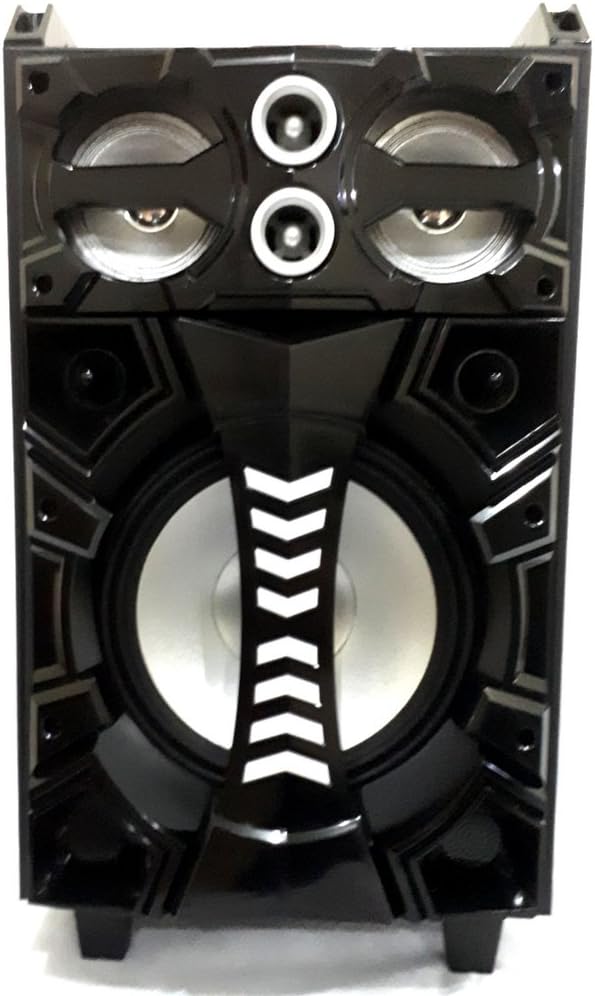
Nọmba 2: Iwaju view of the Ridgeway QS-1037B Bluetooth Speaker, highlighting the 10-inch subwoofer and dual tweeters.

Nọmba 3: Oke view of the speaker, showing the integrated LED globe for party lighting effects.

Nọmba 4: Iwaju view of the speaker with its dynamic LED lights illuminated, showcasing various color patterns.
Ṣeto
1. Gbigba agbara Agbọrọsọ
Before first use, fully charge the speaker's internal battery. Connect the provided charging cable to the speaker's charging port and plug the other end into a suitable power outlet. The charging indicator light will show the charging status. A full charge typically takes approximately 3 hours.
2. Ifiweranṣẹ
Place the speaker on a stable, flat surface. It can be used as a table-mounted or floor-standing unit. Ensure there is adequate ventilation around the speaker and avoid placing it near heat sources or in direct sunlight.
3. Agbara lori / Paa
Locate the power switch on the speaker's control panel. Flip the switch to the "ON" position to power on the speaker. You will hear an audible prompt indicating it is ready for use. To power off, flip the switch to the "OFF" position.
Awọn ilana Iṣiṣẹ
1. Ipo Bluetooth
- Power on the speaker. It will automatically enter Bluetooth pairing mode, indicated by a flashing LED or audible prompt.
- Lori ẹrọ alagbeka rẹ (foonuiyara, tabulẹti, ati bẹbẹ lọ), mu Bluetooth ṣiṣẹ ki o wa awọn ẹrọ to wa.
- Select "Ridgeway QS-1037B" (or similar name) from the list of devices.
- Once paired, the speaker will confirm with an audible sound, and the LED indicator will stop flashing.
- O le mu ohun ṣiṣẹ bayi lati ẹrọ rẹ nipasẹ agbọrọsọ.
2. USB / SD Kaadi Sisisẹsẹhin
- Insert a USB flash drive or SD card into the corresponding slot on the speaker's control panel.
- The speaker will automatically detect the media and begin playing audio files.
- Use the control buttons on the speaker or the remote control to navigate tracks (play/pause, next/previous).
3. Ipo Redio FM
- Press the "Mode" button on the speaker or remote control until you hear the FM radio prompt.
- Press and hold the "Play/Pause" button to initiate an automatic station scan. The speaker will scan and save available FM stations.
- Use the "Next/Previous" buttons to switch between saved stations.
4. Iṣẹ́ Karaoke
- Connect the provided microphone to the microphone input jack on the speaker.
- Adjust the microphone volume using the dedicated knob on the control panel.
- Play your desired music through Bluetooth, USB, or SD card, and sing along!
5. Iṣakoso Ina LED
The speaker features dynamic front LEDs and an LED globe. Use the dedicated LED control button on the speaker or remote control to cycle through different lighting modes or turn them off.
6. Latọna Iṣakoso Lilo
The included remote control allows for convenient operation from a distance. It provides control over power, mode selection, volume, track navigation, FM radio functions, and LED lighting.
Itoju
- Ninu: Lo asọ ti o rọ, ti o gbẹ lati nu ita ti agbọrọsọ. Ma ṣe lo awọn afọmọ abrasive, waxes, tabi awọn nkanmimu.
- Ibi ipamọ: Nigbati o ko ba wa ni lilo fun awọn akoko ti o gbooro sii, tọju agbohunsoke si tutu, ibi gbigbẹ, kuro lati orun taara ati awọn iwọn otutu to gaju.
- Itọju Batiri: Láti mú kí batiri pẹ́ sí i, má ṣe jẹ́ kí batiri náà máa jáde dáadáa nígbà gbogbo. Gba agbára sí agbọ́hùnsọ̀pọ̀ déédéé, kódà bí kò bá tiẹ̀ jẹ́ pé a ń lò ó déédéé.
- Mimu: The speaker is portable but should be handled with care. Use the integrated strap and wheels for easy transport. Avoid dropping or subjecting the speaker to strong impacts.
Laasigbotitusita
| Isoro | Owun to le Fa | Ojutu |
|---|---|---|
| Ko si agbara | Batiri ti dinku; Yipada agbara wa ni pipa. | Charge the speaker; Ensure the power switch is in the "ON" position. |
| Ko si ohun | Iwọn didun kere ju; Ipo ti ko tọ ti yan; A ko so ẹrọ pọ mọ (Bluetooth). | Increase volume; Select the correct input mode (Bluetooth, USB, SD, FM); Re-pair Bluetooth device. |
| Bluetooth ko sopọ | Speaker is not in pairing mode; Device Bluetooth is off; Too far from speaker. | Rii daju pe agbọrọsọ wa ni ipo sisopọ; Tan Bluetooth lori ẹrọ rẹ; Gbe ohun elo jo si agbọrọsọ (laarin awọn mita 10). |
| USB/SD kaadi ko dun | Ti ko ni atilẹyin file ìṣètò; Ìròyìn tó ti bàjẹ́; Káàdì/wakọ̀ kò fi sí i dáadáa. | Ṣe idaniloju ohun afetigbọ files are in a supported format (e.g., MP3); Try a different USB drive/SD card; Re-insert the media securely. |
| Gbohungbohun ko ṣiṣẹ | Kò sí ìsopọ̀ mọ́ gbohùngbohùn; Ìwọ̀n gbohùngbohùn náà kéré jù. | Rí i dájú pé gbohungbohun náà wà ní ààbò; Mu iwọn didun gbohungbohun pọ si. |
Awọn pato
| Awoṣe | QS-1037B |
| Agbọrọsọ Iru | Amplified Subwoofer Speaker |
| Subwoofer Opin | 10 inches (25.4 cm) |
| PMPO Output Wattage | 2000 Wattis |
| Agbara RMS | 120 Wattis |
| Asopọmọra | Bluetooth, USB, SD Card, FM Radio, P2/P2 AUX |
| Pataki Awọn ẹya ara ẹrọ | Front LED Lights, LED Globe, Karaoke Function, Portable (Strap & Wheels) |
| Orisun agbara | Ti abẹnu Batiri gbigba agbara |
| Akoko Gbigba agbara Batiri | Isunmọ. wakati meji 3 |
| Iwọn (D x W x H) | 32 cm x 34.5 cm x 61 cm (12.6 ni x 13.6 ni x 24 in) |
| Iwọn | 10 kg (22 lbs) |
| Àwọ̀ | Dudu |
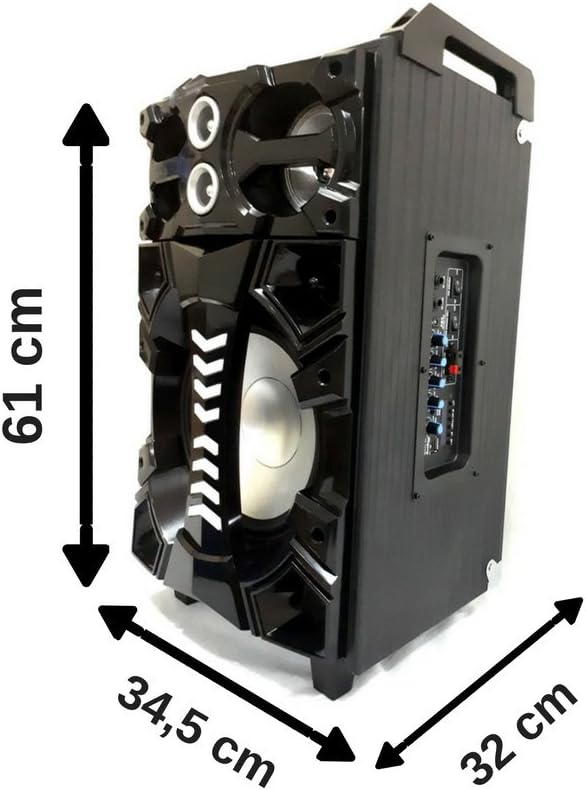
Nọmba 5: Dimensions of the Ridgeway QS-1037B speaker: 61 cm height, 34.5 cm width, and 32 cm depth.
Alaye atilẹyin ọja
The Ridgeway QS-1037B Bluetooth Speaker comes with a 6-osu factory atilẹyin ọja from the date of purchase. This warranty covers manufacturing defects and malfunctions under normal use. It does not cover damage caused by misuse, accidents, unauthorized modifications, or normal wear and tear.
Please retain your proof of purchase for warranty claims. For warranty service, contact Ridgeway customer support.
Onibara Support
For technical assistance, troubleshooting beyond this manual, or warranty inquiries, please contact Ridgeway customer support through their official webaaye tabi alaye olubasọrọ ti a pese pẹlu iwe rira rẹ.
For more information, visit the official Ridgeway webojula: www.ridgeway.com (Note: This is a placeholder link as no specific support link was provided in the product data).


