1. Ifihan
The MOOER Micro Preamp M013 Matchbox is a compact digital preamp pedal designed to accurately recreate the sound and feel of a Matchless amplifier. It features dual channels (Clean and Gain), a 3-band EQ, and an integrated cabinet simulator, making it suitable for direct recording, practice, or integration into a pedalboard setup.
2. Alaye Aabo
- Use only the specified 9V DC power adapter (center negative).
- Má ṣe fi ẹ̀rọ náà hàn sí omi, ọrinrin, tàbí àwọn iwọn otutu tó le koko.
- Yago fun sisọ tabi tẹri ẹsẹ si awọn ipa ti o lagbara.
- Ma ṣe gbiyanju lati ṣajọpọ tabi yi ẹyọ naa pada.
- Jeki kuro ni arọwọto awọn ọmọde.
3. Ọja Ipariview
The M013 Matchbox pedal features a robust metal casing and intuitive controls for shaping your tone.

olusin 1: Top-isalẹ view of the MOOER Micro Preamp M013 Matchbox pedal, illustrating the layout of controls and jacks.
Awọn iṣakoso:
- VOL (Iwọn didun): Adjusts the overall output level of the selected channel.
- TRE (Treble): Ṣe iṣakoso idahun igbohunsafẹfẹ-giga.
- MID (Middle): Awọn iṣakoso idahun aarin-igbohunsafẹfẹ.
- BASS (Bass): Ó ń ṣàkóso ìdáhùn ìgbohùn-ì ...
- Anfani: Adjusts the amount of overdrive/distortion for the selected channel.
- CH/CAB Switch: This toggle switch has two functions:
- In normal operation, it switches between the Clean and Gain channels.
- When holding down the footswitch, it toggles the cabinet simulator on/off.
- Ẹsẹ ẹlẹsẹ: Toggles between the two channels (Clean/Gain) or bypasses the pedal.
Awọn isopọ:

Figure 2: Input Jack (left side)

Figure 3: Output Jack (right side)
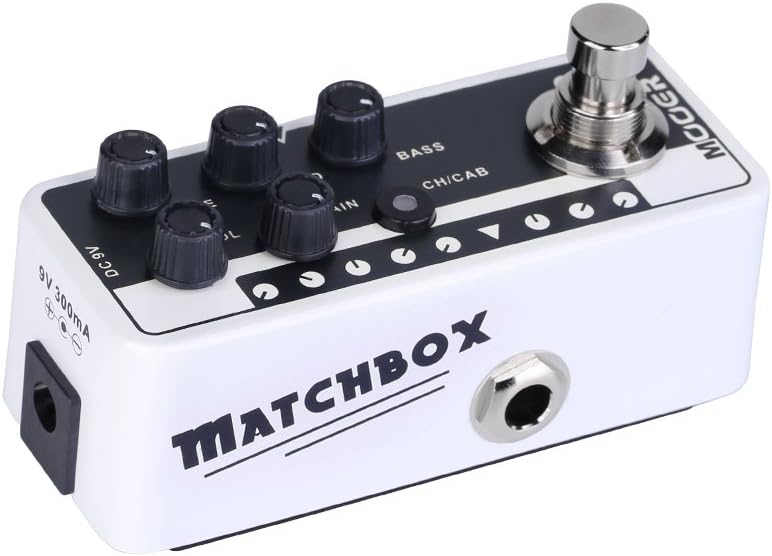
Figure 4: DC 9V Power Input
- Jack Input: Connect your guitar or other instrument here.
- O wu Jack: Sopọ si rẹ amplifier, alapọpo, tabi wiwo ohun.
- DC 9V: Power input for a 9V DC (center negative) power supply.
4. Eto
- So rẹ gita si awọn Jack igbewọle on the right side of the pedal.
- Sopọ awọn O wu Jack on the left side of the pedal to your amplifier's input, a mixer, or an audio interface.
- Connect a 9V DC (center negative) power adapter to the DC 9V igbewọle.
- Rii daju pe gbogbo awọn asopọ wa ni aabo ṣaaju ṣiṣe agbara lori rẹ amplifier tabi iwe eto.
5. Awọn ilana Iṣiṣẹ
Aṣayan ikanni:
The M013 Matchbox offers two distinct channels: Clean and Gain. Use the CH/CAB switch to toggle between these channels. The LED indicator will change color to show the active channel (typically blue for Clean, red for Gain).
Cabinet Simulator:
The integrated cabinet simulator can be toggled on or off. To activate or deactivate the cabinet simulator, press and hold the Ẹsẹ ẹlẹsẹ for approximately 1 second. The LED will flash to indicate the change in status.
Ṣiṣeto Ohun orin:
Ṣatunṣe awọn VOL, TRE, Àárín, Bass, ati JERE knobs to achieve your desired tone for each channel. Experiment with different settings to explore the full range of sounds this pedal can produce.
Iṣẹ-ṣiṣe Footswitch:
A quick press of the Ẹsẹ ẹlẹsẹ will toggle between the currently selected channel and bypass mode. The LED will indicate whether the pedal is active or bypassed.
Fidio Afihan:
Video 1: Official MOOER demonstration of the Micro Preamp M013 Matchbox, showcasing both Clean and Gain channels with and without cabinet simulation. This video provides examples of the pedal's tonal capabilities.
6. Itọju
- Clean the pedal with a soft, dry cloth. Do not use abrasive cleaners or solvents.
- Store the pedal in a dry environment away from direct sunlight and extreme temperatures.
- Regularly check cable connections for wear and tear.
7. Laasigbotitusita
Ko si Agbara:
- Ensure the 9V DC power adapter is correctly connected and functioning.
- Rii daju pe iṣan agbara n ṣiṣẹ.
Ko si Ohun:
- Ṣàyẹ̀wò gbogbo àwọn ìsopọ̀ okùn (gítà sí ìtẹ̀síwájú, ìjáde sí amp/mixer).
- Ensure the pedal is not in bypass mode (check LED indicator).
- Verify that the volume knobs on the pedal and your amplifier are turned up.
- Test with different cables and a different power supply if possible.
Ariwo/Hum ti aifẹ:
- Ensure you are using a regulated 9V DC (center negative) power supply. Unregulated power supplies can introduce noise.
- Check for ground loops by trying different power outlets or isolating the pedal's power.
- Keep the pedal away from other electronic devices that may cause interference.
8. Awọn pato
- Ìwọ̀n Nkan: 5.8 iwon (165 Giramu)
- Awọn iwọn ọja: 3.58 x 1.26 x 1.42 inches
- Orisun Agbara: Okun Itanna
- Voltage: 9 Volts DC
- Ijade Wattage: 30 Watts (referring to the amp model it simulates, not the pedal's power output)
- Orisi Asopọmọra: 6.35mm Jack
- Awọn ẹrọ ibaramu: Gita
- Àwọ̀: Dudu
9. Atilẹyin ọja ati Support
For warranty information and technical support, please refer to the official MOOER website or contact your local dealer. Keep your purchase receipt as proof of purchase for any warranty claims.


