Ọrọ Iṣaaju
O ṣeun fun riraasing the VONYX SPX-PA9210 Portable PA System. This manual provides essential information for the safe and efficient operation of your device. Please read it thoroughly before use and retain it for future reference.
Awọn Itọsọna Aabo
- Ka gbogbo awọn ilana ni pẹkipẹki ṣaaju ṣiṣe ẹrọ naa.
- Pa ẹrọ naa mọ kuro ninu omi, ọrinrin, ati awọn iwọn otutu to lagbara.
- Maṣe ṣii casing; tọka gbogbo iṣẹ si oṣiṣẹ ti o peye.
- Lo oluyipada agbara pàtó kan fun gbigba agbara.
- Rii daju pe fentilesonu to dara lati ṣe idiwọ igbona.
- Yago fun ifihan pẹ si awọn ipele iwọn didun giga lati ṣe idiwọ ibajẹ igbọran.
Package Awọn akoonu
Jẹrisi pe gbogbo awọn ohun kan wa ninu package:
- VONYX SPX-PA9210 Portable PA System Unit
- 2 x UHF Alailowaya Microphones
- Power Adapter / Ngba agbara Cable
- Afowoyi Olumulo (iwe-ipamọ yii)
Ọja Pariview
The VONYX SPX-PA9210 is a portable PA system designed for various audio applications. It features integrated speakers, media playback options, and wireless microphones for versatile use.
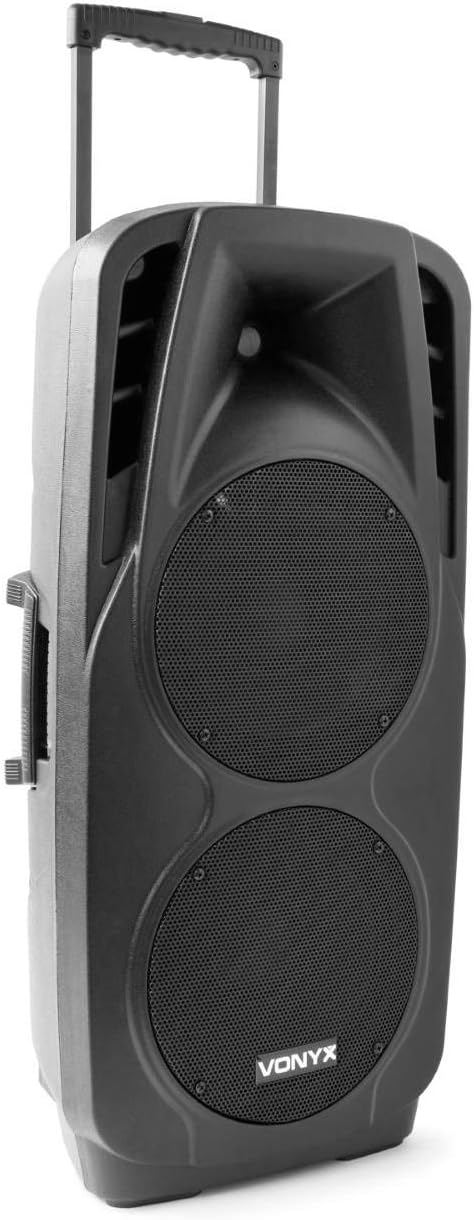
An image showing the VONYX SPX-PA9210 portable PA system. It features a black casing, two large speaker grilles on the front, and a retractable handle at the top for easy transport. A side handle is also visible.
Awọn ẹya pataki:
- Integrated 2x 10-inch speakers with titanium tweeter controller.
- Built-in media player with USB and SD/MMC card slots.
- Asopọmọra Bluetooth fun sisanwọle ohun alailowaya.
- High-performance 12V/7A rechargeable battery for 4-6 hours of autonomy.
- Two UHF wireless microphones with up to 50m range.
- Integrated trolley with telescopic handle and wheels for portability.
- LCD screen for media information display.
Ṣeto
1. Gbigba agbara akọkọ
Before first use, fully charge the internal 12V/7A battery. Connect the provided power adapter to the charging port on the PA system and then to a suitable power outlet. The charging indicator will show the charging status. A full charge typically provides 4-6 hours of operation.
2. Agbara lori / Paa
- To power on the unit, locate the power switch (usually on the rear or control panel) and set it to the "ON" position.
- To power off, set the switch to the "OFF" position.
3. Ṣíṣeto Gbohungbohun
- Insert fresh batteries into the two UHF wireless microphones.
- Turn on the microphones. They should automatically connect to the PA system.
- Adjust the microphone volume on the PA system's control panel. The wireless range is up to 50 meters.
Awọn ilana Iṣiṣẹ
1. Media Playback (USB/SD/MMC)
- Insert a USB flash drive or an SD/MMC card into the corresponding slot on the control panel.
- The system will automatically detect the media and begin playback, or you may need to select the input source using the "Mode" button.
- Use the playback controls (Play/Pause, Next, Previous) on the control panel to manage your music.
- The LCD screen will display track information.
2. Sisopọ Bluetooth
- Press the "Mode" button on the PA system until "Mode" button on the PA system until "Bluetooth" is selected.
- Lori foonu alagbeka rẹ, tabulẹti, tabi ẹrọ Bluetooth miiran ti o ṣiṣẹ, mu Bluetooth ṣiṣẹ ki o wa awọn ẹrọ to wa.
- Select "VONYX SPX-PA9210" (or similar name) from the list to pair.
- Once paired, you can stream audio wirelessly from your device to the PA system.
3. Volume and Tone Controls
- Adjust the master volume knob to control the overall sound output.
- Separate volume controls are available for microphones and media playback.
- Use the bass and treble controls (if available) to adjust the tone of the audio.
Itoju
1. Ninu
Wipe the exterior of the unit with a soft, dry cloth. Do not use abrasive cleaners or solvents. Ensure no liquids enter the device.
2. Itọju batiri
- Lati pẹ aye batiri, yago fun gbigba agbara si batiri ni kikun nigbagbogbo.
- Gba agbara sori ẹrọ naa nigbagbogbo, paapaa ti ko ba si ni lilo, lati ṣetọju ilera batiri.
- Tọ́jú ẹ̀rọ náà sí ibi gbígbẹ tí ó tutù tí kò sì ní jẹ́ kí a lò ó fún ìgbà pípẹ́.
Laasigbotitusita
- Ko si Agbara: Ensure the unit is charged or connected to a power source, and the power switch is in the "ON" position.
- Ko si Ohun: Check all volume controls (master, microphone, media player). Ensure the correct input source is selected. Verify microphone batteries.
- Bluetooth Ko Sopọ: Ensure the PA system is in Bluetooth mode and discoverable. Turn off and on Bluetooth on your device and try pairing again. Move closer to the PA system.
- Ohun Yiyi: Reduce the volume. Check audio cables if using wired inputs. Ensure microphones are not too close to the speakers (feedback).
Awọn pato
| Brand | VONYX |
| Nọmba awoṣe | Sky-170.082 (SPX-PA9210) |
| Awọn iwọn (L x W x H) | 27 x 38.5 x 81 cm |
| Iwọn | 16.25 kg |
| Asopọmọra Technology | Bluetooth, USB |
| Lilo Ọja ti a ṣeduro | Fonutologbolori tabi Tablets |
| Pataki Awọn ẹya ara ẹrọ | Bluetooth, USB Port, Portable, LCD Screen |
| Orisun agbara | Wireless (Internal Battery) |
| Batiri | 12V/7A, 4-6 hours autonomy |
| Ohun elo | Acrylonitrile Butadiene Styrene (ABS) |
| Nọmba ti awọn ikanni | 5 |
| Awọn agbọrọsọ | 2x 10-inch woofers, Titanium tweeter controller |
| Awọn gbohungbohun | 2x UHF Wireless Microphones (up to 50m range) |
Atilẹyin ọja ati Support
For warranty information and technical support, please refer to the documentation provided with your purchase or contact VONYX customer service directly.
Wiwa Awọn apakan apoju: Alaye nipa wiwa awọn ẹya ara ẹrọ fun ọja yii ko si lọwọlọwọ.
Awọn imudojuiwọn sọfitiwia: Information regarding guaranteed software updates for this product is currently unavailable.


