1. Ifihan
O ṣeun fun riraasing the PNI Clementine 9545 Car MP5 Stereo Player. This manual provides essential information for the correct installation, operation, and maintenance of your new car stereo. Please read this manual thoroughly before using the device to ensure optimal performance and safety.
The PNI Clementine 9545 is a versatile 1DIN car multimedia player featuring a 4-inch color LCD screen, Bluetooth connectivity, FM/AM radio, USB and SD card playback, and video input/output capabilities. Enjoy your favorite music and videos on the go, make hands-free calls, and connect a reverse camera for enhanced safety.
2. Alaye Aabo
- A ṣe iṣeduro fifi sori Ọjọgbọn: For safety and proper functionality, it is highly recommended to have this product installed by a qualified professional.
- Ibi ti ina elekitiriki ti nwa: Ensure the device is connected to a 12V DC power supply with proper grounding. Incorrect wiring can cause damage or fire.
- Yago fun Iyapa: Do not operate the device or watch videos while driving. This can lead to accidents. Always prioritize road safety.
- Iwọn otutu: Ma ṣe fi ẹrọ naa han si awọn iwọn otutu to gaju, imọlẹ orun taara, tabi ọriniinitutu giga.
- Ninu: Lo asọ asọ ti o gbẹ fun mimọ. Yago fun abrasive ose tabi epo.
- Afẹfẹ: Rii daju pe fentilesonu to peye ni ayika ẹyọ lati ṣe idiwọ igbona.
3. Ọja Ipariview
3.1 Àwọn Ìṣàkóso àti Àwọn Ìbùdó Ìwájú Pánẹ́lì
The front panel of the PNI Clementine 9545 features a 4-inch LCD touchscreen display and various buttons and ports for easy operation.

Apejuwe aworan: This image displays a detailed, labeled diagram of the PNI Clementine 9545 car stereo's front panel. Key components include the power/mode/end call button, menu button, equalizer button, band/AMS button, a central main knob for volume control, and various numbered buttons for functions like pause, repeat, file list, and track navigation. On the right side, there's an IR receiver, microphone, Micro SD slot, USB port, AUX in, and a reset button. The central part is dominated by the 4-inch touchscreen display.

Apejuwe aworan: A sunmọ-soke iwaju view of the PNI Clementine 9545 car stereo. The left side features several control buttons and a prominent central rotary knob with red backlighting. The right side is dominated by the 4-inch color display, currently showing FM radio information with frequency 87.5 MHz. Below the display, there are touch-sensitive buttons for radio presets. The overall design is sleek and functional.
3.2 Package Awọn akoonu
Apapọ nigbagbogbo pẹlu awọn nkan wọnyi:
- PNI Clementine 9545 Car MP5 Stereo Player
- Iṣagbesori Bar
- Isakoṣo latọna jijin
- Awọn okun Asopọmọra
- Itọsọna olumulo
4. Eto ati fifi sori
This device is designed for 1 DIN installation. Proper wiring is crucial for safe and correct operation. Refer to the wiring diagram below.
4.1 Wiring aworan atọka

Apejuwe aworan: This image displays a detailed wiring diagram for the PNI Clementine 9545 car stereo. It shows color-coded wires for speaker connections (Right rear, Right front, Left front, Left rear, with positive and negative terminals), and power connections (Rear view camera sensor, positive pole, car antenna, negative pole, lighter plug). Each wire is clearly labeled with its function and corresponding color, facilitating correct installation.
4.2 Gbogbogbo fifi sori Igbesẹ
- Ge batiri kuro: Before starting any electrical work, disconnect the vehicle's negative battery terminal to prevent short circuits.
- Iṣagbesori: Install the mounting bar into your car's dashboard opening (1 DIN size). Secure the player into the mounting bar.
- Asopọmọra: Connect the power wires (12V DC, ground), speaker wires (4 x 50W output), and any auxiliary inputs/outputs (RCA, AUX, USB, SD) according to the diagram.
- Reverse Camera (Optional): If installing a reverse camera, connect its video output to the dedicated RCA video input on the player. Connect the camera's power to the reverse light circuit.
- Batiri Atunso: Once all connections are secure, reconnect the vehicle's negative battery terminal.
- Iṣe idanwo: Turn on the car stereo and test all functions (radio, media playback, Bluetooth, camera) to ensure correct installation.
5. Awọn ilana Iṣiṣẹ
5.1 Ipilẹ idari
- Power/Mode (PWR MOD): Press to turn the unit ON/OFF. Short press to switch between modes (Radio, USB, SD, AUX, Bluetooth).
- Volume Control (Main Knob): Yi bọtini aarin pada lati ṣatunṣe ipele iwọn didun.
- Akojọ: Press to access the main menu or settings.
- EQ (Onisọgba): Press to cycle through preset equalizer settings or access custom EQ adjustments.
- Band/AMS (BND AMS): In radio mode, press to switch between FM bands (FM1, FM2, FM3) or AM bands. Long press for Automatic Memory Store (AMS).
- Navigation Buttons (◀◀ / ▶▶): Use to skip tracks, fast forward/rewind, or tune radio frequencies.
- 1/PAU (Pause): Play/Pause media playback.
- 2/LIST: In media mode, press to view awọn file akojọ.
- Reset (RST): Use a thin object to press the reset button to restore factory settings if the unit malfunctions.
5.2 Radio isẹ
The unit supports FM (87.5 – 108.0 MHz) and AM (522 KHz - 1620 KHz) radio bands.
- Yiyi: Use the navigation buttons (◀◀ / ▶▶) to manually tune frequencies.
- Laifọwọyi Search: Long press the navigation buttons to automatically search for the next strong station.
- Awọn ibudo tito tẹlẹ: The unit can store up to 18 FM preset stations. Use the numbered buttons (1-6) to select or save presets. Long press a numbered button to save the current station to that preset.
5.3 Media Playback (USB/SD)
Insert a USB drive into the USB port or an SD card into the SD card slot. The unit will automatically switch to USB/SD mode and begin playback of supported files (MP5, MP3, MP4, WMA, WAV, etc.).
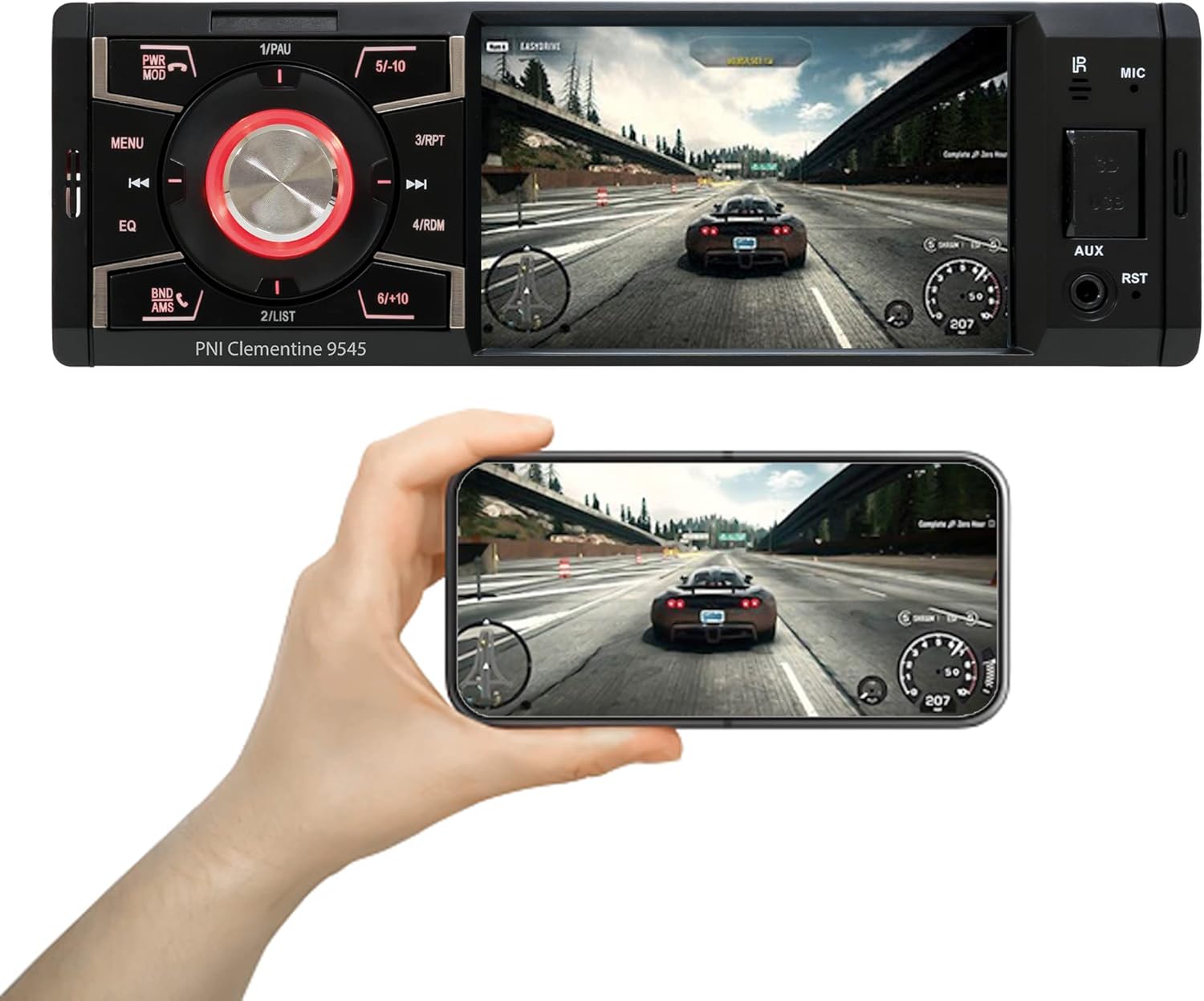
Apejuwe aworan: The PNI Clementine 9545 car stereo is shown playing a video game scene on its 4-inch display. Below the stereo, a hand holds a smartphone that mirrors the same video content, demonstrating the unit's video playback capabilities and potential for screen mirroring or external display connection.
5.4 Bluetooth Iṣẹ
The integrated Bluetooth feature allows for hands-free calling and audio streaming.
- Pipọpọ: Enable Bluetooth on your mobile device and search for "PNI Clementine 9545". Select it to pair.
- Awọn ipe Ọfẹ: Once paired, you can make and receive calls directly through the car stereo. Use the PWR MOD button to answer/end calls.
- Streamingi Streaminganwọle Audio: Play music from your paired phone through the car's audio system.
5.5 Iṣawọle AUX
Connect external audio devices (e.g., MP3 players, smartphones) to the 3.5mm AUX input jack on the front panel using an audio cable.
5.6 Touchscreen isẹ
The 4-inch LCD display is a touchscreen, allowing for intuitive control of various functions and settings.

Apejuwe aworan: A human finger is shown touching the 4-inch touchscreen display of the PNI Clementine 9545 car stereo. The screen displays a 'HOME' menu with various media and function icons, indicating the interactive nature of the display for navigating the stereo's features.
5.7 Reverse Camera Function
When an optional reverse camera is connected and the vehicle is put into reverse gear, the player's display will automatically switch to show the reverse camera feed, assisting with parking and maneuvering.

Apejuwe aworan: The PNI Clementine 9545 car stereo's display shows a reverse camera view of a parking garage, complete with colored parking guidelines (red, yellow, green) overlaid on the image. Below the stereo, a small image of an optional rear view camera is shown, indicating the unit's compatibility with such accessories.
6. Itọju
- Ninu Ẹka naa: Lo aṣọ rírọrùn tí ó gbẹ láti nu pánẹ́ẹ̀lì iwájú kí o sì fi hàn. Fún eruku líle, fi díẹ̀ dì í.ampen the cloth with water. Do not use harsh chemicals, abrasive cleaners, or solvents as they may damage the finish or screen.
- Cleaning Ports: Periodically check USB and SD card slots for dust or debris. Use a can of compressed air to gently clear them if necessary.
- Gbogbogbo Itọju: Avoid placing heavy objects on the unit. Protect it from direct sunlight and extreme temperatures when the vehicle is parked for extended periods.
7. Laasigbotitusita
If you encounter issues with your PNI Clementine 9545, refer to the following common problems and solutions:
| Isoro | Owun to le Fa | Ojutu |
|---|---|---|
| Ko si Agbara | Asopọmọra ti ko tọ; Fiusi ti a fẹ; Batiri ọkọ kekere. | Check power connections and fuses. Ensure battery voltage is sufficient. Consult a professional for wiring inspection. |
| Ko si Ohun | Volume too low; Mute activated; Speaker wires disconnected; Incorrect audio source. | Increase volume. Check if mute is active. Verify speaker connections. Select the correct audio source. |
| Bluetooth Ko Nsopọ | Bluetooth not enabled on phone; Device not in pairing mode; Interference. | Ensure Bluetooth is active on your phone. Put the stereo in Bluetooth pairing mode. Try restarting both devices. |
| USB/SD Ko Ti ndun | Ti ko ni atilẹyin file format; Corrupted media; Incorrectly inserted. | Ṣayẹwo file formats (MP5, MP3, MP4, WMA, WAV). Ensure media is not corrupted. Reinsert USB/SD card correctly. |
| Screen Frozen/Unresponsive | Aṣiṣe sọfitiwia. | Press the RST (Reset) button with a thin object to restart the unit. |
If the problem persists after trying these solutions, please contact customer support or a qualified service technician.
8. Awọn pato
| Ẹya ara ẹrọ | Sipesifikesonu |
|---|---|
| Awoṣe | Clementine 9545 |
| Ipese Voltage | 12V DC |
| Ipalara | 4 ohm |
| Max Audio Power wu | 4 x50W |
| FM Igbohunsafẹfẹ | 87.5 - 108.0 MHz |
| AM Radio Igbohunsafẹfẹ | 522 KHz - 1620 KHz |
| Ibudo USB | USB 2.0 |
| Iho kaadi | Kaadi SD |
| Iwọn ifihan agbara/Ariwo | > 40dB |
| Awọn iwọn (W x H x D) | 178 x 50 x 110 mm |
| Iwọn | 0.627 kg |
| Max Lilo lọwọlọwọ | 10 Amperes |
| AUX Audio Input | 3.5mm mini Jack |
| Iru fifi sori ẹrọ | 1 DIN |
| Ifihan | 4-inch LCD, 800 x 480 pixels, Red button illumination |
| Sisisẹsẹhin fidio | Full HD 1920 x 1080px (AVI format) |
| Sisisẹsẹhin ohun | MP5, MP3, MP4, WMA, WAV, etc. (Stereo output) |
| Awọn iwọn otutu ti nṣiṣẹ | -26°C ~ +80°C |
| Bluetooth | Integrated Bluetooth for calls and audio streaming |
| Fidio Input/O wu | 1 x RCA Video Input/Output, 1 x RCA Video Input for Reverse Camera |
9. Atilẹyin ọja ati Support
9.1 atilẹyin ọja Alaye
Your PNI Clementine 9545 Car MP5 Stereo Player is covered by a manufacturer's warranty. Please refer to the warranty card included in your package or contact your retailer for specific warranty terms and conditions. Keep your proof of purchase for any warranty claims.
9.2 Onibara Support
For technical assistance, troubleshooting beyond this manual, or warranty inquiries, please contact the retailer where you purchased the product or visit the official PNI webojula fun support oro.