1. Ifihan
This manual provides detailed instructions for the installation, operation, and maintenance of your AVIPAS AV-1081W 10x Full HD HDMI PTZ Camera. This camera is designed for professional video applications, offering high-quality video output, flexible control options, and robust streaming capabilities. Please read this manual thoroughly before using the product to ensure proper setup and optimal performance.
2. Awọn ẹya Ọja
- Imujade Ipinnu giga: Delivers 1920 x 1080 Full HD video with frame rates up to 60fps.
- Sun-un Optical: Features a 10x optical zoom lens for detailed image capture.
- Lẹnsi Igun Gigun: Equipped with a 60.9° wide-angle lens.
- Aworan to ti ni ilọsiwaju: High Signal-to-Noise Ratio (SNR) CMOS sensor combined with 2D & 3D noise reduction algorithms for clear images.
- Fidio funmorawon: Supports H.264/H.265 video compression for efficient streaming.
- Awọn Ijade Ọpọ: Provides IP streaming and HDMI output.
- Awọn atọkun Iṣakoso: Supports RS-232 (VISCA/Pelco-D/Pelco-P), VISCA over IP, and IR remote control.
- Agbara Lilo: Low-power sleep function, consuming less than 0.4W.
- Apẹrẹ: Elegant, compact design with a super quiet and smooth pan/tilt mechanism.
3. Àwọn Ẹ̀yà àti Àwòrán Ọjà
Familiarize yourself with the various parts of your AVIPAS AV-1081W camera.

olusin 3.1: Iwaju View. This image shows the front of the AVIPAS AV-1081W PTZ camera, highlighting the main lens assembly and the AVIPAS branding on the base. The lens features 10x zoom capabilities.
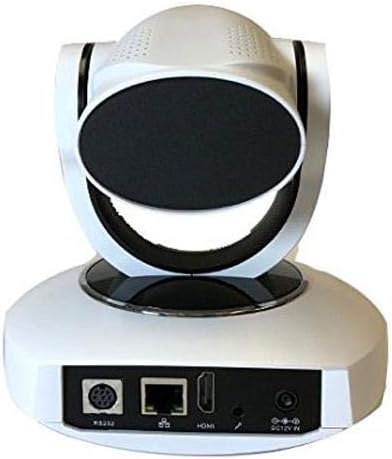
olusin 3.2: Ẹyìn View with Connectivity Ports. This image displays the rear panel of the AVIPAS AV-1081W camera, detailing the various input and output ports. From left to right, these include the RS-232 control port, Ethernet (IP) port, HDMI output, audio input, and DC 12V power input.
4. Awọn ilana iṣeto
4.1 Ṣiṣii silẹ
Carefully remove the camera and all accessories from the packaging. Verify that all components are present.
4.2 Ibi
The AV-1081W is designed for indoor use. It can be placed on a flat surface or mounted to a wall. Ensure the camera is positioned to capture the desired area without obstruction. For wall mounting, use appropriate hardware (not included) to secure the camera firmly.
4.3 Nsopọ kamẹra pọ
- Asopọ agbara: Connect the provided power adapter to the DC 12V IN port on the rear of the camera (refer to Figure 3.2) and then plug it into a power outlet.
- Video Output (HDMI): Connect an HDMI cable from the HDMI port on the camera to an HDMI input on your display or video switcher.
- Network Connection (IP Streaming): For IP streaming and network control, connect an Ethernet cable from the camera's Ethernet port to your network router or switch.
- Serial Control (RS-232): For serial control, connect an RS-232 cable from the camera's RS-232 port to your control device.
- Iṣawọle Olohun: If external audio is required, connect an audio source to the audio input port.
Once all connections are made, power on the camera. The camera will perform a self-test and initialize.
5. Awọn ilana Iṣiṣẹ
5.1 Awọn ọna Iṣakoso
The AV-1081W camera can be controlled via multiple methods:
- IR Isakoṣo latọna jijin: Use the included infrared remote control for basic pan, tilt, zoom, and preset functions. Ensure a clear line of sight to the camera's IR receiver.
- Serial Control (RS-232): Utilize a compatible control panel or software with VISCA, Pelco-D, or Pelco-P protocols connected via the RS-232 port.
- IP Control (VISCA over IP): Wọle si kamẹra naa web interface or use IP-based control software for comprehensive control over your network. Refer to the camera's network settings for its IP address.
5.2 Pan, Tilt, and Zoom (PTZ) Functions
Use your chosen control method to adjust the camera's view:
- Akara: Yi kamẹra naa pada ni apa ila.
- Tẹ: Adjust the camera vertically.
- Sun-un: Adjust the optical zoom to get closer or further from the subject. The camera features 10x optical zoom.
Awọn tito tẹlẹ 5.3
Most control methods allow you to save and recall specific camera positions (pan, tilt, zoom, focus) as presets. Consult your control device's manual for detailed instructions on setting and recalling presets.
5.4 IP Streaming
Once connected to a network, the camera can stream video using H.264/H.265 compression. Access the camera's web interface via its IP address to configure streaming settings, including resolution, bitrate, and streaming protocols.
6. Itọju
- Ninu: Use a soft, dry cloth to clean the camera body. For the lens, use a lens cleaning cloth and specialized lens cleaning solution. Avoid harsh chemicals or abrasive materials.
- Awọn imudojuiwọn famuwia: Periodically check the AVIPAS website for firmware updates. Keeping the firmware updated ensures optimal performance and access to new features.
- Ayika: Ensure the camera is operated within its specified environmental conditions (indoor use only). Avoid extreme temperatures, humidity, or dusty environments.
7. Laasigbotitusita
| Isoro | Owun to le Fa | Ojutu |
|---|---|---|
| No power indicator light. | Adaparọ agbara ko sopọ tabi aṣiṣe. | Ensure the power adapter is securely connected to the camera and a working power outlet. Test the outlet with another device. |
| Ko si ifihan fidio nipasẹ HDMI. | HDMI cable faulty or incorrect input selected on display. | Check HDMI cable connection. Ensure the display is set to the correct HDMI input. Try a different HDMI cable. |
| Cannot access camera via IP. | Network cable disconnected, incorrect IP address, or network configuration issue. | Verify Ethernet cable connection. Confirm the camera's IP address and ensure your computer is on the same network subnet. Clear browser cache and cookies if using the web ni wiwo. |
| IR remote control not working. | Batteries low/dead, IR receiver blocked, or remote out of range. | Replace remote batteries. Ensure no obstructions between the remote and the camera's IR receiver. Operate within the specified range. |
| Camera freezes or crashes during streaming. | Network bandwidth issues, outdated firmware, or camera fault. | Ensure sufficient network bandwidth. Update camera firmware. If issues persist, contact AVIPAS support. |
8. Awọn pato
| Ẹya ara ẹrọ | Ẹ̀kúnrẹ́rẹ́ |
|---|---|
| Orukọ awoṣe | AV-1081W |
| inu ile / ita gbangba Lilo | Ninu ile |
| Ilana Asopọmọra | Wi-Fi, HDMI, IP Streaming |
| Ipinnu Yaworan fidio | 1080p (1920 x 1080) up to 60fps |
| Sun-un Optical | 10x |
| Igun lẹnsi | 60.9 ° oke-igun |
| Fidio funmorawon | H.264/H.265 |
| Awọn ọna Iṣakoso | RS-232 (VISCA/Pelco-D/Pelco-P), VISCA over IP, IR Remote |
| Iṣagbesori Iru | Ògiri Ògiri |
| Agbara agbara | Less than 0.4W (sleep function) |
| Awọn iwọn (L x W x H) | 5.95 x 4.99 x 6 inches |
| Iwọn Nkan | 3.08 iwon (1.4 kilo) |
| Àwọ̀ | Funfun |
| Fọto sensọ Technology | CMOS |
| UPC | 858738005336 |
9. Atilẹyin ọja ati Support
For warranty information, technical support, or service inquiries, please contact AVIPAS customer support. Refer to the official AVIPAS webAaye fun awọn alaye olubasọrọ lọwọlọwọ julọ ati awọn orisun atilẹyin.
AVIPAS Official Webojula: www.avipas.com