Ọrọ Iṣaaju
This manual provides detailed instructions for the installation, operation, and maintenance of your Whistler WBU900 Digital Wireless Backup Camera with Solar Panels. Please read this manual thoroughly before using the product to ensure proper function and safety.
The Whistler WBU900 is designed to enhance vehicle safety by providing a clear view of the area behind your vehicle, reducing blind spots. Its wireless design and solar charging capabilities offer convenient and easy installation.
Package Awọn akoonu
Ensure all items are present before beginning installation:
- Wireless Backup Camera with Solar Panels
- Atẹle
- Vehicle Power Adapter (for monitor)
- AC Charger (for initial camera charging)
- Iṣagbesori Hardware
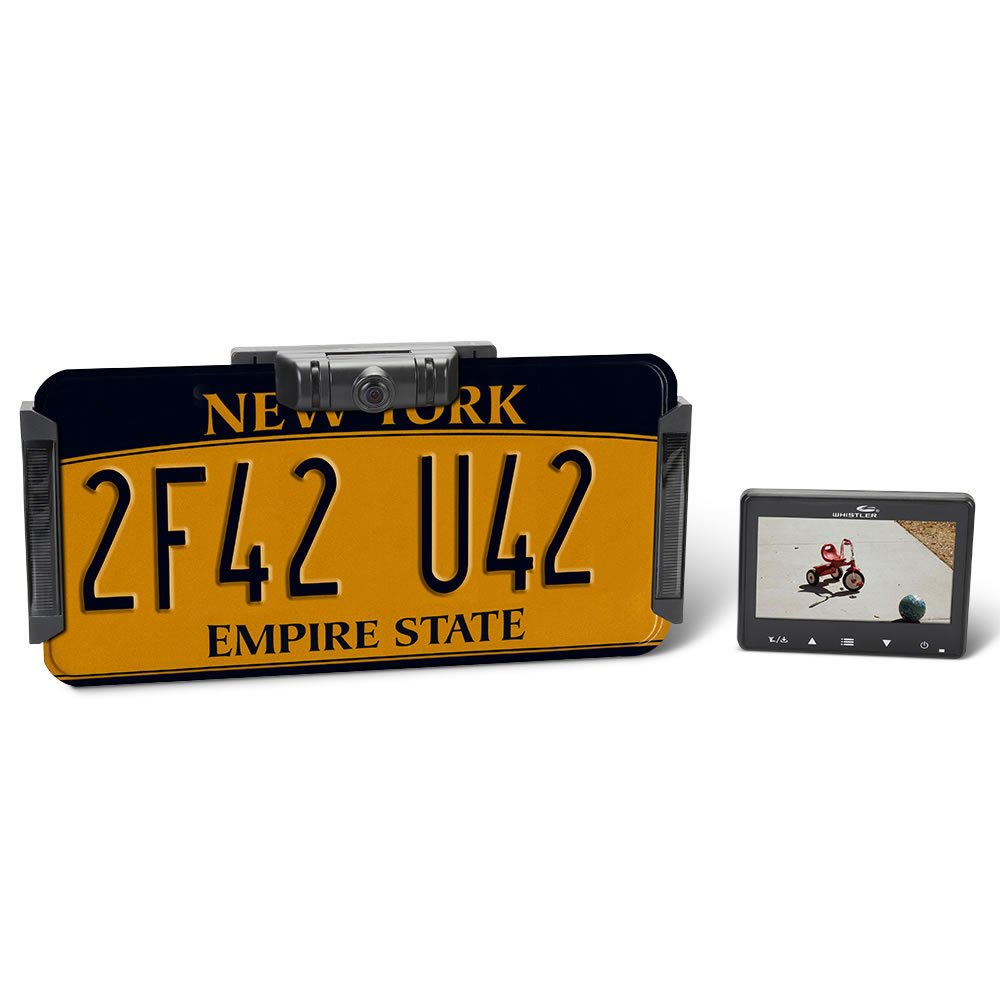
Image: The main components of the Whistler WBU900 Digital Wireless Backup Camera system, including the camera unit with solar panels, the display monitor, and power cables.
Eto ati fifi sori
- Initial Camera Charging: Before installation, fully charge the camera battery using the provided AC charger. Connect the AC charger to the camera and a standard wall outlet. The charging indicator will show when charging is complete.
- Gbigbe Kamẹra:
- Attach the camera to your vehicle's license plate frame. Ensure the solar panels are exposed to direct sunlight for optimal recharging.
- Secure the camera using the provided mounting hardware.
- Gbigbe Atẹle naa:
- Choose a suitable location on your dashboard or windshield that does not obstruct your view tabi dabaru pẹlu awọn idari awakọ.
- Use the included suction cup mount or adhesive mount to secure the monitor.
- Agbara Atẹle naa:
- Connect the vehicle power adapter to the monitor and plug it into your vehicle's 12V accessory outlet (cigarette lighter socket).
- Sisọpọ (ti o ba jẹ dandan): The camera and monitor are typically pre-paired. If they do not connect automatically, refer to the troubleshooting section for pairing instructions.

Image: A person installing the Whistler WBU900 backup camera by attaching it to the vehicle's rear license plate frame.
Awọn ilana Iṣiṣẹ
Titan/Pa a
- Lati tan atẹle naa, tẹ bọtini agbara.
- To turn off the monitor, press and hold the power button.
- The camera will automatically activate when the vehicle is in reverse or when the monitor is powered on.
Viewgígé Fọ́ọ̀mù Kámẹ́rà
Once the monitor is on and the camera is active, the live video feed from the backup camera will be displayed. The monitor may display a "Whistler" logo briefly before showing the live feed.

Image: The Whistler WBU900 monitor displaying a live feed from the backup camera, showing a clear view of a residential area.
Siṣàtúnṣe Ifihan Eto
The monitor typically includes buttons for adjusting brightness, contrast, and other display settings. Refer to the on-screen menu for specific options.
Camera Time Durations
The system offers 2 user-selectable camera time durations, allowing you to choose how long the camera feed remains active after the initial trigger (e.g., shifting into reverse). Consult the monitor's menu for these settings.
Itoju
- Ninu: Regularly clean the camera lens and solar panels with a soft, damp cloth to ensure clear visibility and efficient solar charging. Avoid abrasive cleaners.
- Ngba agbara batiri: The camera's battery is primarily recharged by the integrated solar panels. For optimal performance, ensure the solar panels are exposed to sunlight. If the vehicle is stored in a garage or experiences prolonged periods without sunlight, use the provided AC charger to maintain battery levels.
- Iṣagbesori to ni aabo: Periodically check that both the camera and monitor are securely mounted to prevent dislodgement during vehicle operation.
Laasigbotitusita
| Isoro | Owun to le Fa | Ojutu |
|---|---|---|
| Ko si aworan lori atẹle |
|
|
| Àwòrán náà kò hàn kedere tàbí kò hàn gbangba |
|
|
| Camera turns off automatically after a short period |
|
|
Awọn pato
- Nọmba awoṣe: WBU900
- Awọn iwọn ọja: 10 x 3.15 x 4.25 inches
- Ìwọ̀n Nkan: 1.5 iwon
- Awọn batiri: 1 Batiri ọja kan pato (pẹlu)
- Iru fifi sori ẹrọ: Ailokun
- Voltage: 12 Volts
- Imọ-ẹrọ Sensọ Opitika: CMOS
- Irú lẹnsi: Igun gbooro
- Orisi Asopọmọra: Wireless with RCA receiver
- UPC: 052303408618
- Olupese: Whistler
Alaye atilẹyin ọja
Whistler products are covered by a limited warranty. For specific warranty terms, duration, and claim procedures, please refer to the warranty card included with your product or visit the official Whistler webojula. Tọju iwe-ẹri rira rẹ bi ẹri rira.
Onibara Support
For technical assistance, troubleshooting, or further inquiries, please contact Whistler customer support. Contact information can typically be found on the product packaging, the official Whistler website, or in the full product manual.
Note: Always refer to the complete product manual for the most up-to-date and comprehensive information.


