1. Ifihan
Thank you for choosing the TecTake Corner Computer Desk, Model 402405. This L-shaped workstation is designed to provide a practical and spacious area for your computer and work essentials. Its modern design, featuring a refined tabletop and stable steel construction, ensures durability and a timeless aesthetic. This manual provides essential information for the safe assembly, operation, and maintenance of your new desk.
Jọwọ ka iwe afọwọkọ yii daradara ṣaaju apejọ ati lo, ki o si mu u duro fun itọkasi ọjọ iwaju.
2. Awọn ilana aabo
Láti rí i dájú pé a lo ó dáadáa àti láti dènà ìbàjẹ́, ẹ jọ̀wọ́ ẹ tẹ̀lé àwọn ìlànà ààbò wọ̀nyí:
- Apejọ: Assemble the desk on a soft, clean surface to prevent scratches. Ensure all components are correctly aligned and securely fastened according to the provided assembly instructions.
- Iduroṣinṣin: Do not overload the desk. The maximum load capacity is 100 kg (220 lbs). Distribute weight evenly across the surface.
- Ibi: Place the desk on a level and stable floor. Avoid placing it near heat sources, direct sunlight, or in excessively humid environments.
- Awọn ọmọde: Jeki awọn ẹya kekere ati awọn ohun elo iṣakojọpọ kuro lọdọ awọn ọmọde lati ṣe idiwọ awọn eewu gige.
- Itọju: Regularly check all screws and connections to ensure they remain tight. Tighten if necessary.
- Gbigbe: When moving the desk, lift it rather than dragging it to prevent damage to the legs and floor.
3. Package Awọn akoonu
Before beginning assembly, please verify that all parts are present and undamaged. The package should contain:
- 1x Corner Desk (comprising main tabletop sections and frame components)
- 1x Computer Tower Holder
- 1x Illustrated Assembly Instructions
- All necessary screws, fittings, and tools for assembly (as specified in the assembly instructions)

Figure 1: Assembled TecTake Corner Computer Desk (Dark Wood Finish). This image shows the overall L-shaped design, the spacious work surface, and the integrated keyboard tray.
4. Eto ati Apejọ
The TecTake Corner Computer Desk requires assembly. Please follow the detailed, illustrated instructions provided in your package. It is recommended to have two people for assembly to ensure ease and safety.
- Yọọ kuro: Carefully unpack all components and lay them out on a clean, soft surface to prevent damage.
- Ṣe idanimọ Awọn apakan: Refer to the parts list in the assembly manual to identify each component.
- Tẹle Awọn Igbesẹ: Proceed step-by-step according to the illustrated assembly guide. Ensure all screws and connectors are tightened securely but do not overtighten.
- Keyboard Tray: Install the sliding keyboard tray as indicated in the instructions. Ensure it slides smoothly.
- Computer Tower Holder: Position the included computer tower holder as desired.
- Ṣayẹwo Ipari: Once assembled, gently test the desk's stability and ensure all parts are firmly connected.

olusin 2: Top-isalẹ view of the TecTake Corner Computer Desk (White Finish). This perspective highlights the L-shape and the ample surface area for multiple monitors or work items.
5. Awọn ilana Iṣiṣẹ
Your TecTake Corner Computer Desk is designed for efficient and comfortable use. Here are some operational aspects:
- Ilẹ iṣẹ: Utilize the large L-shaped surface for your monitor(s), laptop, documents, and other office supplies. The design provides ample space for multitasking.
- Keyboard Tray: The integrated sliding keyboard tray allows you to store your keyboard and mouse neatly under the desk when not in use, freeing up valuable desktop space. Gently pull it out for use and push it back in for storage.
- Computer Tower Holder: The included holder is designed to keep your computer tower off the floor, protecting it from dust and allowing for better airflow. It accommodates towers with a maximum width of 25 cm.
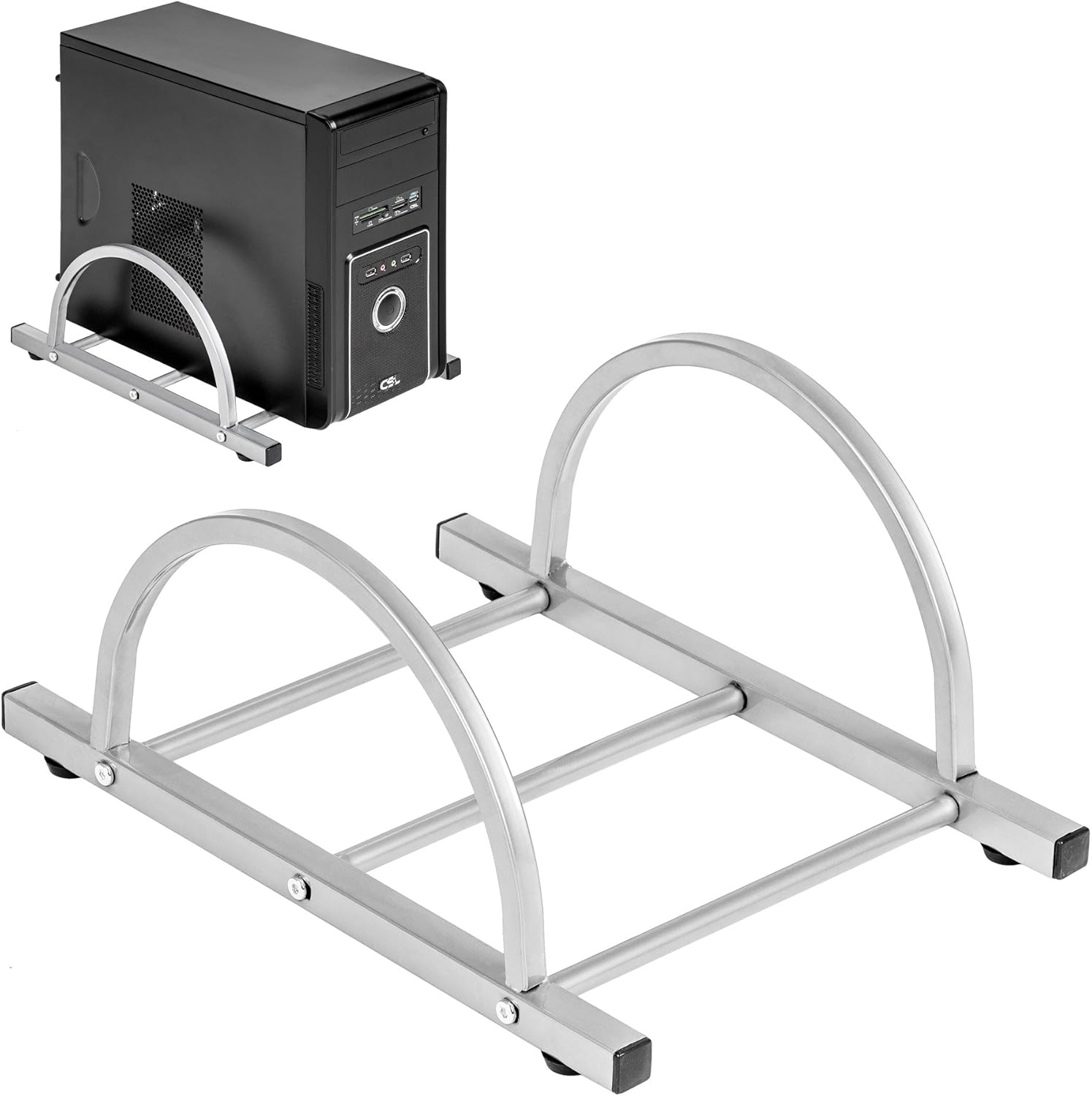
Figure 3: TecTake Computer Tower Holder. This image displays the separate holder designed to keep your PC tower elevated and secure.
6. Itọju
Proper care will extend the life and appearance of your desk:
- Ninu: Mu awọn oju ilẹ pẹlu asọ, damp Aṣọ. Fún àmì líle, lo omi ọṣẹ díẹ̀ kí o sì fi aṣọ mímọ́ gbẹ lẹ́sẹ̀kẹsẹ̀. Yẹra fún àwọn ohun ìfọṣọ tàbí àwọn kẹ́míkà líle.
- Idasonu: Clean up spills immediately to prevent staining or damage to the MDF surface.
- Hardware: Periodically check all screws and fittings for tightness. Re-tighten as necessary to maintain stability.
- Idaabobo: Use coasters for drinks and protective pads under hot items to prevent damage to the tabletop.
7. Laasigbotitusita
If you encounter issues with your desk, consider the following common solutions:
- Iduro jẹ Wobbly:
- Rii daju pe tabili wa lori ipele ipele kan.
- Check all assembly screws and bolts. Tighten any loose connections.
- Verify that all leg caps are properly installed and making full contact with the floor.
- Keyboard Tray Not Sliding Smoothly:
- Check for any obstructions in the sliding mechanism.
- Ensure the rails are correctly installed and aligned.
- Clean the rails if dust or debris is present.
- Awọn ẹya ti o padanu: If you find any parts missing upon unpacking, please refer to the "Warranty and Support" section to contact customer service.
8. Awọn pato
| Ẹya ara ẹrọ | Ẹ̀kúnrẹ́rẹ́ |
|---|---|
| Brand | TecTake |
| Nọmba awoṣe | 402405 |
| Apapọ Awọn iwọn (L x W x H) | 170 x 135 x 75 cm (66.9 x 53.1 x 29.5 inches) |
| Gíga Iṣẹ́ | 75 cm (29.5 inches) |
| Large Tabletop Section (L x W) | 115 x 55 cm (45.3 x 21.7 inches) |
| Small Tabletop Section (L x W) | 80 x 55 cm (31.5 x 21.7 inches) |
| Rounded Corner Section (L x W) | 55 x 55 cm (21.7 x 21.7 inches) |
| Sisanra Tabletop | 1.5 cm (0.6 inches) |
| Sliding Keyboard Tray (L x W) | 56.5 x 35 cm (22.2 x 13.8 inches) |
| Steel Tube Dimensions | 3x2 cm; 2x2 cm; 1.5x1.5 cm |
| Computer Tower Holder Width (Max) | 25 cm (9.8 inches) |
| O pọju fifuye Agbara | 100 kg (220 lbs) |
| Ohun elo | Veneered MDF surface, powder-coated steel tube frame, plastic feet and end caps |
| Color (as per model) | Funfun |
9. Atilẹyin ọja ati Support
TecTake products are manufactured with quality and durability in mind. For information regarding warranty coverage, please refer to the warranty card included with your product or visit the official TecTake webojula.
If you have any questions, require assistance with assembly, or need to report missing/damaged parts, please contact TecTake customer service. Contact details can typically be found on the product packaging, the included assembly instructions, or the official TecTake webojula.
Atilẹyin Ayelujara: www.tectake.de (Jọwọ ṣayẹwo fun agbegbe rẹ website for specific contact information).


