1. Ifihan
The PNI PC50 Programming Cable is designed to facilitate the connection between your computer and compatible CB radio stations, specifically the CRT 6900 and CRT 7900 models. This cable enables users to program various settings, frequencies, and features of their radio using dedicated software. It ensures reliable data transfer for efficient radio management.

Nọmba 1.1: Pariview of the PNI PC50 Programming Cable. This image displays the full length of the black cable, featuring a USB connector on one end and two audio jacks (3.5mm and 2.5mm) on the other, along with a small white connector.
2. Package Awọn akoonu
The PNI PC50 package includes the following item:
- 1x PNI PC50 Programming Cable (100 cm length)
3. Ṣíṣeto ati Fifi sori ẹrọ awakọ
Before using the PNI PC50 programming cable, ensure you have the necessary programming software for your CRT 6900 or CRT 7900 radio station installed on your computer. Drivers may also be required for the cable to be recognized by your operating system.
3.1. Fifi sori awakọ
- So okun pọ: Plug the USB end of the PNI PC50 cable into an available USB port on your computer.
- Fifi sori ẹrọ Awakọ Aifọwọyi: In most cases, your operating system (e.g., Windows, macOS) will attempt to install the necessary drivers automatically. Wait for this process to complete.
- Manual Driver Installation (if needed): If the cable is not recognized or drivers fail to install automatically, you may need to manually install them. Refer to the support section of the PNI website or the documentation provided with your radio's programming software for specific driver downloads. For Windows 11, manual driver installation may be required.
- Jẹrisi fifi sori ẹrọ: After installation, check your computer's Device Manager (Windows) or System Information (macOS) to confirm that the cable is recognized as a serial port (COM port). Note the assigned COM port number, as it will be needed for the programming software.

Nọmba 3.1: Sun mo tipetipe view of the USB connector of the PNI PC50 Programming Cable. This is the end that connects to your computer.
3.2. Connecting to the Radio
- Ensure your CB radio station (CRT 6900 or CRT 7900) is powered off.
- Locate the programming port(s) on your radio. These are typically 3.5mm and 2.5mm audio jack ports.
- Connect the corresponding audio jacks from the PNI PC50 cable into the programming ports on your radio. Ensure a secure connection.
- Power on your CB radio station.
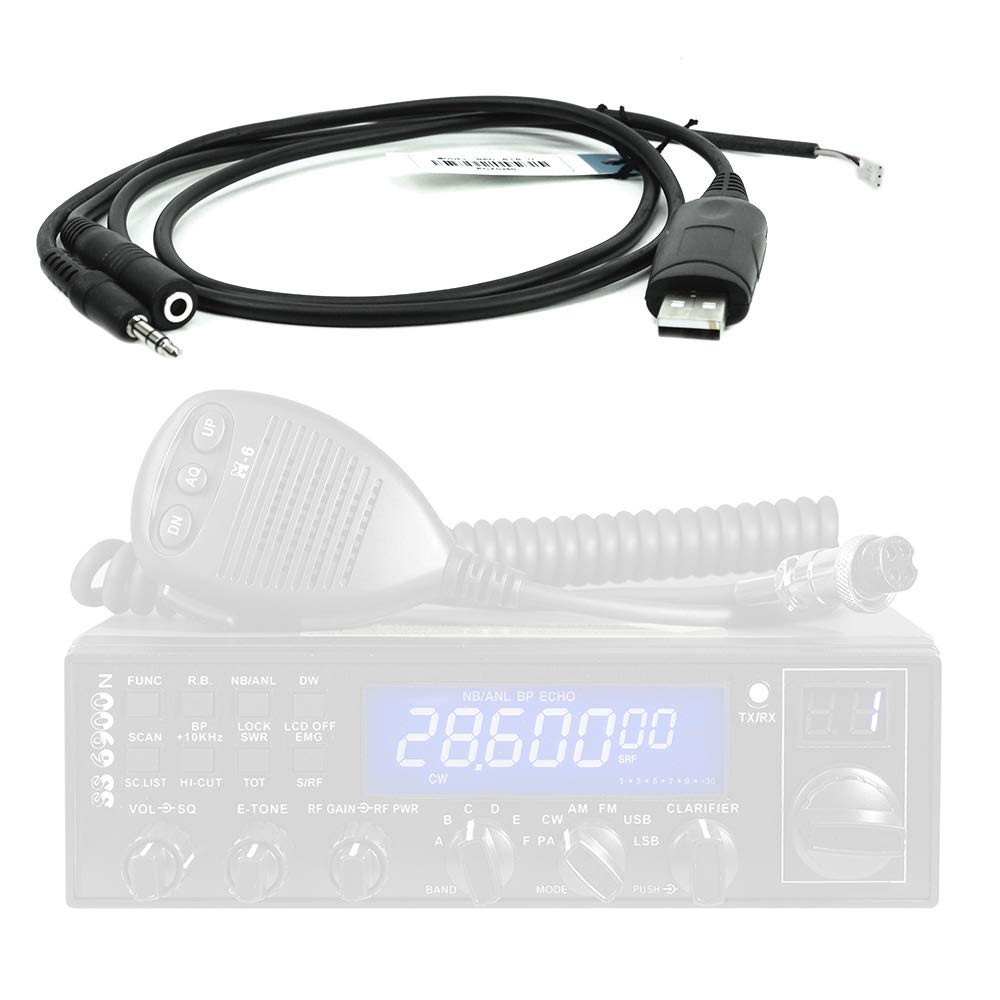
Nọmba 3.2: Example of the PNI PC50 Programming Cable connected to a CRT 6900 CB radio station. The cable's audio jacks are inserted into the radio's programming ports, and the USB end is ready for computer connection.

Nọmba 3.3: Example of the PNI PC50 Programming Cable connected to a CRT 7900 CB radio station. Similar to the CRT 6900, the cable facilitates programming for this model.
4. Awọn ilana Iṣiṣẹ
Once the PNI PC50 cable is connected to both your computer and the CB radio, you can proceed with programming using the appropriate software.
- Ṣíṣe ìfilọ́lẹ̀ Sọ́fítíwọ́ọ̀kì Ìṣètò: Open the specific programming software for your CRT 6900 or CRT 7900 radio on your computer.
- Yan Ibudo COM: Within the software settings, select the correct COM port that was assigned to the PNI PC50 cable during driver installation.
- Ka Data Redio: Use the software's function to read the current configuration from your radio. This is often a good practice before making any changes.
- Ṣatunṣe Eto: Adjust frequencies, channels, features, and other parameters as desired within the software interface.
- Kọ Dátà sí Redio: Once modifications are complete, use the software's function to write the new configuration to your radio. Follow any on-screen prompts or instructions from the software.
- Ge asopọ: After successful programming, close the software, power off your radio, and then safely disconnect the PNI PC50 cable.
Akiyesi: Always refer to the specific user manual and software instructions provided with your CRT 6900 or CRT 7900 radio for detailed programming procedures, as software interfaces and functions may vary.
5. Itọju
Proper care of your PNI PC50 programming cable will ensure its longevity and reliable performance.
- Ibi ipamọ: Tọ́jú okùn náà sí ibi tí ó tutù tí ó sì gbẹ, tí kò sí ìmọ́lẹ̀ oòrùn tààrà àti àwọn igbóná tí ó le koko.
- Mimu: Avoid bending or kinking the cable sharply, as this can damage the internal wires. Always grasp the connectors when plugging or unplugging, rather than pulling on the cable itself.
- Ninu: Tí ó bá pọndandan, fi aṣọ rírọrùn, gbígbẹ, nu okùn náà pẹ̀lẹ́pẹ̀lẹ́. Má ṣe lo àwọn kẹ́míkà líle tàbí àwọn ohun ìfọmọ́ tí ó lè pa.
- Ayewo: Periodically inspect the cable and connectors for any signs of wear, damage, or corrosion.
6. Laasigbotitusita
If you encounter issues while using the PNI PC50 programming cable, consider the following troubleshooting steps:
- Cable Not Recognized by Computer:
- Rii daju pe asopo USB ti fi sii ni kikun sinu ibudo USB ti n ṣiṣẹ.
- Gbiyanju ibudo USB ti o yatọ lori kọnputa rẹ.
- Verify that the necessary drivers are correctly installed (refer to Section 3.1). Reinstall drivers if needed.
- Tun kọmputa rẹ bẹrẹ.
- Sọ́fítíwètì Ṣíṣetò Kò Le Sopọ̀ Mọ́ Rédíò:
- Confirm that the radio is powered on and the cable's audio jacks are securely connected to the radio's programming ports.
- Check that the correct COM port is selected in the programming software.
- Ensure no other software is using the same COM port.
- Verify that the radio model selected in the software matches your physical radio (CRT 6900 or CRT 7900).
- Programming Fails or Errors Occur:
- Ensure the radio's battery is sufficiently charged or it is connected to a stable power source.
- Temporarily disable any antivirus or firewall software that might interfere with the programming process.
- Try reading the radio's current configuration first before attempting to write new data.
- Consult the programming software's help documentation or the radio's manual for specific error codes.
7. Awọn pato
| Ẹya ara ẹrọ | Apejuwe |
|---|---|
| koodu ọja | PNI-PC50 |
| Ibamu | CB CRT 6900 and CRT 7900 Radio Stations |
| USB Ipari | 100 cm |
| Asopọmọra Iru | USB to 3.5mm and 2.5mm Audio Jacks |
| Ọja Mefa | 15.3 x 11.7 x 1.35 cm (tí a fi sínú àpótí) |
| Iwọn Ọja | 30 g |
| Olupese | ONLINESHOP SRL |
8. Atilẹyin ọja ati Support
For warranty information and technical support regarding your PNI PC50 Programming Cable, please refer to the documentation provided at the time of purchase or visit the official PNI webojula. O tun le kan si alagbata rẹ fun iranlọwọ.


