Ọrọ Iṣaaju
The DigiTech Multi-Function LCD Wall Clock (Model XC0225) is a versatile device designed to provide convenient time display along with additional environmental information. This clock features a large LCD screen displaying time, date, day of the week, indoor temperature, and humidity. It also includes alarm and snooze functions, making it suitable for various settings, whether mounted on a wall or placed on a desktop.
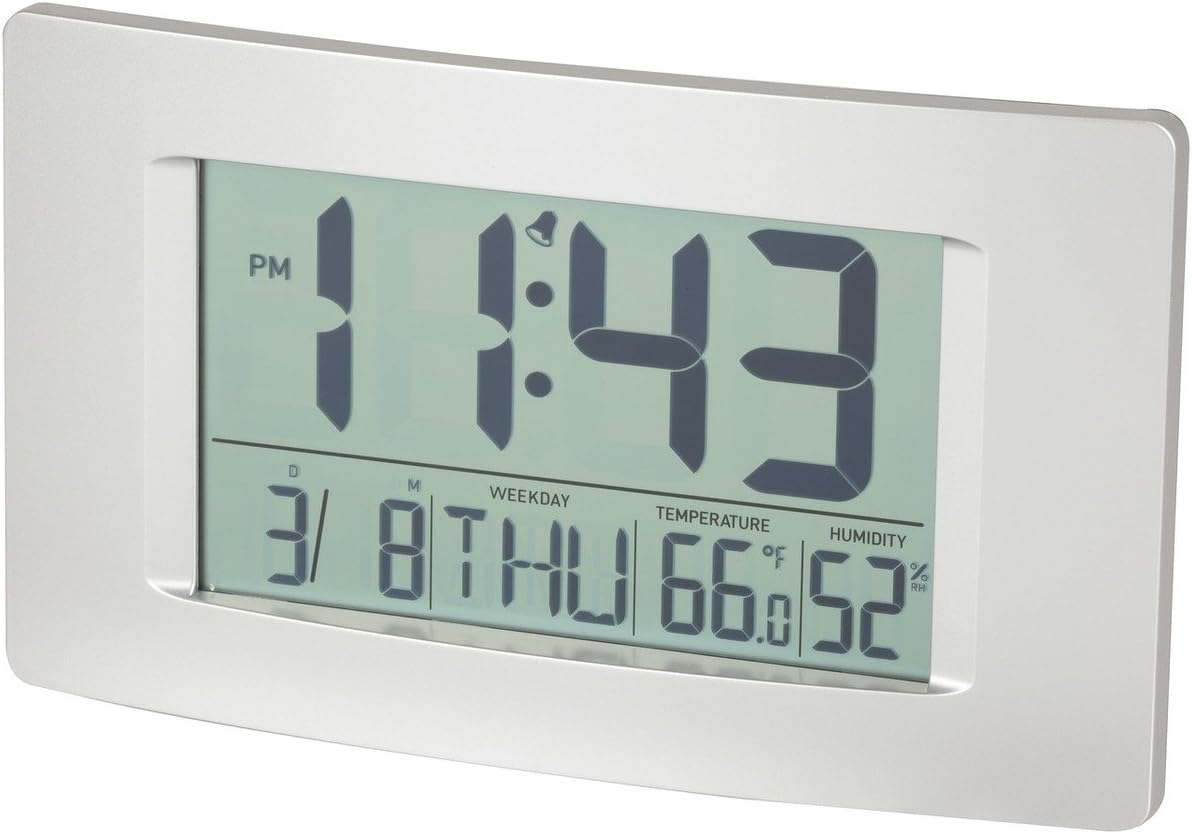
olusin 1: Iwaju view of the Multi-Function LCD Wall Clock.
Package Awọn akoonu
- DigiTech Multi-Function LCD Wall Clock (Model XC0225)
- Afowoyi Olumulo (iwe-ipamọ yii)
Akiyesi: 3 x AA batteries are required for operation and are not included in the package.

Figure 2: Product packaging illustrating the clock and its features.
Ṣeto
1. Fifi sori batiri
- Wa yara batiri ni ẹhin aago naa.
- Ṣii ideri iyẹwu batiri naa.
- Insert 3 x AA batteries, ensuring correct polarity (+ and -) as indicated inside the compartment.
- Pa ideri batiri naa ni aabo.
2. Ibẹrẹ Agbara-On
Upon battery installation, the clock will power on automatically and display default settings. You may need to adjust the time, date, and other settings as described in the "Operating Instructions" section.
3. iṣagbesori Aw
- Ibi tabili: Utilize the integrated stand on the back of the clock to place it on any flat surface.
- Iṣagbede ogiri: Use the integrated hang-hole on the back of the clock to mount it securely on a wall using a suitable screw or hook (not included).
Awọn ilana Iṣiṣẹ
The clock features several buttons on the back for setting and adjusting functions. Refer to the labels next to each button for their specific functions (e.g., MODE, UP, DOWN, ALARM, SNOOZE/LIGHT).
1. Eto Aago ati Ọjọ
- Tẹ awọn MODE button repeatedly until the time display starts flashing.
- Lo awọn UP or SILE awọn bọtini lati ṣatunṣe awọn wakati.
- Tẹ MODE again to move to minutes, then use UP or SILE lati ṣatunṣe.
- Tesiwaju titẹ MODE láti yípo àwọn ètò ọdún, oṣù, àti ọjọ́, láti ṣàtúnṣe ọ̀kọ̀ọ̀kan pẹ̀lú UP or SILE.
- Tẹ MODE igba to kẹhin lati jade kuro ni ipo eto.
2. Eto Itaniji
- Tẹ awọn Itaniji bọ́tìnì lẹ́ẹ̀kan láti fi àkókò ìkìlọ̀ lọ́wọ́lọ́wọ́ hàn.
- Tẹ mọlẹ Itaniji bọtini titi ti akoko itaniji yoo bẹrẹ ìmọlẹ.
- Lo awọn UP or SILE awọn bọtini lati ṣatunṣe aago itaniji.
- Tẹ Itaniji again to move to alarm minutes, then use UP or SILE lati ṣatunṣe.
- Tẹ Itaniji one last time to confirm and exit alarm setting mode.
- Lati mu itaniji ṣiṣẹ/mu ma ṣiṣẹ, tẹ awọn Itaniji button briefly when not in setting mode. An alarm icon will appear/disappear on the display.
3. Iṣẹ lẹẹkọọkan
Nigbati itaniji ba dun, tẹ bọtini naa SNOOZE / LIGHT button to activate the snooze function. The alarm will temporarily stop and sound again after the set snooze interval (1-60 minutes, adjustable in settings).
4. Yíyan Ẹ̀yà Ìwọ̀n Òtútù (°C/°F)
Ni soki tẹ awọn UP button (or a dedicated °C/°F button if present) to toggle between Celsius (°C) and Fahrenheit (°F) temperature display.
5. 12/24 Aago kika
Ni soki tẹ awọn SILE button (or a dedicated 12/24H button if present) to switch between 12-hour and 24-hour time formats.
Itoju
1. Ninu
- Fi aṣọ rírọrùn tí ó gbẹ nu ojú aago náà.
- Do not use abrasive cleaners, solvents, or chemical sprays, as these may damage the display or casing.
2. Batiri Rirọpo
When the display becomes dim or functions become erratic, it is time to replace the batteries. Follow the "Battery Installation" steps in the Setup section to replace the 3 x AA batteries. Always replace all batteries at the same time with new ones.
Laasigbotitusita
| Isoro | Owun to le Fa | Ojutu |
|---|---|---|
| Ifihan ti ṣofo tabi baibai. | Awọn batiri ti ku tabi ti fi sori ẹrọ ti ko tọ. | Rọpo awọn batiri pẹlu awọn batiri AA 3 tuntun, ki o rii daju pe o peye polarity. |
| Akoko/ọjọ ko tọ. | Not set correctly after battery installation or power interruption. | Follow the "Setting Time and Date" instructions to reset. |
| Itaniji ko dun. | Alarm is not activated or alarm time is incorrect. | Ensure the alarm icon is displayed. Verify the alarm time setting. |
| Awọn kika iwọn otutu/ọrinrin dabi pe ko pe. | Clock placed near heat sources, vents, or in direct sunlight. | Relocate the clock to an area with stable ambient temperature and humidity. Allow time for readings to stabilize. |
Awọn pato
| Ẹya ara ẹrọ | Ẹ̀kúnrẹ́rẹ́ |
|---|---|
| Awoṣe | XC0225 |
| Ifihan Iru | LCD oni -nọmba |
| LCD Iwon | 194mm (W) x 110mm (H) |
| Awọn iṣẹ | Time, Date, Day of Week, Alarm, Snooze, Indoor Temperature, Indoor Humidity |
| Aago kika | 12 Hour / 24 Hour selectable |
| Iwọn otutu | -9.9°C si +50°C (14.1°F si 122.0°F) |
| Ibiti ọriniinitutu | 20% si 95% Ọriniinitutu ibatan (RH) |
| Igba didun lẹẹkọọkan | 1 - 60 minutes (adjustable) |
| Orisun agbara | Awọn batiri 3 x AA (kii ṣe pẹlu) |
| Dimensions (Overall, W x H x D) | 306mm x 176mm x 36mm (isunmọ.) |
| Iwọn | 540g (without batteries) / 660g (shipping weight) |
| Iṣagbesori Aw | Integrated Stand, Wall Hang-hole |

Figure 3: Main display area dimensions of the clock for reference.
Atilẹyin ọja ati Support
This DigiTech product comes with a 1-odun atilẹyin ọja lati ọjọ ti o ra. Atilẹyin ọja yi ni wiwa awọn abawọn ninu awọn ohun elo ati iṣẹ ṣiṣe labẹ lilo deede.
For technical support, warranty claims, or further assistance, please contact your retailer or the DigiTech customer service department. Please have your model number (XC0225) and proof of purchase ready when contacting support.


