1. Ifihan
The SenseAir pSENSE RH is a portable instrument designed for accurate measurement of indoor air quality parameters. It precisely measures carbon dioxide (CO2) concentration, ambient temperature, and relative humidity. This device is equipped with an integrated alarm buzzer and advanced computational capabilities to display maximum (MAX), minimum (MIN), average, time-weighted average (TWA), and short-term exposure limit (STEL) values, making it an essential tool for environmental monitoring and assessment.
2. Awọn ẹya Ọja
- Measures CO2 concentration in ranges of 0-5000ppm (with an accuracy of ±30ppm ±5%rdg) and up to 9999ppm.
- Calculates and displays 8-hour Time-Weighted Average (TWA) and 15-minute Short-Term Exposure Limit (STEL) values.
- Provides MAX, MIN, and Average value display functions.
- Equipped with RS232 data output for connectivity and data logging.
- Includes an integrated alarm buzzer for high CO2 levels.
- Comes with a dedicated hard case for protection and portability.
3. Ẹrọ Loriview
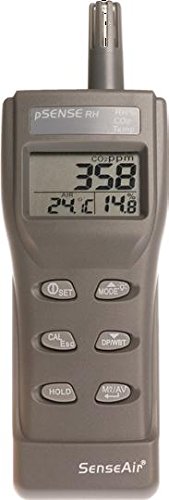
Nọmba 1: Iwaju view of the SenseAir pSENSE RH meter. The device features a digital display showing CO2 concentration (in ppm), air temperature (in °C), and relative humidity (in %). Below the display are six control buttons: SET, MODE, CAL/Esc, DP/WBT, HOLD, and M/AV. The top of the device houses the sensor probe.
Awọn eroja pataki:
- Sensor Probe: Located at the top, for CO2, temperature, and humidity detection.
- Ifihan LCD: Shows real-time readings for CO2 (ppm), Air Temperature (°C), and Relative Humidity (%).
- Awọn bọtini Iṣakoso:
- Ṣeto: Used for entering setup menus and confirming selections.
- Ipo: Toggles between different display modes (e.g., current, MAX, MIN, AVG, TWA, STEL).
- CAL/Esc: Initiates calibration or exits a menu/function.
- DP/WBT: Likely for Dew Point or Wet Bulb Temperature display (specific function may vary by model).
- MU: Didi kika lọwọlọwọ lori ifihan.
- M/AV: Likely for memory functions or switching between manual and automatic averaging.
- Ibudo RS232: For data communication with external devices.
4. Eto
- Unboxing: Carefully remove the pSENSE RH meter and its accessories from the packaging. Inspect for any signs of damage.
- Ibi ti ina elekitiriki ti nwa: Insert the required batteries into the designated compartment, observing correct polarity. Alternatively, connect the device to an appropriate power adapter if available.
- Ibi Ibẹrẹ: For accurate readings, place the device in the environment you wish to monitor, ensuring the sensor probe is exposed to the ambient air and not obstructed. Avoid direct sunlight or strong drafts.
- Agbara Tan: Press the power button (if present, or the SET button for a moment) to turn on the device. The display should illuminate and show initial readings.
5. Awọn ilana Iṣiṣẹ
5.1 Ipilẹ wiwọn
Once powered on, the pSENSE RH will automatically begin measuring and displaying real-time CO2 concentration, temperature, and relative humidity on the LCD screen.
5.2 Aṣayan ipo
Tẹ awọn MODE button to cycle through different display modes. These typically include:
- Awọn kika lọwọlọwọ
- Maximum (MAX) recorded values
- Minimum (MIN) recorded values
- Average (AVG) values
- 8-hour Time-Weighted Average (TWA)
- 15-minute Short-Term Exposure Limit (STEL)
5.3 Holding Readings
Tẹ awọn DIMU button to freeze the current readings on the display. Press it again to release and resume real-time measurements.
5.4 Data Output (RS232)
Connect the device to a computer or data logger via the RS232 port using a compatible cable. Refer to the specific software or communication protocol documentation for detailed instructions on data retrieval and analysis.
6. Itọju
6.1 Ninu
Wipe the device exterior with a soft, dry cloth. Do not use abrasive cleaners or solvents. Keep the sensor probe free from dust and debris.
6.2 Idiwọn
Regular calibration ensures the accuracy of your pSENSE RH meter. To initiate calibration, press the CAL/Esc button. Follow the on-screen prompts or refer to the detailed calibration procedure in the full technical manual (if applicable) for specific instructions, which may involve exposure to a known CO2 concentration.
6.3 Ibi ipamọ
When not in use, store the device in its dedicated hard case in a cool, dry place, away from extreme temperatures and humidity.
7. Laasigbotitusita
7.1 No Display/Power
- Ṣàyẹ̀wò fífi bátìrì sílẹ̀ kí o sì rí i dájú pé àwọn bátìrì náà kò tán.
- Verify power adapter connection if using external power.
7.2 Awọn kika ti ko pe
- Ensure the sensor probe is clean and unobstructed.
- Perform a calibration procedure as described in the Maintenance section.
- Avoid placing the device near heat sources, vents, or in direct sunlight, which can affect temperature and humidity readings.
7.3 Alarm Buzzer Issues
- Check the alarm threshold settings in the device's menu (refer to the full manual for navigation).
- Ensure the CO2 level is above the set threshold if the alarm is expected to sound.
If issues persist, contact SenseAir customer support for further assistance.
8. Awọn pato
| Paramita | Iye |
|---|---|
| Olupese | SenseAir |
| Nọmba apakan | 00-0-0016 |
| Awọn iwọn Ọja (L x W x H) | 20.9 x 5.8 x 7 cm |
| Iwọn Iwọn Iwọn CO2 | 0-5000ppm (±30ppm ±5%rdg), 5001-9999ppm |
| Iṣiro Awọn iye | 8-hour TWA, 15-minute STEL, MAX, MIN, Average |
| Ijade data | RS232 |
| To wa Awọn ẹya ẹrọ | Dedicated hard case |
9. Atilẹyin ọja ati Support
For warranty information, technical support, or service inquiries, please contact SenseAir customer service directly. Details regarding warranty periods and service procedures are typically provided with the product documentation or available on the official SenseAir webojula.
SenseAir Official Webojula: www.senseair.com (This is a placeholder link as no specific link was provided in the input data)


