1. Ifihan
The Audibax Orlando 162 Plus is a professional PAR light designed for various lighting applications. It features 54 x 3W RGB 3-in-1 LEDs, offering a wide range of color mixing capabilities. This device supports DMX control, automatic programs, sound-activated modes, and master/slave operation, making it suitable for stage lighting, events, and architectural illumination. This manual provides essential information for safe operation, setup, and maintenance.
2. Alaye Aabo
- Aabo Itanna: Always connect the device to a grounded power outlet. Ensure the voltage matches the device's requirements (AC90-240V, 50/60Hz). Disconnect power before cleaning or servicing.
- Ibi: Install the fixture in a well-ventilated area, away from heat sources and flammable materials. Ensure stable mounting to prevent accidental falls.
- Mimu: Avoid direct eye exposure to the light source. Do not operate the device if the power cord is damaged. Do not attempt to repair the device yourself; refer servicing to qualified personnel.
- Ayika: This device is intended for indoor use only. Protect it from moisture and extreme temperatures.
3. Package Awọn akoonu
Rii daju pe gbogbo awọn nkan wa lori ṣiṣi silẹ:
- Audibax Orlando 162 Plus PAR Light
- Oke Atẹgun
- Okun agbara
- Itọsọna olumulo
4. Ọja Ipariview
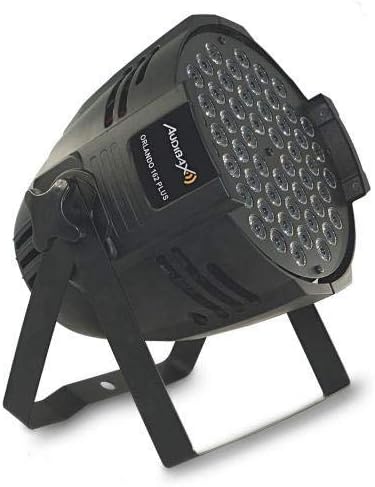
The Audibax Orlando 162 Plus features a robust aluminum housing and an adjustable mounting bracket for versatile positioning.

olusin 4.1: Iwaju view of the Audibax Orlando 162 Plus PAR light, showcasing the 54 RGB LEDs illuminated in green.

olusin 4.2: Apa view of the PAR light, illustrating the adjustable mounting bracket for flexible installation.
Ibi iwaju alabujuto ati awọn isopọ
The rear panel provides access to the control interface and input/output connections.

olusin 4.3: Ẹyìn view of the PAR light, detailing the DMX IN/OUT ports, power input, digital display, and control buttons (MENU, UP, DOWN, ENTER).
- Ifihan Digital: Shows current mode and parameter settings.
- Bọtini MENU: Lilọ kiri nipasẹ awọn aṣayan akojọ aṣayan akọkọ.
- Awọn bọtini oke/isalẹ: Adjust parameter values or navigate menu items.
- Tẹ Bọtini: Jẹrisi awọn aṣayan.
- DMX SINU/ODE: 3-pin XLR connectors for DMX signal connection.
- AGBARA NINU: IEC power input for connecting the power cable.
5. Eto
5.1 Iṣagbesori
- Attach the mounting bracket securely to the fixture using the provided screws.
- Mount the fixture to a truss, ceiling, or stand using appropriate clamps and safety cables (not included). Ensure the mounting surface can support the weight of the fixture.
- Adjust the angle of the fixture using the bracket's locking knobs.
5.2 Asopọ agbara
- Connect the supplied power cable to the POWER IN socket on the rear of the fixture.
- Plug the other end of the power cable into a suitable grounded power outlet.
5.3 DMX Asopọ (Aṣayan)
For DMX control, connect a DMX controller to the DMX IN port of the first fixture. Use DMX OUT to connect to the DMX IN of the next fixture in a daisy chain configuration.
- Use standard 3-pin XLR DMX cables.
- Ensure the DMX chain is terminated with a 120-ohm resistor at the last fixture for optimal signal integrity.
6. Awọn ilana Iṣiṣẹ
Use the MENU, UP, DOWN, and ENTER buttons on the rear panel to navigate and select operating modes and parameters.
6.1 Lilọ kiri Akojọ aṣyn
- Tẹ Akojọ to cycle through the main menu options (e.g., DMX Address, Auto Mode, Sound Mode, Master/Slave).
- Lo UP ati SILE to adjust values or select sub-options within a menu.
- Tẹ WOLE to confirm your selection or save changes.
6.2 Awọn ọna ṣiṣe
The Orlando 162 Plus offers several operational modes:
- Ipo DMX: Allows external control via a DMX controller. Set the DMX address using the menu. Refer to the DMX channel chart (not provided in this manual, typically found in a separate DMX protocol sheet) for specific control functions.
- Ipo Aifọwọyi: The fixture runs through pre-programmed light shows automatically. Various auto programs may be available; use UP/DOWN to select.
- Ipo Mu Ohun-ṣiṣẹ: The light patterns and changes respond to ambient sound detected by the built-in microphone. Adjust sensitivity if available.
- Ọga/Ipo Ẹrú: Connect multiple Orlando 162 Plus fixtures. Set one unit as 'Master' and others as 'Slave'. The slave units will synchronize their operation with the master unit.
- Ipo Awọ Aimi: Select a fixed color. The 3-in-1 RGB LEDs allow for a wide spectrum of colors.
- Iṣẹ Strobe: Activates a flashing light effect. This can often be adjusted for speed.
6.3 Color Examples


7. Itọju
- Ninu: Regularly clean the lens and housing with a soft, lint-free cloth. Do not use abrasive cleaners or solvents. Ensure the device is powered off and unplugged before cleaning.
- Ayewo: Periodically check power cables, DMX cables, and mounting hardware for any signs of wear or damage. Replace damaged components immediately.
- Ibi ipamọ: Nigbati o ko ba si ni lilo, tọju ohun imuduro ni gbigbẹ, agbegbe ti ko ni eruku.
8. Laasigbotitusita
| Isoro | Owun to le Fa | Ojutu |
|---|---|---|
| Ohun èlò ìṣiṣẹ́ náà kò ṣiṣẹ́. | Kò sí ìpèsè agbára; okùn tí ó ní àbùkù. | Ṣàyẹ̀wò ìsopọ̀ okùn agbára; ṣàyẹ̀wò ìjáde agbára; gbìyànjú okùn míràn. |
| Ko si ina jade. | Incorrect mode selected; DMX signal issue. | Ensure fixture is in an active mode (Auto, Sound, DMX with active signal); check DMX connections and address. |
| Iṣakoso DMX ko ṣiṣẹ. | Incorrect DMX address; faulty DMX cable; no DMX terminator. | Verify DMX address matches controller; check DMX cable integrity; ensure DMX terminator is used on the last fixture. |
| Awọn imọlẹ flicker tabi huwa aiṣedeede. | Unstable power supply; DMX signal interference. | Ensure stable power source; check DMX cable quality and connections; use a DMX terminator. |
9. Awọn pato
| Ẹya ara ẹrọ | Sipesifikesonu |
|---|---|
| Nọmba awoṣe | 10132061 |
| Orisun Imọlẹ | 54 x 3W RGB 3-in-1 LEDs |
| Agbara agbara | 162 Wattis |
| Iṣagbewọle Voltage | AC90-240V, 50/60Hz |
| Awọn ọna Iṣakoso | DMX, Auto, Sound-Activated, Master/Slave, Static Color, Strobe |
| Awọn ikanni DMX | Varies by mode (refer to DMX protocol sheet) |
| Ohun elo | Aluminiomu Housing |
| Àwọ̀ | Dudu |
| Awọn iwọn (Apapọ) | 24.5 x 21.5 x 21.5 cm |
| Iwuwo (Ọja) | 2.1 kg |
10. Atilẹyin ọja ati Support
Audibax products are manufactured to high-quality standards. For warranty information, please refer to the terms and conditions provided at the point of purchase or contact Audibax customer support. For technical assistance or service inquiries, please visit the official Audibax webojula tabi kan si ti agbegbe rẹ onisowo.


