1. Ọja Ipariview
The Kenko TELEPLUS HD pro 1.4x DGX is a tele-conversion lens designed to extend the focal length of your existing camera lens. It is installed between the camera body and the shooting lens, effectively multiplying the lens's focal length by 1.4 times.
This teleconverter features a high-definition optical design and is equipped with electronic contacts to maintain communication between the lens and camera, ensuring accurate EXIF data recording and aperture control.

olusin 1.1: Iwaju view of the Kenko TELEPLUS HD pro 1.4x DGX teleconverter, showing the Kenko and TELEPLUS HDpro branding.
2. Key Awọn ẹya ara ẹrọ
- Focal Length Extension: Extends the focal length of the master lens by 1.4 times.
- Electronic Contacts: Equipped with electronic contacts for seamless communication between the lens and camera, allowing for accurate aperture display and EXIF data recording (actual focal length and aperture).
- High Definition Optics: Features a new design of traditional optics for high-definition image quality.
- Apẹrẹ Ere: Exterior finished with a black leather tone, matching modern DSLR aesthetics.
- Iwọn Iwapọ: The 1.4x model is approximately 0.8 inches (2 cm) compact, making it easy to carry and use.
- Iṣakojọpọ Lẹnsi: Consists of 5 elements in 4 groups.
- Aso: Features AR Multi-Coating to reduce flare and ghosting.
3. Eto ati fifi sori
The teleconverter is designed for easy attachment between your camera body and a compatible lens. Follow these steps for proper installation:
- Ensure both your camera and lens are powered off before beginning the installation process.
- Remove the rear cap from your lens and the body cap from your camera.
- Attach the Kenko TELEPLUS HD pro teleconverter to the rear mount of your lens. Align the red dots on both the teleconverter and the lens, then twist until it clicks into place.
- Attach the combined teleconverter and lens assembly to your camera body. Align the red dots on the teleconverter and the camera body, then twist until it clicks into place.
- Once securely attached, you can power on your camera and begin shooting.
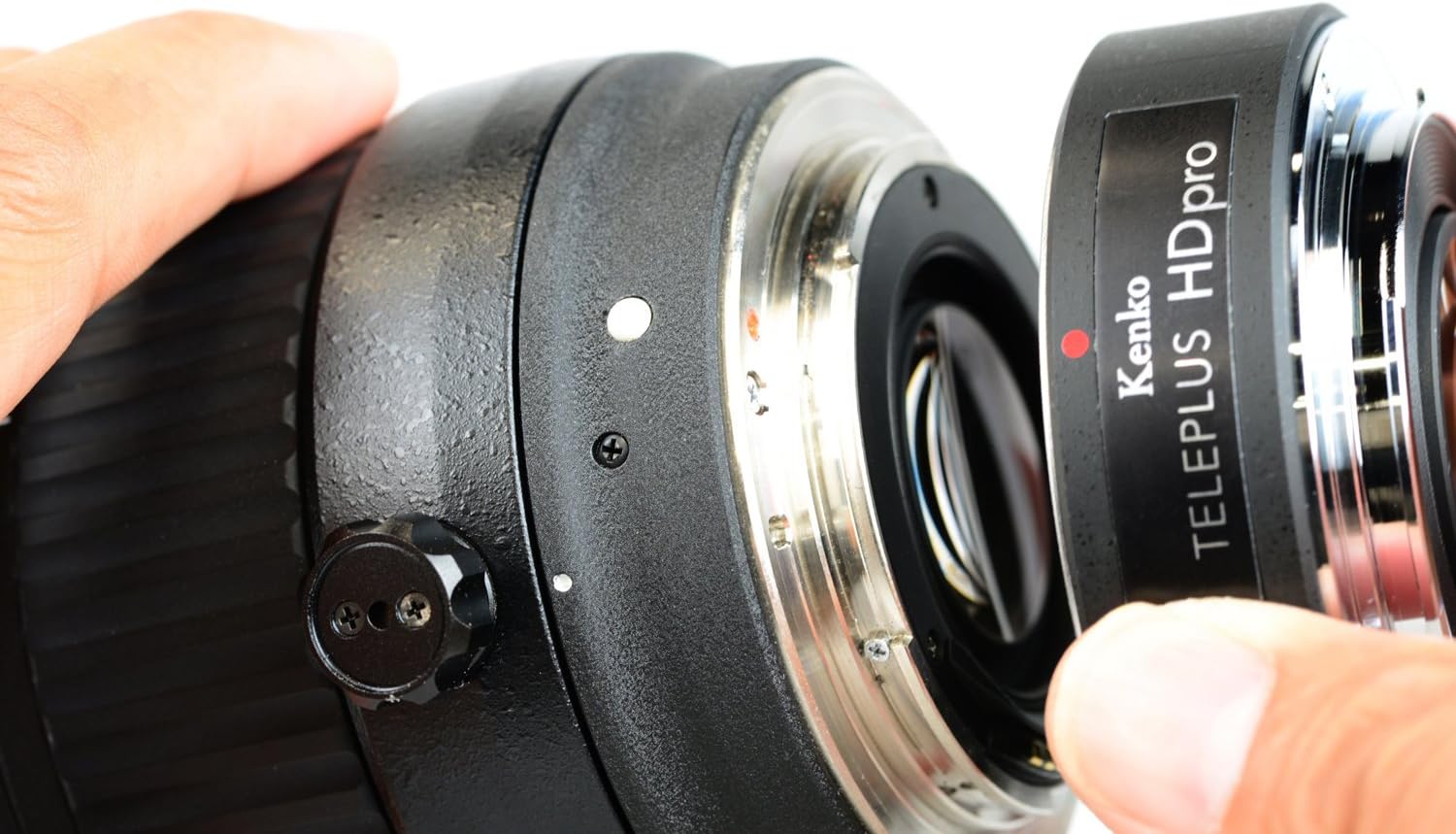
Figure 3.1: A hand holding the teleconverter, aligning it with the rear mount of a camera lens for attachment.

Figure 3.2: The teleconverter is shown already attached to a camera lens, with the combined unit positioned to be mounted onto a Canon EOS 6D camera body. The red alignment dots are visible on both the teleconverter and the camera mount.

Figure 3.3: The Kenko teleconverter is fully attached to a camera lens, and the entire assembly is now mounted onto a Canon EOS 6D camera body, ready for use.
4. Awọn Itọsọna isẹ
When using the Kenko TELEPLUS HD pro teleconverter, consider the following operational aspects:
- Autofocus (AF) Functionality: AF works reliably with master lenses that have an open F-value brighter than F3.5. If the master lens's open F-value is F3.5 or darker, manual focus (MF) is recommended for accurate focusing.
- Iṣakoso Ifihan: The camera's TTL-AE (Through-The-Lens Automatic Exposure) and open metering systems will function as usual. However, due to certain camera and lens combinations, there may be a tendency for overexposure. It is advisable to review captured images and apply negative exposure compensation if necessary.
- EXIF Data: The teleconverter ensures that the EXIF information recorded in your image data reflects the actual focal length and aperture after the 1.4x conversion.
5. Ibamu ati Awọn akọsilẹ pataki
Please observe the following compatibility information and important notes to ensure optimal performance and prevent damage:
- Ibamu Lẹnsi: This product is compatible with original Canon EF lenses and select Tokina lenses only. Other third-party lenses are not officially supported.
- EF-S Lenses: This teleconverter is ko ni ibamu with EF-S lenses and cannot be mounted.
- Hand Shake Correction: It is recommended to turn off the hand shake correction (Image Stabilization) feature on your lens or camera when using the teleconverter, as it may cause defects or unexpected results.
- Optical Corrections: Turn off all in-camera or in-lens optical corrections (e.g., peripheral illumination correction, chromatic aberration correction) as they may cause defects and prevent normal photo capture.
- Stacking Teleconverters: Do not stack multiple teleconverters or extenders (e.g., another teleplus unit) as this can lead to camera failure or severe image degradation.
- Mirrorless Camera Adapters: This product cannot be used in conjunction with adapters designed to attach genuine lenses to mirrorless cameras.
- Awọn aibalẹ: Slight aberrations may be more noticeable compared to using the master lens alone. This is a characteristic of tele-conversion.
- Incompatible Lenses: The following Canon EF lenses are known to be incompatible:
- EF24-70mm F2.8L USM
- EF70-300mm F4-5.6 IS II USM
- EF200mm F2L IS USM
- EF40mm F2.8 STM
- EF600mm F4L IS II USM
- EF400mm F4 DO IS II USM
- EF24-105mm F3.5-5.6 IS STM
- EF50mm F1.8 I, EF50mm F1.8 II, EF50mm F1.8 STM
- EF50mm F1.0L USM
- EF85mm F1.2L USM
- EF200mm F1.8L USM
- MP-E65mm F2.8 1-5 x Macro Photo
- Various TS-E lenses
- Tokina opera 2.0 inches (50 mm) F1.4 FF
6. Alaye Aabo
To prevent damage to the teleconverter, your lens, or camera, please adhere to the following safety guidelines:
- Do not install the teleconverter if any objects protrude from the mount surface of the master lens, as this may cause contact and damage.
- Ensure the teleconverter is securely attached to both the lens and camera before operation.
- When not in use, remove the teleconverter from both the camera and lens and store it in a protective case or with its caps attached to prevent dust and damage.
- Avoid exposing the teleconverter to extreme temperatures, humidity, or direct sunlight for prolonged periods.
7. Itọju
Proper maintenance will ensure the longevity and performance of your Kenko TELEPLUS HD pro teleconverter:
- Ninu: Use a soft, lint-free cloth to clean the exterior. For optical surfaces, use a lens brush to remove dust, followed by a lens cleaning solution and a microfiber cloth if necessary. Avoid touching the glass elements directly with your fingers.
- Ibi ipamọ: When not in use, store the teleconverter with its front and rear caps attached in a dry, cool place, away from direct sunlight and excessive dust.
- Mimu: Always handle the teleconverter by its barrel, avoiding pressure on the optical elements.
8. Laasigbotitusita
| Isoro | Owun to le Fa | Ojutu |
|---|---|---|
| Images appear overexposed. | Certain camera/lens combinations may lead to overexposure with the teleconverter. | Check captured images and apply negative exposure compensation on your camera if needed. |
| Idojukọ aifọwọyi lọra tabi ko pe. | Master lens has an open F-value of F3.5 or darker. | Switch to manual focus (MF) for better accuracy. Ensure sufficient light for AF operation. |
| Image defects or abnormal operation. | Hand shake correction or optical corrections are enabled. | Turn off hand shake correction and all optical corrections on your camera and lens. |
| Teleconverter cannot be mounted. | Attempting to mount on an EF-S lens or an incompatible EF lens. | Verify your lens is a compatible Canon EF lens (not EF-S) and not on the list of incompatible lenses (Section 5). |
9. Awọn pato
| Ẹya ara ẹrọ | Ẹ̀kúnrẹ́rẹ́ |
|---|---|
| Nọmba awoṣe | 601365 |
| Igbega | 1.4x |
| Ikole lẹnsi | 5 eroja ni 4 awọn ẹgbẹ |
| Aso | AR Multi-Coated |
| Awọn iṣagbesori ibaramu | Canon EF |
| Ọja Mefa | 2.68 x 2.68 x 0.77 inches (6.8 x 6.8 x 1.95 cm) |
| Iwọn Nkan | 4.6 iwon (130 giramu) |
| Olupese | Kenko |
| Ọjọ Akọkọ Wa | Oṣu Karun ọjọ 29, Ọdun 2023 |
10. Atilẹyin ọja ati Support
Specific warranty information for this product is not provided in the available documentation. For warranty claims, technical support, or service inquiries, please contact Kenko customer support or refer to the official Kenko webojula fun alaye alaye.
Jọ̀wọ́ pa ẹ̀rí ìrajà rẹ mọ́ fún àwọn ìbéèrè tó bá ní í ṣe pẹ̀lú àtìlẹ́yìn.


