1. Ifihan
This manual provides essential information for the safe and correct operation of your Shinco SO3A 32-inch HD Ready LED TV. Please read all instructions carefully before using the television and retain this manual for future reference.
The Shinco SO3A offers a 32-inch HD Ready display with a resolution of 1366x768p, a 60Hz refresh rate, and a 178-degree viewing angle. It features an A+ Grade Panel, 16.7 million colors, noise reduction, and multiple picture modes. Connectivity options include 2 HDMI ports, 2 USB ports, and 1 VGA port. Audio is delivered through 20W speakers with surround sound capability. Additional features include USB to USB copy, Dynamic Light Control, Eco Vision, and Eye Safe Feature.
2. Alaye Aabo
Always observe the following safety precautions to prevent electric shock, fire, or damage to the television.
- Orisun Agbara: So TV pọ nikan si iṣan agbara AC pẹlu vol ti o tọtaggẹ́gẹ́ bí a ti fihàn lórí àmì TV náà.
- Afẹfẹ: Rii daju pe fentilesonu to ni ayika TV. Ma ṣe dina awọn ṣiṣi atẹgun.
- Omi ati Ọrinrin: Ma ṣe fi TV han si ojo tabi ọrinrin. Ma ṣe gbe awọn nkan ti o kun fun awọn olomi, gẹgẹbi awọn ikoko, lori TV.
- Ninu: Yọ TV kuro ṣaaju ki o to di mimọ. Lo asọ asọ ti o gbẹ. Maṣe lo awọn olutọpa olomi tabi awọn ẹrọ aerosol.
- Ibi: Gbé tẹlifíṣọ̀n náà sí orí ibi tí ó dúró ṣinṣin tàbí kí o so ó mọ́ ògiri dáadáa. Má ṣe gbé e sí ibi tí oòrùn tààrà tàbí sí ẹ̀gbẹ́ ibi tí ooru ti ń mú.
- Mànàmáná: During lightning storms or when unused for long periods, unplug the TV from the wall outlet.
3. Package Awọn akoonu
Jẹrisi pe gbogbo awọn ohun kan wa ninu package:
- 1 x Shinco SO3A LED TV Unit
- 1 x Table Stand Pair
- 1 x Isakoṣo latọna jijin
- 1 x Kaadi atilẹyin ọja
- 1 x Itọsọna olumulo (iwe yii)
- 1 x Wall Mount Kit (includes screws and anchors)

4. Eto
4.1 Ṣiṣii silẹ
Carefully remove the TV from its packaging. It is recommended to keep the original packaging for future transport or service needs.
4.2 Fifi sori ẹrọ Iduro (Ifi sori ẹrọ Tabili)
- Fi oju TV si isalẹ lori rirọ, dada mimọ lati ṣe idiwọ ibajẹ iboju.
- Align the table stand legs with the corresponding screw holes on the bottom of the TV.
- Fi àwọn skru tí a pèsè so àwọn ẹsẹ̀ ìdúró náà mọ́. Rí i dájú pé wọ́n ti di wọ́n mú dáadáa.

4.3 Wall Mount fifi sori
If you choose to wall mount your TV, ensure you use the included wall mount kit and follow the instructions provided with the kit. Professional installation is recommended for wall mounting.

4.4 Nsopọ Peripherals
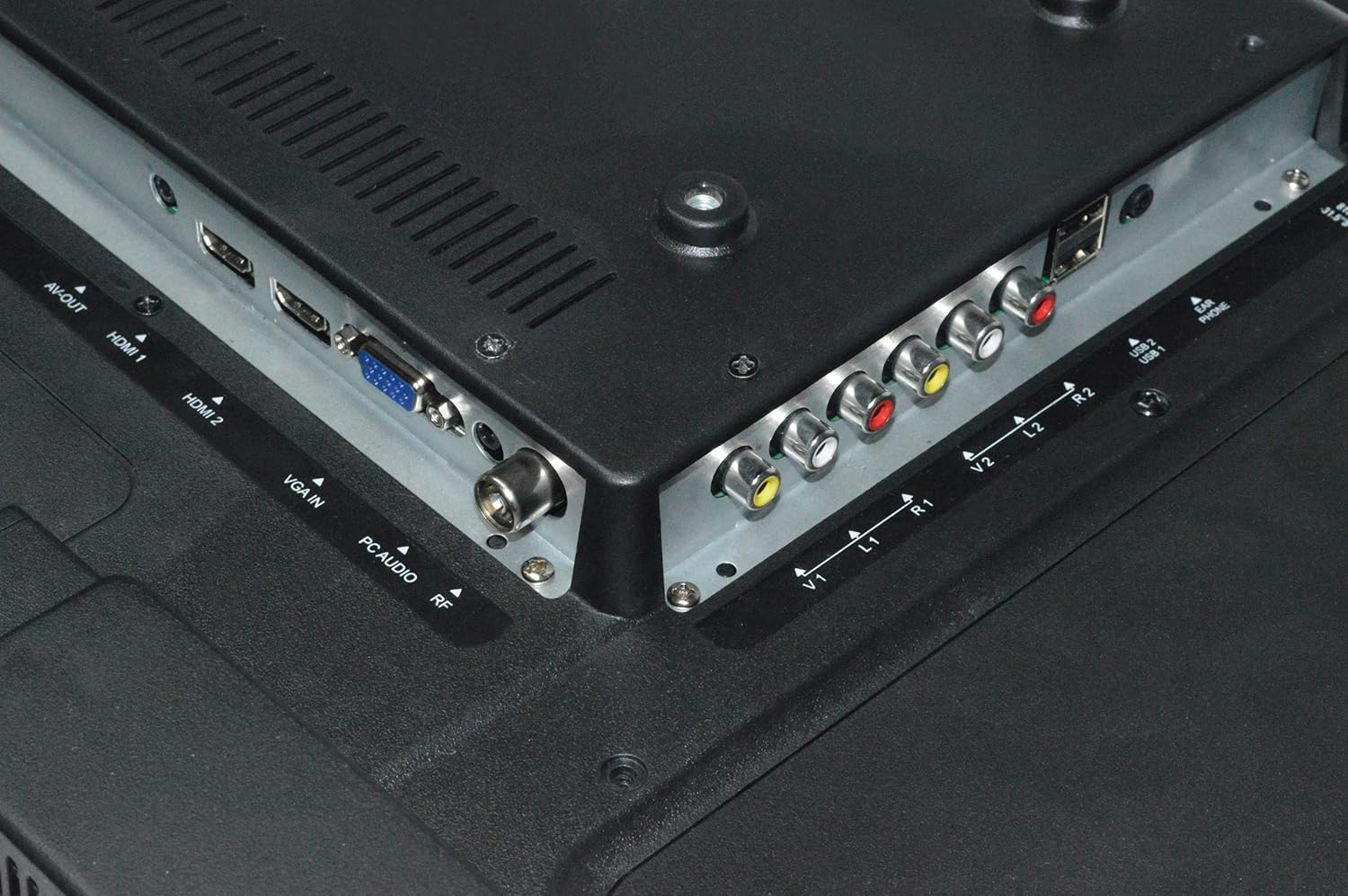
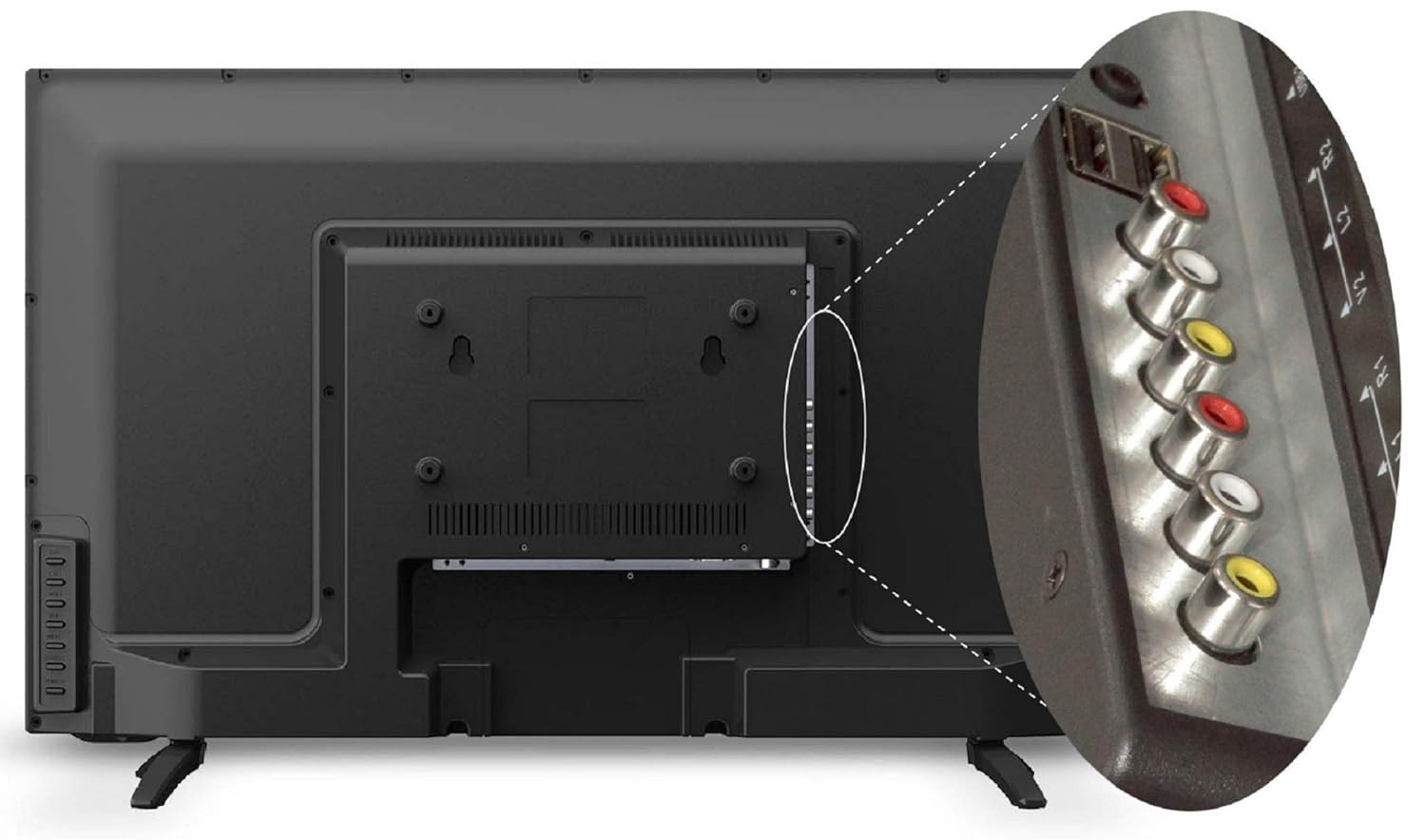
TV nfunni ni ọpọlọpọ awọn ebute oko oju omi fun sisopọ awọn ẹrọ ita:
- Awọn ibudo HDMI (x2): So awọn apoti ṣeto-oke, awọn ẹrọ orin Blu-ray, awọn afaworanhan ere, tabi awọn ohun elo HDMI-ṣiṣẹ miiran.
- Awọn ibudo USB (x2): Connect USB storage devices for media playback or USB to USB copy function.
- Ibudo VGA (x1): Connect a computer or laptop.
- Iṣawọle AV: So awọn ẹrọ agbalagba pọ nipa lilo fidio apapo ati awọn kebulu ohun sitẹrio.
- Iṣawọle RF: So eriali tabi okun USB pọ fun TV igbohunsafefe.
4.5 Asopọ agbara
After connecting all necessary cables, plug the power cord into a wall outlet. The TV will enter standby mode.
5. Awọn ilana Iṣiṣẹ
5.1 Latọna Iṣakoso Awọn iṣẹ
The remote control allows you to operate all TV functions. Insert two AAA batteries (not included) into the remote control, ensuring correct polarity.

- AGBARA: Yi TV si tan tabi paa (ipo imurasilẹ).
- ORISUN: Selects input source (HDMI1, HDMI2, AV, VGA, USB, TV).
- VOL +/-: Ṣe atunṣe ipele iwọn didun.
- CH +/-: Ayipada awọn ikanni.
- Akojọ: Wọle si akojọ aṣayan akọkọ.
- O DARA: Jẹrisi awọn aṣayan ninu awọn akojọ aṣayan.
- Awọn bọtini lilọ kiri (Soke/isalẹ/osi/ọtun): Lilọ kiri nipasẹ awọn akojọ aṣayan ati awọn aṣayan.
- DÁKÚN: Mutes or restores sound.
- ECO: Activates Eco Vision mode for power saving.
- ABALA: Yí ipin apa iboju pada.
5.2 First Time Oṣo
Upon first power-on, the TV will guide you through initial setup steps:
- Aṣayan ede: Yan ede ti o fẹ julọ.
- Aṣayan Orilẹ-ede: Yan agbegbe rẹ.
- Iwoye ikanni: The TV will automatically scan for available channels if an antenna or cable is connected.
5.3 Ipilẹ TV Awọn iṣẹ
- Titan/Apapa: Press the POWER button on the remote or the TV's control panel.
- Aṣayan Orisun Iṣawọle: Press the SOURCE button to cycle through available inputs (HDMI, AV, USB, TV, VGA).
- Atunse iwọn didun: Use VOL +/- buttons.
- Iyipada ikanni: Use CH +/- buttons for sequential change or number buttons for direct input.
5.4 Aworan Eto
Access the Picture menu to adjust display settings:
- Ipo aworan: Select from Standard, Dynamic, Mild, or User to suit your viewing ààyò.
- Imọlẹ: Satunṣe awọn ìwò luminance ti iboju.
- Iyatọ: Ṣe àtúnṣe ìyàtọ̀ láàrín àwọn agbègbè ìmọ́lẹ̀ àti òkùnkùn.
- Àwọ̀: Adjust color saturation.
- Dinku: Adjust the clarity of image edges.
- Dynamic Light Control: Automatically adjusts backlight based on content.
- Idinku Ariwo: Dinku ariwo wiwo ni aworan naa.
- Eye Safe Feature: Dín itujade ina buluu silẹ fun itunu viewing.
5.5 Ohun Eto
Access the Sound menu to adjust audio settings:
- Ipo Ohun: Select from Standard, Music, Movie, or User.
- Agbẹgbẹ: Customize audio frequencies in User mode.
- Ohun kaakiri: Enable or disable virtual surround sound.
- Iwọntunwọnsi: Ṣatunṣe iwọntunwọnsi agbọrọsọ osi/ọtun.
5.6 USB Media Sisisẹsẹhin
Insert a USB storage device into one of the USB ports. The TV will detect the device and prompt you to open the media browser. You can play supported audio (MP3), image (JPEG), and video files.
- USB to USB Copy: This feature allows direct copying of files between two USB devices connected to the TV.
6. Itọju
6.1 Ninu TV
- Yọọ TV nigba gbogbo ṣaaju ṣiṣe mimọ.
- Lo asọ, gbẹ, asọ ti ko ni lint lati nu iboju ati minisita.
- Fun awọn ami alagidi, fẹẹrẹ dampFi omi tàbí ohun èlò ìfọmọ́ ojú tí kò ní bàjẹ́ bò aṣọ náà. Má ṣe fọ́n omi sí orí TV tààrà.
- Avoid using chemical cleaners, as they may damage the TV's finish.
6.2 Latọna Iṣakoso Itọju
- Jeki isakoṣo latọna jijin gbẹ.
- Yago fun sisọ silẹ tabi tẹriba si awọn ipa to lagbara.
- Replace batteries when the remote's range decreases or it stops responding.
7. Laasigbotitusita
Ti o ba pade awọn ọran pẹlu TV rẹ, tọka si awọn iṣoro ti o wọpọ ati awọn ojutu wọnyi:
| Isoro | Owun to le Solusan |
|---|---|
| Ko si agbara | Ṣàyẹ̀wò bóyá okùn agbára náà so mọ́ TV àti ibi tí a ti ń ta ohun èlò ìtajà náà dáadáa. Rí i dájú pé ibi tí a ti ń ta ohun èlò ìtajà náà ní agbára. |
| Ko si aworan, ṣugbọn ohun wa | Check the input source. Ensure the external device (set-top box, DVD player) is turned on and connected correctly. |
| Ko si ohun, ṣugbọn aworan wa | Check the volume level and ensure the TV is not muted. Check audio settings in the menu. |
| Isakoṣo latọna jijin ko ṣiṣẹ | Ṣayẹwo ki o si ropo awọn batiri. Rii daju pe ko si awọn idena laarin isakoṣo latọna jijin ati sensọ IR ti TV. |
| Didara aworan ti ko dara | Adjust picture settings (brightness, contrast, sharpness). Check antenna connection for broadcast TV. Ensure the source device is outputting a high-quality signal. |
8. Awọn pato
Key technical specifications for the Shinco SO3A 32-inch HD Ready LED TV:
| Ẹya ara ẹrọ | Sipesifikesonu |
|---|---|
| Brand | Shinco |
| Awoṣe | SO3A |
| Iwon iboju | 32 inches (80 cm) |
| Ifihan ọna ẹrọ | LED |
| Ipinnu | HD Ṣetan (awọn piksẹli 1366x768) |
| Oṣuwọn sọtun | 60 Hz |
| Viewigun igun | Awọn iwọn 178 |
| Ifihan Iru | A+ ite Panel |
| Awọn ibudo HDMI | 2 |
| Awọn ibudo USB | 2 |
| Ibudo VGA | 1 |
| Ijade ohun | 20 Wattis |
| Awọn iwọn Ọja (LxWxH) | 73.6 x 19 x 47.4 cm |
| Iwọn Nkan | 6.35 kg |
| Orisun agbara | AC |
| Odun awoṣe | 2019 |


9. atilẹyin ọja Information
Your Shinco SO3A LED TV comes with a 1-year standard manufacturer warranty lati ọjọ ti o ra. Atilẹyin ọja yi ni wiwa awọn abawọn iṣelọpọ labẹ lilo deede.
For any product defects, damage, or features not matching the description provided, this product is eligible for replacement within 10 ọjọ ti ifijiṣẹ. Please contact customer support for assistance.
10. Atilẹyin
For technical assistance, service, or warranty claims, please contact the manufacturer:
Olupese: Videotex International Pvt Ltd
Adirẹsi: 347-C, Ecotech-3, Udyog Kendra -2, Greater, Noida - 201306, Uttar Pradesh, India
Nọmba olubasọrọ: 8882569569


