Ọrọ Iṣaaju
This manual provides detailed instructions for the assembly, operation, and maintenance of your La-Z-Boy Sutherland Ergonomic Faux Leather Swivel Computer and Desk Chair, Model CHR10048A. Please read these instructions carefully before assembly and use to ensure proper function and longevity of your product.

Image: The La-Z-Boy Sutherland Ergonomic Faux Leather Swivel Computer and Desk Chair in black, showcasing awọn oniwe-apẹrẹ ati awọn ẹya ara ẹrọ.
Alaye Aabo
- Rí i dájú pé gbogbo àwọn ẹ̀yà ara wà níbẹ̀ tí wọn kò sì bàjẹ́ kí wọ́n tó kó wọn jọ. Má ṣe lò ó tí àwọn ẹ̀yà ara kan bá sọnù tàbí tí wọ́n bá bàjẹ́.
- Assembly requires two people for optimal safety and ease.
- Maṣe duro lori alaga.
- Má ṣe lo àga náà gẹ́gẹ́ bí àga ìgbésẹ̀.
- The maximum weight recommendation for this chair is 250 pounds. Exceeding this limit may cause damage to the chair or personal injury.
- Casters are intended for use on carpet and are not recommended for use on tile or hardwood floors.
- Keep children away from moving parts during assembly and adjustment.
Package Awọn akoonu
Before beginning assembly, verify that all components are present. Refer to the assembly diagram (if provided with your product) for a complete list of parts. Typically, the package includes:
- Alaga Back
- Ijoko ijoko
- Awọn ihamọra (2)
- Ipilẹ Alaga (ipilẹ irawọ marun)
- Awọn oṣere (5)
- Gaasi Gbe Silinda
- Mechanism Awo
- Apo hardware (skru, washers, Allen wrench)

Image: Illustration indicating quick assembly and customer service contact information.
Awọn ilana Apejọ
Assembly is required and instructions are provided with the product. Two people are recommended for assembly. Follow the steps below, referring to the included diagrams for visual guidance.
- So Casters si Ipilẹ: Fi kọọkan ninu awọn simẹnti marun sinu awọn ihò ni opin ẹsẹ kọọkan ti ipilẹ alaga. Titari ṣinṣin titi wọn o fi tẹ sinu aaye.
- Fi Gas Gbe soke: Gbe silinda gbe gaasi sinu iho aarin ti ipilẹ alaga ti o pejọ.
- So Awo Mechanism mọ Ijoko: Align the mechanism plate with the pre-drilled holes on the underside of the chair seat. Ensure the front of the mechanism faces the front of the seat. Secure with screws using the provided Allen wrench.
- Attach Armrests to Seat and Back: Secure the armrests to both the chair seat and chair back using the appropriate screws. Do not fully tighten screws until all are in place.
- So Ijoko pọ si Gbe gaasi: Carefully place the assembled seat and back onto the gas lift cylinder, ensuring the center hole of the mechanism plate aligns with the top of the gas lift. Press down firmly.
- Imuduro ipari: Once all components are assembled, fully tighten all screws.

Image: Illustration showing chair components and adherence to BIFMA standards, indicating robust construction.
Awọn ilana Iṣiṣẹ
Your La-Z-Boy Sutherland chair features several adjustable functions to customize your seating experience.
Tolesese Iga tolesese
To adjust the seat height, locate the lever on the right side of the chair, beneath the seat. Lift the tab upwards to raise or lower the seat to your desired height. Release the tab to lock the height in place.
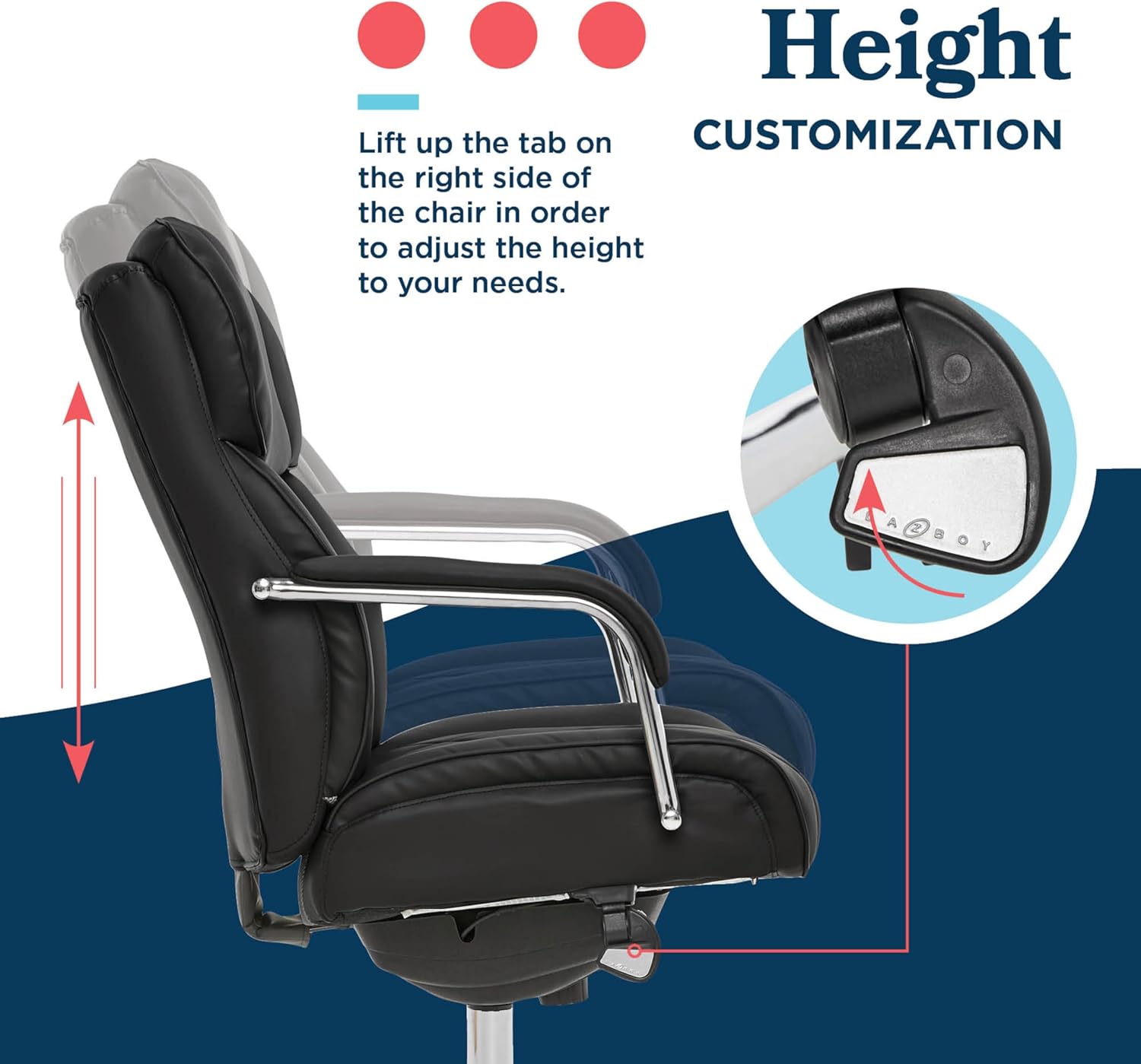
Image: Diagram illustrating the pneumatic seat height adjustment lever and its function.
Recline and Tilt Tension Adjustment
The chair features a swivel tilt mechanism. To adjust the recline, locate the left tab beneath the seat. Flip this tab downwards to unlock the recline function. To adjust the tilt tension, twist the knob located at the front center, beneath the seat. Turn clockwise to increase tension (making it harder to recline) and counter-clockwise to decrease tension (making it easier to recline).

Image: Diagram showing the recline lock lever and the tilt tension adjustment knob.
Swivel Išė
A ṣe apẹrẹ alaga pẹlu iṣẹ swivel 360-degree, gbigba fun yiyi irọrun laisi gbigbe ipilẹ.
Itoju ati Itọju
- Ninu: Spot clean the faux leather upholstery as needed. Use a soft, damp pẹ̀lú ọṣẹ díẹ̀ àti omi. Yẹra fún àwọn kẹ́míkà líle tàbí àwọn ohun ìfọmọ́ tí ó ń pa ara.
- Ayewo: Periodically check all screws and bolts to ensure they are tight. Retighten as necessary to maintain stability and safety.
- Awọn Casters: Keep casters free of debris to ensure smooth gliding.
- Yago fun Imọlẹ Oorun Taara: Ifarahan gigun si imọlẹ oorun taara le fa faux alawọ lati rọ tabi kiraki.
Laasigbotitusita
Ti o ba ba awọn ọran eyikeyi pade pẹlu alaga rẹ, tọka si awọn solusan ti o wọpọ wọnyi:
- Àga náà ń mì tìtì: Ensure all assembly screws are fully tightened. Check that the gas lift is securely seated in the base and mechanism plate.
- Alaga Ko Ṣatunṣe Giga: Verify that the height adjustment lever is functioning correctly and not obstructed. Ensure the gas lift cylinder is properly installed.
- Chair Does Not Recline: Check that the recline lock lever is in the unlocked position. Adjust the tilt tension knob to a looser setting.
- Awọn Casters Ko Yiyi Lara: Inspect casters for hair, dust, or other debris that may be obstructing movement. Clean as necessary.
Awọn pato
| Orukọ awoṣe | Sutherland |
| Nọmba awoṣe | CHR10048A |
| Brand | La-Z-Ọmọkunrin |
| Àwọ̀ | Dudu |
| Ohun elo Iru | Faux Leather (Fill Material: Foam) |
| Awọn iwọn Ọja (Lapapọ) | 23.5"D x 30.25"W x 40.5"H (Adjustable Height: 40.5-43.5"H) |
| Awọn iwọn ijoko | 18"D (Height: 19.5"-22.5"H) |
| Back Mefa | 27"H x 21"W |
| Apa Giga | 29.5 inches (lati ilẹ) |
| Iṣeduro iwuwo ti o pọju | 250 iwon |
| Apejọ ti a beere | Yes (Two people recommended) |
| Awọn ajohunše Pade | ANSI/BIFMA standards |
| UPC | 887909084474 |

Image: Detailed diagram illustrating the various dimensions of the La-Z-Boy Sutherland chair.
Alaye atilẹyin ọja
This La-Z-Boy Sutherland chair comes with a 1-odun olupese lopin atilẹyin ọja on cushions and components. For specific warranty details and claims, please refer to the warranty documentation included with your purchase or contact customer support.
Onibara Support
For assistance with assembly, parts, or any other inquiries regarding your La-Z-Boy Sutherland chair, please contact our dedicated U.S. based customer service team:
- Webojula: www.trueinnovations.com
- Imeeli: service@trueinnovations.com
- Awọn wakati iṣẹ: 7am - 4pm PST (10am - 7pm EST)


