Ọja Pariview
The SteelSeries Arctis 3 headset redefines gaming audio with its innovative design, delivering superior sound, comfort, and style across all major gaming platforms. It features a completely overhauled audio system and a new microphone design for unmatched clarity.
Key Awọn ẹya ara ẹrọ
- Optimal PS5 compatibility: Requires user to change settings on Sony PS5 – disable Sony 3D Audio and then increase default volume to 100%.
- All-Platform Design: Designed for everywhere you game, with superior sound, comfort and style on all gaming platforms, including PC, PlayStation, Xbox One, Nintendo Switch via detachable 3.5 millimeter cables.
- ClearCast Microphone: Widely recognized as the best mic in gaming, the Discord certified ClearCast microphone delivers studio quality voice clarity and background noise cancellation.
- Olohun to gaju: Sound is your competitive advantage with the S1 speaker drivers, engineered to produce ultra-low distortion audio so you hear every detail.
- Itunu Gbogbo-ọjọ: Play all day with athletics inspired performance fabric AirWeave ear cushions that keep your ears cool and dry.
- Spatial Audio Ready: Windows Sonic Spatial Audio fully compatible with native surround sound built into Windows 10 PCs and Xbox One consoles; Headphone sensitivity: 98 dB.
Ohun ti o wa ninu Apoti
- Agbekọri
- Itọsọna olumulo

The SteelSeries Arctis 3 headset and its included accessories, ready for setup.
Ṣeto
Nsopọ Agbekọri Rẹ
The Arctis 3 headset connects via detachable 3.5mm cables, ensuring broad compatibility across various gaming platforms.
PC Asopọ
For PC, use the included splitter extension cable to connect the headset's 3.5mm jack to separate microphone and headphone ports on your computer.
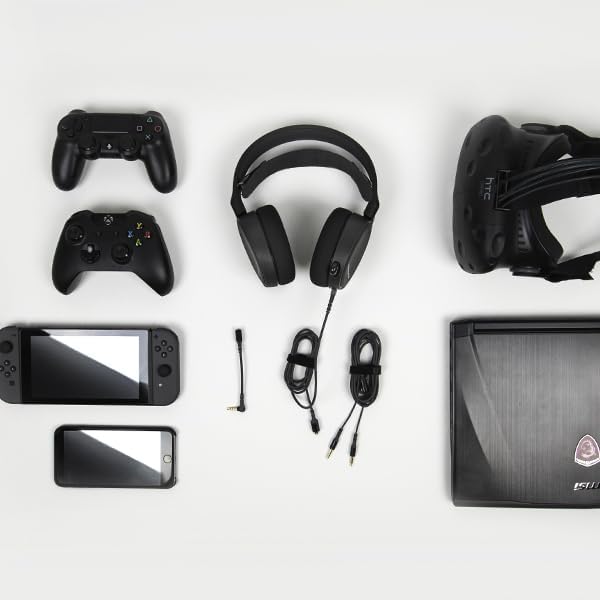
The SteelSeries Arctis 3 headset shown with various compatible devices and connection cables, highlighting its multi-platform design.
Console Connection (PlayStation, Xbox One, Nintendo Switch)
For consoles, connect the headset directly to your controller's 3.5mm audio jack.
Important PS5 Compatibility Note: To ensure optimal PS5 compatibility, disable Sony 3D Audio in your PS5 settings and increase the default volume to 100%.
Official SteelSeries video demonstrating the features and compatibility of the Arctis 3 Black Gaming Headset.
Ṣiṣẹ Agbekọri Rẹ
Gbohungbohun Lilo
The Discord-certified ClearCast microphone is retractable and delivers studio-quality voice clarity with background noise cancellation.
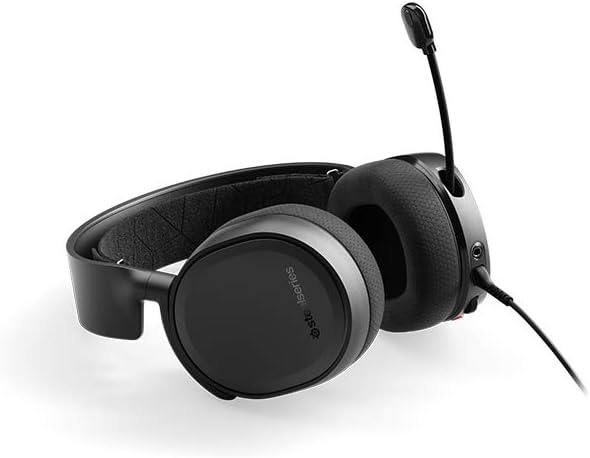
The SteelSeries Arctis 3 headset with its ClearCast microphone extended, ready for voice communication.
To extend the microphone, gently pull it out from the left earcup. To retract, push it back into the earcup until it is flush.
Awọn iṣakoso Agbekọri
The left earcup features convenient controls for volume adjustment and microphone muting.
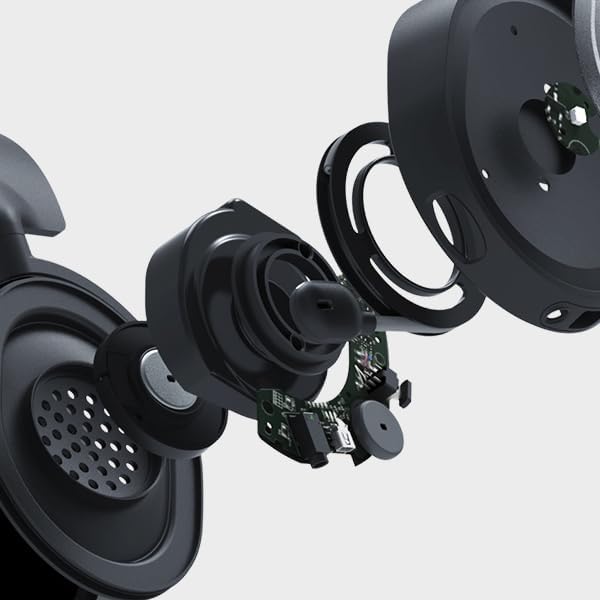
Sun mo tipetipe view of the volume scroll wheel and microphone mute button located on the left earcup of the Arctis 3 headset.
- Kẹkẹ Iwọn didun: Scroll up or down to adjust the audio volume.
- Bọ́tìnì dídákẹ́kọ̀ọ́ gbohungbohun: Tẹ lati dakẹ tabi mu gbohungbohun rẹ dakẹ.
Itoju
To ensure the longevity and optimal performance of your SteelSeries Arctis 3 headset, follow these maintenance guidelines:
- Ninu: Use a soft, dry cloth to wipe down the earcups and headband. Avoid abrasive cleaners or solvents.
- Ibi ipamọ: Tọ́jú agbekọri naa si ibi gbigbẹ ti o tutu, kuro ni oorun taara ati iwọn otutu ti o lagbara. Nigbati o ko ba lo o, fa gbohungbohun naa kuro lati daabobo rẹ.
- Itọju USB: Handle cables gently. Avoid sharp bends or excessive pulling to prevent damage.
- Earcup Maintenance: The AirWeave ear cushions are designed for comfort and breathability. Periodically check them for wear and tear.
Laasigbotitusita
If you encounter issues with your SteelSeries Arctis 3 headset, refer to the following common troubleshooting steps:
- Ko si Olohun/Iwọn kekere:
- Ensure the 3.5mm cable is securely connected to both the headset and your device.
- Ṣayẹwo kẹkẹ iwọn didun lori agbekari ati awọn eto ohun ẹrọ rẹ.
- Verify that the microphone mute button is not engaged.
- For PS5 users, confirm Sony 3D Audio is disabled and volume is at 100% as per setup instructions.
- Gbohungbohun Ko Ṣiṣẹ:
- Rii daju pe gbohungbohun ti gbooro sii ni kikun.
- Check that the microphone mute button is not engaged.
- Verify microphone input settings on your PC or console.
- If using the PC splitter cable, ensure both jacks are correctly inserted into the microphone and headphone ports.
- Ohun Idilọwọ:
- Sokale iwọn didun lori mejeeji agbekari ati ẹrọ rẹ.
- Ṣe idanwo agbekari pẹlu ẹrọ miiran lati ṣe akoso ọran-ẹrọ kan pato.
Awọn pato
| Ẹya ara ẹrọ | Ẹ̀kúnrẹ́rẹ́ |
|---|---|
| Awọn agbekọri Jack | Mini-phone |
| Orukọ awoṣe | Arctis |
| Asopọmọra Technology | Ti firanṣẹ |
| Awọn irinše to wa | User Manual, Headset |
| Awọn Lilo Ni pato Fun Ọja | Ere |
| Akori | Video ere |
| Iṣakoso Iru | Ariwo Iṣakoso |
| Cable Ẹya | Iyasọtọ |
| Iwọn Nkan | 10.4 iwon |
| Onibara Package Iru | Iṣakojọpọ Standard |
| Iwọn Ẹka | 1.0 Iṣiro |
| Ara | Arctis 3 |
| Nọmba ti Awọn nkan | 1 |
| UPC | 813682025212 |
| Nọmba Idanimọ Iṣowo Agbaye | 00813682025212 |
| Olupese | SteelSeries APS |
| Ọja Mefa | 7.93 x 7.08 x 3.58 inches |
| ASIN | B07G12Z1HR |
| Nọmba awoṣe ohun kan | 61503 |
| Awọn batiri | 1 Litiumu polima batiri ti a beere. |
| Onibara Reviews | 4.2 ninu 5 irawọ (awọn idiyele 12,688) |
| Ti o dara ju Ntaa ipo | #23,643 in Video Games, #856 in PC Game Headsets |
| Ti wa ni Duro Nipa Olupese | Rara |
| Ọjọ Akọkọ Wa | Oṣu Kẹjọ Ọjọ 28, Ọdun 2018 |
| Brand | Irin Series |
| Àwọ̀ | Dudu |
| Fọọmù ifosiwewe | Lori Eti |
| Ipalara | 32 ohm |
| Idahun Igbohunsafẹfẹ | 22000 Hz |
Atilẹyin ọja ati Support
The SteelSeries Arctis 3 headset comes with a manufacturer's warranty. For detailed warranty information and support, please refer to the official SteelSeries webojú-òpó wẹ́ẹ̀bù tàbí ìwé ìtọ́nisọ́nà olùlò.
You can download the full User Manual in PDF format: Ilana olumulo (PDF)
For further assistance, visit the official SteelSeries store page: SteelSeries Store


