Ọrọ Iṣaaju
Welcome to the ARCADE1UP At-Home Arcade experience! This manual provides essential information for the assembly, operation, and maintenance of your new ARCADE1UP 6650 Asteroids arcade cabinet. Please read these instructions carefully before assembly and use to ensure safe and optimal performance.
Your ARCADE1UP cabinet brings classic arcade gaming into your home, featuring iconic titles such as Asteroids, Major Havoc, Lunar Lander, and Tempest.
Alaye Aabo
- Apejọ Agba Nilo: Ọjà yìí ní àwọn ẹ̀yà kékeré nínú, ó sì nílò àkójọpọ̀ àwọn àgbàlagbà.
- Aabo Itanna: Ensure the power cord is not damaged. Plug into a grounded outlet. Do not expose to water or excessive moisture.
- Ibi: Place the arcade cabinet on a flat, stable surface. Avoid placing in direct sunlight or near heat sources.
- Afẹfẹ: Ma ṣe dina awọn ṣiṣi atẹgun. Rii daju pe sisan afẹfẹ to peye ni ayika ẹyọ naa.
- Ninu: Yọ agbara kuro ṣaaju ki o to nu. Lo aṣọ rirọ ati gbigbẹ. Maṣe lo awọn ohun elo afọmọ omi tabi awọn aerosol.
- Awọn ọmọde: Supervise children during use. This product is not a toy and is intended for users aged 14 and up.
Package Awọn akoonu
Please refer to the packaging for a complete list of included components. Ensure all parts are present before beginning assembly. If any parts are missing or damaged, contact ARCADE1UP customer support.

Image: The ARCADE1UP Asteroids arcade cabinet packaging, showing the product box with graphics and key features.
Eto ati Apejọ
Assembly typically requires two adults and takes approximately 1-2 hours. Follow the step-by-step instructions provided in the separate assembly guide included with your product. The general process involves:
- Ṣii silẹ: Ni ifarabalẹ yọ gbogbo awọn paati kuro ninu apoti.
- Apejọ igbimọ: Connect the side panels, back panel, and base using the provided hardware.
- Atẹle fifi sori: Securely mount the LCD monitor into the cabinet.
- Control Panel Attachment: Attach the control panel to the cabinet, ensuring all cables are properly connected.
- Marquee and Top Panel: Install the illuminated marquee and top panel.
- Asopọ agbara: Connect the power adapter to the cabinet and then to a wall outlet.

Aworan: Iwaju view of the fully assembled ARCADE1UP Asteroids arcade cabinet, showcasing the screen, control panel, and artwork.
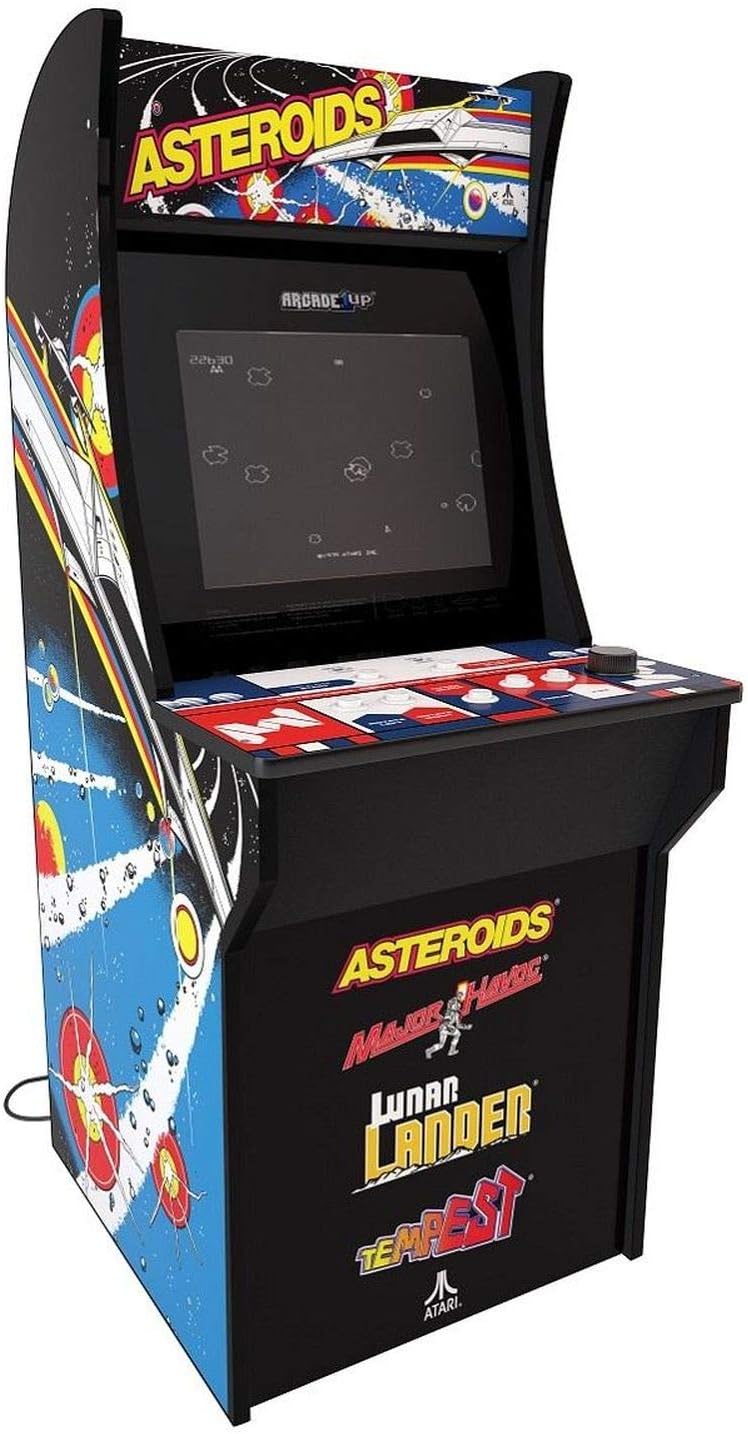
Aworan: Angled view of the fully assembled ARCADE1UP Asteroids arcade cabinet, highlighting the side panel artwork and overall design.

Aworan: Apa view of the ARCADE1UP Asteroids arcade cabinet, showing the detailed side panel artwork and the power cord exiting the back.

Aworan: Isunmọ view of the ARCADE1UP Asteroids control panel, displaying the joystick, buttons, and game instructions printed on the surface.
Awọn ilana Iṣiṣẹ
- Agbara Tan: Plug the power adapter into a wall outlet. The arcade cabinet will automatically power on.
- Aṣayan Ere: Use the joystick and buttons on the control panel to navigate the game selection menu.
- Bẹ̀rẹ̀ eré: Once a game is selected, press the "1 Player Start" or "2 Player Start" button to begin.
- Awọn iṣakoso:
- Joysticks: Movement (e.g., steering your ship in Asteroids).
- Bọtini ina: Shoots projectiles.
- Thrust Button: Propels your ship forward.
- Hyperspace Button: Teleports your ship to a random location (use sparingly, as it can be risky).
- Rotate Left/Right Buttons: For games like Tempest, these buttons control rotation.
- Iṣakoso iwọn didun: Adjust the volume using the dedicated volume buttons or switch, typically located on the control panel or back of the unit.
- Njade kuro ninu ere kan: To return to the main menu, press the "Option" or "Menu" button (refer to your specific control panel layout).
- Agbara Pa: Unplug the power adapter from the wall outlet to power off the unit.
Awọn ere to wa
Your ARCADE1UP 6650 cabinet includes the following classic Atari titles:
- Asteroids: The original space shooter where you destroy asteroids and flying saucers.
- Major Havoc: A vector graphics arcade game with multiple gameplay styles.
- Lunar Lander: A classic game of precision, guiding a lunar module to a safe landing.
- Tempest: A fast-paced tube shooter with vibrant vector graphics.
Itoju
- Ninu Igbimọ Ile-igbimọ: Lo asọ, die-die damp aṣọ láti nu àwọn ojú ìta. Yẹra fún àwọn ohun ìfọṣọ tàbí àwọn ohun olómi.
- Ninu iboju: Use a microfiber cloth specifically designed for electronics screens. Do not spray cleaners directly onto the screen.
- Control Panel Care: Keep the control panel clean and dry. Avoid spills. For stubborn grime, a small amount of isopropyl alcohol on a cloth can be used, but test in an inconspicuous area first.
- Ayẹwo okun agbara: Periodically check the power cord for any signs of damage. If damaged, discontinue use and contact customer support.
Laasigbotitusita
| Isoro | Owun to le Solusan |
|---|---|
| Ko si Agbara / Ẹka Ko Titan |
|
| Ko si Ohun |
|
| Screen Display Issues (No Picture, Flickering) |
|
| Awọn iṣakoso ti ko dahun |
|
If you encounter issues not listed here or if the suggested solutions do not resolve the problem, please contact ARCADE1UP customer support for further assistance.
Awọn pato
- Awoṣe: ARCADE1UP 6650 Asteroids At-Home Arcade Game
- Okunfa Fọọmu: Ni kikun Iwon
- Awọn iwọn ọja: 119.38 cm (H) x 58.42 cm (W) x 48.26 cm (D)
- Ìwọ̀n Nkan: 26.76 kilo
- Iwọn iboju: 17 Inches LCD
- Orisun Agbara: Okun Itanna
- Nọmba Awọn oṣere: 1
- Iru Adari: Joystick and Buttons
- Awọn ere ti a fi kun: Asteroids, Major Havoc, Lunar Lander, Tempest
- Apejuwe Ibiti ọjọ-ori: Ọmọde (A ṣeduro fun awọn ọjọ-ori 14+)
Atilẹyin ọja ati Support
For warranty information, technical support, or to order replacement parts, please visit the official ARCADE1UP webojula tabi kan si wọn onibara iṣẹ Eka. Jeki ẹri rira rẹ fun awọn iṣeduro atilẹyin ọja.
ARCADE1UP Official Webojula: www.arcade1up.com


