1. Ifihan
O ṣeun fun riraasing the ieGeek Portable DVD Player. This manual provides essential information for the safe and efficient operation of your device. Please read it thoroughly before use and retain it for future reference.
Alaye Aabo
- Ma ṣe fi ẹrọ naa han si ojo tabi ọrinrin.
- Má ṣe tú ẹ̀rọ náà ká. Tọ́ka gbogbo iṣẹ́ ìtọ́jú náà sí àwọn òṣìṣẹ́ tó mọ̀ nípa rẹ̀.
- Lo awọn ohun ti nmu badọgba agbara ati awọn ẹya ẹrọ nikan.
- Yago fun awọn iwọn otutu to gaju ati imọlẹ orun taara.
- Jeki ẹrọ naa kuro ni awọn aaye oofa ti o lagbara.
2. Package Awọn akoonu
Jẹrisi pe gbogbo awọn ohun kan wa ninu package:
- ieGeek Portable DVD Player
- Isakoṣo latọna jijin
- Ṣaja ọkọ ayọkẹlẹ
- Adaparọ Agbara AC
- 3-ni-1 Okun AV
- Itọsọna olumulo

Nọmba 2.1: Awọn ẹya ẹrọ ti o wa pẹlu
3. Ọja Ipariview
The ieGeek Portable DVD Player features a 10.5-inch HD swivel screen and supports various media formats for versatile entertainment.
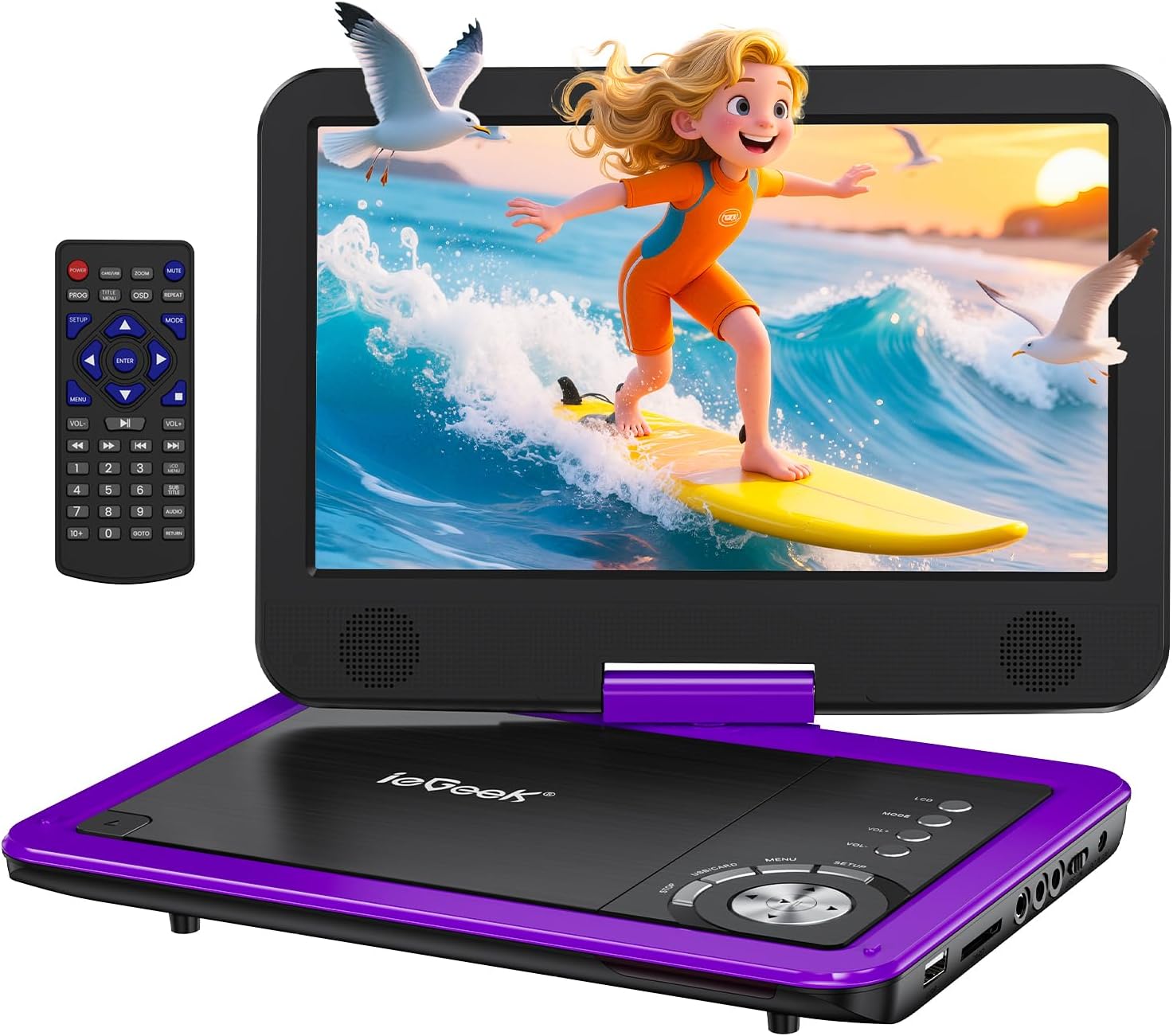
Figure 3.1: ieGeek Portable DVD Player
Awọn iṣakoso ati awọn ibudo

Figure 3.2: Side Ports and Controls
- Ibudo USB: Fun asopọ awọn awakọ filasi USB.
- Iho kaadi SD: Fun fifi kaadi iranti SD sii.
- Jack Earphone: Fun sisopọ olokun.
- JADE: Connects to a TV or projector for larger screen viewing.
- AV NI: Connects to another portable DVD player for synchronized viewing.
- ON/PA Yipada: Fi agbara ẹrọ si tan tabi pa.
- DC NINU 12V: Iṣagbewọle agbara fun ohun ti nmu badọgba AC tabi ṣaja ọkọ ayọkẹlẹ.
- GAME Port: For connecting a game controller (if supported).
4. Eto
4.1 Gbigba agbara akọkọ
Before first use, fully charge the portable DVD player. The built-in rechargeable battery provides approximately 5 hours of video playback.
- Connect the AC Power Adapter to the DC IN 12V port and a power outlet.
- Alternatively, use the Car Charger to power the device in a vehicle.

Àwòrán 4.1: Àwọn Àṣàyàn Gbígbà Owó
4.2 Nfi Disiki kan si
- Slide the 'OPEN' latch to open the disc lid.
- Place the DVD or CD onto the spindle, ensuring it clicks into place.
- Close the disc lid firmly. The player will begin loading automatically.
Akiyesi: Blu-ray discs are not supported.
4.3 Inserting USB/SD Card
- Fi kọnputa filasi USB sinu ibudo USB.
- Insert an SD card into the SD Card slot.
The player will detect the media and allow you to select files fun ṣiṣiṣẹsẹhin.

Figure 4.2: USB and SD Card Insertion
5. Awọn ilana Iṣiṣẹ
5.1 ipilẹ Sisisẹsẹhin
- Titan/Apapa: Use the ON/OFF switch on the side of the device.
- Ṣiṣẹ/Daduro: Press the Play/Pause button on the device or remote to start or pause playback.
- Duro: Tẹ bọtini Duro lati pari ṣiṣiṣẹsẹhin.
- Rekọja: Use the Previous/Next buttons to skip tracks or chapters.
- Iṣakoso iwọn didun: Adjust the volume using the VOL+ and VOL- buttons on the device or remote.
5.2 iboju Yiyi
The 10.5-inch HD screen can rotate 270° and flip 180°, allowing for multiple viewing angles or folding into a tablet-like form.

Figure 5.1: Screen Rotation Capabilities
5.3 Iṣakoso latọna jijin
The included remote control provides full functionality for convenient operation from a distance.
5.4 External Connections (SYNC Screen Playing)
- Sopọ si TV: Use the AV to RCA cable (3-in-1 AV Cable) to connect the AV OUT port of the DVD player to the AV IN ports of a television. This allows you to view akoonu lori kan ti o tobi iboju.
- Connect to Another Player: Use an AV to AV cable (not included) to connect the AV OUT of one player to the AV IN of another, enabling synchronized viewing across two devices.
5.5 Pataki Awọn ẹya ara ẹrọ
- Iṣẹ Iranti Ikẹhin: The player automatically resumes playback from where it was last stopped, even after powering off.
- Sisisẹsẹhin iyipo: Enable the repeat function to play files on a continuous loop.
- Iṣẹ Anti-Gigi: Designed to minimize disc skip issues during movement, ideal for car travel.
6. Media Compatibility
This portable DVD player supports a wide range of media formats and is region-free for DVD playback.

Figure 6.1: Supported Media Types
6.1 Awọn ọna kika Disiki atilẹyin
- CD, DVD, VCD, DVD±R, DVD±RW, CD-R, CD-RW, CVD, SVCD.
- Not compatible with Blu-ray discs.
6.2 Supported Digital Media (USB/SD Card)
Supports USB and SD cards up to 32GB.
- Fidio: AVI, MPG, MPVG4, VOB, FLV, RMVB (resolution within 720*576).
- Ohun: MP3, WMA, OGG, AAC.
7. Laasigbotitusita
If you encounter issues with your ieGeek Portable DVD Player, refer to the following common solutions:
- Ko si Agbara: Ensure the device is fully charged or connected to a power source. Check the ON/OFF switch.
- No Disc Detected: Verify the disc is inserted correctly and is a supported format (not Blu-ray). Clean the disc if necessary.
- Ko si Aworan/Ohun lori TV: Check the AV cable connections between the DVD player and the TV. Ensure the TV input is set to the correct AV channel.
- Didara Aworan Ko dara: Ensure the disc is clean and free of scratches. Adjust screen settings if available.
- Iṣakoso latọna jijin Ko Ṣiṣẹ: Check the remote's batteries. Ensure there are no obstructions between the remote and the player's sensor.
Game Functionality
The ieGeek Portable DVD Player supports game playback via the USB port. Connect a compatible game controller to the USB port to access pre-loaded games or games from a USB drive.
Video 7.1: Demonstrating game play on the ieGeek Portable DVD Player by connecting a game controller via USB and playing a classic game.
8. Awọn pato
| Ọja Mefa | 5.5 x 10.33 x 5.5 inches |
| Iwọn Nkan | 3.25 iwon |
| Awọn batiri | Awọn batiri litiumu polima 1 nilo (pẹlu) |
| Brand | ieGeek |
| Media Iru | DVD, VCD, CD, MP3, MPEG, AVI, VOB, USB, SD |
| Àwọ̀ | eleyi ti |
| Iwon iboju | 10.5 inches |
| Ifihan Iru | LCD |
9. Atilẹyin ọja ati Support
The ieGeek Portable DVD Player typically comes with a 1-year warranty from the date of purchase. For technical support, warranty claims, or any inquiries, please contact ieGeek customer service.
- Imeeli Olubasọrọ: vp-iṣẹ@iegeek.com
- Atilẹyin: Lifetime Technical Support is available.
- Àwọn ìdápadà/Pàṣípààrọ̀: 24 Months Return and Exchange policy.


