1. Ifihan
This manual provides essential information for the safe and efficient operation of your Behringer NX3000D Ultra-Lightweight 3000 Watt Class-D Power Amplifier. Please read it thoroughly before use to ensure optimal performance and longevity of your device.
Awọn ẹya pataki:
- Delivers 2 x 1500 Watts into 2 Ohms; 2 x 900 Watts into 4 Ohms; 3000 Watts into 4 Ohms (Bridge mode).
- Weighs less than 7.9 lbs / 3.6 kg, ensuring portability.
- Features revolutionary cool-running high-density Class-D technology for ultimate reliability and near-zero thermal buildup.
- Equipped with an ultra-efficient switch-mode power supply for noise-free audio, superior transient response, and low power consumption.
- High-performance DSP and 24-bit/96 kHz converters provide ultimate signal integrity and extreme dynamic range.
- DSP section includes sophisticated delay, crossover (3 filter types, up to 48 dB/octave), EQ (8 parametric, 2 dynamic), dynamics processing, and lockable security settings.
2. Awọn Ilana Aabo pataki
Always follow these basic safety precautions when using your ampolutọpa:
- Ka awọn ilana wọnyi.
- Pa awọn ilana wọnyi.
- Tẹtisi gbogbo awọn ikilọ.
- Tẹle gbogbo awọn ilana.
- Maṣe lo ohun elo yii nitosi omi.
- Mọ pẹlu asọ gbigbẹ nikan.
- Ma ṣe dina eyikeyi awọn ṣiṣi atẹgun. Fi sori ẹrọ ni ibamu pẹlu awọn ilana ti olupese.
- Maṣe fi sori ẹrọ nitosi awọn orisun ooru gẹgẹbi awọn imooru, awọn iforukọsilẹ ooru, awọn adiro, tabi awọn ohun elo miiran (pẹlu ampliifiers) ti o gbe ooru jade.
- Ma ṣe ṣẹgun idi aabo ti polarized tabi pilogi iru ilẹ. Plọọgi polarized ni awọn abẹfẹlẹ meji pẹlu ọkan gbooro ju ekeji lọ. Plọọgi iru-ilẹ ni awọn abẹfẹlẹ meji ati prong grounding kẹta. Abẹfẹlẹ ti o gbooro tabi prong kẹta ni a pese fun aabo rẹ. Ti pulọọgi ti a pese ko ba wo inu iṣan-ọna rẹ, kan si alamọdaju kan fun rirọpo ti iṣan igba atijọ.
- Dabobo okun agbara lati ma rin lori tabi pin, ni pataki ni awọn pilogi, awọn ohun elo irọrun, ati aaye nibiti wọn ti jade kuro ninu ohun elo naa.
- Lo awọn asomọ/awọn ẹya ara ẹrọ ti olupese pato.
- Lo nikan pẹlu rira, iduro, mẹta, akọmọ, tabi tabili ti a ti sọ tẹlẹ nipasẹ olupese, tabi ta pẹlu ohun elo. Nigbati a ba lo ọkọ ayọkẹlẹ kan, lo iṣọra nigbati o ba n gbe akojọpọ rira / ohun elo lati yago fun ipalara lati itọsi.
- Yọọ ohun elo yi nigba iji manamana tabi nigba lilo fun igba pipẹ.
- Tọkasi gbogbo iṣẹ si awọn oṣiṣẹ iṣẹ ti o peye. Iṣẹ nilo nigbati ohun elo ba ti bajẹ ni ọna eyikeyi, gẹgẹbi okun ipese agbara tabi plug ti bajẹ, omi ti ta silẹ tabi awọn nkan ti ṣubu sinu ẹrọ, ohun elo naa ti farahan si ojo tabi ọrinrin, ko ṣiṣẹ deede. , tabi ti lọ silẹ.
3. Ohun ti o wa ninu Apoti
Upon unpacking your Behringer NX3000D, ensure all items listed below are present and in good condition:
- Behringer NX3000D 3000W Ultra-Lightweight Class-D Power Ampitanna
- Okun agbara
- Itọsọna Ibẹrẹ Yara (ipamọ yii ṣiṣẹ bi afọwọṣe okeerẹ)
Ti awọn ohun kan ba nsọnu tabi bajẹ, jọwọ kan si alagbata rẹ lẹsẹkẹsẹ.
4. Ọja Ipariview
Familiarize yourself with the front and rear panels of your NX3000D amplifier.
4.1 Igbimọ iwaju

Aworan: Iwaju view of the Behringer NX3000D Power Amplifier, showing the main display, control knobs for channels A and B, and status indicators.
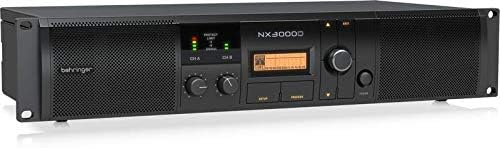
Aworan: iwaju igun view of the Behringer NX3000D Power Amplifier, highlighting the rack-mountable design and ventilation grilles.
- Bọtini agbara: Yipada awọn amplifier tan tabi pa.
- Level Controls (CH A/CH B): Ṣàtúnṣe ìfàmọ́ra ìtẹ̀síwájú fún ikanni kọ̀ọ̀kan.
- Ifihan LCD: Shows DSP settings, operating modes, and status information.
- Navigation Buttons (SETUP, PROCESS, UP/DOWN, EXIT): Used to navigate and adjust DSP parameters.
- LED Indicators (SIGNAL, LIMIT, PROTECT): Provide visual feedback on signal presence, clipping, and protection status.
4.2 ru Panel

Aworan: Ẹyin view of the Behringer NX3000D Power Amplifier, displaying input and output connectors, cooling fan, and power inlet.
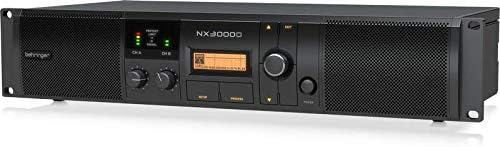
Image: Angled rear view of the Behringer NX3000D Power Amplifier, showing the USB port for PC connection and additional ventilation.
- Iṣawọle AC: Connects to the main power supply using the provided power cable.
- Input Connectors (CH A/CH B): XLR/TRS combo jacks for connecting audio sources.
- Output Connectors (CH A/CH B): Twist-lock speaker connectors for connecting loudspeakers.
- Ibudo USB: For connecting to a computer for DSP control and firmware updates.
- Olufẹ itutu: Ensures proper thermal management of the amplifier.
5. Eto
Follow these steps to set up your Behringer NX3000D ampolutọpa:
- Ibi: Ipo awọn amplifier in a well-ventilated area, away from direct sunlight, heat sources, and moisture. Ensure adequate space around the unit for airflow. For rack mounting, secure the amplifier using appropriate rack screws.
- Asopọ agbara: Connect the supplied AC power cable to the AC input on the rear panel of the amplifier and then to a suitable power outlet. Ensure the amplifier's power switch is in the OFF position before connecting.
- Awọn isopọ ti nwọle: Connect your audio source (e.g., mixer, audio interface) to the Input Connectors (CH A and/or CH B) on the rear panel using XLR or 1/4" TRS cables.
- Awọn isopọ Iṣjade: Connect your passive loudspeakers to the Output Connectors (CH A and/or CH B) using high-quality speaker cables with twist-lock connectors. Ensure correct polarity (+ to + and - to -) and that the impedance of your speakers matches the amplifier's capabilities (2 Ohms, 4 Ohms, or Bridge mode 4 Ohms).
- Agbara Ibẹrẹ Tan: With all connections secure and input levels turned down, switch the amplifier's power button to the ON position. The display will illuminate, and the unit will perform a self-test.
6. Ṣiṣẹ awọn Ampitanna
The Behringer NX3000D features advanced DSP control for precise sound optimization.
6.1 Ipilẹ isẹ
- Awọn ipele Ṣatunṣe: Slowly increase the Level Controls for CH A and/or CH B until the desired volume is achieved. Monitor the SIGNAL and LIMIT LEDs to prevent clipping. The SIGNAL LED indicates audio presence, while the LIMIT LED indicates that the signal is approaching clipping.
- Ipo Abojuto: The PROTECT LED will illuminate if the amplifier enters protection mode due to overheating, short circuits, or other issues. If this occurs, turn off the amplifier, resolve the issue, and then power it back on.
6.2 DSP Control
The integrated DSP allows for comprehensive sound shaping and system management:
- Accessing DSP Settings: Lo awọn ṢETO button to enter the main DSP menu. Navigate through options using the Soke/isalẹ buttons and confirm selections with the rotary encoder.
- Adakoja: Configure high-pass and low-pass filters for each channel. Choose from 3 filter types (e.g., Butterworth, Linkwitz-Riley) and slopes up to 48 dB/octave. This is crucial for integrating subwoofers or bi-amping awọn ọna šiše.
- Idogba (EQ): Utilize the 8 parametric EQs and 2 dynamic EQs per channel to fine-tune the frequency response. This helps in correcting room acoustics or tailoring the sound to specific preferences.
- Idaduro: Apply delay to individual channels to align speakers in different physical positions, ensuring phase coherence.
- Dynamics Processing: Adjust compression, limiting, and gating settings to control the dynamic range of your audio.
- SmartSense Loudspeaker Impedance Compensation: This feature automatically adjusts the amplifier's output to match the loudspeaker impedance, providing consistent power delivery and improved sound quality.
- Eto aabo: Lock DSP settings to prevent unauthorized changes, ideal for fixed installations.
For detailed DSP parameter adjustments, refer to the full software manual available on the Behringer website or connect the amplifier to a PC via the USB port for software control.
7. Itọju
Itọju to dara ṣe idaniloju gigun ati iṣẹ ṣiṣe ti o dara julọ ti rẹ amplifier.
- Ninu: Nigbagbogbo nu ode ti awọn amplifier with a soft, dry cloth. Do not use liquid cleaners or solvents. Ensure ventilation grilles are free from dust and debris.
- Afẹfẹ: Nigbagbogbo rii daju wipe awọn amplifier's ventilation openings are not obstructed. Overheating can lead to reduced performance and potential damage.
- Ibi ipamọ: Ti o ba titoju awọn amplifier for an extended period, disconnect it from power, clean it, and store it in a cool, dry place, preferably in its original packaging or a protective case.
8. Laasigbotitusita
If you encounter issues with your Behringer NX3000D, consult the table below for common problems and solutions.
| Isoro | Owun to le Fa | Ojutu |
|---|---|---|
| Ko si agbara | Power cable disconnected; Power outlet faulty; Amplifier fiusi ti fẹ. | Check power cable connection; Test outlet with another device; Contact qualified service personnel for fuse replacement. |
| Ko si ohun jade | Input/output cables disconnected or faulty; Speaker impedance mismatch; Amplifier in protect mode; Input levels too low. | Check all cable connections; Verify speaker impedance; Check PROTECT LED and resolve underlying issue; Increase input levels gradually. |
| Ohun ti o daru | Input signal too high (clipping); Speaker impedance mismatch; Faulty cables or speakers. | Reduce input signal (monitor LIMIT LED); Verify speaker impedance; Test with different cables/speakers. |
| Amplifier overheats (PROTECT LED on) | Insufficient ventilation; Excessive load (low impedance speakers); Prolonged high-power operation. | Ensure proper ventilation; Use speakers with correct impedance; Reduce output level or allow cooling time. |
If the problem persists after attempting these solutions, please contact Behringer support or a qualified service technician.
9. Imọ ni pato
| Ẹya ara ẹrọ | Sipesifikesonu |
|---|---|
| Brand | Behringer |
| Nọmba awoṣe | NX3000D |
| Ijade Wattage | 2 x 1500 Watts (2 Ohms); 2 x 900 Watts (4 Ohms); 3000 Watts (4 Ohms Bridge mode) |
| Agbọrọsọ Amplification Iru | Kilasi-D |
| Iwọn Nkan | 7.92 poun / 3.6 kilogiramu |
| Ọja Mefa | 19.02 x 9.09 x 3.7 inches |
| Asopọmọra Iru | Twist-lock (Outputs), XLR/TRS Combo (Inputs) |
| Orisun agbara | Okun Itanna |
| Voltage | 100V |
| Àwọ̀ | Dudu |
| DSP | High-performance DSP with 24-bit/96 kHz converters, delay, crossover, EQ, dynamics processing, SmartSense Impedance Compensation |
10. Atilẹyin ọja ati Support
10.1 Atilẹyin ọja
The Behringer NX3000D amplifier typically comes with a 3-odun lopin atilẹyin ọja, indicating its design and engineering quality. Please refer to the warranty card included with your product or visit the official Behringer webAaye fun alaye ofin ati ipo.

Image: Behringer logo with a '3 Years Warranty' badge, indicating the product is designed and engineered in Germany.
10.2 Imọ Support
For technical assistance, troubleshooting beyond this manual, or service inquiries, please visit the official Behringer website or contact their customer support. You can find more information and resources at the Ile itaja Behringer.


