Ọrọ Iṣaaju
This manual provides detailed instructions for the safe and efficient use of the Domus Line ST30/12 30W 12V Power Supply. Please read this manual thoroughly before installation and operation to ensure proper functionality and to prevent damage or injury. This power supply is designed for use with compatible lighting panels, including the TITAN series (maximum 5 panels), PASSEPARTOUT, SMALL, and DATE series.
Awọn Itọsọna Aabo
- Ensure the power supply is disconnected from the mains before any installation, maintenance, or troubleshooting.
- This product is designed for indoor use only (IP20 rating). Do not expose it to moisture, water, or extreme temperatures.
- Maṣe ṣii ipese agbara casing. Ko si awọn ẹya ti o le lo ninu.
- Rii daju pe fentilesonu to dara ni ayika ẹyọ naa lati ṣe idiwọ igbona.
- Connect only compatible 12V DC devices within the specified load range (1-30W).
- Installation should be performed by a qualified professional if you are unsure about electrical connections.
Eto ati fifi sori
Follow these steps for proper installation of your Domus Line ST30/12 power supply:
- Yọ Ipese Agbara kuro: Carefully remove the ST30/12 power supply from its packaging. Inspect for any visible damage.
- Gbigbe (Aṣayan): Position the power supply in a dry, well-ventilated area. Ensure it is not covered or enclosed in a way that restricts airflow.
- Awọn ẹrọ Ijade Sopọ: The power supply features a 500 mm output cable with a 12-way distributor and MiniPlug connectors. Connect your compatible 12V DC lighting panels (e.g., TITAN, PASSEPARTOUT, SMALL, DATE series) to the MiniPlug ports on the distributor. Ensure the total load of connected devices does not exceed 30W.
- Sopọ mọ Agbara Mains: The power supply has a 2000 mm input cable. Plug the input cable into a standard 220-240Vac electrical outlet.
- Jẹrisi isẹ: Once connected, the lighting panels should illuminate. If not, refer to the Troubleshooting section.
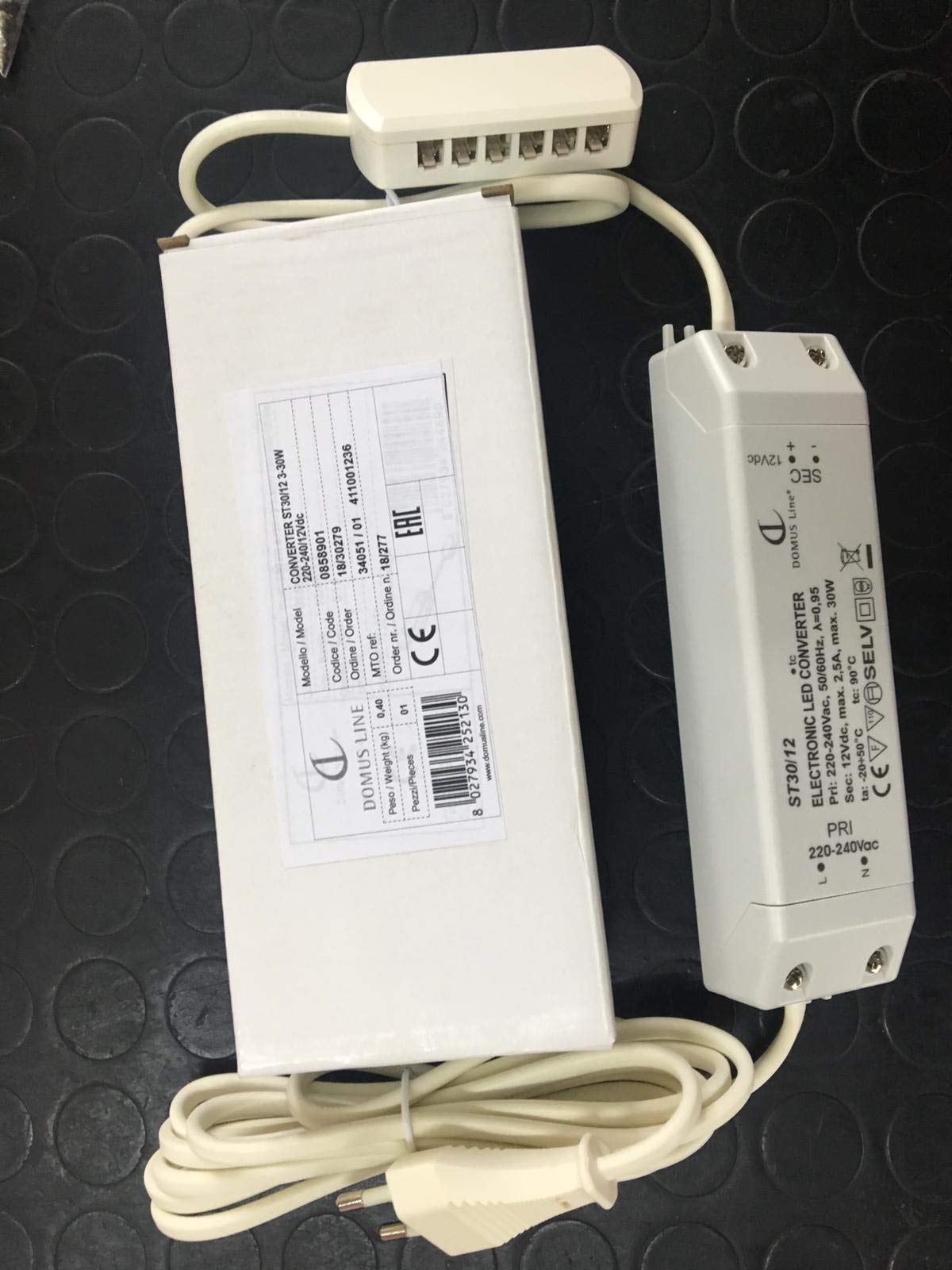
Figure 1: Domus Line ST30/12 Power Supply. This image shows the compact design of the power supply unit, including its input and output cables with MiniPlug connectors, ready for connection to compatible 12V DC lighting systems.
Awọn ilana Iṣiṣẹ
The Domus Line ST30/12 power supply operates automatically once connected to a power source and compatible 12V DC devices. It converts the incoming AC voltage to a stable 12V DC output for your lighting applications.
- Rii daju pe gbogbo awọn asopọ wa ni aabo ṣaaju lilo agbara.
- The power supply is designed for continuous operation within its specified load limits.
- To turn off the connected devices, disconnect the power supply from the mains outlet.
Itoju
The Domus Line ST30/12 power supply requires minimal maintenance.
- Ninu: Disconnect the power supply from the mains before cleaning. Use a soft, dry cloth to wipe the exterior. Do not use liquid cleaners or abrasive materials.
- Ayewo: Periodically check the cables and connectors for any signs of wear or damage. If any damage is found, discontinue use and replace the unit.
- Afẹfẹ: Rii daju pe awọn ṣiṣi afẹfẹ ko ni dina nipasẹ eruku tabi idoti.
Laasigbotitusita
If you encounter issues with your Domus Line ST30/12 power supply, refer to the following common problems and solutions:
| Isoro | Owun to le Fa | Ojutu |
|---|---|---|
| Ko si agbara si awọn ẹrọ ti a ti sopọ. |
|
|
| Devices flicker or dim. |
|
|
| Ipese agbara naa gbona. |
|
|
Ti iṣoro naa ba wa lẹhin igbiyanju awọn solusan wọnyi, jọwọ kan si atilẹyin alabara.
Awọn pato
| Brand: | Domus Line |
| Awoṣe: | ST30/12 |
| Iṣagbewọle Voltage: | 220-240Vac |
| O wujade Voltage: | 12V DC |
| Agbara Ijade: | 30 Wattis |
| Ibiti fifuye: | 1 - 30 Watts (Note: Product description mentioned 1-15W, but title and other specs indicate 30W output. Use 1-30W as the operational range.) |
| Gigun USB Ti nwọle: | 2000 mm |
| Gigun USB Jade: | 500 mm with 12-way distributor |
| Orisi Asopọmọra: | MiniPlug |
| Insulation Degree: | II |
| Atọka Idaabobo: | IP20 (Lilo inu ile nikan) |
| Recommended Panels: | TITAN series (max 5 panels), PASSEPARTOUT, SMALL, DATE |
Atilẹyin ọja ati Support
Fun alaye atilẹyin ọja tabi atilẹyin imọ ẹrọ, jọwọ kan si alagbata rẹ tabi olupese taara. Tọju iwe-ẹri rira rẹ bi ẹri rira.
Manufacturer: Domus Line
Note: Availability of spare parts and software updates is not specified by the manufacturer.


