1. Ifihan
Thank you for choosing the Cecotec Ready Warm 6670 Cristal Electric Radiator. This modern and elegant crystal convector is designed to provide efficient and rapid heating for your living spaces. Featuring an adjustable thermostat, timer function, and Wi-Fi connectivity, it offers convenient control and optimized energy consumption. This manual provides essential information for safe operation, installation, maintenance, and troubleshooting.
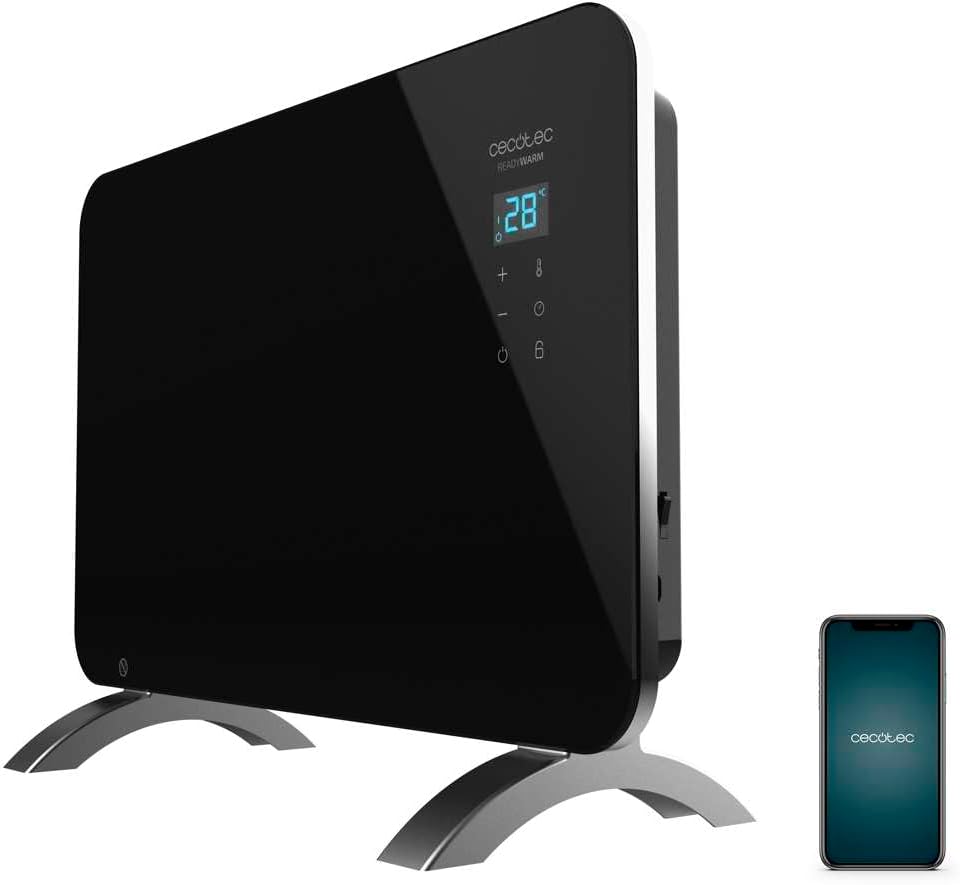
Figure 1: The Cecotec Ready Warm 6670 Cristal Electric Radiator, showcasing its sleek black design and digital display, alongside a smartphone indicating its Wi-Fi control capability.
2. Awọn Ilana Aabo pataki
Jọwọ ka gbogbo awọn itọnisọna ni pẹkipẹki ṣaaju lilo ohun elo naa ki o da wọn duro fun itọkasi ọjọ iwaju. Ikuna lati tẹle awọn ilana wọnyi le ja si mọnamọna, ina, tabi ipalara nla.
- Rii daju voltage tí a fi hàn lórí àmì ìdíyelé bá àwọn ìdìpọ̀ pàtàkì rẹ mutage ṣaaju ki o to so ẹrọ naa pọ.
- Do not use this appliance near water or in damp environments, such as bathrooms, due to its IP24 splash protection rating.
- Always place the radiator on a stable, flat surface. Ensure adequate clearance from walls and furniture for proper ventilation.
- Do not cover the radiator, as this can lead to overheating and fire hazards.
- Pa awọn ọmọde ati awọn ẹranko mọ kuro ninu ohun elo naa lakoko iṣẹ, nitori awọn ilẹ le gbona pupọ.
- Unplug the appliance from the power outlet when not in use, before cleaning, or before moving it.
- Do not operate the appliance with a damaged cord or plug, or if it has malfunctioned or been dropped.
- Repairs should only be performed by qualified personnel. Improper repairs can be dangerous.
- A ṣe apẹrẹ ohun elo yii fun lilo ninu ile nikan.
3. Ọja irinše
Familiarize yourself with the main parts of your Cecotec Ready Warm 6670 Cristal Electric Radiator:
- Main Heating Unit (Glass Panel)
- Digital Ifihan Panel
- Control Buttons (+, -, Power, Mode, Timer)
- Agbara Okun ati Plug
- Detachable Pedestal Feet (for freestanding use)
- Wall Mounting Brackets (optional, not included in this model description but common for panel heaters)

olusin 2: A alaye view of the radiator's digital display and control buttons, showing temperature, mode, and timer indicators.
4. Eto ati fifi sori
Your radiator can be used as a freestanding unit with the included pedestal feet.
4.1. Attaching the Pedestal Feet
- Carefully unpack the radiator and all components.
- Place the radiator on a soft, flat surface to prevent scratching the glass panel.
- Align the pedestal feet with the mounting holes at the bottom of the radiator.
- Fi àwọn skru tí a pèsè so ẹsẹ̀ mọ́. Rí i dájú pé wọ́n so wọ́n mọ́ dáadáa.
- Once the feet are attached, carefully place the radiator upright in your desired location. Ensure it is on a stable, level surface and away from flammable materials.

Figure 3: The radiator positioned in a room, demonstrating its freestanding setup with the pedestal feet.
5. Awọn ilana Iṣiṣẹ
5.1. Ipilẹ isẹ
- So radiator sinu ibudo agbara ti o yẹ.
- Tẹ awọn Agbara bọtini (aami: Circle pẹlu inaro ila) on the control panel to turn the unit on. The digital display will illuminate.
- Lo awọn + ati - buttons to adjust the desired temperature. The display will show the set temperature.
- Tẹ awọn Ipo bọtini (aami: thermometer) to cycle through heating modes (e.g., Eco, Max).
- To turn off the radiator, press the Agbara bọtini lẹẹkansi.
5.2. Wi-Fi Asopọmọra ati App Iṣakoso
The Cecotec Ready Warm 6670 Cristal can be controlled via your smartphone using the Tuya Smart APP.
- Download the "Tuya Smart" app from your smartphone's app store (available for iOS and Android).
- Forukọsilẹ tabi wọle si akọọlẹ Tuya Smart rẹ.
- Rii daju pe foonuiyara rẹ ti sopọ si nẹtiwọki Wi-Fi 2.4 GHz kan.
- On the radiator, press and hold the Wi-Fi button (if available, or a combination of buttons as per app instructions) to enter pairing mode. The Wi-Fi indicator on the display will blink.
- In the Tuya Smart app, tap "+" to add a device. Select "Heater" or "Radiator" from the device list.
- Follow the on-screen instructions in the app to connect the radiator to your Wi-Fi network. This typically involves confirming the Wi-Fi indicator is blinking and entering your Wi-Fi password.
- Once connected, you can control the radiator's power, temperature, mode, and timer settings directly from the app.

Figure 4: A user interacting with a smartphone, illustrating the convenience of controlling the radiator remotely via the Tuya Smart application.
5.3. Iṣẹ Aago
The timer allows you to set a specific duration for the radiator to operate.
- Tẹ awọn Aago bọtini (aami: aago) on the control panel or in the app.
- Lo awọn + ati - buttons to set the desired operating time in hours.
- The radiator will automatically turn off after the set time has elapsed.
6. Itọju ati Cleaning
Regular cleaning ensures optimal performance and extends the lifespan of your radiator.
- Máa yọ radiator kúrò nínú ihò agbára nígbà gbogbo, kí o sì jẹ́ kí ó tutu pátápátá kí o tó sọ ọ́ di mímọ́.
- Mu ese ita gbangba pẹlu asọ, damp asọ. Ma ṣe lo awọn afọmọ abrasive, awọn nkanmimu, tabi awọn kẹmika lile, nitori iwọnyi le ba ipari jẹ.
- Do not immerse the radiator in water or any other liquid.
- Rí i dájú pé omi kò wọ inú pánẹ́ẹ̀lì ìṣàkóso tàbí àwọn ẹ̀rọ iná mànàmáná.
- For storage, clean the unit and store it in a cool, dry place, preferably in its original packaging.
7. Laasigbotitusita
Tí o bá ní ìṣòro pẹ̀lú radiator rẹ, wo àwọn ìṣòro àti ìdáhùn tó wọ́pọ̀ wọ̀nyí:
| Isoro | Owun to le Fa | Ojutu |
|---|---|---|
| Radiator kìí tan. | Not plugged in; power outlet faulty; power button not pressed; overheat protection activated. | Check power connection; try a different outlet; press power button; unplug and let cool for 30 minutes before restarting. |
| Ko si igbejade ooru. | Temperature setting too low; mode not set correctly. | Increase desired temperature; ensure correct heating mode (e.g., Max) is selected. |
| Wi-Fi asopọ kuna. | Incorrect Wi-Fi password; router too far; 5 GHz network used; pairing mode not active. | Verify password; move radiator closer to router; ensure 2.4 GHz network is used; re-enter pairing mode on radiator. |
| Radiator turns off unexpectedly. | Timer function active; overheat protection activated. | Check timer settings; ensure radiator is not covered and has adequate ventilation. |
8. Imọ ni pato
| Ẹya ara ẹrọ | Ẹ̀kúnrẹ́rẹ́ |
|---|---|
| Brand | Cecotec |
| Nọmba awoṣe | big-V1704474 (05350) |
| Àwọ̀ | Dudu |
| Agbara | 1000 W |
| Voltage | 220 Volts |
| Ohun elo | Aluminum (Heating element), Glass (Panel) |
| Alapapo Ọna | Gbigbawọle |
| Pataki Ẹya | Adjustable Thermostat, Wi-Fi Connectivity, Timer, Overheat Protection, IP24 Splash Protection |
| Awọn iwọn (L x W x H) | 47 x 13 x 64 cm (Product); 60 x 24 x 46 cm (Product, alternative) |
| Iwọn Nkan | 5.1 kilo |
| Ariwo Ipele | 44 dB |
| Iṣeduro Lilo | Indoor (Home) |
9. Atilẹyin ọja ati Support
Cecotec products are manufactured to high-quality standards. This product comes with a standard manufacturer's warranty covering defects in materials and workmanship from the date of purchase. Please refer to the warranty card included with your product for specific terms and conditions.
For technical support, troubleshooting assistance, or warranty claims, please contact Cecotec customer service through their official website or the contact information provided in your product packaging. When contacting support, please have your model number (big-V1704474) and purchase date ready.
Spare parts availability: 10 Years.


