Ọrọ Iṣaaju
The Insignia NS-SPBTWAVE2-BK Wave 2 Portable Bluetooth Speaker provides high-quality wireless audio streaming from your compatible devices. Designed for versatility, its robust construction and rubberized feet allow for stable placement in both horizontal and vertical orientations. Enjoy hands-free communication with the built-in speakerphone and extended listening sessions thanks to its 12-hour battery life.
This manual provides essential information for setting up, operating, maintaining, and troubleshooting your speaker. Please read it thoroughly before use and retain it for future reference.
Package Awọn akoonu
Rii daju pe gbogbo awọn nkan wa ninu package:
- Insignia NS-SPBTWAVE2-BK Wave 2 Portable Bluetooth Speaker
- Okun Ngba agbara USB
- 3.5mm Audio Cable (Auxiliary)
- Quick Setup Guide (or similar documentation)
Ọja Awọn ẹya ara ẹrọ
- Asopọ Alailowaya: Connects wirelessly to smartphones, tablets, and other Bluetooth-enabled devices.
- Igbesi aye batiri gigun: Features a rechargeable 2,000 mAh battery, providing up to 12 hours of playback on a full charge.
- Gbohungbohun ti a ṣe sinu: Enables hands-free calling directly through the speaker.
- Ìbáṣepọ̀ Ohun Afikún: Allows for wired connection to audio devices via a 3.5mm audio cable.
- Ibi Iwapọ: Designed to stand securely in both horizontal and vertical positions.
Awọn ẹya ara ti Agbọrọsọ
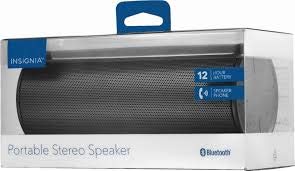
olusin 1: Iwaju view of the Insignia Wave 2 Speaker in horizontal orientation.

Àwòrán 2: Inaro view of the speaker, illustrating the power button, charging port, and auxiliary input port at the bottom.
Refer to the images above for the location of key components such as the power button, volume controls, Bluetooth indicator, charging port, and auxiliary input.
Ṣeto
1. Gbigba agbara Agbọrọsọ
- Connect the small end of the USB charging cable to the charging port on the speaker (refer to Figure 2).
- Connect the large end of the USB charging cable to a USB power adapter (not included) or a powered USB port on a computer.
- The charging indicator light will illuminate. Allow approximately 12 hours for a full charge before first use. The indicator light will change or turn off once charging is complete.
2. Sisopọ Bluetooth
- Ensure the speaker is fully charged. Press and hold the Power button to turn on the speaker. The Bluetooth indicator light will begin to flash, indicating it is in pairing mode.
- On your Bluetooth-enabled device (smartphone, tablet, etc.), navigate to the Bluetooth settings and ensure Bluetooth is enabled.
- Wa fun available devices. Select "Insignia Wave 2" from the list.
- Once paired, the Bluetooth indicator light on the speaker will become solid, and you may hear an audible confirmation.
- Ti o ba beere fun ọrọ igbaniwọle, tẹ "0000".
3. Auxiliary (Wired) Connection
- Connect one end of the 3.5mm audio cable to the AUX input port on the speaker (refer to Figure 2).
- Connect the other end of the 3.5mm audio cable to the headphone jack or audio output port of your audio device.
- The speaker will automatically switch to auxiliary mode when a cable is detected.
Ṣiṣẹ Agbọrọsọ
Titan / Paa
- To turn on: Press and hold the Power button until the indicator lights illuminate.
- To turn off: Press and hold the Power button until the indicator lights turn off.
Iṣakoso iwọn didun
- Ṣatunṣe iwọn didun nipa lilo awọn bọtini iwọn didun lori agbọrọsọ.
- You can also control the volume from your connected Bluetooth device or auxiliary audio source.
Ọwọ-Free Ipe
When connected via Bluetooth, the speaker can be used for hands-free calls:
- Dahun ipe kan: Tẹ bọtini Play/Sidaduro/Ipe lẹẹkan.
- Pari ipe kan: Press the Play/Pause/Call button once during a call.
- Kọ ipe kan: Press and hold the Play/Pause/Call button.
- Speak clearly towards the speaker's built-in microphone for optimal voice pickup.
Itoju
- Ninu: Lo aṣọ rirọ, gbẹ, tí kò ní àwọ̀ láti fi nu ìta agbọrọsọ naa. Má ṣe lo àwọn ohun ìfọṣọ omi, aerosols, tàbí àwọn ohun èlò ìfọṣọ.
- Itọju Batiri: To prolong battery life, avoid fully discharging the battery frequently. Recharge the speaker regularly, even if not in use. Avoid exposing the speaker to extreme temperatures (hot or cold).
- Ibi ipamọ: When not in use for extended periods, store the speaker in a cool, dry place away from direct sunlight and moisture.
- Omi Resistance: Agbọrọsọ yii jẹ KO Má ṣe jẹ́ kí omi má ṣe wọ inú omi. Yẹra fún fífi omi sí i tàbí ọrinrin tó pọ̀ jù.
Laasigbotitusita
| Isoro | Owun to le Solusan |
|---|---|
| Agbọrọsọ ko ni tan. | Rí i dájú pé batiri náà ti gba agbára. So agbọrọsọ náà mọ́ orísun agbára nípa lílo okùn gbigba agbara USB. |
| Ko si ohun lati agbọrọsọ. | Check the volume level on both the speaker and the connected device. Ensure the correct input source (Bluetooth or AUX) is selected. Verify the Bluetooth connection or auxiliary cable. |
| Ko le so pọ nipasẹ Bluetooth. | Ensure the speaker is in pairing mode (flashing Bluetooth indicator). Turn off and on Bluetooth on your device. Move the speaker closer to your device. Forget the speaker from your device's Bluetooth list and try pairing again. |
| Didara ohun to dara tabi iparun. | Ensure the speaker is within Bluetooth range (approx. 33 ft / 10 m). Reduce the volume on the source device or speaker. Check for interference from other wireless devices. Try a different audio source or file. |
| Gbohungbohun ko ṣiṣẹ lakoko awọn ipe. | Ensure the speaker is properly connected via Bluetooth. Speak directly towards the speaker. Check your phone's call settings to ensure audio is routed to the Bluetooth speaker. |
Awọn pato
- Orukọ awoṣe: Igbi 2
- Nọmba awoṣe: NS-SPBTWAVE2-BK
- Imọ-ẹrọ Asopọmọra: Bluetooth
- Igbesi aye batiri: Titi di awọn wakati 12
- Iru Batiri: 1 Lithium ion (pẹlu)
- Akoko gbigba agbara: O fẹrẹ to awọn wakati 12
- Awọn iwọn ọja: 6.8 x 2.8 x 2.8 inches (17.3 x 7.1 x 7.1 cm)
- Ìwọ̀n Nkan: 1 iwon (0.45 kg)
- Ipo Ijade Ohun: Sitẹrio
- Eto Ifihan-si-Noise: 80 dB
- Gbohungbohun ti a ṣe sinu: Bẹẹni
- Iṣawọle Iranlọwọ: Bẹẹni (3.5mm)
- Mabomire: Rara
- Ohun elo: Ṣiṣu
- UPC: 600603230455
Atilẹyin ọja ati Support
This Insignia NS-SPBTWAVE2-BK Wave 2 Portable Bluetooth Speaker comes with a Atilẹyin ọja to lopin. For specific terms and conditions of your warranty, please refer to the warranty card included with your purchase or visit the official Insignia webojula.
For technical support, troubleshooting assistance, or warranty claims, please contact Insignia Customer Service. Contact information can typically be found on the Insignia webaaye tabi ninu iwe ọja rẹ.


