Ọrọ Iṣaaju
This instruction manual provides detailed guidance for the safe and proper installation and operation of your USX MOUNT XML006-24K Full Motion TV Wall Mount. This mount is designed to securely hold 42-85 inch televisions with VESA patterns ranging from 200x100mm to 600x400mm and a maximum weight capacity of 110 lbs (50 kg). It is compatible with 16, 18, or 24 inch wood stud spacing, as well as concrete walls.
Please read this manual thoroughly before beginning installation to ensure correct assembly and to prevent potential damage or injury. Keep this manual for future reference.
Alaye Aabo
ÌKÌLỌ̀: Àìka kíkà àti títẹ̀lé àwọn ìlànà wọ̀nyí lè fa ìpalára ńlá, ìbàjẹ́ dúkìá, tàbí pípa àtìlẹ́yìn rẹ.
- Do not install this product into drywall alone. It must be mounted to wood studs or a solid concrete wall.
- Rí i dájú pé ìrísí ògiri náà lè gbé gbogbo ìwọ̀n àkójọpọ̀ àti tẹlifíṣọ̀n rẹ ró láìléwu.
- Verify your TV's VESA pattern and weight are within the specified limits of this mount.
- Use all provided hardware. Do not substitute parts.
- Ti o ko ba ni idaniloju nipa eyikeyi apakan ti ilana fifi sori ẹrọ, kan si alamọja ti o peye.
- Pa awọn ọmọde ati awọn ohun ọsin kuro lakoko fifi sori ẹrọ.
Package Awọn akoonu
Verify that all components are present and undamaged before beginning installation. If any parts are missing or defective, contact USX MOUNT customer support.
- Wall Apejọ
- TV Brackets (2 pieces)
- Mounting Hardware Kit (various screws, washers, spacers, concrete anchors if requested)
- Ipele Bubble
- Iṣagbesori Àdàkọ
- Àwọn Ìdè Okùn (àwọn ègé márùn-ún)

Aworan: Pariview of the USX MOUNT XML006-24K Full Motion TV Wall Mount and included accessories.
Awọn pato
| Nọmba awoṣe | XML006-24K |
| Ibamu TV Awọn iwọn | 42 - 85 inches |
| O pọju fifuye Agbara | 110 lbs (50 kg) |
| VESA ibamu | 200x100mm to 600x400mm |
| Ibamu odi | 16", 18", 24" Wood Studs, Solid Concrete Wall |
| Titẹ Igun | +5° / -15° |
| Igun Swivel | +/- 45 ° |
| Atunse Ipele | +/- 4 ° |
| Itẹsiwaju lati Wall | 2.58 inches (ti a fà sẹ́yìn) sí 16.67 inches (tí a fẹ̀ sí i) |
| Ohun elo | Alloy Irin |
| UL Akojọ | Bẹẹni |
Eto ati fifi sori
Before you begin, gather the necessary tools (e.g., drill, stud finder, screwdriver, measuring tape) and ensure you have all package contents.
1. Pre-Fifi sọwedowo
- Verify TV Size and Weight: Ensure your TV is between 42 and 85 inches and weighs no more than 110 lbs (50 kg).

Image: Confirming TV size (42-85 inches) and weight (max 110 lbs).
- Ṣayẹwo Àpẹẹrẹ VESA: Locate the four mounting holes on the back of your TV and measure the horizontal and vertical distance between them. This mount supports VESA patterns from 200x100mm to 600x400mm.

Image: Guide to checking your TV's VESA mounting pattern.
- Identify Cable Outlets: Ensure the mounting brackets will not block any essential cable outlets on your TV.

Image: Checking for potential cable outlet obstruction by the TV mount.
- Determine Wall Type: This mount is suitable for 16", 18", or 24" wood studs and solid concrete walls. Do not install on drywall alone. For concrete walls, specific concrete anchors are required (contact customer support if needed).

Image: Compatible wall types for installation.
2. Ṣíṣe Àwo Ògiri
- Wa Awọn ile-iṣọ: Use a stud finder to accurately locate the edges and center of two adjacent wood studs. Mark the center of the studs. For concrete walls, mark your desired drilling locations.
- Position Template: Tape the mounting template to the wall at your desired TV height, ensuring it is level using the included bubble level.
- Awọn Iho Pilot Lilu: Drill pilot holes at the marked locations. The size and depth of the pilot holes depend on your wall type and the lag bolts used. Refer to the hardware kit instructions for precise drilling specifications.
- So Awo Odi: Align the wall plate with the pilot holes and secure it to the wall using the provided lag bolts and washers. Tighten all bolts firmly, but do not overtighten.

Image: Installation of the wall plate onto wood studs or a concrete wall.
3. So awọn biraketi pọ mọ TV
- Select Screws and Spacers: Choose the correct diameter and length of screws from the hardware kit that fit your TV's VESA holes. Use spacers if necessary to ensure the screws do not bottom out or to create clearance for cables.
- So awọn biraketi TV: Carefully attach the two TV brackets to the back of your television using the selected screws and washers. Ensure the brackets are centered and securely fastened.
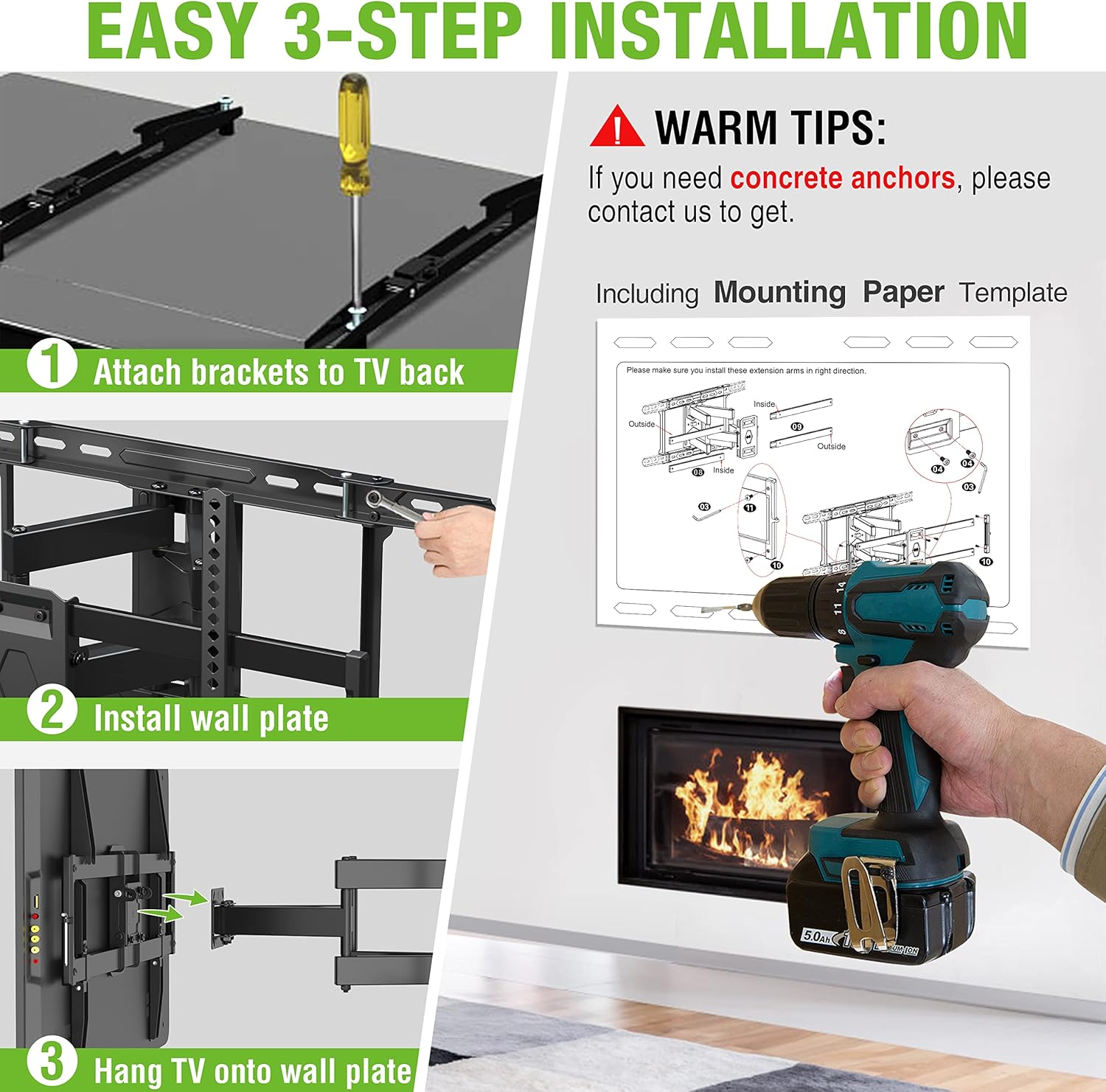
Image: Step 1: Attaching the TV brackets to the back of the television.
4. Ṣíṣe tẹlifíṣọ̀n
- Hang TV onto Wall Plate: With assistance, carefully lift the television and hook the TV brackets onto the wall plate. Ensure both brackets are properly seated on the wall plate.
- TV to ni aabo: Locate the safety screws or locking mechanisms on the bottom of the TV brackets. Tighten these to secure the TV to the wall plate, preventing accidental dislodgement.
Image: Step 3: Hanging the TV onto the installed wall plate.
Awọn ilana Iṣiṣẹ
The USX MOUNT XML006-24K offers full motion capabilities for optimal viewing awọn igun.
- Itẹsiwaju ati ifẹhinti: Gently pull the TV away from the wall to extend the articulating arms up to 16.67 inches. Push the TV back towards the wall to retract it to a low profile ti 2.58 inches.

Image: Illustrating the extension and retraction range of the TV mount.
- Atunṣe tẹlọrun: The mount allows for a tilt range of +5° (upwards) to -15° (downwards). Loosen the tilt adjustment knobs on the TV brackets, adjust to your desired angle, and then re-tighten the knobs to secure the position.

Image: Demonstrating the tilt adjustment range of +5° to -15°.
- Atunṣe Swivel: The articulating arms allow the TV to swivel up to +/- 45° left or right, depending on TV size and wall distance. Gently push the TV to the desired swivel angle.

Image: Illustrating the +/- 45° swivel capability of the mount.
- Atunse Ipele: If the TV appears slightly unlevel after installation, you can adjust it by +/- 4°. Consult the specific mechanism on your mount for this adjustment, typically involving loosening and re-tightening screws on the TV brackets.

Image: Demonstrating the +/- 4° level adjustment feature.
Itoju
- Lokọọkan ṣayẹwo gbogbo awọn skru ati awọn asopọ lati rii daju pe wọn wa ni wiwọ ati aabo.
- Nu oke naa pẹlu asọ ti o gbẹ. Yago fun abrasive ose tabi epo.
- Maṣe kọja agbara iwuwo ti o pọju ti 110 lbs (50 kg).
Laasigbotitusita
| Isoro | Owun to le Fa | Ojutu |
|---|---|---|
| TV kii ṣe ipele | Wall plate not level during installation; TV brackets not adjusted. | Use the level adjustment feature on the TV brackets to correct the angle. Recheck wall plate level if issue persists. |
| Oke kan lara riru | Loose mounting bolts; incorrect wall type; overloaded mount. | Ensure all wall plate bolts are securely tightened. Verify wall type compatibility. Confirm TV weight is within limits. |
| TV ko le wa ni til/yiyi | Tilt/swivel knobs are too tight; obstruction. | Loosen tilt adjustment knobs. Check for any cables or objects obstructing movement. |
| Ohun èlò tí kò sí | Aṣiṣe apoti. | Contact USX MOUNT customer support for replacement parts. |
Onibara Support
USX MOUNT provides a dedicated customer support team based in the US, available to assist you with any inquiries regarding the use or installation of your TV wall mount. Please do not hesitate to contact us if you require assistance or have questions.
For further assistance, please refer to the official USX MOUNT webojula tabi kan si wọn onibara iṣẹ taara.


