1. Awọn Ilana Aabo pataki
Please read all instructions carefully before using this projector and retain them for future reference. Improper operation may result in electric shock, fire, or other hazards.
- Orisun Agbara: Lo adapter agbara ti a pese pẹlu pirojekito nikan.tage ibaamu ipese agbara agbegbe.
- Afẹfẹ: Do not block any ventilation openings. Ensure adequate airflow around the projector to prevent overheating.
- Ibi: Place the projector on a stable, flat surface. Avoid placing it in direct sunlight, near heat sources, or in environments with high humidity or dust.
- Omi ati Ọrinrin: Do not expose the projector to rain, moisture, or immerse it in water. If liquid enters the device, disconnect power immediately and contact support.
- Ninu: Yọọ pirojekito kuro ninu iṣan agbara ṣaaju ṣiṣe mimọ. Lo asọ asọ ti o gbẹ. Ma ṣe lo olomi tabi aerosol olutọpa.
- Ṣiṣẹ: Má ṣe gbìyànjú láti ṣe iṣẹ́ yìí fúnra rẹ. Tọ́ka gbogbo iṣẹ́ náà sí àwọn òṣìṣẹ́ iṣẹ́ tó péye.asing le fi ọ han si vol ti o lewutage tabi awọn ewu miiran.
- Idaabobo Oju: Ma wo taara sinu pirojekito lẹnsi nigbati awọn lamp ó ń ṣiṣẹ́, nítorí pé ìmọ́lẹ̀ tó mọ́lẹ̀ lè fa ìpalára ojú.
2. Package Awọn akoonu
Daju pe gbogbo awọn ohun ti a ṣe akojọ rẹ si isalẹ wa ninu package rẹ. Ti awọn ohun kan ba nsọnu tabi bajẹ, jọwọ kan si atilẹyin alabara.
- DBPOWER T22 Portable Video Projector
- Isakoṣo latọna jijin
- Okun HDMI
- AV Cable
- Okun agbara
- Itọsọna olumulo
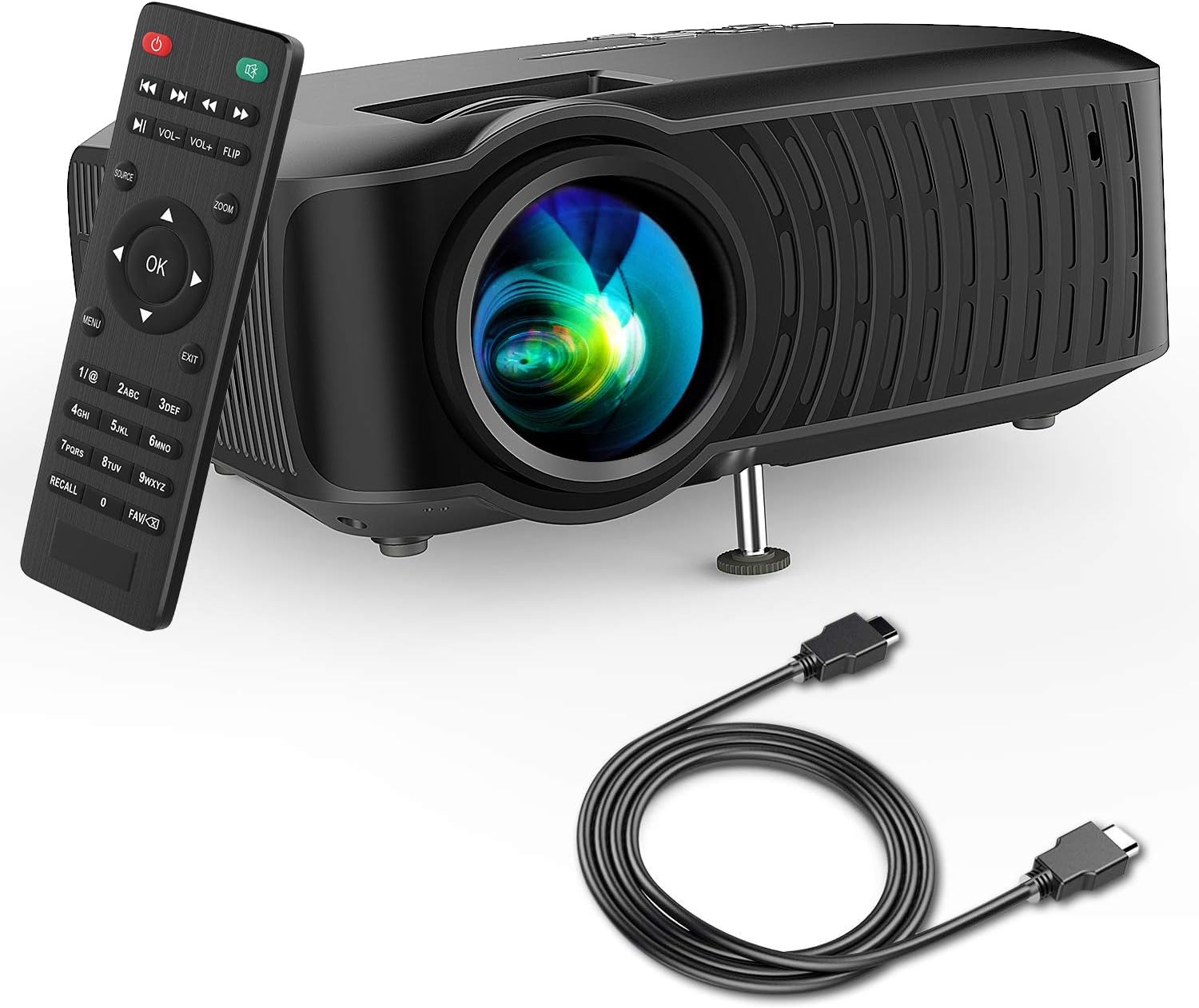
Image: The DBPOWER T22 Portable Video Projector, its remote control, and an HDMI cable, representing the typical package contents.
3. Ọja Ipariview
Familiarize yourself with the various parts of your DBPOWER T22 projector.
3.1 Iwaju ati ẹgbẹ View

Aworan: A ẹgbẹ view of the DBPOWER T22 projector with dimensions indicating its compact and portable design (21.8cm length, 17.2cm width, 9.16cm height).
- Lẹnsi asọtẹlẹ: Emits the image onto the screen.
- Idojukọ Oruka: Ó ń ṣe àtúnṣe sí kedere àwòrán.
- Keystone Correction Ring: Ó ń ṣe àtúnṣe ìyípadà àwòrán trapezoidal.
- Awọn Ibudo Afẹ́fẹ́: For heat dissipation. Do not block.
- Ẹsẹ Atunse: Raises or lowers the front of the projector.
3.2 Rear Panel and Connectivity
The rear panel provides various input and output ports for connecting external devices.
- Ibudo HDMI: Connects to devices like laptops, Blu-ray players, game consoles, and TV sticks.
- Ibudo USB: Connects to USB flash drives for media playback.
- Ibudo AV: Connects to older devices using the included AV cable.
- Iho kaadi SD: For playing media directly from an SD card.
- Ohùn tó ń jáde (Jack 3.5mm): Ó sopọ̀ mọ́ àwọn agbọ́hùnsọ tàbí agbekọ́rí ìta.
- Iṣagbewọle agbara: Sopọ si ohun ti nmu badọgba agbara.
3.3 Iṣakoso latọna jijin
The remote control allows convenient operation of the projector from a distance.
- Bọtini agbara: Yi pirojekito tan/pa.
- Bọtini Orisun: Selects input source (HDMI, AV, USB, SD).
- Awọn bọtini lilọ kiri (Soke/isalẹ/osi/ọtun): Navigates menus.
- Bọtini O dara: Jẹrisi awọn aṣayan.
- Bọtini Akojọ: Ó ń wọlé sí àwọn ètò ìṣiṣẹ́ àwòrán.
- Bọtini Jade: Ti jade kuro ninu akojọ aṣayan lọwọlọwọ tabi iṣẹ.
- Iwọn didun +/-: Ṣatunṣe iwọn didun agbọrọsọ.
- Flip Button: Rotates the projected image.
- Bọtini Sun-un: Adjusts image zoom (digital zoom).
4. Eto
4.1 Titan / Pa a
- Connect the power cable to the projector's power input, then plug the other end into a power outlet.
- Press the power button on the projector or the remote control to turn it on. The indicator light will change.
- Lati paa, tẹ bọtini agbara lẹẹkansi.
4.2 Adjusting Image Focus and Keystone
Achieve a clear and rectangular image by adjusting the focus and keystone correction.

Image: Diagram showing the manual keystone correction and focus rings on the side of the projector, with examples of de-focused and focused images, and trapezoidal correction.
- Idojukọ: Yiyi awọn Oruka idojukọ until the projected image appears sharp and clear.
- Atunse okuta bọtini: If the image appears trapezoidal (wider at the top or bottom), rotate the Keystone Correction Ring to make the image rectangular. The projector supports ±15° manual keystone correction.
4.3 Nsopọ Awọn ẹrọ ita
The DBPOWER T22 supports multiple input sources.
- HDMI: Connect an HDMI cable from your device (e.g., laptop, game console, Amazon Fire TV Stick) to the projector's HDMI port.
- USB: Fi kọnputa filasi USB sinu ibudo USB.
- TI: Use the provided AV cable to connect to devices with AV output.
- Kaadi SD: Fi kaadi SD sii sinu iho kaadi SD.
- Foonuiyara: For iOS devices, an external Lightning to HDMI adapter is required. For Android devices, an external Micro USB/Type-C to HDMI adapter is required. (Adapters not included).
5. Ṣiṣẹ Pirojekito
5.1 Yiyan Orisun Input
After connecting your device, you need to select the correct input source.
- Tẹ awọn Orisun button on the remote control or the projector.
- Use the navigation buttons to select the desired input source (e.g., HDMI, USB, AV, SD).
- Tẹ OK lati jẹrisi.
5.2 Media Playback (USB/SD)
When a USB drive or SD card is inserted, the projector will display a media browser.
- Lilö kiri nipasẹ awọn folda ati files using the remote control's navigation buttons.
- Yan a file (e.g., video, photo, music, text) and press OK lati mu ṣiṣẹ.
5.3 Audio wu
The projector features an improved built-in speaker system. For enhanced audio, you can connect external speakers.

Image: An illustration of the DBPOWER T22 projector highlighting its stereo speakers, indicating that external speakers are not always necessary for an enjoyable audio experience.
- Agbọrọsọ ti a ṣe sinu: The projector's internal speaker provides audio. Adjust volume using the VOL +/- awọn bọtini lori isakoṣo latọna jijin.
- External Speakers/Headphones: Connect a 3.5mm audio cable from your external audio device to the projector's Audio Out port.
5.4 Projector Settings (Menu)
Tẹ awọn Akojọ aṣyn button on the remote to access settings such as Picture Mode, Aspect Ratio, Sound Mode, and other system preferences.
6. Itọju
6.1 Ninu awọn lẹnsi
Use a professional lens cleaning cloth or lens paper to clean the projector lens. Avoid touching the lens directly with your hands.

Aworan: Ohun exploded view of the projector lens assembly, highlighting the tempered glass lens and the importance of a dust cover to protect it from scratches and dust.
6.2 Wíwẹ ara Projector
Wipe the projector body with a soft, dry cloth. Do not use abrasive cleaners or solvents.
6.3 Heat Dispersion System
The projector features an advanced cooling system to ensure stable operation and extend lamp life. Ensure ventilation ports are clear.

Aworan: inu view of the DBPOWER T22 projector, illustrating the advanced heat dispersion system with air flowing through cooling fins to maintain optimal operating temperature.
6.4 Lamp Igbesi aye
LED lamp in your DBPOWER T22 projector has an extended lifespan of over 50,000 hours, significantly reducing the need for lamp rirọpo.
7. Laasigbotitusita
Ti o ba pade awọn ọran, tọka si awọn iṣoro ti o wọpọ ati awọn ojutu wọnyi.
| Isoro | Owun to le Fa | Ojutu |
|---|---|---|
| No image or "No Signal" message | Incorrect input source selected; loose cable connection; device not powered on. |
|
| Aworan ti ko dara | A kò ṣe àtúnṣe ìfojúsùn; ẹ̀rọ ìfihàn náà sún mọ́/jìnnà sí ìbòjú. |
|
| Trapezoidal image | Àwòrán tí a fi ń gbé àwòrán jáde kò dúró sí ìbòjú náà. |
|
| Ko si ohun tabi iwọn didun kekere | Volume too low; mute enabled; external audio device issues. |
|
| Isakoṣo latọna jijin ko ṣiṣẹ | Dead batteries; obstruction; remote not pointed at IR receiver. |
|
8. Awọn pato
Detailed technical specifications for the DBPOWER T22 Portable Video Projector.
| Ẹya ara ẹrọ | Ẹ̀kúnrẹ́rẹ́ |
|---|---|
| Brand | DBPOWER |
| Nọmba awoṣe | T22 |
| Imọlẹ | 120 ANSI Lumens (80% brighter than most market projectors) |
| Ipin Itansan | 2000:1 |
| Ipinnu atilẹyin | 1080P (HD ni kikun) |
| Ipinnu Ifihan Ilu abinibi | 800 x 480 |
| Ifihan Iru | LCD |
| Lamp Igbesi aye | wakati meji 50,000 |
| Iwọn Isọtẹlẹ | 32-176 inches |
| Ijinna asọtẹlẹ | 1-5.2 mita |
| Keystone Atunse | Manual ±15° |
| Asopọmọra Technology | HDMI, USB, AV, SD Card |
| Agbọrọsọ ti a ṣe sinu | Yes (Improved system) |
| Ọja Mefa | 21.59 x 17.02 x 9.14 cm |
| Iwọn Nkan | 1.9 kg |
| Wattage | 24 watt |
9. Atilẹyin ọja ati Support
DBPOWER products are designed and manufactured to the highest quality standards. For warranty information, technical support, or customer service inquiries, please refer to the contact information provided with your purchase or visit the official DBPOWER webojula.
Osise Webojula: www.dbpower.co (Jọwọ ṣakiyesi: URL may vary by region. Refer to product packaging for specific regional support details.)


