1. Ifihan
This manual provides essential information for the safe and effective use of your VirtuFit CTR 1.2i Crosstrainer. Please read all instructions carefully before assembly and operation to ensure proper function and to prevent injury.
1.1 Alaye pataki Aabo
- Kan si alagbawo kan ṣaaju ki o to bẹrẹ eyikeyi eto idaraya.
- Jeki awọn ọmọde ati awọn ohun ọsin kuro ninu ẹrọ nigba lilo.
- Place the crosstrainer on a flat, stable surface with adequate clearance around it.
- Ṣe àyẹ̀wò ohun èlò náà fún àwọn ẹ̀yà ara tí ó ti bàjẹ́ tàbí tí ó ti bàjẹ́ kí o tó lò ó. Má ṣe lò ó bí ó bá bàjẹ́.
- Wọ aṣọ idaraya ti o yẹ ati bata bata.
- The maximum user weight capacity for this device is 115 kg.
- Duro adaṣe lẹsẹkẹsẹ ti o ba ni rirẹ, dizzy, tabi ni iriri irora.
2. Ọja Ipariview
The VirtuFit CTR 1.2i is a compact elliptical trainer designed for home use, offering a full-body workout with various training options.
2.1 Key Awọn ẹya ara ẹrọ
- Apẹrẹ fifipamọ aaye: Ideal for smaller living spaces, with transport wheels for easy relocation.
- Intuitive Training Programs: Features 21 pre-programmed modes and 16 resistance levels.
- Heart Rate Controlled Training: Includes four heart rate-guided programs for targeted workouts.
- Asopọmọra Smart: Bluetooth compatible with the Fitshow fitness app for tracking and enhanced training.
- User-Friendly Console: Displays time, distance, heart rate, resistance level, speed, program, watts, and RPM.
- Irọrun: Low entry point, integrated smartphone/tablet holder, and water bottle holder.
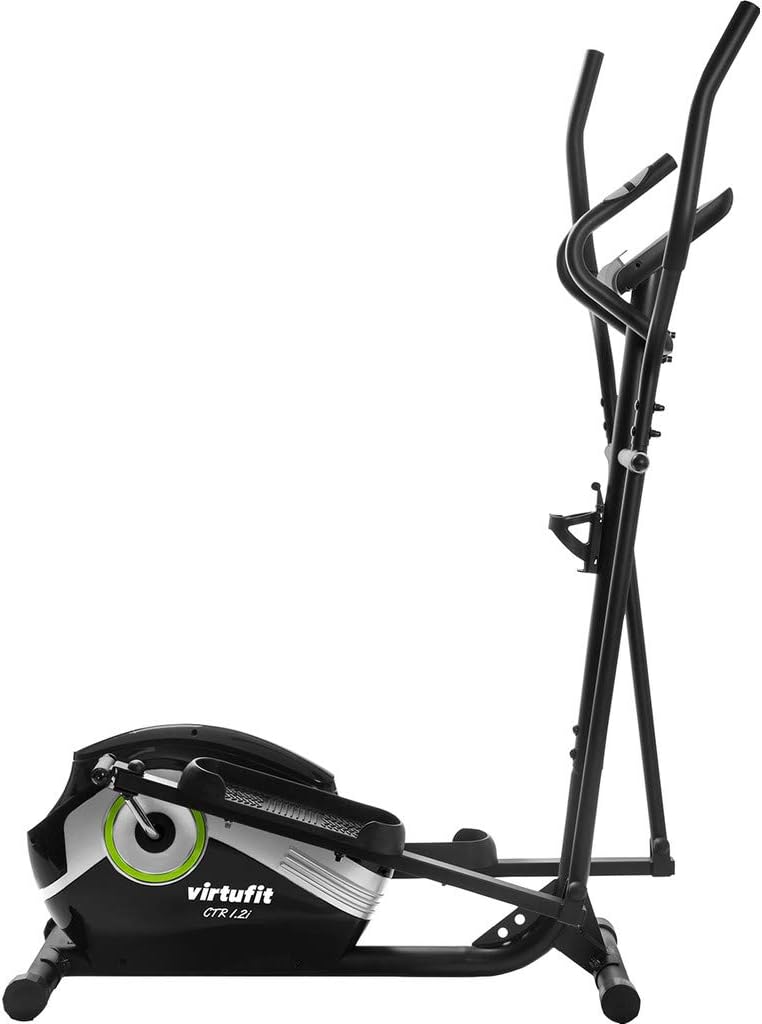
Nọmba 1: VirtuFit CTR 1.2i Crosstrainer. This image shows the complete crosstrainer from a side angle, highlighting its compact design and main components.
3. Eto
3.1 Unpacking ati Apejọ
Carefully remove all components from the packaging. Detailed assembly instructions, including diagrams and a list of included parts, are provided in the separate assembly guide that accompanies your product. Follow these instructions precisely to ensure correct and safe assembly.
3.2 Ibi
Choose a location that is level, stable, and offers sufficient space around the crosstrainer for safe operation. Ensure there is no obstruction to movement and that the floor is protected if necessary.
4. Awọn ilana Iṣiṣẹ
4.1 console Awọn iṣẹ
The integrated display provides real-time feedback on your workout. Information typically includes:
- Àkókò: Iye akoko adaṣe rẹ.
- Ijinna: Lapapọ ijinna bo.
- Oṣuwọn Ọkàn: Your current heart rate (requires hand pulse sensors or compatible chest strap).
- Ipele resistance: Current intensity setting.
- Iyara: Your current speed.
- Eto: The active training program.
- Wattis: Power output during exercise.
- RPM (Awọn Iyika Fun Iṣẹju): Cadence of your stride.
4.2 Awọn Eto Ikẹkọ
The CTR 1.2i offers 21 pre-programmed training modes. These programs automatically adjust the resistance to guide you through various workout profiles. Refer to the console manual for details on selecting and customizing these programs. You can also manually adjust between 16 resistance levels.
4.3 Heart Rate Training
Utilize the four heart rate-controlled programs for targeted cardiovascular training. These programs adjust resistance to keep your heart rate within a specific zone, optimizing your workout for fat burning or endurance. Ensure proper contact with the hand pulse sensors or use a compatible heart rate monitor for accurate readings.
4.4 Smart Connectivity (Fitshow App)
Enhance your training experience by connecting your smartphone or tablet via Bluetooth to the VirtuFit CTR 1.2i using the Fitshow fitness app. The app allows you to:
- Record and track your workouts.
- Monitor your progress over time.
- Synchronize training data with Apple Health Kit.
The Fitshow app is available for Android (version 4.3 or higher) and iOS (version 9.0 or higher).
4.5 Lilo Ohun Tí Ó Gbé Ẹ̀rọ Mọ́
A holder is integrated above the display to securely place your smartphone or tablet. This allows you to watch videos, listen to music, or use fitness apps during your workout.
5. Itọju
5.1 Ninu
Máa fi ìpolówó nu crosstrainer náà déédééamp aṣọ lẹ́yìn lílo kọ̀ọ̀kan láti mú òógùn àti eruku kúrò. Yẹra fún àwọn ohun ìfọṣọ tàbí àwọn ohun èlò ìfọṣọ tí ó lè ba ìparí tàbí àwọn ohun èlò ẹ̀rọ itanna jẹ́.
5.2 Ibi ipamọ
Tí o kò bá lò ó, tọ́jú ẹ̀rọ ìkọ́lé náà sí ibi gbígbẹ, tí ó tutù, tí kò sí ìmọ́lẹ̀ oòrùn tààrà àti otútù líle. Lo àwọn kẹ̀kẹ́ ìrìnnà láti gbé ẹ̀rọ náà lọ́nà tí ó rọrùn.
5.3 deede ayewo
Periodically check all bolts, nuts, and moving parts to ensure they are securely fastened and functioning correctly. Lubricate moving parts as recommended in the assembly guide to maintain smooth operation.
6. Laasigbotitusita
If you encounter issues with your VirtuFit CTR 1.2i Crosstrainer, consider the following common solutions:
- No Power/Display Not Working: Check power connections. Ensure batteries (if applicable) are correctly installed or replaced.
- Awọn Ariwo Alailẹgbẹ: Inspect for loose bolts or components. Lubricate moving parts as per maintenance instructions.
- Kika Oṣuwọn ọkan ti ko pe: Ensure hands are firmly placed on the pulse sensors. Clean sensors if necessary.
- Awọn ọran Asopọmọra App: Ensure Bluetooth is enabled on your device and the crosstrainer. Restart both devices and try reconnecting. Check app compatibility with your device's operating system version.
- Àtakò tí kò yípadà: Verify all cables are securely connected. If the issue persists, contact customer support.
7. Awọn pato
| Ẹya ara ẹrọ | Sipesifikesonu |
|---|---|
| Brand | VirtuFit |
| Orukọ awoṣe | CTR 1.2i |
| Nọmba awoṣe | VFELCTR1.2i |
| Àwọ̀ | Dudu, Grẹy |
| Awọn iwọn Ọja (D x W x H) | 105 x 60 x 160 cm |
| Iwọn Nkan | 27 kilo |
| Ohun elo | Ṣiṣu, Irin |
| Resistance Mechanism | Oofa |
| Nọmba awọn ipele Resistance | 16 |
| Iṣeduro iwuwo iwuwo | 115 Kilograms (Note: Product description states 115kg, specifications list 150kg. Please adhere to the lower value for safety.) |
| Gígùn Ìrìn Àjò Tó Gíga Jùlọ | 14 Inṣi |
| Awọn batiri To wa | Rara |
| Akọkọ Wa Ọjọ | Oṣu Kẹta Ọjọ 15, Ọdun 2020 |
8. Atilẹyin ọja ati Support
VirtuFit, as a Dutch fitness brand, is committed to providing high-quality fitness equipment. For warranty information, technical support, or service inquiries, please refer to the documentation included with your purchase or contact the retailer from whom you purchased the VirtuFit CTR 1.2i Crosstrainer. Keep your proof of purchase for warranty claims.


