1. Ifihan
O ṣeun fun riraasing the Mistral Stand Fan MSF040. This manual provides essential information for the safe and efficient operation, assembly, maintenance, and troubleshooting of your new fan. Please read these instructions thoroughly before use and retain them for future reference.

Figure 1: Fully assembled Mistral Stand Fan MSF040. This image displays the fan's overall design, including the circular base, adjustable stand pole, and the fan head with its protective grille.
2. Awọn Ilana Aabo pataki
Lati dinku eewu ina, mọnamọna, tabi ipalara, nigbagbogbo tẹle awọn iṣọra aabo ipilẹ wọnyi:
- Ka gbogbo awọn ilana ṣaaju lilo olufẹ yii.
- Rii daju pe ipese agbara voltage matches the rating label on the fan.
- Do not operate any fan with a damaged cord or plug. If the cord or plug is damaged, contact qualified service personnel for repair or replacement.
- Unplug the fan from the power outlet when not in use, before cleaning, or before moving it.
- Ma ṣe fi afẹfẹ, pulọọgi, tabi okun bọ inu omi tabi awọn olomi miiran.
- Keep the fan out of reach of children and pets. Close supervision is necessary when the fan is used near children.
- Má ṣe fi ìka tàbí ohunkóhun sínú iná mànàmáná nígbà tí afẹ́fẹ́ bá ń ṣiṣẹ́.
- Gbe awọn àìpẹ lori kan idurosinsin, ipele dada lati se o lati tipping lori.
- Maṣe lo afẹfẹ ninu tutu tabi damp awọn ipo, gẹgẹbi awọn balùwẹ tabi awọn agbegbe ifọṣọ.
- Ma ṣe dina awọn ṣiṣi afẹfẹ tabi ṣiṣẹ nitosi awọn aṣọ-ikele tabi awọn ohun elo miiran ti o le dina ṣiṣan afẹfẹ.
3. Package Awọn akoonu
Nígbà tí o bá ṣí àpótí náà, jọ̀wọ́ rí i dájú pé gbogbo àwọn èròjà wọ̀nyí wà níbẹ̀:
- Fan Motor Unit with Rear Grille
- Bla Blade
- Iwaju Yiyan
- Grille Locking Nut
- Blade fila
- Stand Pole (Upper and Lower sections)
- Yika Mimọ
- Ipilẹ Fixing dabaru
- Okùn Agbára (tí a ti sopọ̀ mọ́ra)
- Itọsọna olumulo
4. Apejọ Awọn ilana
Follow these steps to assemble your Mistral Stand Fan MSF040:
- Ṣepọ ipilẹ: Place the stand pole onto the round base. Secure it from underneath the base using the provided base fixing screw. Ensure it is tightened firmly.
- So Ẹka Mọto naa: Insert the fan motor unit onto the top of the stand pole. Secure it with the pole locking screw, if present, or by twisting until it clicks into place.
- Fi sori ẹrọ Grille Rear: Place the rear grille onto the motor unit, aligning the notches. Secure it with the grille locking nut, turning clockwise until tight.
- Mount the Fan Blade: Slide the fan blade onto the motor shaft, ensuring the pin on the shaft aligns with the groove on the blade. Secure it with the blade cap, turning counter-clockwise until tight.
- Attach the Front Grille: Position the front grille over the rear grille, aligning the clips. Secure the front grille by pressing the clips firmly around the edge until it is fully closed.
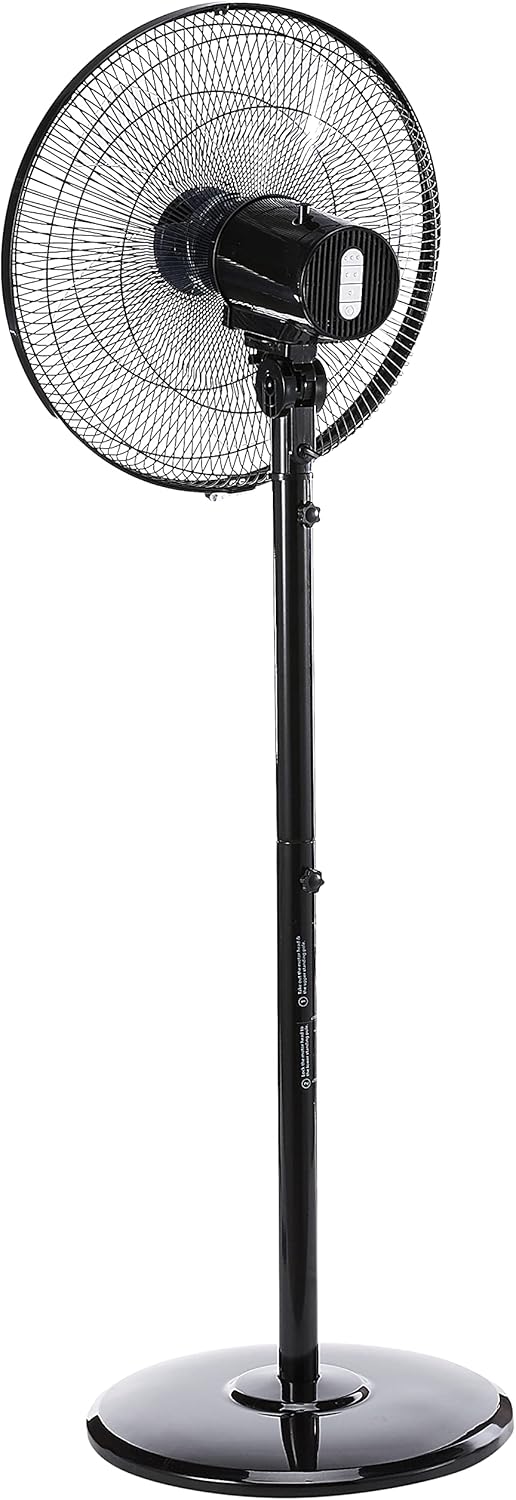
olusin 2: Apa view of the fan, illustrating the adjustable height feature of the stand pole. The pole can be extended or retracted to suit different user preferences.
5. Awọn ilana Iṣiṣẹ
Once assembled, your Mistral Stand Fan MSF040 is ready for operation:
- Asopọ agbara: Fi pulọọgi agbara sinu ihò ina ti o yẹ.
- Titan/Apapa: Use the power button on the control panel to turn the fan on or off.
- Yiyan Iyara: The fan offers 3 speed selections. Press the speed control buttons on the control panel to cycle through low, medium, and high settings.
- Oscillation: To activate the left and right oscillation, press the oscillation button on the control panel. Press it again to stop oscillation.
- Atunṣe tẹlọrun: The fan head can be tilted 30° up or down. Gently adjust the fan head to your desired angle.
- Atunse Giga: The stand pole features a convertible height mechanism. Loosen the height adjustment knob on the stand pole, adjust to the desired height, and then tighten the knob firmly.

olusin 3: Isunmọ view of the fan's control panel, featuring tactile buttons for power, speed selection, and oscillation.
6. Itọju ati Cleaning
Regular cleaning and maintenance will ensure optimal performance and extend the lifespan of your fan:
- Máa yọ afẹ́fẹ́ náà kúrò nígbà gbogbo láti ibi tí agbára ń jáde kí a tó fi mọ́.
- Mu ese ita ti afẹfẹ afẹfẹ pẹlu asọ, damp asọ. Ma ṣe lo abrasive ose tabi epo.
- For thorough cleaning of the fan blades, the front grille can be carefully removed. Refer to the assembly instructions in reverse order for safe disassembly and reassembly.
- Ensure all parts are completely dry before plugging the fan back in and operating it.
- Tọ́jú afẹ́fẹ́ sí ibi tí ó tutù tí ó sì gbẹ nígbà tí a kò bá lò ó fún ìgbà pípẹ́.
7. Laasigbotitusita
If you encounter any issues with your fan, please refer to the following common problems and solutions:
- Olufẹ ko tan:
- Ṣayẹwo boya okun agbara ti wa ni edidi ni aabo sinu iṣan itanna ti n ṣiṣẹ.
- Ensure the power button on the control panel is pressed.
- Verify that the household circuit breaker or fuse has not tripped.
- Fan ṣe ariwo dani:
- Unplug the fan and check for any obstructions (e.g., loose debris, wires) in the fan blades or grilles.
- Ensure all parts are securely assembled and tightened.
- Fan does not oscillate:
- Ensure the oscillation button on the control panel has been pressed.
Ti iṣoro naa ba wa lẹhin ṣiṣe ayẹwo awọn aaye wọnyi, jọwọ kan si atilẹyin alabara.
8. Awọn pato
| Ẹya ara ẹrọ | Ẹ̀kúnrẹ́rẹ́ |
|---|---|
| Brand | MISTRAL |
| Awoṣe | MSF040 |
| Electric Fan Design | Floor Fan / Pedestal Fan |
| Blade Iru | 5 ABS blade |
| Iyara Yiyan | 3 awọn iyara |
| oscillation | Left & right oscillation |
| Titunse pulọọgi | 30° up & down |
| Atunṣe Giga | Convertible height |
| Adarí Iru | Button Control (Tactile) |
| Ohun elo | Ṣiṣu |
| Àwọ̀ | Dudu |
| Orisun agbara | Okun Itanna |
| Iwọn Nkan | 5.35 kilo |
| Awọn irinše to wa | Okun |

Figure 4: Close-up of the power plug, indicating the corded electric power source for the fan.
9. Atilẹyin ọja ati Support
Your Mistral Stand Fan MSF040 comes with a Atilẹyin ọja Agbegbe (Singapore) Ọdun 2. Jọwọ ṣe idaduro ẹri rira rẹ fun awọn iṣeduro atilẹyin ọja.
For technical support, service, or warranty inquiries, please contact Mistral customer service through their official channels. Refer to the product packaging or the official Mistral webaaye fun awọn alaye olubasọrọ.


