1. Ifihan
The Yamaha YDP144 Arius Series Digital Piano offers an authentic acoustic piano experience suitable for pianists of all levels. It features an 88-key Graded Hammer Standard (GHS) keyboard action, replicating the feel of an acoustic piano with heavier touch in the low keys and lighter touch in the high keys. The instrument incorporates new piano samples, including the expressive Yamaha CFX 9-foot concert grand piano voice, and Damper Resonance technology for realistic pedaling effects. With its furniture-style cabinet and advanced features, the YDP144 is designed to enhance your musical journey.

Image: The Yamaha YDP144 Arius Series Digital Piano in Dark Rosewood, accompanied by its matching bench.
2. Ohun ti o wa ninu Apoti
Your Yamaha YDP144 Arius Series Digital Piano package includes the following components:
- Yamaha Arius Series YDP144 Digital Piano Console
- Matching Bench
- Furniture Stand
- 3-Efatelese Unit
- Isinmi Orin
- Ideri Bọtini
- 50 Classical Music Masterpieces Book
- Afowoyi eni
- Awọn ọna Isẹ Itọsọna
- Adapter agbara
3. Eto
Follow these steps to assemble and set up your Yamaha YDP144 Digital Piano:
- Ṣii silẹ: Ni ifarabalẹ yọ gbogbo awọn paati kuro ninu apoti. Rii daju pe gbogbo awọn ẹya ti a ṣe akojọ si ni apakan 'Kini Apoti' wa ni bayi.
- Iduro Iduro: Assemble the furniture stand according to the detailed instructions in the Owner's Manual. This typically involves attaching the side panels to the crossbar and securing them with screws.
- Attach Pedal Unit: Connect the 3-pedal unit to the assembled stand. Ensure the cable from the pedal unit is routed correctly for connection to the piano console.
- Place Piano Console: Carefully place the main piano console onto the assembled stand. Align the console with the mounting points on the stand and secure it using the provided screws.
- Awọn okun Sopọ: Connect the pedal unit cable to the corresponding port on the underside of the piano console. Plug the power adapter into the DC input port on the back of the piano and then into a wall outlet.
- Install Music Rest & Key Cover: Insert the music rest into its designated slot on the piano. Place the key cover over the keys when not in use to protect them from dust.
For a visual guide on assembly, you may find the following video helpful:
Video: An unboxing and assembly guide for a digital piano, demonstrating the setup process. (Note: This video is from an influencer and may not feature the exact YDP144 model, but illustrates general assembly steps.)
4. Awọn ilana Iṣiṣẹ
4.1 Agbara Tan / Pa ati Iwọn didun
To power on the piano, press the power button located on the left side of the control panel. Adjust the master volume using the slider control to your desired level. To power off, press the power button again.
4.2 Yiyan Voices
The YDP144 offers 10 distinct voices, including two variations of the CFX Premium Grand Piano Voice, electric pianos, organs, strings, harpsichords, and vibraphone. To select a voice, press the 'Grand Piano/Function' button and then press the corresponding key on the keyboard as indicated in the Quick Operation Guide or Owner's Manual. The CFX Premium Grand Piano Voice recreates the power and tone of Yamaha's flagship concert grand piano.
4.3 Ìṣe Kííbọọ̀dù
The Graded Hammer Standard (GHS) weighted action provides a realistic piano feel, with a heavier touch in the lower keys and a lighter touch in the higher keys, similar to an acoustic piano. The special matte black key tops are designed to absorb moisture and remain tactile for comfortable play during extended use.
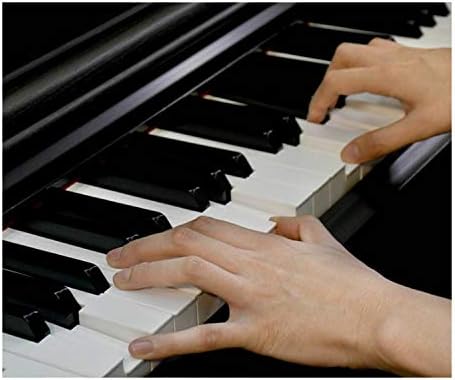
Aworan: A sunmọ-soke view of hands playing the keys of the Yamaha YDP144, highlighting the realistic feel of the Graded Hammer Standard action.
4.4 Pedal Functions
The YDP144 features a 3-pedal unit. The sustain pedal offers half-damper control, allowing for continuously increasing amounts of sustain as the pedal is depressed, digitally recreating the depth of tone found in acoustic pianos.
4.5 Gbigbasilẹ ati Sisisẹsẹhin
The piano includes built-in recording and playback capabilities. Refer to your Owner's Manual for detailed instructions on how to record your performances and play them back.
4.6 Agbekọri Lilo
Connect headphones to one of the two standard stereo phone jacks for private practice. This allows you to play without disturbing others.
4.7 Asopọmọra
The YDP144 supports various connectivity options including USB Type B for connection to computers or smart devices, and features Bluetooth and Wi-Fi for enhanced functionality with compatible applications.
Fidio: A review of the Yamaha Arius Series Piano, highlighting its features and sound quality.
5. Itọju
To ensure the longevity and optimal performance of your Yamaha YDP144 Digital Piano, follow these maintenance guidelines:
- Ninu: Regularly wipe the piano's surface with a soft, dry cloth. For stubborn dirt, use a slightly damp asọ ati lẹhinna gbẹ daradara. Yago fun abrasive ose tabi epo.
- Abojuto bọtini: Keep the keys clean by wiping them with a soft cloth. Do not use chemical cleaners on the keys, as this may damage the finish.
- Awọn ipo Ayika: Avoid exposing the piano to direct sunlight, extreme temperatures, or high humidity, as these can cause damage to the instrument's components and finish.
- Idaabobo eruku: Use the provided key cover when the piano is not in use to prevent dust accumulation on the keys and internal mechanisms.
6. Laasigbotitusita
If you encounter any issues with your Yamaha YDP144 Digital Piano, consider the following basic troubleshooting steps:
- Ko si Ohun: Check if the power is on and the volume is turned up. Ensure headphones are not plugged in if you expect sound from the speakers. Verify all cables are securely connected.
- Ohun Yiyi: Lower the volume to see if the distortion resolves. Check for any loose connections or damaged cables.
- Awọn bọtini Ko Dahun: Ensure the piano is powered on. If only specific keys are affected, consult the Owner's Manual for advanced diagnostics.
- Awọn oran Ẹsẹ: Check the pedal unit cable connection. Ensure the pedals are not obstructed.
For more detailed troubleshooting information and solutions, please refer to the comprehensive Owner's Manual included with your piano or visit the official Yamaha support webojula.
7. Awọn pato
| Ẹya ara ẹrọ | Sipesifikesonu |
|---|---|
| Orukọ awoṣe | Yamaha YDP144R Arius Series Digital Console Piano with Bench, Rosewood |
| Awọn iwọn (W x H x D) | 53-7/16” W x 32-1/16” H x 16-5/8” D (53.44"D x 32.24"W x 16.61"H) |
| Iwọn Nkan | 83 lbs |
| Nọmba ti Awọn bọtini | 88 |
| Keyboard Ise | Ti dọgba Hammer Standard (GHS) igbese iwuwo |
| Key Tops | Matte dudu |
| Nọmba ti Pedals | 3 (Sustain with half-damper control) |
| Max Polyphony | 192 |
| Nọmba Awọn Ohùn | 10 |
| Awọn agbekọri | (2) Standard Stereo phone jack |
| Gbigbasilẹ ati Sisisẹsẹhin | Bẹẹni |
| Asopọmọra Technology | Bluetooth, USB, Wi-Fi |
| Asopọmọra Iru | USB Iru B |
| Orisun agbara | USB |
| Olupese | Yamaha |
| UPC | 889025120388 |
| Àwọ̀ | Igi Rósì Dúdú |
| Olorijori Ipele | Olubere |
| Pataki Ẹya | Gbigbasilẹ |
8. Atilẹyin ọja ati Support
For detailed information regarding the product warranty, including terms, conditions, and registration, please refer to the warranty card included in your product packaging or visit the official Yamaha website. For technical support, service, or additional assistance, please contact Yamaha Customer Support through their official channels.
O le wa alaye diẹ sii ati awọn orisun atilẹyin lori awọn Ile itaja Yamaha lori Amazon.


