1. Ifihan
This manual provides comprehensive instructions for the installation, operation, and maintenance of the STI DSC1 Power Supply Controller. The DSC1 is designed to provide reliable power control for various industrial applications, supporting both 115Vac and 230Vac input voltages.
The STI DSC1 is a robust power supply controller, identified by its model number DSC1 and alternative ID 43203-0010 K. It is engineered for durability and performance in demanding environments.
2. Alaye Aabo
Máa tẹ̀lé àwọn ìlànà ààbò wọ̀nyí nígbà gbogbo láti dènà ìpalára àti ìbàjẹ́ sí ẹ̀rọ náà:
- Ensure all power is disconnected before installation, maintenance, or troubleshooting.
- Awọn oṣiṣẹ ti o peye nikan ni o yẹ ki o ṣe fifi sori ẹrọ ati itọju.
- Daju igbewọle voltage matches the device's specifications (115/230Vac).
- Ma ṣe ṣiṣẹ ẹrọ ti o ba han pe o bajẹ.
- The enclosure is rated NEMA 4 and IP65, providing protection against dust and water ingress. However, avoid direct exposure to high-pressure water jets or prolonged submersion.
3. Eto ati fifi sori
The DSC1 Power Supply Controller is designed for secure mounting. Follow these steps for proper installation:
- Ibi Igbesoke: Select a stable, flat surface capable of supporting the unit's weight (approximately 10.83 lbs). Ensure adequate ventilation around the unit.
- Iṣagbesori ti ara: Secure the controller using appropriate fasteners through the designated mounting holes on the unit's base.
- Awọn Isopọ Itanna: Connect the 115/230Vac power input to the designated terminals. Ensure all wiring complies with local electrical codes.
- Awọn isopọ Iṣjade: Connect the controlled device(s) to the output terminals as per your system's requirements.

olusin 3.1: Iwaju view of the DSC1 Power Supply Controller. This view highlights the overall form factor and the top panel which contains operational instructions and warnings.
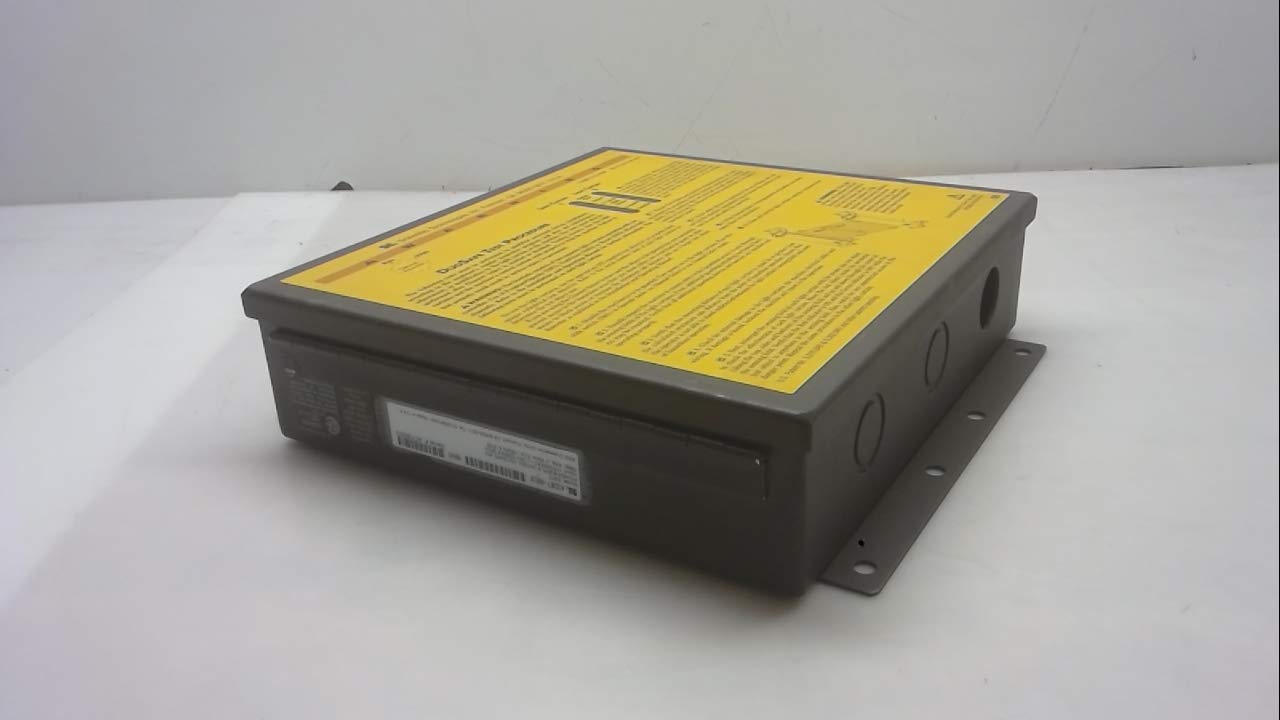
olusin 3.2: Apa view of the DSC1 Power Supply Controller. This perspective shows the robust metal enclosure, mounting flanges, and circular knockouts for electrical conduit connections.
4. Awọn ilana Iṣiṣẹ
Once the DSC1 Power Supply Controller is properly installed and wired, follow these steps for operation:
- Agbara Tan: Apply power to the input terminals. The unit will initiate its power-up sequence.
- Awọn Atọka Ipo Observe any status indicators on the unit (refer to the label on the device for specific indicator meanings, such as the "DuoSafe Test Procedure" mentioned on the top panel).
- Ṣayẹwo iṣẹ ṣiṣe: Verify that the connected devices are receiving power and operating as expected.
- Agbara Pa: To power down the unit, disconnect the input power supply.
5. Itọju
Regular maintenance ensures the longevity and optimal performance of your DSC1 Power Supply Controller:
- Ninu: Periodically clean the exterior of the unit with a soft, dry cloth. Do not use abrasive cleaners or solvents.
- Ayewo: Annually inspect all electrical connections for tightness and signs of corrosion. Check the enclosure for any physical damage.
- Awọn ipo Ayika: Ensure the operating environment remains within the specified temperature and humidity ranges. The NEMA 4, IP65 rating protects against dust and water, but extreme conditions should be avoided.
6. Laasigbotitusita
If you encounter issues with your DSC1 Power Supply Controller, refer to the following common problems and solutions:
| Isoro | Owun to le Fa | Ojutu |
|---|---|---|
| No power to connected device. | Input power disconnected; Faulty wiring; Internal fault. | Verify input power supply; Check all wiring connections; If problem persists, contact support. |
| Unit not responding. | Iṣagbewọle ti ko tọ voltage; Overload condition. | Jẹrisi igbewọle voltage is 115/230Vac; Reduce load on the output. |
| Àwọn ariwo tàbí òórùn àìròtẹ́lẹ̀. | Ikuna paati inu. | Immediately disconnect power and contact qualified service personnel. |
7. Awọn pato
Detailed technical specifications for the STI DSC1 Power Supply Controller:
| Iwa | Iye |
|---|---|
| Nọmba awoṣe | DSC1 |
| Brand | STI |
| Iṣagbewọle Voltage | 115/230Vac |
| Igbohunsafẹfẹ | 50/60Hz |
| Agbara agbara | 56VA |
| Akoko Idahun | <45ms |
| Apade Rating | NEMA 4, IP65 |
| Product Dimensions (Unit) | 3.00 x 10.00 x 11.00 inches |
| Awọn Iwọn Nkan (L x W x H) | 0.12 x 0.39 x 0.43 inches |
| Iwọn Nkan | 10.83 iwon |
| Awọn ẹrọ ibaramu | Personal Computer (as a power supply controller) |
| Olupese | STI |
| Ọjọ Akọkọ Wa | Oṣu Kẹta Ọjọ 4, Ọdun 2019 |

Figure 7.1: Product label detailing specifications. This image provides critical information such as model number, input voltage, frequency, power consumption, response time, and enclosure rating.
8. Atilẹyin ọja ati Support
For warranty information and technical support regarding your STI DSC1 Power Supply Controller, please contact the manufacturer directly.
Olupese: STI
Refer to the product packaging or the manufacturer's official webAaye fun awọn alaye olubasọrọ lọwọlọwọ julọ ati awọn ofin atilẹyin ọja.


