1. Ifihan
This manual provides comprehensive instructions for the Ideal Wireless Charging Receiver Adapter. This product is designed to enable wireless charging functionality for specific iPhone models that do not have built-in Qi wireless charging capabilities. Please read this manual carefully before installation and use to ensure optimal performance and safety.
2. Ọja Ipariview
The Ideal Wireless Charging Receiver is an ultra-thin, lightweight adapter that allows your iPhone to charge wirelessly using any standard Qi-compatible wireless charger. It features a flexible connector that plugs into your iPhone's Lightning port and a flat receiving coil that adheres to the back of your device, typically hidden under a protective case.

This image displays the Ideal Wireless Charging Receiver, highlighting its compact design and printed technical specifications. An accompanying illustration shows how the receiver attaches to an iPhone and charges wirelessly on a charging pad.
3. Ibamu
This wireless charging receiver is specifically designed for iPhone models that do not have factory-integrated Qi wireless charging capabilities. Compatible models include:
- iPhone 7, iPhone 7 Plus
- iPhone 6, iPhone 6 Plus, iPhone 6S
- iPhone 5, iPhone 5S, iPhone 5C, iPhone SE
The receiver is compatible with all standard Qi wireless charging pads.
4. Eto ati fifi sori
Follow these steps to install the Ideal Wireless Charging Receiver:
- Mura iPhone rẹ: Ensure your iPhone is clean and free of debris on the back surface and around the Lightning port.
- So olugba pọ: Carefully plug the flexible Lightning connector of the receiver into your iPhone's Lightning port. Ensure it is fully seated.

A alaye view of the Ideal Wireless Charging Receiver's flexible connector securely plugged into the Lightning port of an iPhone, demonstrating the correct connection method.
- Position the receiver: Gently fold the receiver's coil pad onto the back of your iPhone. The adhesive backing (if present) will help secure it. Ensure it lies flat and does not obstruct the camera or other sensors.
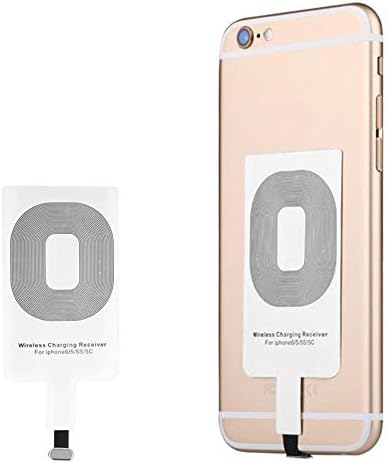
This image shows the Ideal Wireless Charging Receiver laid flat against the back of an iPhone, illustrating its slim profile and how it adheres to the device before being covered by a case.
- Install a protective case: For best results and to protect the receiver, place your iPhone into a non-metallic protective case. The receiver is designed to work through most standard cases.
5. Awọn ilana Iṣiṣẹ
Once the Ideal Wireless Charging Receiver is installed:
- Place on charging pad: Position your iPhone (with the receiver attached and preferably inside a case) onto a powered Qi-compatible wireless charging pad.
- Verify charging: Your iPhone should indicate that it is charging. If not, adjust the position of your iPhone on the charging pad.
- Charging through cases: The receiver is designed to allow charging through most protective cases. It is generally not necessary to remove your phone case.

An iPhone, equipped with the Ideal Wireless Charging Receiver, is shown resting on a circular wireless charging pad, indicating the device is ready for inductive charging.
6. Itọju
To ensure the longevity and proper functioning of your wireless charging receiver:
- Keep the receiver dry and clean. Avoid exposure to liquids.
- Avoid excessive bending or twisting of the flexible connector, as this can damage the internal wiring.
- Do not attempt to disassemble or repair the receiver yourself.
7. Laasigbotitusita
If you encounter issues with your wireless charging receiver, consider the following:
- No charging indication:
- Ensure the receiver's Lightning connector is fully and correctly inserted into your iPhone's port.
- Verify that your wireless charging pad is powered on and functioning correctly.
- Adjust the position of your iPhone on the charging pad. The charging coils need to align.
- Slow or intermittent charging:
- Thick phone cases (especially metallic ones) can interfere with wireless charging. Try removing your case to see if performance improves.
- Ensure no foreign objects are between your iPhone and the charging pad.
- A ko da olugba mọ:
- Disconnect and reconnect the receiver.
- Restart your iPhone.
8. Awọn pato
| Ẹya ara ẹrọ | Sipesifikesonu |
|---|---|
| Iṣawọle | DC5V/1A |
| Abajade | DC5V/800mA |
| Asopọmọra Iru | Monomono |
| Boṣewa alailowaya | Qi |
| Approximate Dimensions (Receiver) | 7 cm (Ipari) x 4.5 cm (Iwọn) |
| Approximate Weight (Receiver) | 4 g |
| Ibaramu iPhone Models | 7, 7 Plus, 6, 6 Plus, 6S, 5, 5S, 5C, SE |
9. Atilẹyin ọja ati Support
This Ideal Wireless Charging Receiver comes with a 3-osu atilẹyin ọja against manufacturing defects from the date of purchase.
For warranty claims, technical support, or any product-related inquiries, please contact the retailer from whom you purchased the product. Please retain your proof of purchase for warranty validation.


