1. Ifihan
This manual provides detailed instructions for the Retro-Bit Official Sega Genesis USB Controller 8-Button Arcade Pad. This controller is designed to offer a classic gaming experience with modern compatibility, featuring a familiar design and additional functionality for various platforms. Please read this manual thoroughly to ensure proper setup and operation of your device.
2. Ọja Ipariview
The Retro-Bit Official Sega Genesis USB Controller is an officially licensed replica of the classic Sega Genesis controller, enhanced with modern features for broad compatibility.
Awọn ẹya pataki:
- Official SEGA Licensed Controller (Original Grade Quality)
- Classic 6-button layout with repositioned Mode button
- New L/R Shoulder Buttons for extra configuration options
- 10-foot cable length for flexible gameplay
- Compatible with Sega Genesis Mini, Nintendo Switch/Switch 2, PC, Mac, Steam, RetroPie, Raspberry Pi
- Supports both D-Input and X-Input modes
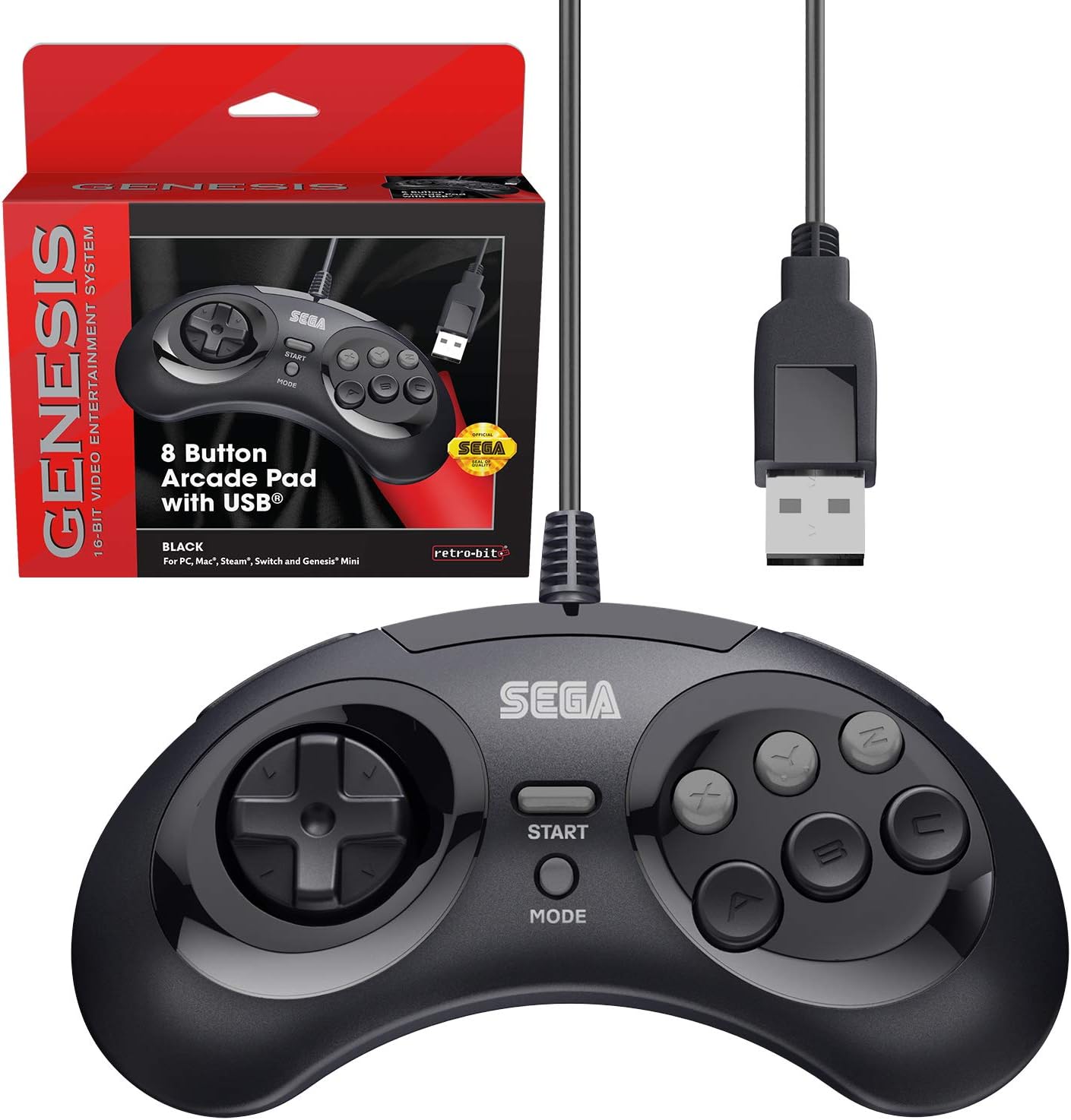
Figure 2.1: The Retro-Bit Official Sega Genesis USB Controller 8-Button Arcade Pad and its packaging.
3. Eto
Setting up your Retro-Bit Sega Genesis USB Controller is a straightforward process. The controller is designed for plug-and-play functionality on most supported systems.
3.1 Nsopọ Adarí
- Locate an available USB port on your desired gaming device (PC, Mac, Nintendo Switch, Sega Genesis Mini, RetroPie, Raspberry Pi).
- Plug the USB-A connector of the controller's 10-foot cable into the USB port.
- The system should automatically detect and install the necessary drivers. No additional software installation is typically required.
- For Nintendo Switch handheld mode, a USB-C adapter (not included) may be required to connect the USB-A cable.

olusin 3.1: Isunmọ view of the controller's face buttons and D-pad.
Video 3.1: An unboxing of the Retro-Bit Official Sega Genesis USB Controller, demonstrating the physical product and its packaging. This video shows the controller being removed from its box and highlights its wired USB connection.
4. Awọn ilana Iṣiṣẹ
The controller features a classic 6-button layout with additional shoulder buttons and a Mode button for enhanced functionality.
4.1 Ifilelẹ bọtini
- D-Pad: Directional input for movement.
- A, B, C, X, Y, Z Buttons: Main action buttons.
- Bọtini Ibẹrẹ: Typically used for pausing games or confirming selections.
- Bọtini Ipo: Can be used for specific game functions or system navigation.
- L/R Shoulder Buttons: New additions for expanded control options in modern games or emulators.

olusin 4.1: Apa view of the controller, highlighting the newly added L and R shoulder buttons.
4.2 Switching Input Modes (D-Input / X-Input)
The controller supports both D-Input (DirectInput) and X-Input (XInput) modes. X-Input is commonly used for modern PC games, while D-Input is often used for older games and some emulation platforms.
- To swap between D-Input and X-Input, hold the BERE button for 5 seconds. The controller will switch modes.
- Note: The controller defaults to D-Input mode upon connection and does not retain settings between sessions. You may need to switch modes each time you connect the controller.
4.3 Switch Macros (Nintendo Switch Specific)
For Nintendo Switch, specific button combinations can be used to change D-Pad input or swap button layouts:
- Hold START for 5 seconds: Ipo Ti ṣiṣẹ
- Up + START: D-Pad input (Left Joystick)
- Left + START: Joystick osi
- Right + START: Joystick ọtun
- Down + START: Swap A, B, X, Y buttons
Video 4.2: A alaye review of the Retro-Bit Official Sega Genesis USB Controller, including demonstrations of its features, button feel, and compatibility with various systems. This video also explains the D-Input/X-Input switching and button mapping.
5. Ibamu
The Retro-Bit Official Sega Genesis USB Controller offers broad compatibility with various modern and retro gaming platforms:
- Sega Genesis Mini
- Nintendo Switch / Switch 2
- PC (Windows)
- Mac (macOS)
- Steam (PC/Mac)
- RetroPie
- Rasipibẹri Pi
- PS3 (as indicated in manual, though not on box)

Figure 5.1: A compatibility chart showing various Retro-Bit controller types and their supported platforms. This wired USB model is compatible with many systems.

Figure 5.2: The controller is fully compatible with the Sega Genesis Mini console, providing an authentic retro gaming experience.
6. Default Button Mapping
The following table illustrates the default button mapping across different input modes and platforms. Please refer to this table for optimal configuration.
| Awọn iṣakoso | Genesisi | D-Iwọle | X-Igbewọle | PS3* | Mac* | Yipada |
|---|---|---|---|---|---|---|
| Up | Up ↑ | Up ↑ | Y-Axis ↑ | Up ↑ | Up ↑ | Up ↑ |
| Ọtun | Right → | Right → | X-Axis → | Right → | Right → | Right → |
| Isalẹ | Down ↓ | Down ↓ | Y-Axis ↓ | Down ↓ | Down ↓ | Down ↓ |
| Osi | Left ← | Left ← | X-Axis ← | Left ← | Left ← | Left ← |
| A | A | 1 | A | 2 | 1 | B |
| B | B | 2 | B | 1 | 2 | A |
| C | C | 3 | X | 3 | 3 | Y |
| X | X | 4 | Y | 4 | 4 | X |
| Y | Y | 5 | LB | L1 | 5 | L |
| Z | Z | 6 | RB | R1 | 6 | R |
| L | L | 7 | LT | L2 | 7 | ZL |
| R | R | 8 | RT | R2 | 8 | ZR |
| Ipo | Yan | 9 | Pada | Yan | 9 | - |
| Bẹrẹ | Bẹrẹ | 10 | Bẹrẹ | Bẹrẹ | 10 | + |
| Bẹrẹ + A | Itọsọna | 11 | Itọsọna | Ile | 11 | Ile |
*PS3 and Mac compatibility may vary or require specific settings.
7. Itọju
To ensure the longevity and optimal performance of your controller, follow these maintenance guidelines:
- Ninu: Lo asọ, asọ ti o gbẹ lati nu si isalẹ oludari. Fun idoti alagidi, die-die dampen awọn asọ pẹlu omi. Yẹra fun awọn kẹmika lile tabi awọn afọmọ abrasive.
- Ibi ipamọ: Tọju olutọju naa ni itura, aye gbigbẹ kuro lati orun taara ati awọn iwọn otutu to gaju. Yago fun wiwọ okun ni wiwọ lati yago fun ibajẹ.
- Mimu: Do not drop the controller or expose it to excessive force. Avoid pulling the cable forcefully from the USB port.
8. Laasigbotitusita
If you encounter issues with your controller, please refer to the following common troubleshooting steps:
- A ko rii Alakoso:
- Ensure the USB cable is securely plugged into an active USB port.
- Try plugging the controller into a different USB port on your device.
- Restart your gaming device or computer.
- Verify that your operating system or gaming platform supports the controller (refer to Section 5: Compatibility).
- Buttons Not Responding Correctly:
- Check the input mode (D-Input vs. X-Input) by holding the BERE button for 5 seconds. Some games or emulators require a specific mode.
- For Nintendo Switch, try the Switch Macros (Section 4.3) to adjust D-Pad input or swap buttons if needed.
- Ensure the game or emulator's control settings are configured correctly for a 6-button or 8-button controller.
- Ìdádúró tàbí Ìfàsẹ́yìn:
- Ensure the controller is directly connected to a USB port and not through an unpowered USB hub.
- Minimize background applications on your PC/Mac that might consume system resources.
- For optimal performance, ensure your display device (monitor/TV) is set to a low-latency "Game Mode" if available.
9. Awọn pato
| Ẹya ara ẹrọ | Ẹ̀kúnrẹ́rẹ́ |
|---|---|
| Brand | Retiro-Bit |
| jara | SEGA Genesis 8-button Arcade Pad |
| Nọmba awoṣe | 849172010239 |
| Asopọmọra Technology | USB (Ti firanṣẹ) |
| USB Ipari | ẹsẹ̀ 10 (ìwọ̀n mítà 3) |
| Adarí Iru | Gamepad |
| Awọn ẹrọ ibaramu | SEGA Genesis Mini, PC, Mac, Steam, RetroPie, Raspberry Pi, Nintendo Switch |
| Awọn ọna igbewọle | D-Input, X-Input (switchable) |
| Iwọn Nkan | 9.7 iwon |
| Package Mefa | 7.09 x 5.75 x 2.48 inches |
10. Atilẹyin ọja ati Support
For warranty information and customer support, please refer to the official Retro-Bit website or contact their customer service directly. Details are typically provided with the product packaging or on the manufacturer's webojula.
If you have questions, comments, or if this product did not turn out the way it was intended, please contact Retro-Bit customer service at info@retro-bit.com.


