1. Ifihan
This manual provides essential information for the safe and efficient operation of your Vonyx CDJ450 DJ Workstation. Please read it thoroughly before using the device and retain it for future reference. The Vonyx CDJ450 is a versatile DJ workstation featuring dual CD/MP3 players, Bluetooth connectivity, two USB ports, and a 2-channel mixer, designed for comprehensive audio control.
2. Awọn ilana aabo
- Rii daju pe ipese agbara ibaamu voltage pato lori kuro.
- Do not expose the unit to rain or moisture to prevent electric shock.
- Yago fun gbigbe ẹrọ naa si nitosi awọn orisun ooru tabi ni imọlẹ orun taara.
- Maṣe ṣii casing; tọka gbogbo iṣẹ si oṣiṣẹ ti o peye.
- Jeki awọn šiši fentilesonu ko o lati ṣe idiwọ igbona.
- Ge asopọ okun agbara nigba iji manamana tabi nigba lilo fun igba pipẹ.
3. Ọja Ipariview
The Vonyx CDJ450 integrates two media players and a central mixer into a single unit, offering a compact and powerful solution for DJs.

Nọmba 3.1: Oke-isalẹ view of the Vonyx CDJ450 DJ Workstation, showing the dual players and central mixer controls.

Nọmba 3.2: Igun view of the workstation, highlighting its compact design and accessible controls.

Nọmba 3.3: Close-up of the central mixer and player controls, including jog wheels, pitch faders, and display screens.

Nọmba 3.4: USB ports located on the top panel, demonstrating USB drive connectivity for MP3 playback.

Nọmba 3.5: Iwaju view with both CD trays open, ready for disc insertion.

Nọmba 3.6: Alaye view of a player's display, showing track information, and associated playback controls.
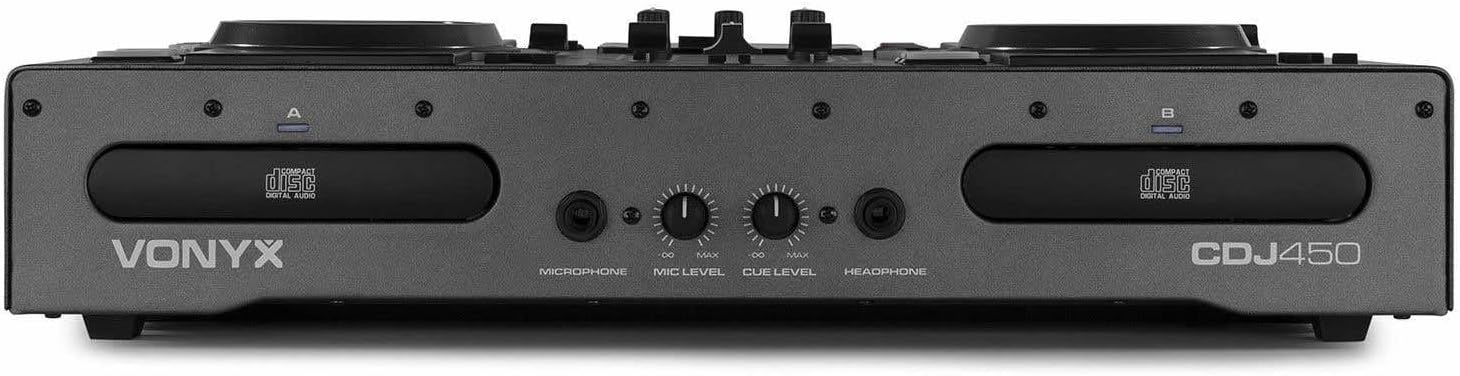
Nọmba 3.7: Front panel featuring microphone input, microphone level control, cue level, and headphone output.

Nọmba 3.8: Rear panel showing power input, main outputs (XLR, RCA), record output, USB Type-B port, and switchable Phono/Line inputs.
4. Eto
- Ibi: Place the CDJ450 on a stable, flat surface with adequate ventilation.
- Asopọ agbara: Connect the included power cable to the unit's power input and then to a suitable wall outlet. Ensure the power switch is in the OFF position before connecting.
- Ijade ohun: Connect the main outputs (XLR or RCA) to your amplifier, àwọn agbọ́hùnsọ tí a fi agbára ṣe, tàbí ètò PA.
- Awọn ẹrọ ita (Aṣayan): Connect external audio sources (e.g., turntables, additional CD players) to the Phono/Line inputs on the rear panel. Use the switches to select the correct input type.
- Microphone/Headphones: Connect your microphone to the XLR-DJ input or the 6.3mm jack on the front. Plug your headphones into the 3.5mm jack on the front.
- Asopọ USB (Aṣayan): For computer control or recording, connect a USB Type-B cable from the unit to your computer.
5. Awọn ilana Iṣiṣẹ
5.1. Agbara Tan / Paa
Flip the power switch on the rear panel to the 'ON' position. The displays will illuminate. To power off, flip the switch back to 'OFF'.
5.2. Media Playback (CD/USB)
- Sisisẹsẹhin CD: Insert an audio CD or MP3 CD into one of the CD trays. The unit will automatically read the disc.
- Sisisẹsẹhin USB: Fi kọnputa filasi USB ti o ni MP3 sii files into one of the USB ports on the top panel.
- Aṣayan Orisun: Use the 'SOURCE' button above each player to switch between CD and USB input.
- Aṣayan orin: Use the navigation buttons or the numeric keypad to select tracks. The integrated folder search function allows quick access to files on USB drives.
- Iṣakoso Sisisẹsẹhin: Use the 'PLAY/PAUSE' and 'CUE' buttons for standard playback control.
5.3. Bluetooth Asopọmọra
- Mu Bluetooth ṣiṣẹ lori foonuiyara, tabulẹti, tabi kọǹpútà alágbèéká rẹ.
- Select 'Bluetooth' as the source on the desired player.
- Wa fun available devices on your external device and select 'Vonyx CDJ450'.
- Once paired, you can stream audio wirelessly to the workstation.
5.4. Mixer Functions
- Awọn Faders ikanni: Adjust the volume level for each player (Channel A and B).
- Awọn iṣakoso EQ: Use the HIGH, MID, and LOW knobs for each channel to adjust the frequency response.
- Gain/Level: Adjust the input gain for each channel to match levels.
- Agbelebu: Blend between Channel A and Channel B.
- Ijade Ọga: Control the overall volume of the mix.
- Gbohungbohun: Adjust microphone volume using the 'MIC LEVEL' knob on the front panel.
- Agbekọri: Use the 'CUE LEVEL' knob to adjust headphone volume and the 'CUE' buttons on each channel to monitor specific sources.
5.5. Pataki Awọn ẹya ara ẹrọ
- Binu: Use the jog wheels for scratching effects.
- Yipada: Play audio in reverse.
- Adehun: Create a brake effect on playback.
- Ipo: Adjust the playback speed and pitch using the pitch faders.
- Loop: Use 'LOOP IN', 'LOOP OUT', and 'RELOOP' buttons to create and manage seamless loops.
6. Awọn isopọ
The CDJ450 offers a variety of input and output options:
- Awọn abajade:
- 2 x XLR Speaker Outputs
- 1 x RCA Master Output
- 1 x RCA Recorder Output
- Awọn igbewọle:
- 2 x Switchable Phono/Line RCA Inputs (for external devices)
- 1 x XLR-DJ Microphone Input
- 1 x 6.3mm Jack Microphone Input (front)
- Digital/Control:
- 2 x USB Ports (Type-A, top panel, for media playback)
- 1 x USB Type-B Port (rear, for computer connection)
- Bluetooth Asopọmọra
- Abojuto:
- 1 x 3.5mm Jack Headphone Output (front)
7. Itọju
- Ninu: Lo asọ asọ ti o gbẹ lati nu ode ti ẹyọ naa. Ma ṣe lo abrasive ose tabi epo.
- CD Trays: Keep CD trays free of dust and debris. Avoid touching the lens inside the CD player.
- Ibi ipamọ: Tí o kò bá lò ó, tọ́jú ẹ̀rọ náà sí ibi tí ó tutù tí ó sì gbẹ, kúrò níbi tí oòrùn kò ti lè tàn án tàbí ibi tí ó gbóná janjan.
8. Laasigbotitusita
| Isoro | Owun to le Fa | Ojutu |
|---|---|---|
| Ko si agbara | Power cable disconnected; power switch off; faulty outlet. | Check power cable connection; ensure power switch is ON; try a different outlet. |
| Ko si ohun jade | Volume levels too low; incorrect input/output connections; external amplifier ni pipa. | Increase master/channel volumes; verify all audio connections; ensure external amplifier wa lori. |
| CD not playing/reading | Disc dirty or scratched; incorrect disc format; source not selected. | Clean or replace disc; ensure disc is audio CD or MP3 CD; select 'CD' source. |
| USB ko dun | A kò ṣe àtúnṣe ìwakọ̀ USB dáadáa; a kò ṣe àtìlẹ́yìn rẹ̀ file type; source not selected. | Ensure USB is FAT32 formatted; only MP3 files supported; select 'USB' source. |
| Bluetooth ko sopọ | Bluetooth not enabled on external device; unit not in pairing mode; interference. | Enable Bluetooth on your device; select 'Bluetooth' source on CDJ450; try re-pairing. |
9. Awọn pato
- Orukọ awoṣe: CDJ450
- Imọ-ẹrọ Asopọmọra: Bluetooth, USB
- Nọmba ti Disiki: 2
- Awọn ọna kika ohun ti o ni atilẹyin: CD, MP3, USB, AAC (Bluetooth)
- Orisi Asopọmọra: Bluetooth, Jack 6.35 mm, RCA, USB, XLR 3-pin
- Nọmba awọn ikanni: 2
- Ìwọ̀n Nkan: 7.8 kilo
- Awọn ẹrọ ibaramu: Agbekọri, Agbọrọsọ
- Olupese: Vonyx
10. Atilẹyin ọja ati Support
For warranty information, please refer to the documentation provided at the time of purchase or contact your retailer. For technical support, please visit the official Vonyx webojula tabi kan si wọn onibara iṣẹ Eka.


