1. Ifihan
This manual provides detailed instructions for the installation, operation, and maintenance of your Renogy MPPT 30A Solar Charge Controller. Designed for 12V/24V DC systems, this controller optimizes power harvesting from your solar panels and efficiently charges various battery types, including Lithium, AGM, and Gel. Please read this manual thoroughly before installation and use to ensure optimal performance and safety.
2. Ọja Ipariview
Awọn ẹya pataki:
- Innovative MPPT Design: Die-cast aluminum design ensures excellent heat dissipation. Renogy's Maximum Power Point Tracking technology offers up to 99% tracking efficiency and 98% peak conversion efficiency, providing optimal charging even in cloudy conditions.
- Automatic 12V/24V Detection: Laifọwọyi ṣe awari 12V tabi 24V DC eto voltages. The LCD screen and multiple LED indicators display solar charging information, battery operation, customizable parameters, and error codes.
- Idaabobo Eto Gbogbogbo: Features self-diagnostic capabilities to protect against reverse polarity, battery overcharge, battery over-discharge, overload, short circuit, and reverse current.
- To ti ni ilọsiwaju 4-Stage gbigba agbara: Provides 4-stage charging (Bulk, Absorption, Float, and Equalization) for lead-acid batteries and 2-stage charging (Bulk and Absorption) for Lithium batteries, including Lithium reactivation.
- Versatile Load Control: Connect DC appliances directly to optional load terminals to monitor consumption or configure timed controls directly from the controller.
- Abojuto latọna jijin: The RS232 communication port allows the Renogy Rover to connect with the Renogy BT-1 Bluetooth module (recommended, not included) for monitoring system status and productivity via the Renogy DC Home App.
Awọn Irinṣẹ Ọja:
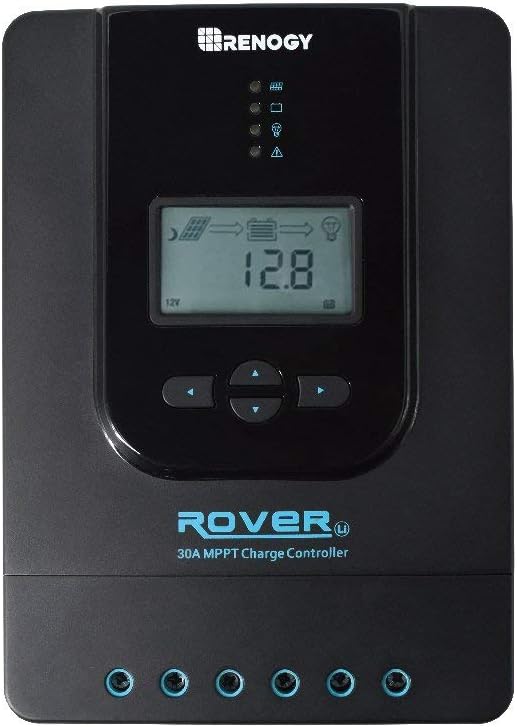
olusin 1: Iwaju view of the Renogy MPPT 30A Solar Charge Controller, showing the LCD display, control buttons, and LED indicators.

Figure 2: Dimensions of the Renogy MPPT 30A Solar Charge Controller (238mm x 173mm x 72.5mm, Weight: 2.0kg).

Figure 3: Key features of the Renogy MPPT 30A Solar Charge Controller, including MPPT Technology, Electronic Protection, Reverse Protection, 4 Charging Stages, Max Input 100VDC, and RS232 Communication Port.
3. Eto & Fifi sori
Proper installation is crucial for the safe and efficient operation of your solar charging system. Follow these steps carefully.
Aworan atọka:

Figure 4: General wiring diagram showing connections between solar panel, charge controller, battery, and optional inverter/load. Ensure correct polarity for all connections.
Ìtẹ̀léra Ìsopọ̀:
- So batiri pọ mọ oluṣakoso idiyele.
- Connect the solar panel to the charge controller.
- Connect the DC load (if applicable) to the charge controller.
Pataki: Always connect the battery first and disconnect the solar panel first when disassembling the system. This prevents damage to the controller.
Video Guide: Installation and Basic Operation
Video 1: A comprehensive guide demonstrating the unboxing, component overview, connection sequence, and initial setup of a similar MPPT solar charge controller. This video provides visual instructions for connecting the battery, solar panel, and load, as well as navigating the display and setting basic parameters.
4. Awọn ilana Iṣiṣẹ
The Renogy MPPT 30A Solar Charge Controller features an intuitive LCD display and control buttons for easy operation and monitoring.
Iboju Ifihan LCD:

Olusin 5: Pariview of the LCD display, showing various parameters such as main screen, solar panel voltage, charging current, battery capacity, battery voltage, load current, ambient temperature, discharged Ah, and accumulated Ah.
Use the "SELECT" and "ENTER" buttons to navigate through the display screens and adjust settings.
Ètò Irú Bátírì:
The controller supports various battery types. To select your battery type:
- Press the "SELECT" button to navigate to the battery type interface.
- Long press the "ENTER" button until the battery type number flashes.
- Use the "SELECT" button to cycle through the available battery types (Sealed, Gel, Flooded, Lithium, User).
- Press "ENTER" to confirm your selection.

Figure 6: Display showing different battery type options: Sealed (default), Gel, Flooded, Li (Lithium), and User-defined.
Load Mode Settings:
The controller offers various load operating modes. To adjust the load mode:
- Press the "SELECT" button to navigate to the load mode interface.
- Long press the "ENTER" button until the load mode number flashes.
- Use the "SELECT" button to cycle through the available load modes (e.g., 24-hour, dusk-to-dawn, timed, manual).
- Press "ENTER" to confirm your selection.
For manual load control, you can activate/deactivate the load directly via the ENTER button when in manual load mode.
To ti ni ilọsiwaju Voltage Parameters (User-Defined Battery Type):
If you select the "User" battery type, you can customize various voltage parameters. This is typically for advanced users or specific battery chemistries not covered by the default settings. Refer to your battery manufacturer's specifications for appropriate values.
Lati ṣatunṣe voltage paramita:
- Ensure the battery type is set to "User".
- Navigate to the desired voltage parameter screen using the "SELECT" button.
- Long press the "ENTER" button until the value flashes.
- Use the "SELECT" button to adjust the value.
- Press "ENTER" to confirm the new value.
Akiyesi: Voltage settings can damage your battery. Consult your battery's specifications or a qualified professional before making adjustments.
5. Itọju
Regular maintenance ensures the longevity and optimal performance of your Renogy MPPT 30A Solar Charge Controller.
- Mimọ: Jẹ́ kí olùdarí náà mọ́ tónítóní, kí ó sì wà láìsí eruku àti ìdọ̀tí. Lo aṣọ gbígbẹ fún fífọ nǹkan mọ́.
- Awọn isopọ: Periodically check all wiring connections for tightness and corrosion. Loose connections can cause overheating and damage.
- Afẹfẹ: Ensure adequate airflow around the controller for proper heat dissipation. Do not block ventilation openings.
- Ayewo Batiri: Regularly inspect your batteries for any signs of damage, swelling, or leakage. Ensure battery terminals are clean and secure.
- Awọn imudojuiwọn famuwia: Check the Renogy website for any available firmware updates for your controller model.
6. Laasigbotitusita
If you encounter issues with your solar charging system, refer to the following common troubleshooting steps:
- Ko si Ifihan/Agbara:
- Ṣàyẹ̀wò àwọn ìsopọ̀ bátìrì kí o sì rí i dájú pé wọ́n wà ní ààbò àti pé wọ́n wà ní ìṣọ̀kan tó tọ́.
- Daju batiri voltage is within the controller's operating range (12V/24V).
- Inspect fuses or circuit breakers in the battery circuit.
- Ko si gbigba agbara lati awọn panẹli oorun:
- Ensure solar panel connections are secure and correctly polarized.
- Check for sufficient sunlight reaching the solar panels.
- Daju oorun nronu voltage is within the controller's input range.
- Inspect any inline fuses or circuit breakers in the solar panel circuit.
- Fifuye ko ṣiṣẹ:
- Check load connections and ensure they are secure and correctly polarized.
- Verify the load mode setting on the controller.
- Check for overcurrent or short circuit on the load terminals.
- Rii daju pe batiri voltage jẹ loke awọn kekere voltage disconnect (LVD) setting.
- Awọn koodu aṣiṣe:
- Refer to the controller's LCD display (Figure 5) for any error codes. Consult the full product manual (if provided separately) for specific error code definitions and solutions.
If the issue persists after following these steps, contact Renogy customer support for further assistance.
7. Awọn pato
| Iwa | Iye |
|---|---|
| Brand | Renogy |
| Nọmba awoṣe | RNG-CTRL-RVR30-FBA |
| UPC | 810009711612 |
| Awọn iwọn (L x W x H) | 23.8 x 17.2 x 7.73 cm |
| Iwọn | 2 kilo |
| Ohun elo | Aluminiomu |
| Voltage | 12 Volts (12V/24V Auto-detect) |
| Ifihan Iru | LCD |
| Àwọ̀ | Blue/Black/Green/White |
8. Atilẹyin ọja & Atilẹyin
Fun alaye atilẹyin ọja ati atilẹyin imọ-ẹrọ, jọwọ tọka si Renogy osise webojula tabi kan si wọn onibara iṣẹ taara. Tọju iwe-ẹri rira rẹ bi ẹri rira fun awọn iṣeduro atilẹyin ọja.
Renogy is committed to providing high-quality renewable energy products and support to its customers.


