1. Alaye Aabo pataki
Jọwọ ka ati loye gbogbo awọn ilana ṣaaju ki o to bẹrẹ fifi sori ẹrọ. Ikuna lati tẹle awọn ilana wọnyi le ja si mọnamọna, ina, tabi ipalara ti ara ẹni to ṣe pataki.
- Aabo Itanna: All electrical wiring must be performed by a qualified electrician and comply with all local and national electrical codes. Disconnect power at the main circuit breaker before installation or servicing.
- Iṣagbesori: The ceiling fan must be mounted to a structurally sound ceiling joist or outlet box capable of supporting the fan's weight (approximately 16.34 lbs). Ensure the mounting location allows for proper blade clearance.
- Iyọ abẹfẹlẹ: Maintain a minimum clearance of 7 feet from the floor to the bottom of the fan blades. Ensure there is adequate space around the fan for proper air circulation.
- Damp Ti won won: This fan motor is damp rated, suitable for indoor or covered outdoor use where it will not be directly exposed to water.
- A ṣe iṣeduro fifi sori Ọjọgbọn: Due to the complexity of electrical wiring and mounting, professional installation is highly recommended.
2. Package Awọn akoonu
Verify that all components are present before beginning installation. If any parts are missing or damaged, contact Fanimation customer service.
- Fanimation Spitfire MA6721BBL Ceiling Fan Motor (Black)
- TR500 Handheld Remote Control (requires 23A battery, not included)
- Iṣagbesori Hardware Kit
- Ilana itọnisọna
Akiyesi: Fan blades and optional LED light kit are sold separately and are not included with this motor assembly.
3. Eto ati fifi sori
Yi apakan pese a gbogboogbo loriview of the installation process. Always refer to the detailed installation guide included with your fan motor for specific steps and diagrams.
3.1 Pre-Fifi Igbesẹ
- Ge asopọ agbara: Turn off power to the fan's circuit at the main electrical panel.
- Ibi Igbesoke: Confirm the ceiling joist or outlet box can support the fan's weight and provide adequate blade clearance.
3.2 Mounting the Fan Motor
Secure the mounting bracket to the ceiling outlet box. Carefully lift the fan motor assembly and attach it to the mounting bracket according to the specific instructions provided.

Nọmba 1: Lapapọ view of the Fanimation Spitfire MA6721BBL Ceiling Fan Motor with blades and light kit installed.
3.3 Itanna onirin
Connect the fan's electrical wires to the household wiring. Ensure all connections are secure and properly insulated. This step requires electrical expertise.
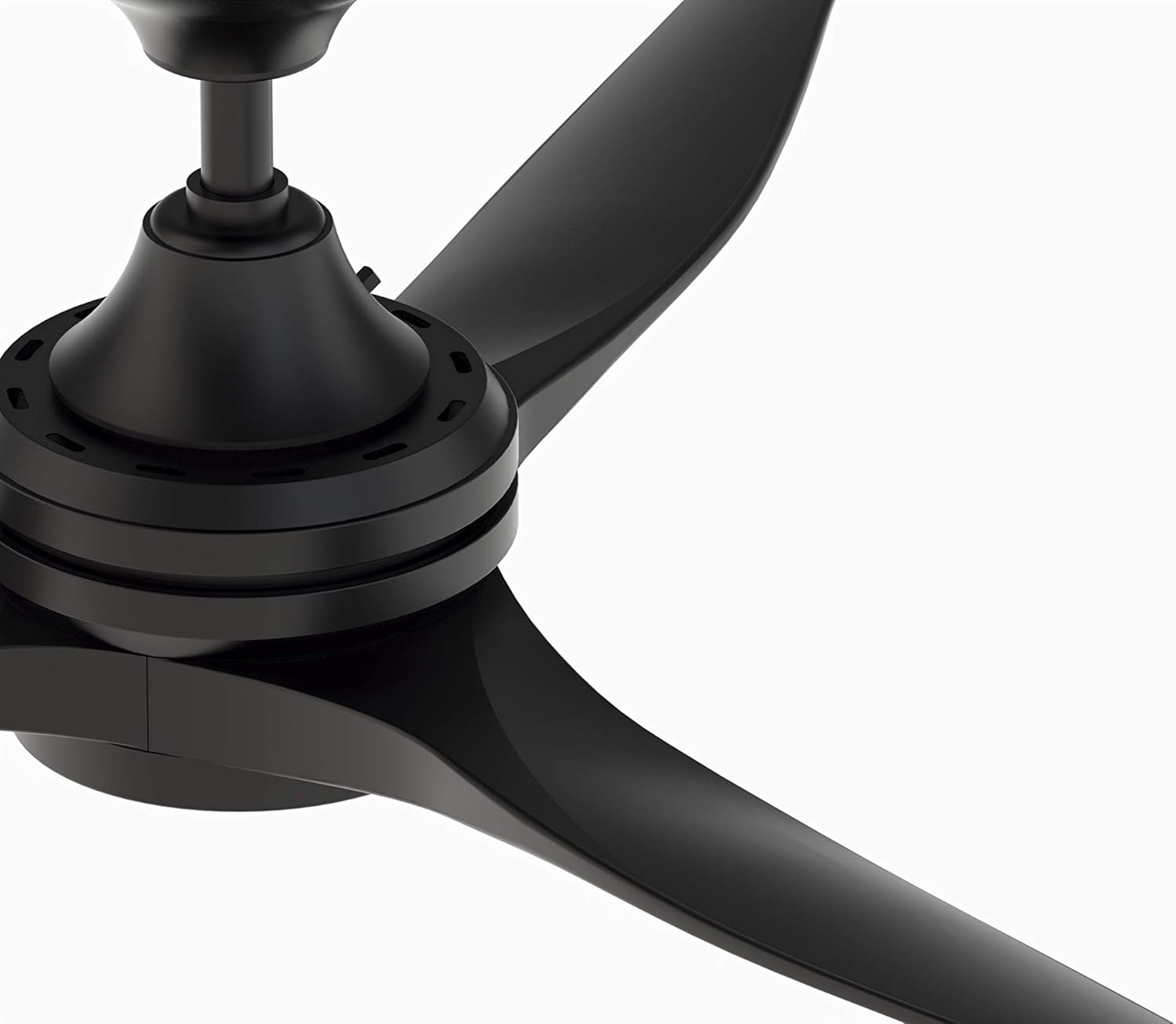
olusin 2: Isunmọ view of the fan motor housing, showing connection points for wiring and blade attachment.
3.4 Attaching Blades and Light Kit (Sold Separately)
Once the motor is securely mounted and wired, attach the fan blades and any optional light kit according to their respective instructions. Ensure all screws are tightened appropriately.

Nọmba 3: Alaye view of the fan motor with an optional LED light kit installed at the bottom.

Nọmba 4: Alaye view of the fan motor without an optional light kit, showing the cover plate.
4. Awọn ilana Iṣiṣẹ
The Fanimation Spitfire MA6721BBL is controlled via the included TR500 handheld remote control or compatible smart home devices (sold separately).
4.1 Handheld Remote Control (TR500)
The TR500 remote provides comprehensive control over your fan's functions:
- Iyara Olufẹ: Adjusts between 3 speeds (Low, Medium, High).
- Yipada Yipada: Changes the direction of blade rotation for seasonal use.
- Awọn iṣakoso ina: If an optional light kit is installed, the remote can turn the light on/off and dim it.
- Akoko oorun: Activates a timer function to automatically turn off the fan after a set period.
Ensure the remote has a fresh 23A battery installed for optimal performance.
4.2 Iyipada Afẹfẹ
The fan features reversible airflow for multi-season use:
- Ipo Ooru (Sisalẹ Atẹgun): Blades rotate counter-clockwise, creating a downward breeze that produces a cooling effect.
- Ipo Igba otutu (Sisan Atẹgun ti oke): Blades rotate clockwise, drawing cool air up and pushing warm air down from the ceiling, helping to redistribute heat.
Use the reverse switch on the remote control to change the direction of airflow.

Figure 5: Illustration of reversible airflow, showing both downward (cooling) and upward (warming) air movement.
4.3 Smart Home Compatibility
The Fanimation Spitfire MA6721BBL is compatible with WiFi or Bluetooth controls (required controls sold separately) for integration with smart home systems. Refer to the documentation of your chosen smart home control system for setup instructions.
5. Itọju
Itọju deede ṣe idaniloju igbesi aye gigun ati iṣẹ ti o dara julọ ti olufẹ aja rẹ.
- Ninu: Ekuru awọn abẹfẹfẹ afẹfẹ ati ile mọto lorekore pẹlu asọ, damp cloth. Avoid using abrasive cleaners or solvents, as they may damage the finish. Ensure the fan is turned off and power is disconnected before cleaning.
- Tightness Checks: Periodically check all screws on the motor housing, downrod, and blade attachments to ensure they are secure. Loose screws can cause wobbling or noise.
- Iwontunwonsi Blade: If the fan wobbles, check that the blades are securely attached and balanced. A blade balancing kit (often sold separately) can help correct minor wobbles.
6. Laasigbotitusita
This section addresses common issues you might encounter with your Fanimation Spitfire ceiling fan motor.
| Isoro | Owun to le Fa | Ojutu |
|---|---|---|
| Fan ko ni tan-an | No power to the fan; Loose wiring; Remote battery dead or not paired. | Check circuit breaker; Verify all wire connections are secure (consult an electrician); Replace remote battery or re-pair remote. |
| Afẹfẹ kekere | Fan speed set too low; Incorrect blade pitch; Fan size not appropriate for room. | Increase fan speed using the remote; Ensure blades are installed correctly; While this model offers 5227 CFM on high, consider room size and fan placement. |
| Fan wobbles | Loose mounting hardware; Unbalanced blades; Loose blade screws. | Ensure mounting bracket and downrod are secure; Check and tighten all blade screws; Use a blade balancing kit if necessary. |
| Remote control is unresponsive or finicky | Dead battery; Interference; Remote not paired correctly. | Replace the 23A battery; Ensure no obstructions between remote and fan receiver; Refer to remote pairing instructions in the full manual. |
| Light kit not working (if installed) | Loose wiring; Faulty bulb (if replaceable); Light kit not properly connected. | Check wiring connections to the light kit; If LED, ensure proper connection; Consult an electrician if issues persist. |
If you are unable to resolve an issue after consulting this troubleshooting guide, please contact Fanimation customer support or a qualified electrician.
7. Awọn pato
| Ẹya ara ẹrọ | Ẹ̀kúnrẹ́rẹ́ |
|---|---|
| Brand | Ifarabalẹ |
| Nọmba awoṣe | MA6721BBL |
| Àwọ̀ | Dudu |
| Electric Fan Design | Aja Fan Motor |
| Orisun agbara | Okun Itanna |
| Ara | Aṣa |
| Pataki Ẹya | Afẹfẹ iparọ |
| Niyanju Lilo | Afẹfẹ |
| Wattage | 2760 Wattis (2.76E+3) |
| Pari Iru | Ti pari |
| Nọmba ti Blades | 3 (Blades sold separately) |
| Air Sisan Agbara | 5227 CFPH (Cubic Feet Per Hour) |
| Awọn Eto Iyara | 3 RPM (Awọn Iyika Fun Iṣẹju kan) |
| Voltage | 120.0 Volts |
| Iwọn Nkan | 16.34 iwon |
| Ọja Mefa | 7.9 x 7.9 x 12 inches |
| Awọn irinše to wa | Latọna jijin |
| inu ile / ita gbangba Lilo | Ninu ile, ita gbangba (Damp Ti won won) |
| Ọna Iṣakoso | App (via compatible smart home controls, sold separately) |
| UPC | 840506085459 |
8. Atilẹyin ọja ati Support
8.1 atilẹyin ọja Alaye
This Fanimation Spitfire MA6721BBL Ceiling Fan Motor comes with a Atilẹyin ọja to lopin. Please refer to the warranty documentation included with your product for full terms and conditions, including coverage details and limitations.
8.2 Onibara Support
For technical assistance, replacement parts, or warranty claims, please contact Fanimation customer support. You can find contact information on the official Fanimation webaaye tabi nipasẹ apoti atilẹba ọja rẹ.
Ṣabẹwo si Fanimation itaja lori Amazon fun diẹ ẹ sii awọn ọja ati alaye.


