Ọrọ Iṣaaju
This instruction manual provides detailed guidance for the proper installation, operation, and maintenance of your Celly Car Holder Flex Plus. Please read this manual thoroughly before using the product to ensure optimal performance and safety.
Ọja Pariview
The Celly Car Holder Flex Plus is a universal smartphone holder designed for secure mounting in vehicles. It features a strong suction cup for attachment to either the dashboard or windscreen, automatic arms for easy phone placement, a flexible arm for optimal positioning, and 360° rotation capability.
Awọn ẹya pataki:
- Strong suction cup for secure attachment.
- Automatic arms for convenient smartphone insertion and removal.
- Flexible arm (14 cm) for adjustable viewing awọn igun.
- 360° rotatable head for portrait or landscape orientation.
- Compatible with smartphones up to 6.5 inches.
Kini o wa ninu apoti:
- Celly Car Holder Flex Plus Black

Nọmba 1: The Celly Car Holder Flex Plus, showcasing its flexible arm, suction cup base, and adjustable phone cradle.

Nọmba 2: The retail packaging for the Celly Car Holder Flex Plus, displaying the product and brand information.
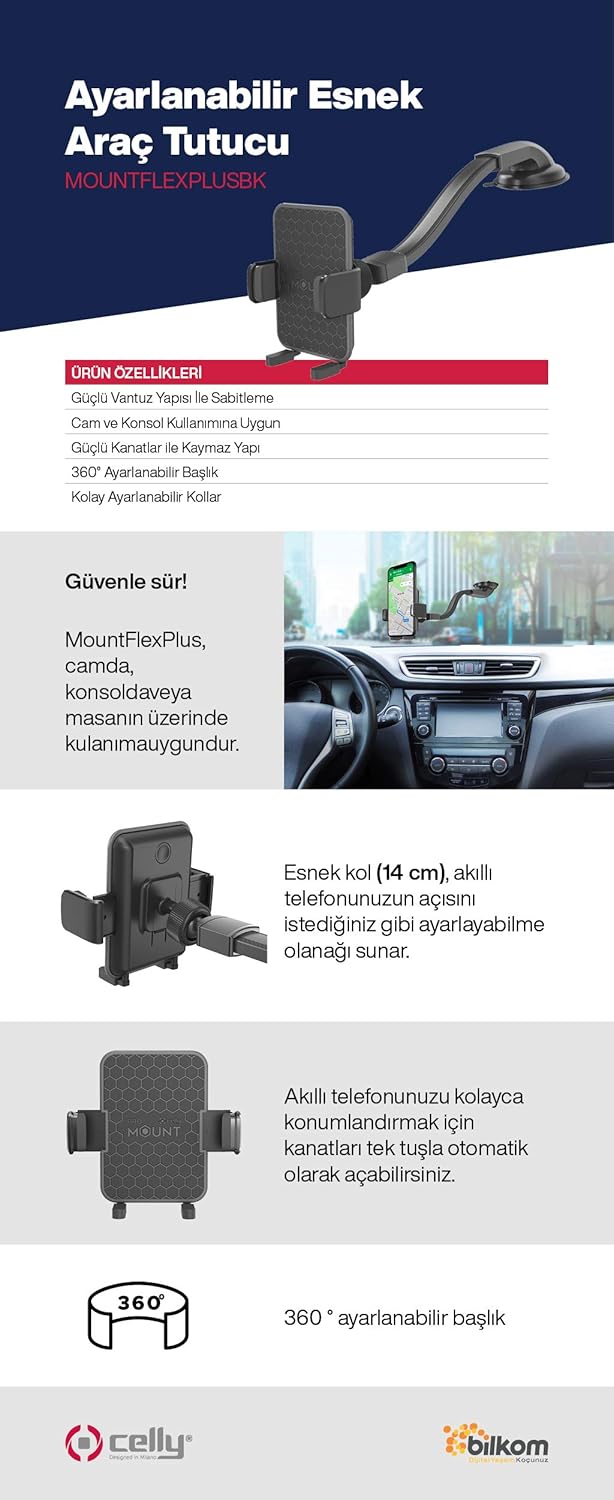
Nọmba 3: An infographic illustrating key features and benefits of the Celly Car Holder Flex Plus. It highlights the strong suction cup, suitability for glass and console use, non-slip grip, 360° adjustable head, and easily adjustable 14 cm flexible arm for safe driving.
Eto ati fifi sori
Follow these steps to properly install your Celly Car Holder Flex Plus in your vehicle.
- Yan Ibi Igbesoke: Select a clean, flat surface on your dashboard or windshield. Ensure the chosen location does not obstruct your view of the road or interfere with airbags or vehicle controls.
- Mọ Ilẹ-ilẹ: Thoroughly clean the chosen mounting surface with a suitable cleaner and allow it to dry completely. This ensures maximum suction cup adhesion.
- So Cup Famu naa: Press the suction cup firmly against the cleaned surface. Engage the locking mechanism (if present) on the suction cup base to create a strong vacuum seal.
- Adjust the Flexible Arm: Position the flexible arm to your desired viewing angle. The 14 cm flexible arm allows for significant adjustment.
- Orient the Phone Cradle: Rotate the phone cradle 360° to achieve either portrait or landscape orientation, as preferred.

Nọmba 4: The Celly Car Holder Flex Plus securely mounted on a car dashboard, holding a smartphone in an accessible position for navigation.

Nọmba 5: Omiiran view of the Celly Car Holder Flex Plus installed in a vehicle, demonstrating its flexible arm and stable phone placement.
Awọn ilana Iṣiṣẹ
Using your Celly Car Holder Flex Plus is straightforward:
- Inserting Your Smartphone: Gently press the release button or spread the automatic arms of the cradle. Place your smartphone into the cradle, ensuring it sits securely between the arms. The arms will automatically adjust to grip your phone.
- Removing Your Smartphone: To remove your smartphone, gently press the release button or spread the automatic arms to release the grip.
- Títúnṣe Viewigun Angle: The flexible arm allows you to bend and position your smartphone for optimal viewing. The cradle can also be rotated 360 degrees to switch between portrait and landscape modes.

Nọmba 6: A alaye view of the phone cradle mechanism, showing the automatic arms designed to securely hold a smartphone.

Nọmba 7: An alternative close-up of the phone cradle, highlighting its textured surface for enhanced grip and stability.
Itoju
To ensure the longevity and proper functioning of your Celly Car Holder Flex Plus, follow these simple maintenance guidelines:
- Ninu: Regularly wipe the holder and suction cup with a soft, damp cloth. Avoid abrasive cleaners or solvents that could damage the materials.
- Itọju Ifọmu: If the suction cup loses its grip, clean both the cup and the mounting surface thoroughly. A small amount of moisture on the suction cup can sometimes help restore adhesion.
- Ibi ipamọ: When not in use for extended periods, store the holder in a cool, dry place away from direct sunlight and extreme temperatures.
Laasigbotitusita
If you encounter issues with your Celly Car Holder Flex Plus, refer to the following common problems and solutions:
- Iṣoro: The suction cup does not adhere securely to the dashboard or windshield.
Ojutu:- Ensure the mounting surface is clean, dry, and free of dust or grease.
- For textured dashboards, the suction cup may not form a perfect seal. Consider mounting on the windshield or using a smooth adhesive disc (not included) if dashboard mounting is preferred.
- Press the suction cup firmly and engage the locking lever completely.
- Iṣoro: The phone cradle arms do not grip the smartphone properly.
Ojutu:- Ensure your smartphone's size is within the compatible range (up to 6.5 inches).
- Check for any obstructions in the cradle mechanism.
- Ensure the phone is centered in the cradle before the arms close.
- Iṣoro: The flexible arm vibrates excessively.
Ojutu:- Ensure the suction cup is firmly attached.
- Adjust the arm to a position that minimizes leverage and vibration.
Awọn pato
| Nọmba awoṣe | MOUNTFLEXPLUSBK |
| Ọja Mefa | 12.8 x 2.68 x 3.43 inches |
| Iwọn Nkan | 5.8 iwon |
| Àwọ̀ | Dudu |
| Olupese | Seli |
| Awọn ẹrọ ibaramu | Awọn fonutologbolori |
| Awọn awoṣe Foonu ibaramu | Universal (up to 6.5 inches) |
| Iṣagbesori Iru | Ferese, Dasibodu |
| Pataki Awọn ẹya ara ẹrọ | Rotatable, Flexible Arm |
Atilẹyin ọja ati Support
For warranty information or technical support, please refer to the official Celly webojula tabi kan si wọn onibara iṣẹ taara. Tọju iwe-ẹri rira rẹ bi ẹri rira.
Olupese: Seli
Webojula: www.celly.com (Please check the manufacturer's official website for the most current support information.)


