1. Ifihan
Thank you for choosing the ANENG Q1 9999 Counts True RMS Digital Multimeter. This device is designed for safe and accurate measurement of various electrical parameters. It features True RMS measurement, Non-Contact Voltage (NCV) detection, auto/manual ranging, and an EBTN black display with an analog bar graph for enhanced readability. Please read this manual thoroughly before use to ensure proper operation and safety.
2. Alaye Aabo
WARNING: To avoid possible electric shock, fire, or personal injury, please read all safety information before you use the product.
- Rí i dájú pé multimeter náà wà ní iṣẹ́ àti ìwọ̀n tó yẹ fún ìwọ̀n tí a ń ṣe.
- Maṣe kọja awọn iye titẹ sii ti o pọju fun iṣẹ eyikeyi.
- Ṣayẹwo awọn itọsọna idanwo fun idabobo ti o bajẹ tabi irin ti o farahan ṣaaju lilo. Rọpo ti o ba bajẹ.
- Má ṣe lo multimeter tí ó bá hàn bí ẹni pé ó ti bàjẹ́ tàbí tí kò bá ṣiṣẹ́ dáadáa.
- Ṣọ́ra nígbà tí o bá ń ṣiṣẹ́ pẹ̀lú voltages loke 30V AC RMS, 42V tente oke, tabi 60V DC. Awọn wọnyi ni voltages duro a mọnamọna ewu.
- Máa yọ àwọn ìtọ́wò ìdánwò kúrò nínú àyíká náà kí o tó yí àwọn iṣẹ́ tàbí àwọn ìlà padà.
- Replace batteries as soon as the low battery indicator appears to avoid incorrect readings.
- Tẹle awọn koodu aabo agbegbe ati ti orilẹ-ede.
3. Ọja Ipariview
The ANENG Q1 multimeter is a versatile tool for electrical measurements. Below is an image illustrating the device and its included accessories.

Image 3.1: ANENG Q1 Digital Multimeter and included accessories, including test leads, temperature probe, and storage bag.
The device features a large EBTN display, function buttons, and input jacks for test leads.

Aworan 3.2: Iwaju view of the ANENG Q1 Multimeter, highlighting the display, function buttons, and input terminals.
4. Eto
4.1 Fifi sori batiri
The ANENG Q1 multimeter requires two 1.5V AA batteries (not included). To install or replace batteries:
- Ensure the multimeter is powered off and disconnect all test leads.
- Wa ideri iyẹwu batiri ni ẹhin ẹrọ naa.
- Lo ẹ̀rọ ìdènà láti tú ìdènà tí ó so ìbòrí náà mọ́.
- Remove the cover and insert two AA batteries, observing correct polarity (+/-).
- Ropo ideri kompaktimenti batiri ki o si Mu dabaru.
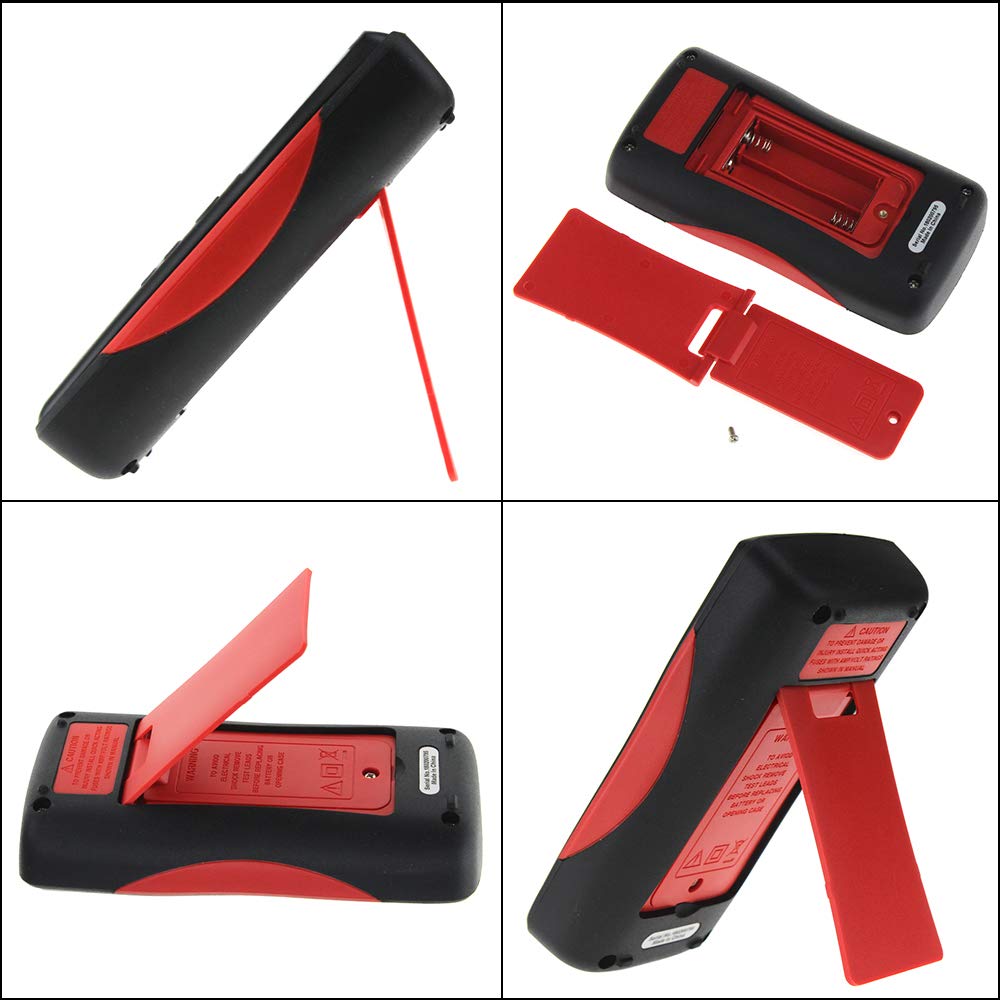
Aworan 4.1: Ẹyin view of the multimeter, illustrating the battery compartment and the integrated kickstand.
4.2 Nsopọ Awọn itọsọna Igbeyewo
The multimeter comes with two standard test probes and a 16-in-1 multifunctional test line set. Always connect the black test lead to the COM (Common) jack. Connect the red test lead to the appropriate input jack based on the measurement type:
- VΩHz-+ jack for Voltage, Resistance, Frequency, Diode, and Continuity measurements.
- mA jack for milliampere lọwọlọwọ wiwọn.
- .A jack for microampere lọwọlọwọ wiwọn.
- 10A Max jack for high current measurements (up to 10A).

Image 4.2: Included test leads and various accessories, such as alligator clips and fine-point probes.
5. Awọn ilana Iṣiṣẹ
The ANENG Q1 features both auto-ranging and manual-ranging capabilities. Press the RANGE button to switch between auto and manual modes. In manual mode, press RANGE repeatedly to cycle through available ranges.
5.1 Agbara Tan / Pa
Tẹ mọlẹ AGBARA button (red circle with line) for more than 2 seconds to turn the multimeter on or off. The device also features an Auto Power Off function to conserve battery life.
5.2 Iwọn AC / DC Voltage
- So dudu igbeyewo asiwaju si awọn COM jack ati idanwo pupa si asiwaju VΩHz-+ jaki.
- Turn on the multimeter. The device will typically default to auto-ranging voltage wiwọn.
- Touch the test probes to the circuit points where voltage ni ki won won.
- Ka voltage value on the display. The multimeter automatically detects AC or DC voltage.
5.3 Measuring AC/DC Current
- PATAKI: Rii daju pe iyika naa ti ni agbara ṣaaju asopọ multimeter ni jara.
- So dudu igbeyewo asiwaju si awọn COM jack. Connect the red test lead to the mA, .A, tabi 10A Max jack depending on the expected current.
- Insert the multimeter in series with the circuit where current is to be measured.
- Re-energize the circuit.
- Ka iye lọwọlọwọ lori ifihan naa.
5.4 Idiwọn Resistance
- So dudu igbeyewo asiwaju si awọn COM jack ati idanwo pupa si asiwaju VΩHz-+ jaki.
- Rí i dájú pé agbára ìṣiṣẹ́ tàbí ohun èlò náà ti dínkù kí o tó wọn agbára ìdènà.
- Touch the test probes across the component to be measured.
- Ka iye resistance lori ifihan.
5.5 Idiwọn Capacitance
- So dudu igbeyewo asiwaju si awọn COM jack ati idanwo pupa si asiwaju VΩHz-+ jaki.
- Ensure the capacitor is fully discharged before measurement to avoid damage to the multimeter.
- Fọwọ́ kan àwọn ìwádìí ìdánwò lórí àwọn ebute capacitor náà.
- Ka iye kapasito lori ifihan.
5.6 Measuring Temperature
- Connect the temperature sensor (thermocouple) to the VΩHz-+ ati COM jacks, observing polarity if applicable.
- Place the tip of the temperature sensor on or near the object whose temperature is to be measured.
- Read the temperature value on the display. The unit can be switched between Celsius and Fahrenheit.
5.7 Non-olubasọrọ Voltage (NCV) erin
Iṣẹ́ NCV gba láàyè láti rí i pé a ti lo AC voltage without direct contact with conductors.
- Tẹ awọn NCV button to activate the NCV mode.
- Gbé òkè multimeter náà súnmọ́ adarí tàbí ìtajà.
- The display will show an increasing number of bars and an audible beep will indicate the presence and strength of AC voltage.

Image 5.1: The multimeter performing a Non-Contact Voltage (NCV) test near a power strip, indicated by the signal icon on the display.
5.8 Idanwo Diode ati Itẹsiwaju
These functions are typically accessed through the VΩHz-+ jack and a dedicated button or range selection.
- Idanwo Diode: So okun pupa mọ anode ati okun dudu mọ katode ti diode naa. Ifihan naa yoo fi okun iwaju han.tage silẹ. Yipada awọn itọsọna lati ṣayẹwo fun Circuit ṣiṣi.
- Idanwo Ilọsiwaju: Touch the probes to the two points of the circuit. A continuous beep indicates a low resistance path (continuity).
6. Itọju
6.1 Ninu
Pa ọran naa pẹlu ipolowoamp Aṣọ àti ọṣẹ ìfọṣọ díẹ̀. Má ṣe lo àwọn ohun ìfọṣọ tàbí àwọn ohun olómi. Jẹ́ kí àwọn ibi tí a fi ń wọlé wà ní ìpamọ́ pẹ̀lú ẹ̀gbin àti ọrinrin.
6.2 Batiri Rirọpo
Refer to Section 4.1 for battery replacement instructions. Replace batteries promptly when the low battery indicator appears on the display.
6.3 Fiusi Rirọpo
The multimeter is protected by internal fuses. If the current measurement function stops working, the fuse may need replacement. Fuse replacement should only be performed by qualified personnel. Refer to the specifications for fuse ratings.
7. Laasigbotitusita
- Ko si ifihan tabi ifihan ti ko lagbara: Ṣàyẹ̀wò fífi bátìrì sílẹ̀ kí o sì gba agbára. Rọpò bátìrì tí ó bá pọndandan.
- Awọn kika ti ko tọ: Ensure test leads are properly connected, the correct function/range is selected, and the batteries are not low.
- Wiwọn lọwọlọwọ ko ṣiṣẹ: Ṣàyẹ̀wò fiusi náà. Tí ó bá fẹ́, fi fiusi tí ó ní ìwọ̀n tó yẹ rọ́pò rẹ̀.
- "OL" or "OVER" on display: Indicates an overload or out-of-range measurement. Select a higher range or ensure the input is within the device's limits.
8. Awọn pato
| Paramita | Ibiti / iye |
|---|---|
| Ifihan Iru | Digital Display, 9999 Counts, EBTN Black Display, Analog Bar Graph |
| Agbara | 9.99nF / 99.99nF / 999.9nF / 9.99µF / 99.99µF / 999.9µF / 9.999mF |
| Voltage (AC/DC) | 99.99mV / 999.9mV / 9.999V / 99.99V / 999.9V |
| Lọ́wọ́lọ́wọ́ (AC/DC) | 99.99µA / 999.9µA / 99.99mA / 999.9mA / 9.999A |
| Atako | 99.99Ω / 999.9Ω / 9.999kΩ / 99.99kΩ / 999.9kΩ / 9.999MΩ / 99.99MΩ |
| Igbohunsafẹfẹ | 99.99Hz / 999.9Hz / 9.999kHz / 99.99kHz / 999.9kHz / 5MHz |
| Iwọn otutu | -20°C ~ 1000°C / -4°F ~ 1832°F |
| Idanwo Diode | Bẹẹni |
| Itesiwaju | Bẹẹni |
| Ojuse Cycle | 1% - 99% |
| SampOṣuwọn ling | 3 igba fun keji |
| Agbara | 2 x 1.5V AA batiri |
| Ipo Iṣiṣẹ | Auto / Afowoyi Range |
| Awọn iwọn otutu ti nṣiṣẹ | 0-40°C |
| Ọriniinitutu ti nṣiṣẹ | ≤ 75% RH |
| Ibi ipamọ Ipo | -20 ~ 60°C |
| Ọriniinitutu ipamọ | ≤ 80% RH |
| Aabo Rating | 600V CAT III, 1000V CAT II (inferred) |
9. Atilẹyin ọja ati Support
Specific warranty information is not provided in the product details. For warranty claims or technical support, please contact the retailer or manufacturer directly. Keep your purchase receipt as proof of purchase.


