Awọn Itọsọna Aabo pataki
Please read all instructions carefully before using your HIBREW coffee maker. Retain this manual for future reference.
- Always ensure the coffee maker is placed on a stable, level surface away from the edge of the countertop.
- Maṣe fi ohun elo, okun, tabi pulọọgi sinu omi tabi awọn olomi miiran.
- Abojuto sunmọ jẹ pataki nigbati eyikeyi ohun elo ba lo nipasẹ tabi sunmọ awọn ọmọde.
- Yọọ kuro lati inu iṣan nigbati ko si ni lilo ati ṣaaju ṣiṣe mimọ. Gba laaye lati tutu ṣaaju fifi sii tabi mu awọn ẹya kuro, ati ṣaaju ki o to nu ohun elo naa.
- Ma ṣe ṣiṣẹ ohun elo eyikeyi pẹlu okun tabi pulọọgi ti o bajẹ, tabi lẹhin aiṣe ohun elo tabi ti bajẹ ni eyikeyi ọna.
- Lilo awọn asomọ ẹya ẹrọ ti a ko ṣeduro nipasẹ olupese ohun elo le ja si ina, mọnamọna, tabi ipalara si awọn eniyan.
- Maṣe lo ni ita.
- Ma ṣe jẹ ki okun duro lori eti tabili tabi counter, tabi fi ọwọ kan awọn aaye ti o gbona.
- Ma ṣe gbe sori tabi sunmọ gaasi ti o gbona tabi ina ina, tabi ni adiro ti o gbona.
- Always fill the water reservoir with fresh, cold water.
- Do not open the K-Cup holder during the brewing process.
- Ohun elo yii jẹ fun lilo ile nikan.
Ọja Pariview
The HIBREW Single Serve Programmable Single Cup Coffee Maker is designed for convenient and quick brewing of your favorite beverages. It features a patented heater for instant brewing, a large 45 oz. BPA-free removable water reservoir, and a simple one-touch control panel with programmable brew sizes and an auto-off function.

This image displays the overall design of the HIBREW Single Serve Coffee Maker. It shows the main unit in black, with a silver K-Cup holder and a white mug placed on the drip tray. The water reservoir on the left side is visible with a blue light indicating water level.
Ṣeto
1. Ṣíṣí àpò àti ìmọ́tótó àkọ́kọ́
- Yọ gbogbo ohun èlò ìdìpọ̀ àti àmì kúrò nínú ẹ̀rọ tí a fi ń ṣe kọfí.
- Mu ese ita ti kofi alagidi pẹlu ipolowoamp asọ.
- Wash the removable water reservoir and drip tray with warm, soapy water. Rinse thoroughly and dry.
2. Àgbáye awọn Omi ifiomipamo
- Remove the water reservoir from the back of the coffee maker.
- Fill the reservoir with fresh, cold water up to the "Max" fill line. Do not overfill.
- Place the water reservoir back onto the coffee maker, ensuring it is securely seated.

This image highlights the water reservoir on the left side of the coffee maker, showing the "Min" fill line and a blue light indicating the water level. The removable drip tray is also visible at the base of the brewing area.
3. First Brew Cycle (Cleaning Cycle)
Before brewing coffee, perform a cleaning cycle to prime the system and remove any manufacturing residue.
- Rii daju pe ibi ipamọ omi ti kun.
- Gbe agolo nla kan sori atẹ atẹgun.
- Do kii ṣe insert a K-Cup.
- Tẹ bọtini agbara (red circle with vertical line) to turn on the coffee maker.
- Select the largest brew size (e.g., 12 oz) by pressing the corresponding button.
- The coffee maker will dispense hot water. Discard the water.
- Tun ilana yii ṣe ni igba 2-3.
Awọn ilana Iṣiṣẹ
1. Pipọnti Kofi
- Rii daju pe ifiomipamo omi ti kun pẹlu titun, omi tutu.
- Gbe ago kan si ori atẹ drip.
- Lift the handle to open the K-Cup holder.
- Insert a K-Cup pod into the holder. Close the handle firmly until it clicks.
- Tẹ bọtini agbara (red circle with vertical line) to turn on the coffee maker. The brew size buttons will illuminate.
- Select your desired brew size (Small, Medium, or Large) by pressing the corresponding button. The selected button will illuminate.
- The coffee maker will begin brewing. Coffee will dispense into your mug.
- To stop brewing at any time, press the currently illuminated brew size button again.
- Nígbà tí iṣẹ́ náà bá parí, fi pẹ̀lẹ́pẹ̀lẹ́ yọ ago rẹ kúrò.
- Lift the handle to eject the used K-Cup pod into a waste bin.

This image shows the top lid of the coffee maker lifted, revealing the K-Cup holder with a coffee pod placed inside, ready for brewing.
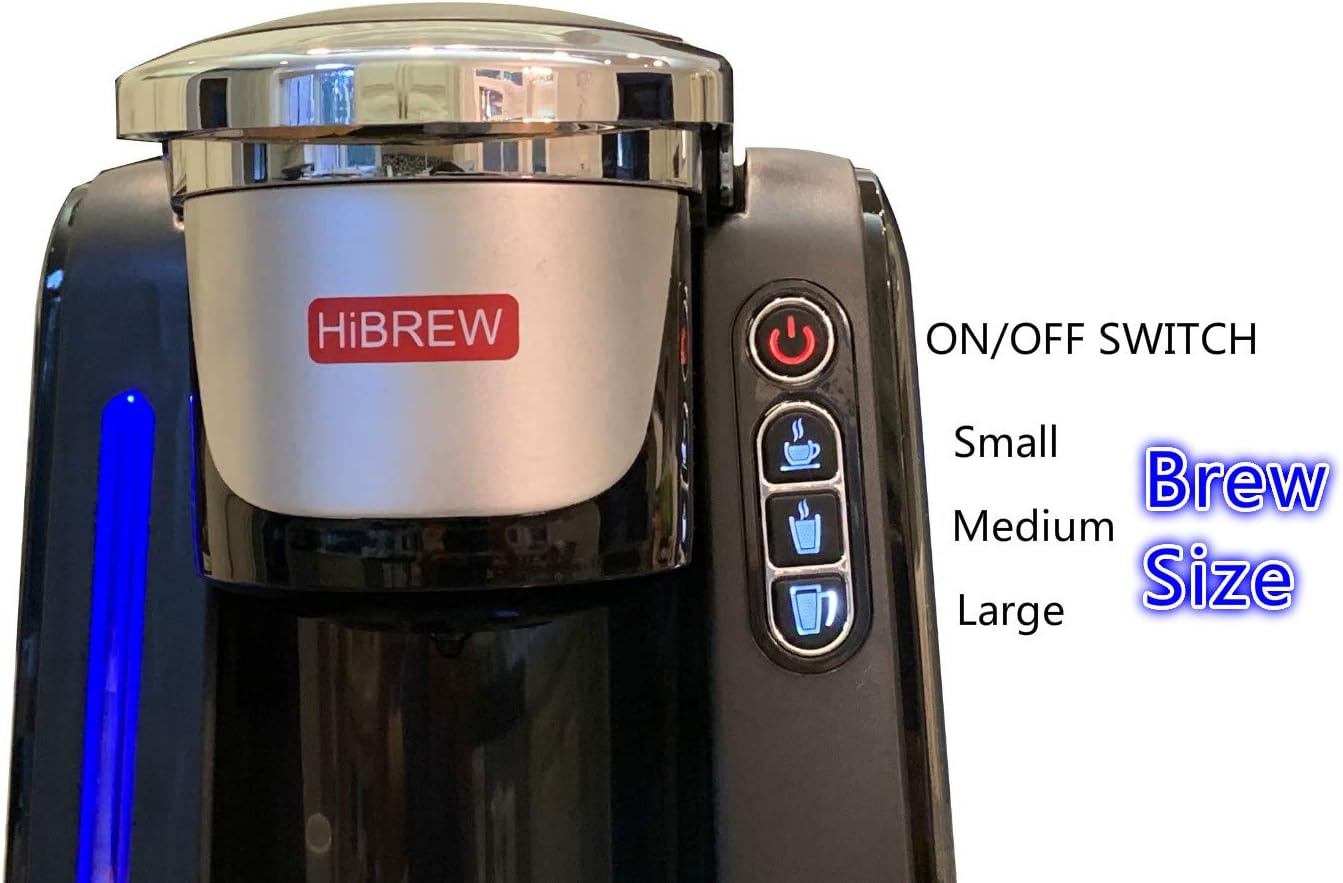
Aworan yii pese alaye kan view of the control panel. It clearly labels the "ON/OFF SWITCH" (power button) and the three brew size buttons: Small, Medium, and Large, each represented by a coffee cup icon.
2. Programming Brew Sizes
The HIBREW coffee maker allows you to customize the volume for the Small, Medium, and Large brew size buttons. The available options are 4 oz / 6 oz / 8 oz, 6 oz / 8 oz / 10 oz, or 8 oz / 10 oz / 12 oz.
- With the coffee maker powered on, press and hold the desired brew size button (Small, Medium, or Large) for approximately 3 seconds until it flashes.
- While the button is flashing, press it repeatedly to cycle through the available volume options for that size.
- Release the button when your desired volume is displayed or selected (indicated by the button remaining illuminated).
- Repeat for other brew size buttons if desired.
3. Auto-Off Feature
The auto-off feature can be programmed to turn off the coffee maker after 15 minutes, 1 hour, or 2 hours of inactivity, helping to save energy.
- With the coffee maker powered on, press and hold the power button (red circle with vertical line) for approximately 3 seconds until it flashes.
- While the button is flashing, press it repeatedly to cycle through the auto-off time options (15 min, 1 hr, 2 hr).
- Release the button when your desired auto-off time is selected (indicated by the button remaining illuminated).
4. How to Brew Coffee (Video Demonstration)
This video demonstrates the simple steps to brew coffee using the HIBREW Single Serve Coffee Maker, including placing the K-Cup and selecting the brew size.
Itoju
1. Nu Àwo Drip
- Awọn drip atẹ jẹ yiyọ kuro fun rorun ninu.
- Simply slide the drip tray out from the base of the coffee maker.
- Wash with warm, soapy water, rinse, and dry thoroughly.
- Tun atẹ drip sii.
2. Gbogbogbo Cleaning
- Mu ese ita ti kofi alagidi pẹlu ipolowoamp, Aṣọ ti kii ṣe abrasive.
- Clean the K-Cup holder and needle area regularly to prevent clogs. Use a paperclip to clear any blockages in the needle.
- The water reservoir should be cleaned periodically with warm, soapy water.
3. Sisọ
Over time, mineral deposits (scale) can build up in your coffee maker, affecting performance and taste. Descaling is recommended every 3-6 months, or more frequently if you have hard water.
- Sofo awọn ifiomipamo omi.
- Fill the reservoir with a descaling solution (e.g., white vinegar or a commercial descaling agent) mixed with water according to the solution's instructions.
- Gbe agolo nla kan sori atẹ atẹgun.
- Run several brew cycles (without a K-Cup) until the reservoir is empty.
- Fi omi ṣan omi daradara ki o kun pẹlu omi titun.
- Run several more brew cycles with fresh water to flush out any remaining descaling solution.
Laasigbotitusita
| Isoro | Owun to le Fa | Ojutu |
|---|---|---|
| Ẹlẹda kofi ko ni tan. | Ko edidi ni; agbara iṣan oro. | Rii daju pe okun agbara ti wa ni edidi ni aabo sinu iṣan itanna ti n ṣiṣẹ. |
| No water dispenses or brewing is slow. | Low water level; clogged needle; mineral buildup. | Fill water reservoir. Clean the K-Cup holder needle. Perform a descaling cycle. |
| Kofi jẹ alailagbara tabi omi. | Incorrect brew size selected; K-Cup not properly punctured. | Select a smaller brew size. Ensure K-Cup is firmly seated and punctured. |
| Water leaks from the coffee maker. | A kò gbé omi sí ibi tí ó yẹ; atẹ́ omi kún. | Ensure the water reservoir is firmly in place. Empty and clean the drip tray. |
| Ilẹ̀ kọfí nínú ago. | K-Cup lid not sealed; K-Cup overfilled (if using reusable filter). | Ensure K-Cup is properly inserted. If using a reusable filter, do not overfill. |
Awọn pato
- Brand: HIBREW
- Nọmba awoṣe: d7302b22-21f6-4ef9-9938-d7468a5212e7
- Irisi Ẹlẹda Kofi: Ọtí amúṣẹ́-kanṣoṣo
- Ipo isẹ: Ni kikun Aifọwọyi
- Agbara Ipamọ omi: 45 oz. (approx. 2.8 lbs)
- Awọn iwọn ọja: 15 x 14 x 9 inches
- Ìwọ̀n Nkan: 7.28 iwon
- Iru Iṣwọle Kofi: PODS
- Ẹya Pataki: Programmable Brew Sizes, Auto-Off
- Olupese: HIBREW Inc.
- Ọjọ Akọkọ Wa: Oṣu Karun ọjọ 23, Ọdun 2019
Atilẹyin ọja ati Support
For warranty information and customer support, please refer to the warranty card included with your product or visit the official HIBREW webojula. Tọju iwe-ẹri rira rẹ bi ẹri rira fun awọn iṣeduro atilẹyin ọja.
Ibi iwifunni:
- Webojula: Visit the HIBREW Store on Amazon
- (Specific contact details like phone number or email are not provided in the product data. Please refer to the product packaging or official website for direct support.)


