1. Ifihan
Thank you for choosing the Ozeri 360 Duo Tower Fan. This manual provides essential information for the safe and efficient operation of your new fan. Please read these instructions thoroughly before use and retain them for future reference.
The Ozeri 360 Duo Tower Fan features a unique dual oscillation system and advanced airflow patterns designed to circulate air effectively throughout your room.
2. Awọn Ilana Aabo pataki
- Ka gbogbo awọn ilana ṣaaju lilo olufẹ yii.
- Rii daju pe ipese agbara ibaamu voltage pato lori awọn àìpẹ ká Rating aami.
- Ma ṣe ṣiṣẹ afẹfẹ eyikeyi pẹlu okun ti o bajẹ tabi plug. Jabọ afẹfẹ kuro tabi pada si ile-iṣẹ iṣẹ ti a fun ni aṣẹ fun idanwo ati/tabi atunṣe.
- Ma ṣe ṣiṣe okun labẹ capeti. Ma ṣe bo okùn pẹlu awọn rogi jiju, awọn asare, tabi awọn ibora ti o jọra. Ṣeto okun kuro ni agbegbe ijabọ ati nibiti kii yoo ṣe kọlu.
- Lati ge asopọ afẹfẹ, tan awọn idari si PA, lẹhinna yọ plug kuro ni iṣan.
- Do not insert or allow foreign objects to enter any ventilation or exhaust opening as this may cause an electric shock or fire, or damage the fan.
- Ma ṣe dina awọn ṣiṣi afẹfẹ tabi ṣiṣẹ nitosi awọn aṣọ-ikele tabi awọn ohun elo miiran ti o le dina ṣiṣan afẹfẹ.
- Afẹfẹ yii kii ṣe ipinnu fun lilo ninu tutu tabi damp awọn ipo.
- Nigbagbogbo gbe awọn àìpẹ lori kan idurosinsin, alapin dada nigba isẹ ti.
- Abojuto sunmọ jẹ pataki nigbati eyikeyi ohun elo ba lo nipasẹ tabi sunmọ awọn ọmọde.
3. Package Awọn akoonu
Carefully unpack your Ozeri 360 Duo Tower Fan and ensure all items are present:
- Ozeri 360 Duo Tower Fan Unit
- Fan Base (consisting of two halves)
- Isakoṣo latọna jijin
- Ilana Afowoyi (iwe yii)
4. Ọja Ipariview
Familiarize yourself with the components of your Ozeri 360 Duo Tower Fan.
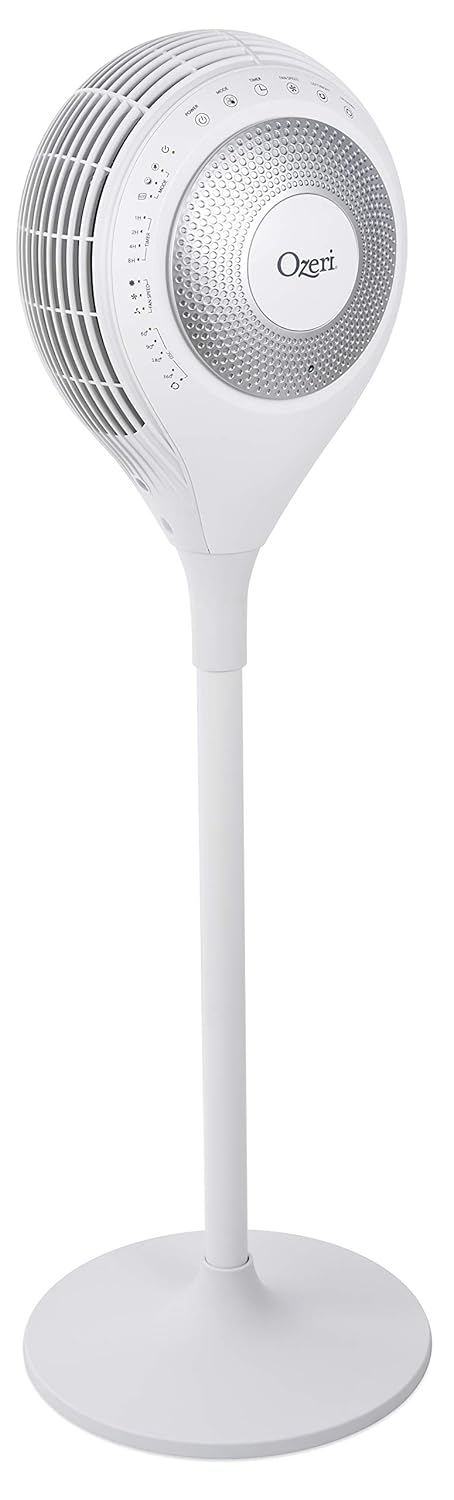


5. Eto
The Ozeri 360 Duo Tower Fan is designed for easy assembly without special tools.
- Ṣepọ ipilẹ: Connect the two halves of the fan base together. Ensure they snap securely into place.
- Attach Fan Unit to Base: Carefully align the main fan unit with the assembled base. Push down firmly until it is securely seated.
- Gbe Olufẹ naa: Place the fan on a firm, level surface, ensuring there are no obstructions to airflow.
- Sopọ si Agbara: So okùn agbára náà mọ́ inú ìsopọ̀ iná mànàmáná AC déédéé.
6. Awọn ilana Iṣiṣẹ
Your Ozeri 360 Duo Tower Fan can be operated using the touch control panel on the unit or the included remote control.

6.1. Control Panel and Remote Functions
| Bọtini / Iṣẹ | Apejuwe |
|---|---|
| Agbara (⏻) | Ó ń tan tàbí pa afẹ́fẹ́ náà. |
| Ipo (☸) | Cycles through Normal, Natural, Sleeping, and Eco modes. |
| Fan Speed (☠) | Adjusts fan speed (Low, Medium, High) in Normal mode. Speed adjusts automatically in other modes. |
| Left/Right Oscillation (↻) | Activates or deactivates horizontal oscillation (60°, 90°, 180°, 360°). Press repeatedly to cycle through options. |
| Up/Down Oscillation (⇅) | Activates or deactivates vertical oscillation. |
| Aago (⏲) | Sets the auto-off timer for 1, 2, 4, or 8 hours. |

6.2. Awọn ọna ṣiṣe
- Ipo deede: Provides continuous airflow at a selected speed (Low, Medium, High).
- Ipo Adayeba: Simulates natural breezes by alternating between low, medium, and high airflow speeds.
- Ipo sisun: Provides soothing, patterned airflow. The fan speed gradually reduces after 30 minutes to promote restful sleep. The LED display dims automatically.
- Ipo Eco: Adjusts fan speed automatically based on ambient temperature to maintain comfort and optimize energy use.
6.3. Dual Oscillation
The Ozeri 360 Duo Tower Fan features both horizontal (Left/Right) and vertical (Up/Down) oscillation. These can be used independently or simultaneously to create helical wind currents, ensuring comprehensive air circulation throughout the room.
- Oscillation Petele: Press the Left/Right Oscillation button to cycle through 60°, 90°, 180°, or 360° rotation angles.
- Oscillation inaro: Press the Up/Down Oscillation button to activate or deactivate vertical movement of the fan head.
7. Itọju
Ninu deede yoo ṣe iranlọwọ lati ṣetọju iṣẹ onifẹ rẹ ki o fa igbesi aye rẹ pọ si.
- Ṣaaju ki o to sọ di mimọ: Yọọ igbafẹfẹ kuro nigbagbogbo lati iṣan agbara ṣaaju ṣiṣe mimọ.
- Ode Ninu: Lo asọ, damp asọ lati mu ese awọn ita ita ti awọn àìpẹ. Ma ṣe lo abrasive ose tabi epo.
- Air Intake/Output Vents: Use a vacuum cleaner with a brush attachment to gently remove dust from the air intake and output vents. Do not attempt to disassemble the fan for cleaning.
- Ibi ipamọ: If storing the fan for an extended period, cover it to protect it from dust and store it in a cool, dry place.
8. Laasigbotitusita
If you experience issues with your Ozeri 360 Duo Tower Fan, please refer to the following common problems and solutions:
| Isoro | Owun to le Fa | Ojutu |
|---|---|---|
| Fan ko ni tan-an. | Not plugged in; power outlet not active; power button not pressed. | Ensure the fan is securely plugged into a working outlet. Press the Power button on the unit or remote. |
| Afẹfẹ alailagbara. | Fan speed set too low; vents obstructed; dust accumulation. | Increase fan speed. Ensure vents are clear. Clean dust from vents as per Maintenance section. |
| Oscillation ko ṣiṣẹ. | Iṣẹ oscillation ko mu ṣiṣẹ. | Press the Left/Right or Up/Down Oscillation button to activate. |
| Isakoṣo latọna jijin ko ṣiṣẹ. | Batteries depleted; remote not aimed at sensor. | Replace remote control batteries. Ensure the remote is aimed at the fan's control panel sensor. |
9. Awọn pato
| Ẹya ara ẹrọ | Ẹ̀kúnrẹ́rẹ́ |
|---|---|
| Brand | Òsérì |
| Orukọ awoṣe | Ozeri 360 Duo Tower Fan, with Dual Oscillation |
| Nọmba Awoṣe Nkan | OZF7 |
| Àwọ̀ | Funfun |
| Electric Fan Design | Fan Fan |
| Orisun agbara | AC |
| Ọja Mefa | 14.5"D x 14.5"W x 45.5"H |
| Iwọn Nkan | 14.96 iwon (6.8 kilo) |
| Pataki Ẹya | Oscillating (Dual Oscillation: Horizontal and Vertical) |
| Ọna Iṣakoso | Touch, Remote |
| Pato sipesifikesonu | Energy Star, FCC |
| UPC | 815817012654 |
10. Atilẹyin ọja ati Support
Ozeri products are manufactured to high-quality standards. For specific warranty information, please refer to the warranty card included with your purchase or visit the official Ozeri webojula.
For technical support, replacement parts, or customer service inquiries, please contact Ozeri customer support through their official channels.
Atilẹyin Ayelujara: Ṣabẹwo si Ozeri itaja lori Amazon fun alaye ọja diẹ sii ati awọn orisun atilẹyin.


