1. Ifihan
Thank you for choosing the ZIPRO Nitro Exercise Bike. This manual provides essential information for the safe and efficient assembly, operation, and maintenance of your new fitness equipment. Please read this manual thoroughly before use and keep it for future reference.

Figure 1.1: The ZIPRO Nitro Exercise Bike, showcasing its sleek design and compact footprint, ideal for home fitness.
Ọja Pariview Fidio
Yi fidio pese kan gbogboogbo loriview of the ZIPRO product range, demonstrating various fitness equipment in use. While not specific to the Nitro model's assembly, it illustrates the brand's commitment to quality and user experience.
2. Alaye Aabo
Before using the exercise bike, please observe the following safety precautions:
- Kan si dokita ṣaaju ki o to bẹrẹ eto adaṣe tuntun eyikeyi.
- Jeki awọn ọmọde ati awọn ohun ọsin kuro ninu ẹrọ nigba lilo.
- Place the bike on a flat, stable surface. Ensure adequate space around the bike.
- Wọ aṣọ ìdánrawò tó yẹ àti bàtà eré ìdárayá. Yẹra fún aṣọ tí kò ní jẹ́ kí ó wọ inú àwọn ohun tí ń gbéra.
- Ṣe àyẹ̀wò kẹ̀kẹ́ náà fún àwọn ẹ̀yà ara tó ti bàjẹ́ tàbí tó ti bàjẹ́ kí o tó lò ó. Má ṣe lò ó bí ó bá bàjẹ́.
- Maṣe kọja iwuwo olumulo ti o pọju ti 150 kg (330 lbs).
- Duro adaṣe lẹsẹkẹsẹ ti o ba ni rirẹ, dizzy, tabi ni iriri irora.
3. Package Awọn akoonu
Carefully unpack all components and verify that all parts are present. If any parts are missing or damaged, contact customer support immediately.
Akojọ Awọn eroja:
- Ifilelẹ akọkọ
- Imuduro iwaju
- Amuduro ẹhin
- Awọn ẹsẹ ẹsẹ (Osi ati ọtun)
- Seat Post and Seat
- Ifiweranṣẹ ati Awọn ọpa imudani
- Console/Monitor
- Omi Igo dimu
- Àwọn ohun èlò ìṣàkójọ (àwọn bọ́tìnì, àwọn ẹ̀rọ ìfọṣọ, àwọn èso, àwọn irinṣẹ́)
4. Apejọ Awọn ilana
Follow these steps to assemble your ZIPRO Nitro Exercise Bike. It is recommended to have two people for assembly.
- So awọn amuduro mọra: So àwọn ohun ìdúró iwájú àti ẹ̀yìn mọ́ férémù àkọ́kọ́ nípa lílo àwọn ṣẹ́ẹ̀tì àti àwọn ẹ̀rọ ìfọṣọ tí a pèsè. Rí i dájú pé wọ́n so wọ́n pọ̀ dáadáa kí ó lè dúró ṣinṣin.
- Fi awọn Pedals sori ẹrọ: Identify the left (L) and right (R) pedals. The left pedal screws counter-clockwise, and the right pedal screws clockwise. Thread them into the crank arms and tighten securely. Pedals are equipped with adjustable straps for foot stability.

Figure 4.1: Pedals with adjustable straps, designed to keep your feet secure during exercise.
- Assemble Seat: Attach the seat to the seat post. Insert the seat post into the main frame and adjust to your desired height. Secure with the adjustment knob. The ergonomic seat offers precise two-level adjustment for comfort during long training sessions.

Figure 4.2: The seat post with multiple adjustment holes for vertical positioning.

Figure 4.3: The seat can also be adjusted horizontally for optimal riding posture.
- Install Handlebar Post and Handlebars: Connect the handlebar post to the main frame. Attach the handlebars to the post. Ensure all connections are secure. The handlebars allow for convenient angle adjustment.

Figure 4.4: The console and handlebars, featuring integrated pulse sensors for heart rate monitoring.
- Attach Console: Mount the console onto the handlebar post. Connect any necessary sensor cables from the main frame to the console. The advanced computer with a clear screen facilitates monitoring your workout and performance.

Figure 4.5: The console includes a convenient holder for your smartphone, allowing for entertainment or fitness app integration during workouts.

Figure 4.6: The console's holder is also suitable for larger devices like tablets, enhancing your workout experience.
- Install Water Bottle Holder: Secure the water bottle holder to the designated spot on the main frame.
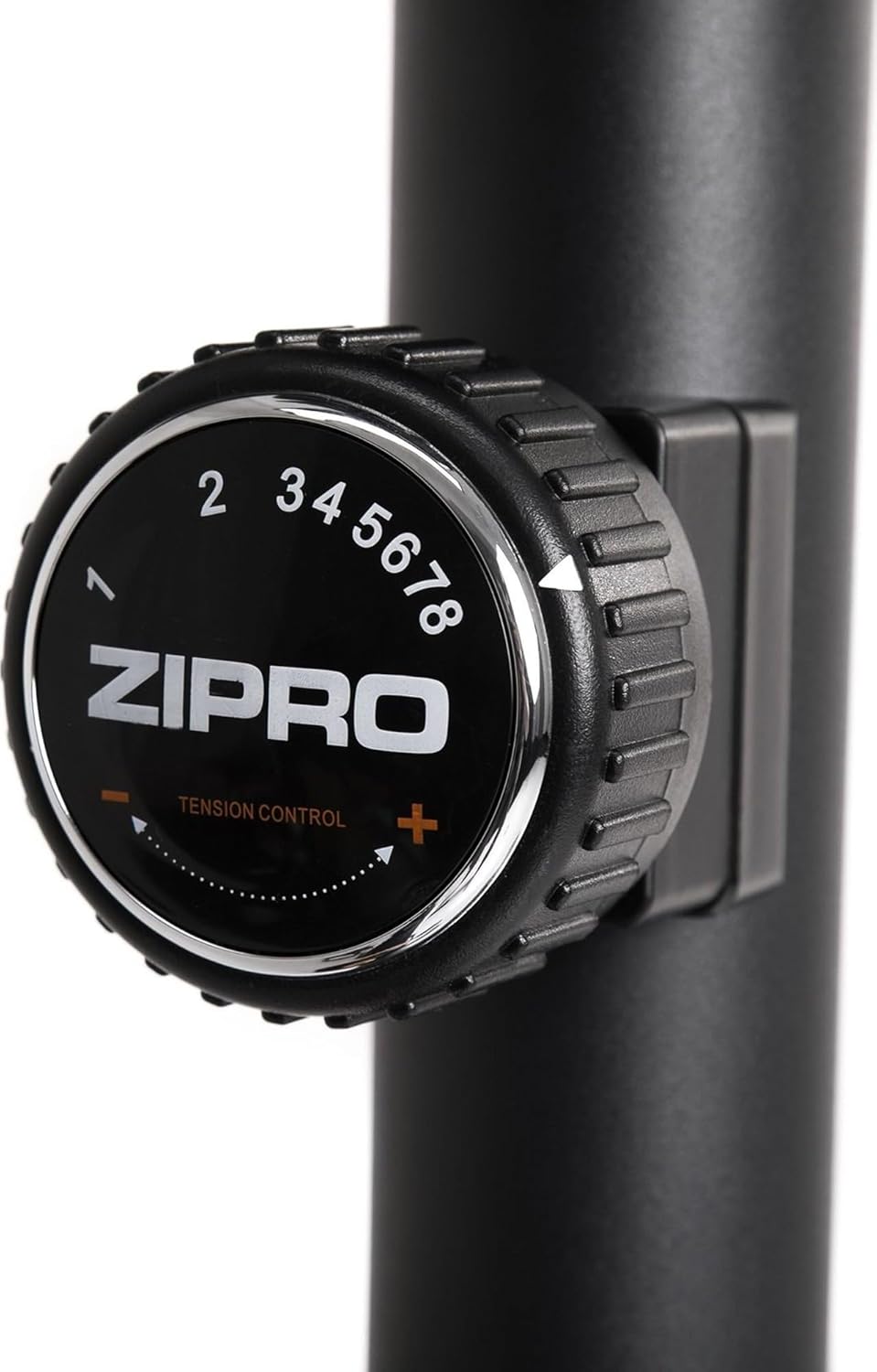
Figure 4.7: A practical water bottle holder ensures hydration is always within reach during your workout.
5. Awọn ilana Iṣiṣẹ
5.1. Ṣíṣe àtúnṣe sí resistance
The ZIPRO Nitro Exercise Bike features 8 levels of magnetic resistance. To adjust the resistance, turn the tension control knob located below the console. Turn clockwise to increase resistance (harder) and counter-clockwise to decrease resistance (easier).

Figure 5.1: The resistance knob allows for easy adjustment of workout intensity across 8 levels.
5.2. Awọn iṣẹ console
The console displays various workout metrics. Use the buttons below the screen to navigate and reset data.
- YII: Automatically cycles through display functions.
- Àkókò: Ó ń fi àkókò ìdánrawò hàn.
- Iyara: Ṣe afihan iyara lọwọlọwọ.
- Ijinna: Tracks distance covered.
- Awọn ọja: Àṣírò àwọn kalori tí wọ́n ti jó.
- ODOMETER (TOTAL DIST): Han lapapọ akojo ijinna.
- Polusi: Shows heart rate when hands are on the pulse sensors.
- Tun: Tẹ lati pa data adaṣe lọwọlọwọ rẹ.
- Ipo: Selects specific display functions.
- Ṣeto: Used for setting target values (e.g., time, distance, calories).
5.3. Adjusting Seat and Handlebars
For optimal comfort and effectiveness, adjust the seat and handlebars to your body size.
- Giga Ijoko: Loosen the adjustment knob on the seat post, raise or lower the seat until your leg has a slight bend at the knee when the pedal is at its lowest point. Tighten the knob securely.
- Seat Horizontal Position: Loosen the knob under the seat, slide the seat forward or backward to find a comfortable position relative to the handlebars. Tighten the knob.
- Handlebar Angle: Loosen the adjustment knob on the handlebar post to tilt the handlebars to a comfortable angle. Tighten the knob.
6. Itọju
Ìtọ́jú déédéé ń mú kí kẹ̀kẹ́ ìdánrawò rẹ pẹ́ títí, kí ó sì wà ní ààbò.
- Ninu: Pa keke naa kuro pẹlu ipolowoamp asọ lẹhin lilo kọọkan lati yọ lagun ati eruku kuro. Yago fun abrasive ose.
- Ayewo: Máa ṣàyẹ̀wò gbogbo àwọn bulọ́ọ̀tì, èso, àti àwọn ẹ̀yà tí ń gbéra láti mọ̀ bóyá wọ́n le koko tàbí wọ́n ti bàjẹ́. Mú kí àwọn ohun tí ó ń so mọ́ ara wọn di.
- Lubrication: The magnetic resistance system is generally maintenance-free. However, if you notice any squeaking from moving parts (e.g., pedal axles), apply a small amount of silicone-based lubricant.
- Ibi ipamọ: Tọ́jú kẹ̀kẹ́ náà sí ibi gbígbẹ àti tútù, níbi tí oòrùn kò ti lè mú kí ó tàn tààrà tàbí kí ó má baà mú kí ó gbóná dáadáa.
7. Laasigbotitusita
Apá yìí ń sọ̀rọ̀ nípa àwọn ìṣòro tó wọ́pọ̀ tí o lè bá pàdé pẹ̀lú kẹ̀kẹ́ ìdánrawò rẹ.
| Isoro | Owun to le Fa | Ojutu |
|---|---|---|
| Ariwo gbigbé tàbí ìró fífẹ́ | Loose bolts; lack of lubrication; internal component issue. | Check and tighten all assembly bolts. Apply lubricant to moving joints if accessible. If noise persists, contact customer support. |
| Kọ́nsólù kò ṣàfihàn dátà | Batteries low or incorrectly installed; loose sensor cable connection. | Replace console batteries (battery operated). Check that the sensor cable from the main frame is securely connected to the console. |
| Resistance ko yi pada | Resistance cable disconnected or damaged; magnetic mechanism issue. | Inspect the resistance cable connection. Ensure the knob turns freely. If the issue persists, contact customer support. |
| Kẹ̀kẹ́ ń mì tìtì nígbà tí a bá ń lò ó | Uneven floor; loose stabilizers. | Adjust the leveling caps on the stabilizers to compensate for uneven surfaces. Ensure stabilizer bolts are tight. |
8. Awọn pato
Key technical specifications for the ZIPRO Nitro Exercise Bike:
| Ẹya ara ẹrọ | Ẹ̀kúnrẹ́rẹ́ |
|---|---|
| Orukọ awoṣe | Nitro |
| Resistance Mechanism | Oofa |
| Awọn ipele Resistance | 8 |
| O pọju User iwuwo | 150 kg (330 lbs) |
| Awọn iwọn Ọja (L x W x H) | 92 x 60 x 143 cm (36.2 x 23.6 x 56.3 inches) |
| Iwọn Ọja | 28.6 kg (63 lbs) |
| Orisun agbara | Battery Operated (for console) |
| Ohun elo | Ṣiṣu, Irin |
| Àwọ̀ | Dudu |

Figure 8.1: Detailed dimensions of the exercise bike, indicating length (115 cm), width (59 cm), and height (145 cm).
9. Atilẹyin ọja ati Support
ZIPRO products are designed for durability and performance. For warranty information and customer support, please refer to the warranty card included with your purchase or visit the official ZIPRO webojula.
If you encounter any issues not covered in this manual or require further assistance, please contact ZIPRO customer service:
- Olupese: Morele.net Sp. z oo
- Brand: ZIPRO
- Nọmba awoṣe: 5304090
- ASIN: B07T94XY4F
Please have your model number and purchase date ready when contacting support.


